
Choosing the right label printer can save time, reduce waste, and keep your shipping, inventory, and office workflows running smoothly. The best models balance speed, connectivity, print quality, and label compatibility.
In this roundup, we focus on premium label printing systems built for consistent, high-volume use so you can match the right machine to your business needs.
Best 10 Premium Label Printing Systems Picks for 2026
Compact Multi-Connectivity Labeling
Brother QL-820NWB Professional, Ultra Flexible Monochrome Label Printer
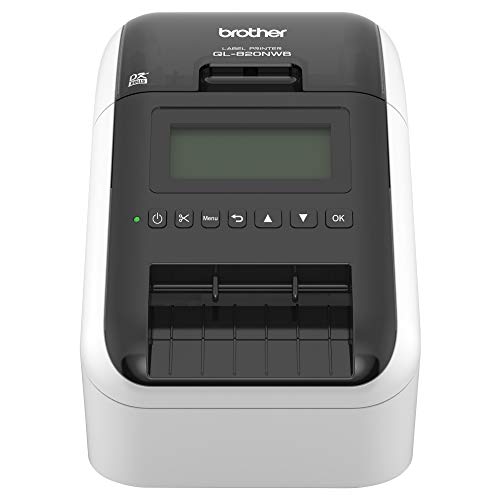
- Bluetooth, Ethernet, Wi‑Fi, and USB host support
- Prints up to 110 address labels per minute
- Monochrome LCD for standalone use
Best For: offices needing flexible, network-ready label printing
Fast USB Shipping Labels
Rollo USB Shipping Label Printer

- 150mm/s direct thermal printing
- USB setup for Windows and Mac
- Works with major shipping platforms
Best For: high-volume shipping label printing from a computer
Network-Ready Office Labels
Brother QL-820NWB with Auto Cut

- 110 labels per minute at 300 dpi
- Auto cutter reduces wasted label sheets
- Bluetooth, Ethernet, Wi‑Fi, and Wireless Direct
Best For: teams needing fast office labels with auto cutting
Wireless Shipping Convenience
Rollo Wireless Shipping Label Printer

- AirPrint and Wi‑Fi support across many devices
- 150mm/s direct thermal output
- Compatible with major shipping platforms
Best For: wireless shipping label printing from mixed devices
Field-Ready Portable Printing
Brady M710 Bluetooth & Wi-Fi Portable Label Printer

- Bluetooth and Wi‑Fi connectivity
- Prints up to 3" per second
- Rugged build with auto cutting
Best For: Technicians needing a durable portable label printer
Wide-Format Shipping Labels
Brother QL-1100 Wide Format Thermal Label Printer

- Prints labels up to 4 inches wide
- Barcode crop function for UPCs
- Compact USB printer for packing stations
Best For: Shipping, postage, and barcode labels
Industrial 2-Inch Desktop Labeling
Makeid D50 Industrial Label Maker with Auto Cutter

- Thermal transfer labels designed to resist fading
- 300 DPI output with auto cutter
- Mobile app and PC software support
Best For: Industrial electrical, cable, and safety labeling
Fast Shipping and Office Labeling
Brother QL-700 Professional Label Printer
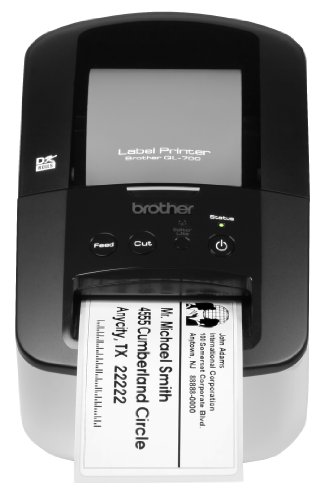
- Up to 93 labels per minute
- No ink or toner required
- Prints labels, banners, and postage
Best For: Busy offices needing fast, low-maintenance labeling
Smart Network Label Printing

- Direct thermal printing
- Automatic label recognition
- USB and LAN connectivity
Best For: Offices needing fast, automated label printing
Color-Coded Office Output

- 93 labels per minute at 300 dpi
- Black and red printing support
- Plug & Label from Word, Excel, Outlook
Best For: Users wanting fast, high-visibility labels
Compact Multi-Connectivity Labeling – Brother QL-820NWB Professional, Ultra Flexible Monochrome Label Printer
If you want premium label printing systems for a busy office, this Brother model stands out for its mix of speed, connectivity, and standalone usability. It supports Bluetooth, Ethernet, Wi‑Fi, and USB host connectivity, while the monochrome LCD makes it practical even when you are not printing from a computer.
Best For: Offices and workstations that need flexible label printing from multiple devices and networks.
Pros:
- Flexible connectivity with Bluetooth, Ethernet, Wi‑Fi, and USB host support
- Fast output up to 110 standard address labels per minute
- Monochrome LCD screen supports standalone use
- Can print black/red labels with DK-2251 supplies
Cons:
- Monochrome printing only
- Designed around Brother DK labeling supplies
This is a strong fit when you need a dependable, network-ready label printer that can handle a range of office tasks without much setup friction. It is especially appealing if you value speed and flexible connection options over color output.
Fast USB Shipping Labels – Rollo USB Shipping Label Printer
For premium label printing systems focused on shipping, the Rollo USB is built around speed, simplicity, and broad platform support. It uses direct thermal printing, connects by USB, and works with major shipping services and marketplaces, making it a practical choice for high-volume label workflows.
Best For: Sellers and shippers who want a fast USB thermal printer for 4×6 shipping labels.
Pros:
- Prints at 150mm/s, or about one 4×6 label per second
- Compatible with Windows and Mac via USB
- Works with major platforms like FedEx, UPS, USPS, Amazon, Shopify, and Etsy
- Can also make custom labels, barcodes, QR codes, and stickers
Cons:
- USB-only connection
- Monochrome direct thermal printing only
This model makes sense if your priority is straightforward shipping label output with minimal operating cost. It is less about office versatility and more about dependable, fast thermal printing for labels that need to be clear and scannable.
Network-Ready Office Labels – Brother QL-820NWB with Auto Cut
If you are comparing premium label printing systems for office or front-desk use, this Brother QL-820NWB adds speed, auto cutting, and flexible network connectivity. It supports Bluetooth, Ethernet, Wi‑Fi, and Wireless Direct, and the LCD screen lets it work as a standalone printer when needed.
Best For: Teams that need fast, network-connected label printing with an auto cutter.
Pros:
- Prints up to 110 standard address labels per minute at 300 dpi
- Auto cutter helps print one or multiple labels cleanly
- Supports Bluetooth, Ethernet, Wi‑Fi, and Wireless Direct
- Includes starter label rolls in the box
Cons:
- Monochrome output only
- Best results depend on genuine Brother DK supplies
This version is especially useful if you want the QL-820NWB platform with added convenience from the auto cutter. It is a polished choice for offices that print addresses, file labels, badges, and other everyday business labels.
Wireless Shipping Convenience – Rollo Wireless Shipping Label Printer
Among premium label printing systems, this Rollo model is built for wireless convenience without giving up the speed of direct thermal printing. It supports AirPrint for iPhone, iPad, and Mac, and also works over Wi‑Fi for Android, Windows, Chromebook, and Linux, so it fits a wide range of setups.
Best For: Users who want wireless 4×6 shipping labels across many device types.
Pros:
- AirPrint support for iPhone, iPad, and Mac
- Wi‑Fi printing for Android, Windows, Chromebook, and Linux
- Prints at 150mm/s with 203 DPI output
- Designed for shipping labels and custom label use
Cons:
- Monochrome direct thermal printing only
- Maximum media width is 4.1 inches
This printer is a good fit when wireless setup matters as much as printing speed. It also brings broader device compatibility than many basic shipping printers, which makes it easier to share across different workflows.
Field-Ready Portable Printing – Brady M710 Bluetooth & Wi-Fi Portable Label Printer
The Brady M710 is built for premium label printing systems when you need speed, connectivity, and ruggedness in one portable unit. With Bluetooth and Wi‑Fi, 3″ per second print speeds, and support for text, barcodes, shapes, and images, it suits demanding field and shop labeling jobs.
Best For: Technicians and teams that need a durable portable printer for fast, flexible label creation in the field or shop.
Pros:
- Bluetooth and Wi‑Fi keep it connected across job sites
- Prints up to 3 inches per second with automatic label cutting
- Can save, share, and import label data for repeat use
- Built to handle 4-foot drops plus sand and dust exposure
Cons:
- Portable design may not suit high-volume desktop workflows
- Advanced features may be more than casual users need
Overall, this is a strong choice if your priority is a rugged, connected label printer that can move from shop to field without slowing down.
Wide-Format Shipping Labels – Brother QL-1100 Wide Format Thermal Label Printer
The Brother QL-1100 is a practical pick for premium label printing systems focused on shipping, postage, and barcode work. It prints wide-format labels up to 4″ across, includes a barcode crop function, and supports plug-and-label printing on Windows for quick setup.
Best For: Packing stations, offices, and fulfillment workflows that need wide shipping labels and barcode printing.
Pros:
- Supports labels up to 4 inches wide for shipping and badges
- Barcode crop function simplifies barcode and UPC printing
- USB host interface works well at a compact packing station
- Compatible with Windows, Linux, and Mac
Cons:
- Prints monochrome only
- Barcode crop function is Windows only
- Requires USB connection rather than wireless printing
If you want a dependable thermal label printer for shipping and barcode tasks, the QL-1100 offers strong utility in a small footprint.
Industrial 2-Inch Desktop Labeling – Makeid D50 Industrial Label Maker with Auto Cutter
The Makeid D50 is aimed at premium label printing systems for industrial and technical applications. Its thermal transfer printing, 300 DPI resolution, and 2-inch format make it a good fit for cable, electrical, lab, warehouse, and safety labeling where durability matters.
Best For: Industrial users who need compact, durable labels for electrical, data, safety, and asset marking tasks.
Pros:
- Thermal transfer output is designed to resist fading over time
- 300 DPI resolution helps produce sharp, detailed labels
- Automatic cutter supports bulk labeling efficiency
- Mobile app and PC software provide flexible editing options
Cons:
- 2-inch maximum media size limits label width
- Uses exclusive consumables for auto-template matching
- Not intended for broad-format shipping labels
For specialized industrial labeling, the D50 balances portability, durability, and controlled consumable management in a compact desktop design.
Fast Shipping and Office Labeling – Brother QL-700 Professional Label Printer
If you’re comparing premium label printing systems for everyday office tasks, the Brother QL-700 is built for speed and simplicity. It prints up to 93 labels per minute, uses convenient drop-in rolls, and handles everything from shipping labels to file folders with no ink or toner required.
Best For: Busy offices that need fast, low-maintenance labeling for packages, envelopes, folders, and postage.
Pros:
- Prints up to 93 labels per minute for high-volume jobs.
- Supports pre-sized labels plus continuous-length paper and film tapes.
- No ink or toner needed, which keeps ongoing costs down.
- Auto cutter helps produce precise cuts for one or multiple labels.
Cons:
- Monochrome output only.
- Designed around Brother’s label rolls and tapes.
- Best suited to label printing rather than general document printing.
Overall, the QL-700 is a practical pick when speed, easy loading, and low operating cost matter more than extra print features. It covers a wide range of common office labeling needs in a compact, desk-friendly format.
Smart Network Label Printing – DYMO LabelWriter 550 Turbo
For premium label printing systems that aim to reduce setup friction, the DYMO LabelWriter 550 Turbo focuses on speed and automation. Its direct thermal printing avoids ink and toner, while automatic label recognition helps identify label size, type, and remaining labels for smoother day-to-day printing.
Best For: Offices that want fast label output with automatic sizing and network connectivity.
Pros:
- Direct thermal printing keeps maintenance and supply costs lower.
- Automatic label recognition reduces manual setup and printing errors.
- USB and LAN connectivity support flexible office integration.
- Handles shipping labels, file folder labels, name badges, and barcodes.
Cons:
- Requires compatible label formats for best results.
- Best fit for label workflows rather than broad print tasks.
- Network features may be more than a simple single-desk setup needs.
In practice, the LabelWriter 550 Turbo is strongest in workspaces that value automation and shared access. It combines fast output with smart label detection, making routine printing feel more streamlined.
Color-Coded Office Output – Brother QL-800 Label Printer
The Brother QL-800 is a strong option if you want premium label printing systems with a little extra visual impact. It delivers up to 93 labels per minute at 300 dpi and adds black-and-red printing for labels that can stand out in busy office environments.
Best For: Users who want fast labeling with black-and-red output for more noticeable labels.
Pros:
- Prints up to 93 labels per minute at 300 dpi.
- Supports black and red printing for eye-catching labels.
- Works with Windows and Mac systems.
- Plug & Label support allows printing from Word, Excel, and Outlook without extra software.
Cons:
- Requires Brother Genuine DK pre-sized labels or continuous-length tapes.
- Designed for labeling tasks, not full document printing.
- USB-based setup may be less flexible than networked models.
For offices that want speed plus better label visibility, the QL-800 offers a useful mix of productivity and presentation. The built-in auto-cutter and simple software-free workflow make it a solid day-to-day labeling tool.
How We Picked These Premium Label Printing Systems
We prioritized models that deliver dependable output, practical workflow features, and strong long-term value. That means looking at print speed, connectivity options, media support, durability, and how well each printer fits real-world labeling tasks such as shipping, barcode creation, product labeling, and office organization.
We also favored systems that are easy to deploy and simple to maintain, since the best Premium Label Printing Systems should improve efficiency without adding friction.
Quick Comparison: What Matters Most
If you print mostly 4×6 shipping labels, a dedicated thermal model with USB or Wi-Fi may be the best fit. If you need flexible office labeling, look for compact printers with pre-sized labels and broad device compatibility. For field use or on-the-go asset tagging, portability and battery-ready design become more important than raw speed.
In general, choose the printer that best matches your label size range, daily volume, and workflow location.
Key Buying Factors for Premium Label Printing Systems
Print Speed and Volume
Higher speed matters if you process many orders or labels per day. Fast output is useful, but steady performance and low reprint rates are just as important.
Connectivity
USB is fine for a single workstation, while Wi-Fi, Ethernet, and Bluetooth add flexibility for shared offices and mobile teams. If multiple users need access, network connectivity can be a major advantage.
Label Format Support
Check whether the printer supports your preferred label widths, shipping formats, barcode labels, or specialty sizes. A printer that only handles one format may be limiting if your needs grow.
Software and Compatibility
Look for systems that work with your operating system, shipping platforms, and label design tools. Smooth software integration can matter as much as hardware specs.
Durability and Maintenance
Premium models should be built for repeated use with minimal downtime. Easy media loading, cutter quality, and reliable thermal performance all help lower operational hassle.
Who Should Buy Which Premium Label Printing Systems?
High-volume e-commerce sellers should focus on fast thermal shipping printers with flexible connectivity. Offices and small businesses may prefer compact desktop models that handle address, folder, and barcode labels efficiently. Mobile technicians, warehouse teams, and field service users should lean toward portable options with rugged construction. If you need a more specialized workflow, choose a model built around your most common label type rather than the broadest feature list.
For most buyers, the best choice is the printer that fits current demand while leaving room to scale. A well-chosen label system can streamline daily tasks and stay useful for years.

