
If your household is juggling work, school, chores, meals, and appointments, this 10.1-inch Digital Family Calendar review looks at a practical way to put those details on one shared screen.
It combines a touchscreen calendar with chores, dinner planning, lists, and a photo-frame mode.
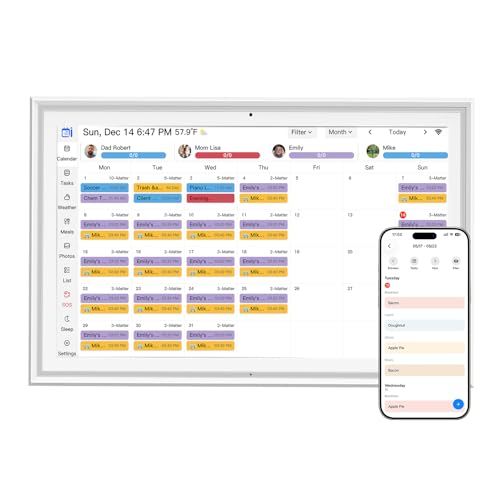
Digital Family Calendar Review Summary
The 10.1-inch Digital Family Calendar is designed for families that need a visible household command center rather than another calendar buried inside one person’s phone.
The listing says it can combine multiple personal calendars, including iOS and Google calendars, into one interface, while color-coding family members and tasks.
That makes it a sensible fit for a kitchen, hallway, home office, or another place where everyone can see the day’s plan.
Buy it if you want shared visibility, interactive chores, and dinner planning in one device. It is especially appealing when the goal is to make schedules understandable for children as well as adults.
However, the available product information does not provide detailed hardware specifications, storage information, or independent performance testing, so buyers who mainly want a conventional photo frame or a highly configurable professional calendar should look closely at the app and ecosystem before ordering.
Review Scorecard
| Category | Editorial score | Buyer-focused rationale |
|---|---|---|
| Shared scheduling | 9/10 | Combines multiple calendars into one family-facing view. |
| Household organization | 9/10 | Adds chores, dinner planning, groceries, and other list-style tools. |
| Family participation | 8/10 | Color assignments and an interactive chore chart support shared use. |
| Remote management | 8/10 | The eCalendar App is intended to manage the calendar away from home. |
| Setup appeal | 8/10 | The claimed process is plug in, connect to Wi-Fi, and link the app. |
| Photo-frame versatility | 8/10 | It can display family photos when the calendar is not in use. |
| Evidence confidence | 6/10 | The listing gives useful functions but few detailed technical specifications. |
Key Features and Specifications of Digital Family Calendar
The product is described as a 10.1-inch touchscreen digital calendar and picture frame.
Its strongest differentiator is not simply the screen; it is the combination of several household-planning features in one interface.
- Unified family calendar: The listing says the device can integrate multiple personal calendars, including iOS and Google calendars, into one display.
- Color-coded people and tasks: Different colors can be assigned to family members and activities, making a crowded schedule easier to scan.
- Chore chart: The interactive chore feature is intended to help organize housework and encourage children to build consistent habits.
- Dinner planner: A dedicated dinner-planning function can keep meal decisions visible and reduce repeated “What’s for dinner?” questions.
- Remote access: The eCalendar App is presented as a way to manage the calendar while away from the device.
- Additional planning tools: The listed free app features include a photo frame, chore chart, dinner plan, grocery list, and more.
- Optional advanced function: The listing mentions a paid Magic Import feature for users who need additional importing tools. The available evidence does not explain its exact compatibility or limitations.
- Photo display: When it is not being used as a calendar, the touchscreen can show family photographs as home decor.
The setup claim is straightforward: plug in the device, connect it to Wi-Fi, and link the calendar through the mobile app.
That sounds approachable for ordinary households, although successful syncing will still depend on the calendars and devices you intend to authorize.
The listing also says additional devices can be authorized, which may be useful if more than one household member needs access.
The absence of a fuller specifications list is worth noting.
There is no supplied information here about resolution, dimensions beyond the 10.1-inch screen description, internal storage, speaker performance, battery operation, wall mounting, or privacy controls.
Those are not necessarily flaws, but they are questions to resolve before buying if they matter to your setup.
Pros and Cons of Digital Family Calendar
Pros
- One shared view for many responsibilities: Calendar events, chores, dinner planning, and grocery reminders are presented as parts of the same household system.
- Useful for mixed-age families: Color-coded assignments and a chore chart may be easier for children to follow than a traditional shared calendar app.
- Remote management is built into the concept: The eCalendar App is intended to let users update the organizer even when they are not standing in front of it.
- More than a calendar: Photo-frame mode gives the screen a second purpose when there are no appointments to display.
- Multiple calendar support: Bringing iOS and Google calendars together could reduce the need to check several accounts.
Cons
- Limited supplied technical detail: The evidence does not specify storage, resolution, dimensions, or mounting options.
- App dependence: The main value relies on connecting the device to Wi-Fi and using the companion app.
- Some functionality may cost extra: Magic Import is identified as a paid feature, though its exact scope is not provided.
- Not necessarily ideal for a single-user setup: Someone who only needs a personal digital calendar may not use the family-oriented chore and dinner features.
- No hands-on testing is available: These are listing-based assessments, not claims about real-world sync speed, display quality, or long-term reliability.
Who Should Buy Digital Family Calendar?
This organizer makes the most sense for families that want a visible central schedule.
It could suit parents coordinating school, work, appointments, chores, meals, and shopping, particularly when not every household member checks the same phone calendar.
The color system may also help separate one person’s commitments from another’s at a glance.
It is a strong candidate for households trying to involve children in everyday routines.
A chore chart that everyone can see can make responsibilities more concrete, while the dinner planner puts the evening plan in the same place as the day’s activities.
The photo-frame function is another advantage for buyers who want the screen to remain useful between planning moments.
You may want to skip it if you already have a satisfactory shared calendar workflow and do not want another connected display in the home.
It may also be a poor match if your priority is detailed hardware performance, extensive offline use, or a standalone photo frame with no app setup.
Since the supplied evidence does not cover privacy settings or account-management details, security-conscious buyers should review those points before connecting personal calendars.
How the Digital Family Calendar Fits Daily Household Routines
A visible morning briefing
Placed in a shared area, the screen can serve as a quick morning reference for appointments, school activities, and individual tasks.
The value comes from reducing the need to ask who is doing what, provided the connected calendars stay current.
Chores that are easier to see
The chore chart gives routine housework its own place instead of leaving it in a message thread or memory.
Color assignments can help children recognize their responsibilities, while the family can use the display as a shared reminder.
Dinner and shopping in the same system
Dinner planning and a grocery list address two closely related household decisions.
Keeping them alongside the calendar can make the evening plan more actionable, though the listing does not describe recipe, inventory, or automatic shopping integrations.
A useful screen after planning
Photo-frame mode gives the device a decorative role when the schedule is quiet.
That is a thoughtful design choice for a family room or kitchen, because the display does not become useful only during calendar checks.
Alternatives to Digital Family Calendar
The best alternative depends on whether you value a dedicated family display, a broader smart-home ecosystem, or a simpler app-first workflow.
- Skylight Calendar is a recognizable dedicated family-calendar line for buyers who want a purpose-built household display and are willing to compare ecosystem features.
- Hearth Display is worth considering for families focused on routines, responsibilities, and a shared home dashboard.
- Echo Show may fit buyers who want a display that also belongs to a broader voice-assistant and smart-home ecosystem.
- Cozi Family Organizer is a better comparison for shoppers who prefer a software-centered family calendar and do not need a dedicated touchscreen on the wall or counter.
These alternatives should be compared by calendar compatibility, chore support, privacy controls, app costs, and whether the device can remain useful outside scheduling.
The 10.1-inch Digital Family Calendar stands out when the appeal is specifically an all-in-one family screen with photo display, rather than a general smart display or phone app.
Is Digital Family Calendar Worth It?
The 10.1-inch Digital Family Calendar is worth considering for households that want a shared, visible organizer with family-oriented extras.
Its combination of multi-calendar syncing, color-coded assignments, chores, dinner planning, grocery support, remote app access, and photo mode gives it a broader role than a basic digital calendar.
The main caution is the thin technical evidence.
Buyers should confirm the app’s compatibility, the treatment of paid features such as Magic Import, privacy options, and the physical installation details that matter in their home.
If those checks line up with your needs, this is a practical choice for making family logistics easier to see and easier to share.
If you only need a personal calendar or a simple photo frame, its extra functions may not justify the added setup.
Bottom line: choose it when household visibility and shared routines are the priority; look elsewhere when detailed hardware specifications or a simpler app-only workflow matter more.