
The best professional USB desk fans deliver focused airflow without taking over your workspace. For office desks, home workstations, and shared environments, the right model balances quiet operation, compact size, adjustability, and convenient USB power.
We compared 10 leading options across speed control, rotation, portability, noise-conscious design, power flexibility, and everyday usability to help you choose a fan that fits your desk and work habits.
Best 10 Professional USB Desk Fans Picks for 2026
Quiet Compact Pick

- Under-25 dB operation
- 360° adjustable airflow
- USB powered with removable front cover
Best For: Quiet personal cooling in compact workspaces
Most Adjustable Cordless Pick
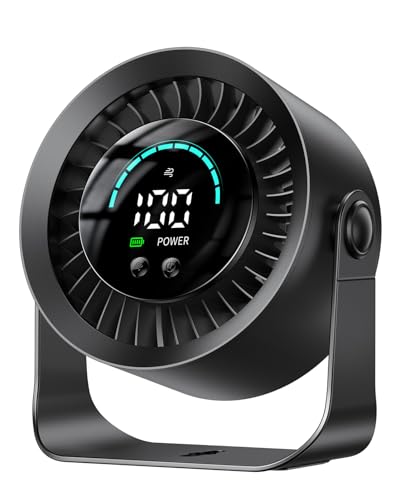
- 100 stepless speed settings
- Up to 17-hour battery life
- Tabletop or wall-mountable design
Best For: Cordless cooling with precise speed control
Sturdy Metal Base Pick
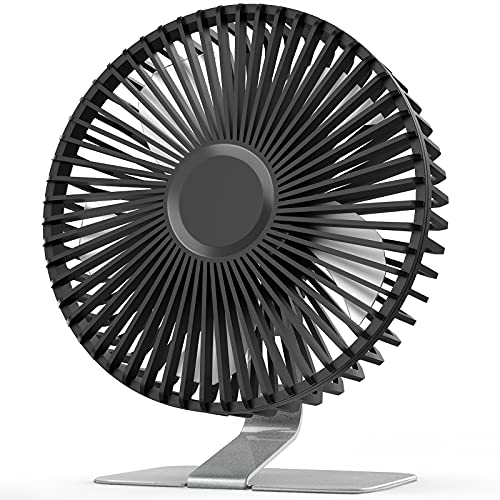
- Four speed settings
- Heavy-duty metal base
- Adjustable and easy to clean
Best For: Stable desk cooling with stronger high-speed airflow
Compact Quiet Pick

- 25 dB operation with three speeds
- 360° adjustable head and stable base
- USB-A powered with a 4.9-foot cord
Best For: Small desks, offices, nightstands, and travel
Most Adjustable
KIMMOO Rechargeable USB Desk Fan

- 100 speed levels with digital display
- Up to 8.5 hours of stated battery life
- Turbo airflow and flexible positioning
Best For: Cordless home-office use, travel, and precise cooling
Best Easy-Clean Design
- 25 dB quiet airflow with four speeds
- 360° adjustable head and 4.9-foot cable
- Detachable cover for easier cleaning
Best For: Bedrooms, offices, dorm rooms, and maintenance-conscious users
Quiet Metal Pick
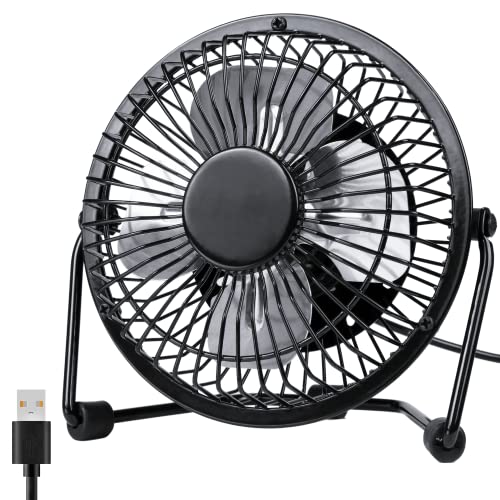
- Metal frame with a refined appearance
- Quiet operation below 40 dB
- 360-degree rotatable head
Best For: Quiet personal cooling in compact workspaces
Lightweight Value Pick

- Three adjustable speed settings
- Weighs about 4 ounces
- Tilts from 0 to 30 degrees
Best For: Portable cooling at desks, in cars, or while traveling
Powerful Portable Pick

- Three speeds up to 4.8 m/s
- 90-degree tilt with a long cable
- Stable rubber-padded base
Best For: Adjustable airflow for offices, dorms, and travel
Quiet Compact Pick – SWEETFULL USB Desk Fan
For professional USB desk fans that stay unobtrusive in an office, the SWEETFULL offers a compact footprint, three speed settings, and a broad 5.8-inch airflow area. Its USB cable works with laptops, power banks, adapters, and car chargers, though it does not include a battery.
Best For: Quiet personal cooling in offices, study spaces, and other indoor work areas.
Pros:
- Operates at under 25 dB according to the product notes.
- 360° tilt adjustment helps direct airflow precisely.
- Removable front cover simplifies cleaning.
- Lightweight 10-ounce design and anti-slip base suit crowded desks.
Cons:
- USB-powered only; it is not cordless.
- Offers three speeds rather than fine-grained adjustment.
The SWEETFULL is a practical choice when quiet operation, portability, and easy maintenance matter more than battery freedom or advanced controls.
Most Adjustable Cordless Pick – DIGIX 100-Speed Desk Fan
The DIGIX stands out among professional USB desk fans with 100 stepless speed settings, a rechargeable 3000mAh battery, and a 360° rotating head. Its LED display shows speed and battery status, while tabletop and wall-mounting options add flexibility for home offices and travel.
Best For: Users who want cordless operation and highly precise airflow control.
Pros:
- Up to 17 hours of battery life on low speed.
- 100 speed levels allow detailed comfort adjustment.
- 360° rotation and included adhesive hook support flexible placement.
- 23 dB noise rating and a battery-status display suit focused work.
Cons:
- Battery-powered design requires recharging for cordless use.
- Its feature set may be more than needed for simple desk cooling.
Choose the DIGIX when adjustable performance and wireless convenience are priorities. It is especially versatile for desks, nightstands, travel, and temporary wall mounting.
Strong Airflow Value – Koonie 5-Inch USB Desk Fan
For buyers seeking professional USB desk fans with straightforward controls and strong airflow, the Koonie combines a seven-blade design with three speeds and a compact 5-inch frame. Its USB-C connection makes it easy to use with compatible USB power sources, but it is not rechargeable.
Best For: Compact desks where dependable airflow and simple USB operation are the main priorities.
Pros:
- Maximum airflow is listed at 15.4 ft/s.
- Stable triangle structure helps keep the fan in place.
- 180° adjustment directs air toward a preferred position.
- Eight-ounce design is easy to move between work areas.
Cons:
- 35 dB noise rating is higher than some quieter alternatives.
- USB powered and not rechargeable, so it needs a connected power source.
The Koonie is a sensible small-desk option for users who want a compact fan with strong stated airflow, simple button controls, and adjustable positioning without paying for battery features.
Sturdy Metal Base Pick – SLENPET 6-Inch USB Fan
The SLENPET offers a more substantial alternative among professional USB desk fans, pairing a vintage metal base with a 6.5-inch frame and four speed settings. Its USB cable supports computers, laptops, power banks, and wall chargers, while the adjustable head and removable cover add everyday practicality.
Best For: Office or bedside users who prefer a stable metal-bodied fan with stronger high-speed airflow.
Pros:
- Four speed settings include a super-wind mode when supplied with sufficient current.
- Heavy-duty metal base provides stable placement.
- 0–90° tilt helps aim airflow where needed.
- Removable front cover supports blade cleaning.
Cons:
- Noise is listed as less than 50 dB, making it louder on paper than quieter picks.
- It is corded USB powered rather than battery powered.
- Its larger frame may take more desk space.
The SLENPET makes sense for buyers who value stability, a classic metal appearance, and an extra speed setting. It is less suited to those who need silent operation or cordless portability.
Compact Quiet Pick – TriPole USB Desk Fan
For shoppers comparing professional USB desk fans for a workstation, nightstand, or travel bag, the TriPole focuses on simple, quiet personal cooling. Its three speeds, 360° adjustment, USB-A power, and compact footprint make it easy to position wherever you need airflow.
Best For: Small desks, home offices, travel, and users who prefer plug-in USB operation.
Pros:
- Quiet 25 dB operation with three adjustable speeds.
- 360° up-and-down head adjustment directs airflow where needed.
- 4.9-foot USB-A cable and stable silicone-padded base support flexible placement.
- Detachable cover helps simplify cleaning.
Cons:
- No built-in battery; it requires a USB power source.
- The product notes recommend a 5V/1A charger if the highest speed does not operate properly.
Choose this model when a lightweight, straightforward fan matters more than advanced controls. Its compact design and low noise suit focused desk work, while the adjustable head helps compensate for its small size.
Most Adjustable – KIMMOO Rechargeable USB Desk Fan
Among professional USB desk fans, the rechargeable KIMMOO stands out for precise airflow control and cordless flexibility. Its 100 speed levels, digital display, turbo airflow mode, and rechargeable battery give you more control than a basic plug-in desk fan.
Best For: Home-office users, travel, and anyone who wants cordless operation with finely adjustable airflow.
Pros:
- 100 speed settings allow very precise airflow adjustments.
- Rechargeable battery provides up to 8.5 hours of stated continuous cooling.
- LED display shows battery status and selected wind speed.
- 35 dB low-speed operation and flexible positioning support quieter work or rest.
Cons:
- At 14.72 ounces, it is heavier than the smallest plug-in models.
- Its 5.5-inch depth takes up more desk space than a mini fan.
- Fast charging requires a 5V/2A adapter.
This is the strongest choice when customization and portability are priorities. The battery removes the need to stay near an outlet, while the display and wide speed range make it easier to maintain a comfortable breeze.
Best Easy-Clean Design – SWEETFULL USB Desk Fan
The SWEETFULL is a practical option for shoppers seeking professional USB desk fans with quiet operation and uncomplicated controls. Its four speeds, 360° adjustable head, 4.9-foot cable, and detachable rear cover balance everyday desk cooling with easy maintenance.
Best For: Bedrooms, offices, dorm rooms, and users who want a compact fan that is easy to clean.
Pros:
- Quiet operation rated as low as 25 dB.
- Four speed settings reach a stated maximum of 5.2 m/s.
- 360° adjustment helps direct airflow from different seating or sleeping positions.
- Detachable cover supports cleaning the blades and interior.
Cons:
- No built-in battery; it must remain connected to a USB power source.
- The 4.9-foot cable may still require a nearby charger or power bank.
- Its tabletop design is intended for indoor use according to the listed details.
Pick the SWEETFULL if routine cleaning and quiet performance are more important than cordless convenience. It offers a useful middle ground between a basic mini fan and a feature-heavy rechargeable model.
Quiet Metal Pick – Compact 4-Inch USB Desk Fan
For shoppers comparing professional USB desk fans, the Zuvas QT-U401 stands out for its compact metal construction and quiet operation. It offers two speed settings, a 360-degree rotatable head, and USB-A power for flexible placement at a desk, sofa, bed, or home office.
Best For: Quiet personal cooling in offices, bedrooms, and compact workspaces.
Pros:
- Metal frame and aluminum blades provide a more refined, sturdy feel.
- Runs below 40 dB, according to the supplied product notes.
- 360-degree rotation helps direct airflow across a wider area.
- Works with USB adapters, hubs, power banks, PCs, and laptops.
Cons:
- Only two speed settings are available.
- The 4-inch blade size is intended for personal airflow rather than broad-room circulation.
- It requires a USB power source and does not include a built-in battery.
This is a practical choice when quiet performance, stable desk placement, and a more professional metal appearance matter more than maximum airflow or extensive controls.
Lightweight Value Pick – Gaiatop 3-Speed USB Desk Fan
The Gaiatop TF30 is a lightweight option for anyone seeking professional USB desk fans that are easy to move between workstations. Its three speed settings, compact footprint, and USB compatibility make it suitable for offices, travel, cars, and other small spaces.
Best For: Portable desk cooling with simple three-speed control.
Pros:
- Three speed settings allow more airflow adjustment than a two-speed fan.
- Weighs about 4 ounces and occupies a small desktop footprint.
- Tilts vertically from 0 to 30 degrees for directional airflow.
- Can connect to laptops, power banks, AC adapters, and car chargers.
Cons:
- Noise is listed at up to 50 dB, so it may be less quiet than smaller low-noise models.
- The third speed requires a 5V/1A power source.
- Its plastic construction may feel less substantial than a metal desk fan.
Choose this model if portability and three-speed flexibility are priorities. Its compact design is convenient for mobile work, though buyers seeking the quietest operation may prefer a lower-rated noise option.
Powerful Portable Pick – Gaiatop 5.5-Inch USB Desk Fan
For professional USB desk fans with stronger airflow control, the Gaiatop TF55B combines three speeds with a brushless motor and a larger 5.5-inch format. Its long cable, adjustable tilt, and rubber-padded base make it a useful fit for office desks, dorms, libraries, and travel.
Best For: Users who want stronger adjustable airflow in a portable desktop fan.
Pros:
- Three speeds reach a listed maximum wind speed of 4.8 m/s and 2,500 rpm.
- Brushless motor design is specified with noise up to 40 dB.
- 90-degree tilt and a 4.9-foot cable improve placement flexibility.
- Wide rubber-padded base helps reduce vibration and slipping.
Cons:
- The larger design takes more desk space than the smallest portable fans.
- It is USB powered and does not provide independent battery operation.
- Plastic construction may not offer the same premium feel as a metal model.
This model is a strong all-around choice for workspaces where airflow range and stability are important. It offers more speed control and a longer cable while remaining light enough for travel.
How We Picked the Best Professional USB Desk Fans
We focused on features that matter during real workdays rather than headline specifications alone. Each fan was assessed for airflow control, desk footprint, adjustability, power options, portability, and ease of use. Models with rechargeable batteries received additional consideration because they can operate away from a wall outlet, while wired USB fans may be better suited to permanent desk setups.
Noise is also important in professional environments. A fan can be powerful yet distracting, so we favored designs offering multiple speeds or quieter low settings. Build quality, stability, controls, and practical positioning features such as tilt or 360-degree rotation also influenced the comparison.
Quick Comparison
| Feature | What to look for | Best suited to |
|---|---|---|
| Power | USB cable or rechargeable battery | Desk or portable use |
| Speed control | Two to four settings, or stepless adjustment | Simple or highly customized cooling |
| Positioning | Tilt adjustment or 360-degree rotation | Focused, flexible airflow |
| Size | Approximately 4 to 6 inches | Compact personal cooling |
| Noise control | Quiet low-speed operation | Offices, calls, and studying |
Key Buying Factors for Professional USB Desk Fans
Airflow and Speed Range
Choose a fan with enough airflow for your seating position, but do not assume the highest speed is always best. Multiple settings let you reduce noise during meetings and increase cooling when needed. Stepless or high-count speed controls offer the most precise adjustment, while simpler two- or four-speed designs are easier to operate.
USB Power and Battery Life
Wired models work well beside a computer, monitor, power bank, or USB wall adapter. Rechargeable fans provide more freedom for hot-desking, travel, and rooms without a nearby outlet. Check whether the fan can operate while charging and whether its battery capacity suits the length of your typical work session.
Size, Stability, and Positioning
A compact fan should leave room for your keyboard, notebook, or monitor stand. Look for a weighted or stable base, especially at higher speeds. Tilt adjustment directs air toward your face or hands, while 360-degree rotation is useful when several positions need airflow throughout the day.
Noise and Controls
For professional use, quiet operation matters as much as cooling power. Simple physical controls are convenient, while digital displays can make settings easier to monitor. Consider how visible the controls are and whether indicator lights could be distracting in a dim workspace.
Who Should Buy Which Professional USB Desk Fans?
Choose a compact wired model if you mainly need quiet, affordable cooling at one desk. A rechargeable fan is the better choice for shared offices, travel, bedside use, or flexible workstations. Select a model with broad rotation when positioning changes frequently, and prioritize a wide speed range if you are sensitive to temperature or noise. For the smallest desks, a 4- or 5-inch fan is generally easier to place; choose a 5.5- or 6-inch design when stronger airflow matters more than minimum footprint.