
A well-organized workstation depends on more than a tidy desktop. The right under-desk cable tray keeps power strips, adapters, and excess cable length off the floor while making everyday connections easier to reach.
We compared 10 professional under-desk cable trays across mounting style, construction, capacity, adjustability, and workspace compatibility to help you choose a dependable solution for an office, studio, or home setup.
Best 10 Professional Under-Desk Cable Trays Picks for 2026
Best Fabric Capacity
Univivi 36-Inch Clamp-On Cable Tray
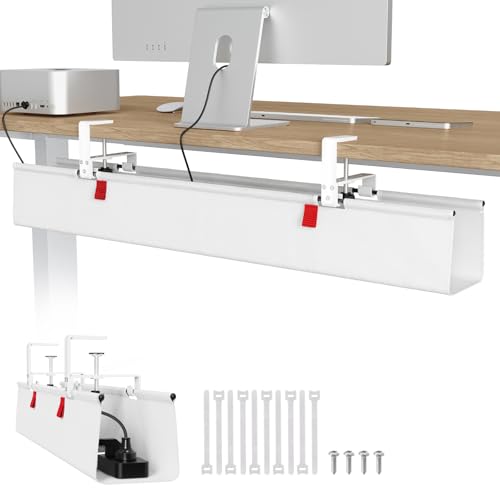
- 36-inch fabric tray offers substantial storage space.
- Clamp-on or screw-in installation supports varied desks.
- Built-in ties and bottom support help organize heavier items.
Best For: Large workstations needing enclosed, high-capacity cable storage
Best Multi-Tray Setup
pamo Three-Piece Steel Cable Organizer
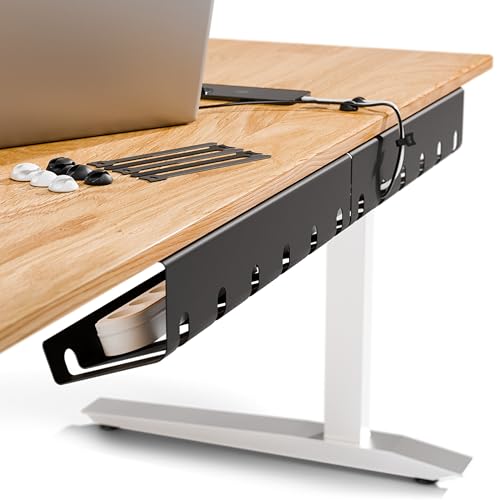
- Three steel trays support modular cable organization.
- Beveled access keeps adapters and cables reachable.
- Includes reusable ties and supports screw-in installation.
Best For: Workstations needing separate cable-storage zones
Best No-Drill Metal Tray
Litwaro Clamp-Mount Cable Basket

- Clamp installation avoids drilling and takes about three minutes.
- Carbon steel supports approximately 15 pounds.
- Rubber pads and reversible mounting protect and adapt to the desk.
Best For: Flat-edge desks needing compact, reversible cable storage
Best Long No-Drill Tray
Mzmaxy 25-Inch Mesh Cable Tray

- 25-inch mesh tray provides extended under-desk coverage.
- Clamp mounting fits desks from 0.4 to 2 inches thick.
- Ventilated design supports airflow around stored equipment.
Best For: Standing desks needing long, reversible cable storage
Best for Height-Adjustable Desks

- Moves with height-adjustable desks
- Powder-coated steel construction
- Conceals power strips and adapters
Best For: Sit-stand desks and minimalist workspaces
Best Modular Two-Piece Setup

- Includes two metal cable channels
- Adhesive or screw installation
- Includes ties, holders, screws, and tape
Best For: Home offices, gaming desks, and standing desks
Best for Large Desks

- Extended 48-inch storage capacity
- C-clip or screw mounting
- Ventilated steel construction
Best For: Wide desks and multi-device workstations
Best Value Pair
Xpatee 2-Pack Clamp-On Cable Trays

- Two trays create a 31.4-inch combined run
- No-drill clamps with anti-scratch mats
- 10-pound capacity per tray
Best For: Long desks and removable cable organization
Best for Maximum Coverage
DELAMU Large Metal Cable Trays

- 33 inches of combined tray length
- Pre-drilled design includes screws and anchors
- Ventilated metal trays with removable access
Best For: Permanent, high-capacity indoor installations
Best Premium Single Tray
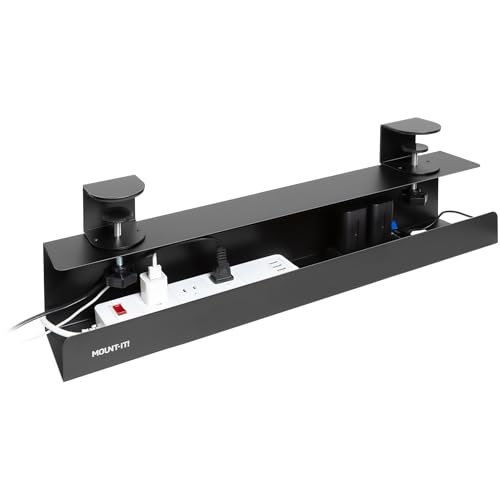
- No-drill clamp installation for glass and standing desks
- 11-pound powder-coated steel capacity
- Lifetime warranty with U.S.-based support
Best For: Professional workstations needing durable single-tray coverage
Best Fabric Capacity – Univivi 36-Inch Clamp-On Cable Tray
For shoppers comparing professional under-desk cable trays, the Univivi stands out with a long, fabric-covered design that can hold adapters, sockets, and other larger accessories. Its clamp-on or screw-in installation makes it adaptable to wood, glass, and metal desktops.
Best For: Large workstations that need high-capacity cable and power-adapter storage without committing to one installation method.
Pros:
- Generous 36-inch length and 5.5-inch width and height for substantial storage capacity.
- Supports both no-drill clamp mounting and screw-in installation.
- 600D Oxford fabric, bottom support, and built-in ties help contain heavier equipment.
- Unfoldable tray design makes adding or removing items easier.
Cons:
- The fabric enclosure may be less suitable than an open metal mesh tray for users who prioritize airflow.
- Its 36-inch size may be more than needed for compact desks.
The Univivi is a strong choice when capacity and flexible mounting matter most. Its enclosed fabric construction is particularly useful for concealing a substantial collection of cables and power components.
Best Multi-Tray Setup – pamo Three-Piece Steel Cable Organizer
For a modular professional under-desk cable tray setup, this pamo set provides three separate steel organizers. The beveled easy-access design keeps power adapters, strips, and signal cables reachable while routing them beneath the desk.
Best For: Offices, gaming desks, or height-adjustable workstations that benefit from distributing cables across multiple under-desk sections.
Pros:
- Three coated-steel trays can separate power supplies and cable groups.
- Easy-access design keeps stored equipment reachable.
- Sturdy 1mm steel construction accommodates large power strips and laptop adapters.
- Includes reusable cable ties for bundling cable sets.
Cons:
- Installation requires screws rather than offering a no-drill option.
- The set weighs 2.3 kg, which may be more than a single-tray setup.
- The supplied dimensions and screw-in design require adequate under-desk space.
Choose the pamo set when organization across multiple zones is more useful than one continuous basket. Its steel construction and included ties give it a practical, office-ready feel, provided screw mounting is acceptable.
Best No-Drill Metal Tray – Litwaro Clamp-Mount Cable Basket
The Litwaro is a practical professional under-desk cable tray for users who want sturdy metal storage without drilling. Its clamp system fits flat desk edges from 0.4 to 2.4 inches thick, while side holes allow cables to pass through the basket.
Best For: Home-office and standing-desk users who need a quick, reversible installation for power strips, hubs, and computer transformers.
Pros:
- No-drill clamp mounting can be assembled in about three minutes or less.
- Carbon-steel construction holds approximately 15 pounds.
- Rubber clamp pads help protect the desktop from scratches.
- Inward or outward installation and side cable holes add routing flexibility.
Cons:
- It is designed for flat-edge desks within the stated 0.4- to 2.4-inch thickness range.
- At 13.4 inches long, it provides less continuous storage than the longer trays in this roundup.
The Litwaro balances quick installation with a sturdy metal design. It is a good fit when you want to avoid drilling and need a compact basket for essential power and cable hardware.
Best Long No-Drill Tray – Mzmaxy 25-Inch Mesh Cable Tray
For professional under-desk cable trays with extended coverage, the Mzmaxy combines a 25-inch metal mesh basket with clamp mounting. It provides room for cables and sockets while allowing ventilation and accommodating inward or outward positioning.
Best For: Standing desks and home offices that need a longer no-drill tray for power accessories and cable bundles.
Pros:
- 25-inch length offers more storage coverage than compact cable baskets.
- Clamp fits desks from 0.4 to 2 inches thick and includes non-slip protective pads.
- Metal mesh promotes ventilation and helps reduce dust accumulation.
- Open side design allows cables to pass through freely.
Cons:
- The tray arrives in two parts and requires screw assembly.
- Its clamp range is narrower than the Litwaro’s stated maximum thickness.
- The manufacturer lists a three-month warranty.
The Mzmaxy is a sensible middle ground between compact trays and oversized systems. Its length, mesh construction, and no-drill clamp make it well suited to a tidy standing-desk setup, provided the desktop falls within its thickness range.
Best for Height-Adjustable Desks – Steel Power-Supply Cable Tray
For shoppers comparing professional under-desk cable trays, the Monoprice Workstream tray offers a durable steel solution for concealing power strips, surge protectors, adapters, and cables. Its design is intended to move with height-adjustable desks while also fitting wood or wood-composite conventional desktops.
Best For: Sit-stand desks and minimalist workspaces that need a compact, concealed cable-management area.
Pros:
- Designed to move with height-adjustable desks, helping reduce wire tangles during adjustment.
- Powder-coated steel construction provides a durable, minimalist enclosure.
- Hides power supplies, power strips, surge protectors, and adapters under the desk.
Cons:
- Designed for wood or wood-composite tabletops, so compatibility with other surfaces is not established in the supplied details.
- At 24.4 inches long, it may offer less coverage than extra-long trays.
Choose this model when desk movement and a clean, concealed appearance matter more than maximum tray length. Its steel construction and focused 24.4-inch format suit organized office setups.
Best Modular Two-Piece Setup – Delamu Metal U-Channel Trays
This Delamu two-pack is a practical choice among professional under-desk cable trays when you want flexible placement and included organizing accessories. Its metal U-shaped channels support either adhesive or screw installation and include cable ties, holders, and screws for a more complete setup.
Best For: Home offices, gaming desks, and standing desks that benefit from modular cable storage and multiple mounting options.
Pros:
- Two metal U-shaped channels provide modular under-desk organization.
- Adhesive mounting avoids tools, while screw mounting supports a firmer hold of up to 11 pounds.
- Includes cable ties, cable holders, screws, and adhesive tape.
- Grooves, perforations, and pre-drilled holes support ventilation and cable routing.
Cons:
- Adhesive installation requires a clean, smooth surface and a 24-hour curing period before loading cables.
- Tape mounting has a lower stated capacity of up to 4 pounds.
- The supplied details do not establish a warranty.
The Delamu stands out for installation flexibility and its accessory bundle. Use screws when maximum stated holding capacity is important, or choose adhesive mounting for a no-drill installation on a suitable surface.
Best for Large Desks – 48-Inch Ventilated Cable Tray
For larger workstations, the Univivi 48-inch tray provides broad under-desk coverage for power strips, chargers, power cords, and data cables. It combines a ventilated steel structure with no-drill C-clips or screw mounting, making it a flexible option for professional under-desk cable trays in home or office setups.
Best For: Wide desks and multi-device workstations requiring substantial cable and power-strip storage.
Pros:
- 48-inch extended design offers generous storage for power strips, cords, chargers, and data cables.
- Supports traceless C-clip mounting or more secure screw installation.
- Enlarged cable holes allow flexible front- or back-side routing.
- Hollow, ventilated construction promotes heat dissipation.
Cons:
- Its extended size may be excessive for compact desks.
- Screw mounting requires drilling, while C-clip mounting may not suit every desk design.
- The supplied dimensions list a 48-inch length and width, but do not clarify the tray’s usable interior dimensions.
This Univivi model is a strong fit when capacity and desk-wide coverage are priorities. Its dual mounting approach and ventilation make it adaptable, though smaller desks may be better served by a shorter tray.
Best Value Pair – Xpatee 2-Pack Clamp-On Cable Trays
For shoppers comparing professional under-desk cable trays, the Xpatee pair stands out when you need extended coverage without drilling. Its two metal trays can be aligned into a 31.4-inch run, while the clamp-on design works with wood, glass, and other desk materials.
Best For: Long desks, multi-device workstations, and renters who want removable cable storage.
Pros:
- Two trays provide up to 31.4 inches of combined cable-management space.
- Clamp installation avoids drilling and includes anti-scratch mats.
- Each tray supports up to 10 pounds and has openings on both sides for easier power-strip access.
- Includes cable clips and ties for a more complete setup.
Cons:
- Each tray is only 15.7 inches long when used separately.
- Designed for desks between 0.4 and 2.4 inches thick, so compatibility should be checked first.
The Xpatee is a practical value choice for users who want broad under-desk coverage and flexible mounting direction. Its metal construction and included accessories make it well suited to larger home-office or professional setups.
Best for Maximum Coverage – DELAMU Large Metal Cable Trays
The DELAMU 2-pack is a strong option among professional under-desk cable trays when you prefer a secure screw-mounted installation and generous overall length. The pre-drilled metal trays offer 33 inches of combined space for power strips, hubs, cords, and small desk accessories.
Best For: Permanent home-office or workplace installations with multiple cables and power supplies.
Pros:
- Two trays provide a total of 33 inches of cable-management space.
- Pre-drilled mounting holes and included screws and anchors simplify installation.
- Metal construction, a wide opening, and ventilation support sturdy, accessible storage.
- Included plastic sheets create a base for cords, stationery, or small gadgets.
Cons:
- Screw-in installation requires drilling or fastening into the desk or wall.
- The product is listed for indoor use only.
- No warranty is specified in the supplied details.
Choose the DELAMU when installation permanence and capacity matter more than tool-free mounting. Its two-piece layout also allows the trays to be positioned closer together or farther apart to suit the desk.
Best Premium Single Tray – Mount-It! Clamp-On Cable Tray
For a polished professional workstation, the Mount-It! tray combines clamp-on convenience with heavy-duty steel construction. This 23.6-inch under-desk cable tray installs without drilling, screws, or adhesive and supports up to 11 pounds, making it suitable for power strips and cable bundles.
Best For: Glass desks, standing desks, and business workstations needing durable no-drill installation.
Pros:
- Clamp-on mounting works without drilling, screws, or adhesives.
- Powder-coated steel supports up to 11 pounds without sagging or flexing.
- Can face inward to conceal cords or outward for easier access.
- Lifetime warranty and U.S.-based technical support add long-term value.
Cons:
- It is sold as one tray rather than a multi-pack.
- Its 23.6-inch length provides less total coverage than the two-tray options.
- Fits desktops from 0.2 to 1.97 inches thick, which may exclude some thicker desks.
The Mount-It! is the most support-oriented choice of the group, pairing a sturdy steel frame with flexible orientation and a lifetime warranty. It is especially compelling when protecting a glass or adjustable desk from permanent modification is a priority.
How We Picked the Best Professional Under-Desk Cable Trays
We focused on the features that matter most in a working setup: secure mounting, usable storage space, material strength, cable access, and installation requirements. The roundup includes no-drill clamp-on designs, steel and metal mesh trays, single trays, and multipacks so you can match the organizer to your desk and equipment.
We also considered differences in tray length, channel shape, mounting hardware, and compatibility with standing desks. A tray that works well for a laptop charger and power strip may not be suitable for a multi-monitor workstation, so capacity and placement were treated as key factors.
Quick Comparison
- Best for no-drill installation: Clamp-on trays that attach to the desktop frame without permanent holes.
- Best for larger setups: 36- and 48-inch trays with room for power strips, adapters, and cable slack.
- Best for multiple workstations: Two- and three-pack options for desks, shared offices, or separate cable zones.
- Best for a clean appearance: Enclosed or U-channel designs that keep cables grouped and less visible.
- Best for heavier equipment: Steel trays with sturdy brackets and a clearly stated weight capacity.
Key Buying Factors for Professional Under-Desk Cable Trays
Mounting Method
No-drill clamp mounts are useful for rented spaces, glass or delicate desktops, and users who expect to reposition the tray. Screw-mounted models can provide a more permanent installation, but they require suitable clearance and a compatible desk underside.
Size and Capacity
Measure the available width before buying. A longer tray can hold a power strip and several adapters, while a compact channel may be better for routing monitor, USB, and charging cables. Check the tray depth as well as its length, particularly when large power bricks are involved.
Construction and Cable Access
Metal trays generally offer strong long-term support, while mesh or open designs improve ventilation and make cables easier to inspect. Look for openings that let you route cords upward at convenient points without creating sharp bends.
Desk and Standing-Desk Compatibility
Check the clamp range, underside clearance, and whether the tray could interfere with a sit-stand mechanism. Leave enough slack for the desk to rise and lower without pulling connectors or placing tension on the power strip.
Who Should Buy Which Professional Under-Desk Cable Trays?
Choose a long 36- or 48-inch tray if you run several monitors, speakers, a desktop computer, or other power-hungry accessories. A compact tray is usually sufficient for a laptop, dock, and a small power strip. Multipacks make sense when you are organizing more than one desk or want separate trays for power and data cables.
For renters and frequently rearranged workspaces, prioritize clamp-on Professional Under-Desk Cable Trays with tool-free installation. For a fixed office workstation, a robust steel tray with generous capacity may be the better long-term choice. Before ordering, verify the dimensions, mounting clearance, included hardware, and stated load limit against your desk and equipment.