
A desktop CNC mill can turn aluminum and brass stock into useful parts, but machines in this category differ considerably in rigidity, work area, enclosure, and setup effort. Some are compact, enclosed systems; others are open-frame routers that need more space and careful cutting settings.
These 10 picks cover both approaches. Use the buying guide below to narrow your choice by the metals you plan to cut, the size of your parts, and how much hands-on setup you want.
Best 10 Desktop Cnc Mill for Metal Picks for 2026
Best Ready-to-Use Pick

- All-metal frame with ball screws on every axis
- 800W router; 6,000–30,000 RPM
- Prewired; install Z-axis module to start
Best For: Quick setup for small metal and mixed-material projects
Best Precision-Focused Pick

- Stated ±0.03 mm precision
- 710W spindle with digital display
- Dual rails and ball screws on every axis
Best For: Detailed aluminum and acrylic work
Best for Rotary Projects

- Included simultaneous-machining 4th axis
- Auto-probing and leveling
- Quick tool changer and PCB pack included
Best For: Rotary parts and mixed-material projects
Best for Larger Workpieces

- 435 x 400 x 80 mm working area
- Reinforced spoilboard reduces sag
- GRBL control with upgrade options
Best For: Larger mixed-material projects and future upgrades
Rotary Pick

- Includes simultaneous 4th-axis machining
- 10-second quick tool changes
- Auto-probing and leveling
Best For: Makers machining cylindrical or multi-sided parts
Upgradeable Pick

- 800W router included
- Dual linear guides on every axis
- Optional spindle and motion upgrades
Best For: Hands-on users doing light-duty metal cutting
Enclosed 3-Axis Pick

- Enclosed 11.8 x 7.9 x 5.1-inch work area
- Supports aluminum and brass
- Quick tool changes and auto-probing
Best For: Small 3-axis projects in home workshops
Precision Pick

- 800W router with 1/8-inch collet
- Dual HGH-15 rails and 1204 ball screws on XYZ
- Wi-Fi control and Z probe included
Best For: Detail-focused aluminum and brass projects
Long-Bed Pick

- 300 × 600 × 73 mm working area
- 800W router and dual linear guides on XYZ
- Ball-screw and 1.5kW spindle upgrades available
Best For: Longer aluminum projects and multiple small parts
High-Power Pick
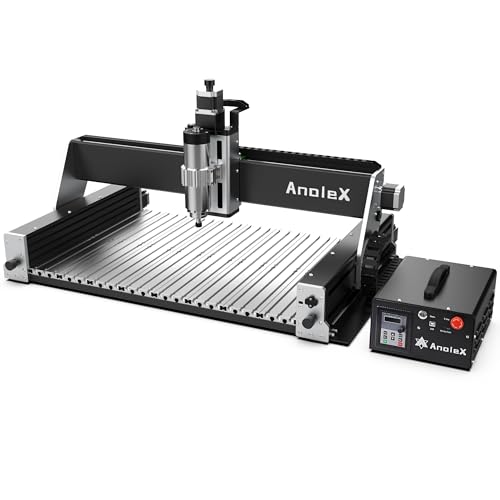
- 1.5kW spindle with 1/8- and 1/4-inch collets
- 600 × 400 × 130 mm working area
- Dual HGH-15 rails and 1204 ball screws on XYZ
Best For: Larger aluminum and brass jobs
Best Ready-to-Use Pick – LUNYEE 3020 Nova
If you want a desktop cnc mill for metal with minimal assembly, the LUNYEE 3020 Nova arrives with its wiring connected; you install the Z-axis module before use. Its all-metal frame, ball screws, and linear guides make it a practical option for aluminum and brass projects.
Best For: Makers who want a mostly assembled machine for small metal and mixed-material projects.
Pros:
- 1204 ball screws and HG-15 linear guides on all three axes; stated accuracy is ±0.05 mm.
- 800W router with six speed settings across a 6,000–30,000 RPM range.
- Supports GRBL software including UGS, Fusion 360, Easel, and Candle.
Cons:
- The Z-axis module still needs installation after unboxing.
- Listed accuracy is ±0.05 mm, versus ±0.03 mm claimed for the Genmitsu 3030-PROVer Ultra in this roundup.
The 3020 Nova stands out for its straightforward setup and well-specified motion system. Choose it if getting started quickly matters more than having the tightest stated accuracy here.
Best Precision-Focused Pick – Genmitsu 3030-PROVer Ultra
The Genmitsu 3030-PROVer Ultra is a desktop cnc mill for metal buyers who prioritize a rigid motion system and stated positioning precision. Its all-metal chassis pairs HG15 dual linear rails and 1204 ball screws on every axis with a 710W digital spindle.
Best For: Detail-oriented aluminum and acrylic projects where a rigid build and visible spindle feedback are priorities.
Pros:
- Stated ±0.03 mm precision, with dual linear rails and ball screws on every axis.
- 710W spindle has a real-time digital display.
- Ships in two pre-assembled modules and includes a side-mounted emergency stop.
Cons:
- Y-axis alignment is still required during setup.
- The listed 23 kg weight makes it heavier than the 19.2 kg LUNYEE model in this roundup.
This is a strong match if you value the stated precision and spindle readout. Its app control and compatibility with Candle, UGS, and Easel also offer several ways to run projects.
Best for Rotary Projects – Carvera Air with 4th Axis
For buyers comparing a desktop cnc mill for metal that can also tackle rotary and PCB work, this Carvera Air package includes a 4th-axis module and PCB fabrication pack. It combines auto-probing and leveling with a quick tool changer for multi-step jobs.
Best For: Makers planning cylindrical or double-sided pieces alongside metal, wood, and PCB projects.
Pros:
- Included 4th axis supports simultaneous rotary machining within a 3.6-inch-diameter by 7.9-inch-long work area.
- Auto-probing and leveling help streamline calibration.
- Quick tool changer is specified to switch tools in 10 seconds.
- Wi-Fi or USB control and Makera CAM support a range of devices and workflows.
Cons:
- The 4th-axis rotary work area limits the size of cylindrical parts.
- Maximum stated spindle speed is 13,000 RPM, below the LUNYEE’s listed 30,000 RPM.
Carvera Air’s appeal is its integrated workflow, particularly when projects call for rotary machining or frequent tool changes. Check the stated rotary dimensions against the parts you intend to make.
Best for Larger Workpieces – Genmitsu 4040-PRO
If your search for a desktop cnc mill for metal starts with work area, the Genmitsu 4040-PRO offers 435 x 400 x 80 mm of travel. Its reinforced spoilboard and lead-screw-driven motion system suit larger signs, prototypes, and engraving jobs, though the supplied material list emphasizes wood, acrylic, MDF, nylon, and carbon fiber composites.
Best For: Makers who need more room for mixed-material projects and want an upgradeable GRBL machine.
Pros:
- 435 x 400 x 80 mm working area accommodates larger projects.
- Center aluminum spoilboard support is designed to reduce bed sag.
- Pre-assembled modules are specified for roughly 15-minute assembly.
- Supports compatible spindle-mount and accessory upgrades.
Cons:
- The supplied notes do not specify a spindle power rating or a metal-cutting performance figure.
- Assembly is required before use.
The 4040-PRO makes the most sense when bed size and expandability outweigh a metal-first specification. If aluminum is your primary material, compare its listed capabilities carefully with the more metal-focused machines above.
Rotary Pick – Carvera Air with 4th Axis Kit
If your search for a desktop cnc mill for metal includes cylindrical parts or multi-sided projects, this Carvera Air bundle adds a 4th-axis rotary module to the enclosed machine. It supports milling metals alongside wood and plastics, with Makera CAM for preparing jobs.
Best For: Makers who want rotary machining and automated setup in one desktop package.
Pros:
- Included 4th axis supports simultaneous rotary machining within a 3.6-inch-diameter by 7.9-inch-long work area.
- Quick tool changer switches tools in about 10 seconds.
- Auto-probing and leveling help calibrate workpieces; Wi-Fi and USB control offer connection options.
Cons:
- Rotary work is limited by the stated 3.6-inch diameter and 7.9-inch length.
- Makera CAM supports Mac and Windows, though the controller supports additional platforms.
Choose this version when the included rotary axis will see real use. For primarily flat parts, the 4th-axis kit may add capability you do not need.
Upgradeable Pick – 3030-Evo Max CNC Router
The 3030-Evo Max is a desktop cnc mill for metal shoppers who prefer an open, upgradeable router for light-duty work. Its included 800W trim router and dual linear guides on all three axes are geared toward projects such as aluminum and copper cutting.
Best For: Tinkerers who want a light-duty metal-cutting machine with room for hardware upgrades.
Pros:
- Includes an 800W, six-speed trim router rated for 8,000–24,000 RPM.
- Dual MGN-15 linear guides on the X, Y, and Z axes add rigidity.
- Supports Wi-Fi control and GRBL-compatible software on Windows, Linux, and Mac.
- Can be upgraded with a 1.5kW spindle, ball screws, closed-loop motors, or a larger table.
Cons:
- Router speed is adjusted manually by dial, not through software.
- The supplied router and lead screws are not the optional spindle and ball-screw upgrades.
This is the more hands-on choice: useful if you value component access and an upgrade path, but plan around the included configuration rather than optional parts.
Enclosed 3-Axis Pick – Carvera Air Standard
For buyers seeking a desktop cnc mill for metal without a rotary-axis bundle, the standard Carvera Air offers an enclosed 3-axis setup. Its stated material range includes aluminum and brass, and its 11.8 x 7.9 x 5.1-inch work area suits compact parts and detailed projects.
Best For: Home workshops and makerspaces making small 3-axis metal parts in an enclosed machine.
Pros:
- Enclosure helps contain chips and dust and reduce noise.
- Quick tool changer allows tool swaps in about 10 seconds.
- Auto-probing and surface leveling simplify workpiece setup.
- Makera CAM supports Mac and Windows, with Wi-Fi or USB machine control.
Cons:
- This package is the standard 3-axis version; a 4th-axis module is not listed as included.
- The 11.8 x 7.9 x 5.1-inch work area limits part size.
Pick this version for enclosed, automated 3-axis work on modestly sized stock; choose a rotary-equipped package if cylindrical machining is central to your plans.
Precision Pick – 4030-Evo Ultra 2
If you want a desktop CNC mill for metal with ball screws already installed, the 4030-Evo Ultra 2 pairs dual HGH-15 linear rails and 1204 ball screws on all three axes with an 800W trim router. It is aimed at aluminum and brass work as well as wood, acrylic, and PCB projects.
Best For: Buyers prioritizing rigid motion hardware and fine detail over a larger work area.
Pros:
- Dual linear rails and ball screws on X, Y, and Z.
- Manufacturer-stated repeatability of ±0.005 mm and aluminum cutting or engraving accuracy of ±0.02 mm.
- Wi-Fi control, programmable macro button, limit switches, emergency stop, and included Z probe.
Cons:
- Router speed must be adjusted with its manual dial, despite software-controlled run/stop.
- Included ER11 collet is 1/8 inch, so other shank sizes require a compatible collet.
The installed ball screws make this the more complete precision-focused option of the two 800W machines here. Treat the stated accuracy figures as manufacturer specifications, not a guarantee for every setup or cut.
For longer stock or several smaller parts, this desktop CNC mill for metal offers a stated 300 × 600 × 73 mm working area. The 3060-Evo Max comes with an 800W trim router, dual MGN-15 linear guides on each axis, and T8 lead screws.
Best For: Buyers who need a longer cutting area and are comfortable with an upgrade path for heavier-duty motion and spindle hardware.
Pros:
- 300 × 600 mm bed accommodates longer projects or multiple small workpieces.
- Includes Wi-Fi control, a programmable macro button, limit switches, emergency stop, and Z probe.
- Supports optional 1204 ball screws and a compatible 1.5kW spindle kit.
Cons:
- Ships with T8 lead screws rather than ball screws.
- Router speed requires manual dial adjustment; software controls run/stop only.
Choose this model for its bed length rather than assuming it matches the ball-screw-equipped machines out of the box. The spindle and ball-screw upgrades are options, not included components.
If you need more spindle power and working room, the RX6040 is a desktop CNC mill for metal with a 1.5kW air-cooled spindle and a stated 600 × 400 × 130 mm processing area. It also includes dual HGH-15 linear rails and 1204 ball screws across X, Y, and Z.
Best For: Buyers planning larger aluminum or brass jobs who want a 1.5kW spindle and ball screws installed from the start.
Pros:
- 1.5kW spindle accepts the supplied 1/8-inch and 1/4-inch ER11 collets.
- Dual linear rails and ball screws on all three axes.
- Full-metal aluminum-alloy worktable, Wi-Fi control, and emergency stop.
Cons:
- Z-probe tool is not included.
- Spindle speed is set manually even though run/stop is software-controlled.
Its larger work area and included spindle distinguish it from the 800W options. The manufacturer lists steel among workable materials, but tool choice and conservative cutting settings still matter for metal jobs.
How We Picked the Best Desktop Cnc Mill for Metal
We focused on machines positioned for metal cutting and compared the features that most affect practical use: frame construction, linear guides, drive components, spindle or router configuration, work-area class, enclosure options, and bundled accessories. The list spans compact enclosed Carvera Air configurations, smaller 3020 and 3030 machines, and larger 4030, 4040, and 3060-class routers. We treated advertised precision and metal-cutting claims as specifications to verify, not guarantees of finished-part accuracy or cutting speed.
Quick Comparison
For a contained workspace and an integrated desktop workflow, start with the Carvera Air configurations; choose among them based on whether you need the fourth-axis rotary kit, PCB kit, or neither. For an open-frame machine with a smaller footprint, compare the LUNYEE 3020 Nova, Genmitsu 3030-PROVer Ultra, and 3030-Evo Max. The Genmitsu 4040-PRO and 4030-Evo Ultra 2 offer a larger-format alternative, while the 3060-Evo Max suits projects that need more room along one axis. The RX6040 is the option to examine if its 1.5 kW spindle and larger machine format match your available space and power setup. Check actual usable travel and clearance before assuming a model number describes the cutting area.
Key Buying Factors for a Desktop Cnc Mill for Metal
Match the Machine to the Metal
Aluminum and brass are sensible starting points for many compact machines, provided you use suitable cutters, workholding, lubrication or chip clearing, and conservative feeds and depths of cut. Do not assume a machine advertised for “metal” will handle steel efficiently. If steel is your main material, confirm documented cutting capability and consider a more rigid mill.
Prioritize Rigidity and Workholding
A sturdy frame, well-supported linear motion, and low-backlash drives help keep a cutter stable, but the fixture matters too. Budget for a vise or clamps, a spoilboard or fixture plate where appropriate, and enough Z clearance for the stock, tool, and workholding together. A larger work area is only useful if the machine remains stable for your intended cuts.
Plan for Chips, Noise, and Software
Open-frame routers need a plan for containing sharp chips and managing noise; an enclosure can simplify that job but does not eliminate cleanup. Check the supplied controller, CAM workflow, file compatibility, tool-setting method, and whether rotary or PCB work requires extra hardware or software. Also verify spindle power requirements and the space needed around the machine.
Who Should Buy Which Desktop Cnc Mill for Metal?
Choose an enclosed Carvera Air setup if workspace containment and a more integrated workflow matter most; pay for rotary or PCB accessories only if those projects are on your list. Choose a 3020 or 3030-class machine if your parts are small and bench space is limited. Move toward the 4030, 4040, or 3060 options when stock dimensions demand it and you can accommodate an open machine. Consider the RX6040 when you want its larger-format, 1.5 kW spindle configuration and are prepared for the associated setup. For any Desktop Cnc Mill for Metal, confirm the real work envelope, supported materials, and accessory costs before buying.