
Choosing a vinyl cutter with contour cutting means balancing precision, workflow, and the kind of materials you plan to cut. For decals, labels, and small production runs, the right machine should track cleanly, read registration marks reliably, and stay consistent over long jobs.
Below, we focus on options that offer useful cutting width, software support, and practical features for hobbyists, small businesses, and sign shops that need dependable contour cutting performance.
Best 10 Vinyl Cutter with Contour Cutting Picks for 2026
Best for Auto Contour Cutting
VEVOR 34" Vinyl Cutter Plotter

- Camera-assisted contour cutting for printed graphics
- 34-inch max feed with 31-inch cutting width
- Fast 800mm/s speed and 500g cutting force
Best For: Windows users who need larger-format contour cutting for decals, signs, and stickers.
Best for Print-and-Cut Workflows
USCutter MH400 53" Contour Cutter

- ARMS contour cutting for registration-mark accuracy
- Barcode job recall speeds repeat production
- Vacuum hold-down improves control on thin media
Best For: Print shops and sign makers doing repeat decal, label, and sticker production.
Best for Bluetooth Setup
VEVOR 34in Bluetooth Vinyl Cutter

- Bluetooth Android control plus USB/COM computer connections
- 34-inch cutting area for larger sign and decal jobs
- Starter kit includes vinyl rolls, blades, and tools
Best For: Makers and small shops that want wireless control and dependable contour cutting for signs, decals, and heat-transfer projects.
Best for Print-and-Cut Projects
28" USCutter LaserPoint 3 Vinyl Cutter

- ARMS contour cutting for printed stickers and decals
- Includes stand, basket, and VinylMaster Cut software
- Quieter fan-free motor with improved vinyl tracking
Best For: Small shops and hobbyists who need accurate contour cutting for printed vinyl and decals.
Best for Contour Accuracy

- Claimed ±0.1 mm contour detection for detailed cuts
- Dual-blade design for cutting, scoring, and drawing
- Includes SignMaster software, film, and sticker sheets
Best For: Hobbyists and small shops that want contour cutting precision in an all-in-one bundle.
Best for Print-and-Cut Shops
28" USCutter Titan 3 Servo Cutter
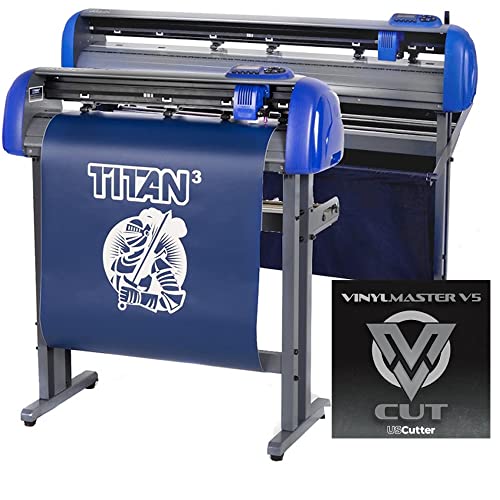
- ARMS automatic print-and-cut contour cutting
- Quiet servo motor with 37 in/sec cutting speed
- Includes VinylMaster Cut software and support
Best For: Small businesses and hobbyists focused on printed stickers, decals, and heat-transfer contour cuts.
Best for Contour Cutting
VEVOR 28-Inch Vinyl Cutter Bundle

- Contour detection with claimed ±0.1 mm accuracy
- Dual blades reduce the need for blade swaps
- Includes starter media and SignMaster activation
Best For: Beginners and small shops making contour-cut decals, stickers, and HTV projects.
Best for Contour Cutting Beginners
34" LaserPoint 3 Vinyl Cutter Bundle
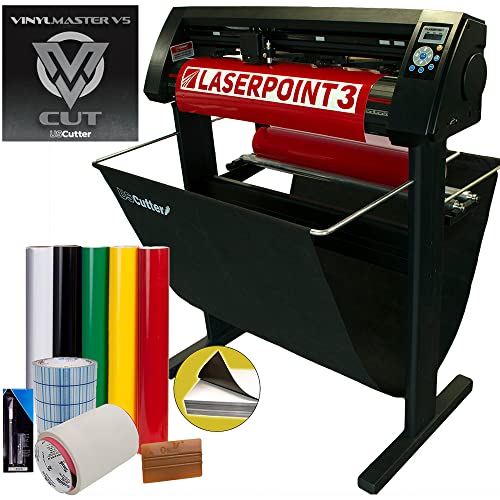
- ARMS automatic contour cutting for print-and-cut jobs
- Bundle includes stand, basket, vinyl, tape, and tools
- VinylMaster Cut software helps with design and vectorizing
Best For: Beginners and small business owners who want a ready-to-use contour-cutting setup.
Best Value Starter
USCutter 34-inch Vinyl Cutter with Stand
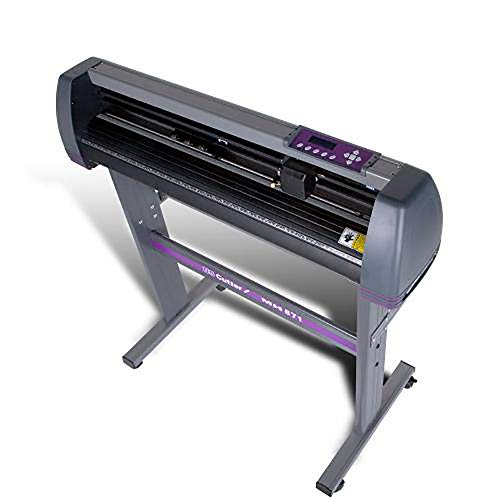
- 34-inch feed width with 30-inch cut width
- VinylMaster Cut software and 3 blades included
- Lifetime US-based phone support and setup help
Best For: New sellers and small businesses that want an affordable starter cutter for signs, decals, and heat-transfer projects.
Best for Large Desktop Jobs
VEVOR 28-Inch Vinyl Cutter Plotter

- Wide 28.3-inch feed for larger decals and signs
- LCD controls with adjustable pressure and speed
- Windows-only compatibility with SignMaster software
Best For: Windows users who want a wide-format cutter for decals, signage, and DIY materials.
Best for Auto Contour Cutting – VEVOR 34" Vinyl Cutter Plotter
If you want a vinyl cutter with contour cutting for decals, signage, and mixed media projects, this VEVOR 34-inch plotter offers a strong feature set for the price. The built-in camera helps with contour tracking, while the LCD control panel, high cutting speed, and wide material support make it practical for small shops and ambitious hobby users alike.
Best For: Users who need automatic contour cutting for stickers, decals, and sign-making without moving up to a more expensive cutter.
Pros:
- Automatic camera contour cutting improves tracking for printed graphics and decals
- Wide 34-inch max paper feed and 31-inch cutting width suit larger jobs
- Fast 800mm/s cutting speed with up to 500g pressure for efficient production
- Works with common sign-making software and connects via USB, COM, or U-disk
Cons:
- Not compatible with Mac systems
- Setup and software learning may take time for first-time users
- Best suited to Windows-based workflows only
Overall, this is a capable vinyl cutter with contour cutting if you want automated print-and-cut functionality and larger-format capacity in one machine. It stands out most for buyers who value camera-assisted accuracy and broad sign-making versatility over plug-and-play simplicity.
Best for Print-and-Cut Workflows – USCutter MH400 53" Contour Cutter
If you need a vinyl cutter with contour cutting for decals, labels, stickers, or signage, the USCutter MH400 is built around production-style workflow features rather than basic hobby use. ARMS optical registration, barcode job recall, and a vacuum hold-down strip help improve accuracy and reduce handling errors on long or repeated jobs.
Best For: Print shops, sign makers, and high-volume users who want automated print-and-cut precision with wide-format capacity.
Pros:
- ARMS contour cutting reads registration marks for accurate print-and-cut results.
- Barcode workflow makes it easier to recall repeat jobs quickly.
- Vacuum hold-down helps keep thin media flat for cleaner cuts.
- Includes VinylMaster Cut software for PC and long-run material tracking features.
Cons:
- PC-only software may be limiting for Mac users.
- 53-inch size needs dedicated floor space and setup room.
- More machine than casual crafters typically need.
For buyers who want a vinyl cutter with contour cutting that supports real production workflows, the MH400 stands out for its automation, media control, and wide-format options. It’s a better fit for repeat business and print-and-cut jobs than for occasional crafting.
Best for Bluetooth Setup – VEVOR 34in Bluetooth Vinyl Cutter
If you want a vinyl cutter with contour cutting that’s aimed at small shop and hobby production, this VEVOR 34-inch plotter offers a practical mix of Bluetooth control, computer connectivity, and a wide cutting path. It’s built for sign making, decals, heat-transfer projects, and other jobs where you need repeatable cuts without stepping up to a pro-level system.
Best For: Makers and small businesses that want wireless phone control plus reliable contour cutting for signs, decals, and transfer work.
Pros:
- Bluetooth Android app support adds convenient mobile control, with USB and COM options for PCs.
- Steel roller shaft and stated 0.01 mm blade accuracy help improve long-run cut consistency.
- 34-inch class cutting area works well for larger signs and wider vinyl sheets.
- Includes a starter accessory bundle with vinyl rolls, blades, holders, and other tools.
Cons:
- Bluetooth support is limited to Android mobile use rather than iOS.
- The included software setup may take some time for first-time users.
- At nearly 47 pounds, it is not especially lightweight or portable.
Overall, this is a solid vinyl cutter with contour cutting if your priority is broad compatibility, a large working width, and an accessory package that helps you start producing right away.
Best for Print-and-Cut Projects – 28" USCutter LaserPoint 3 Vinyl Cutter
If you want a vinyl cutter with contour cutting that can handle stickers, labels, and printed heat-transfer graphics, the USCutter LaserPoint 3 is built around that workflow. Its ARMS laser guidance helps it read registration marks for automated print-and-cut jobs, while the included stand, basket, and VinylMaster Cut software make it easier to get started.
Best For: Small shops and hobbyists who need accurate contour cutting for printed vinyl, decals, and transfer projects.
Pros:
- ARMS contour cutting with laser guidance for print-and-cut jobs
- Includes stand, media catch basket, and VinylMaster Cut software
- Quieter fan-free motor and grippier grit rollers for better tracking
- Lifetime US-based technical support
Cons:
- Windows-only software limits Mac users
- Not the most compact option at 45 pounds
- Setup may take some tuning for first-time users
Overall, the LaserPoint 3 is a practical choice if your priority is reliable print-and-cut output rather than a basic cutter-only setup. For buyers specifically shopping for a vinyl cutter with contour cutting, it offers a strong mix of automation, included accessories, and support.
Best for Contour Accuracy – VEVOR 53-Inch Vinyl Cutter
If you want a vinyl cutter with contour cutting for decals, signs, and sticker work, this VEVOR bundle stands out for its built-in preview/test function, dual-blade setup, and claimed ±0.1 mm tracking accuracy. It’s a practical fit for makers who want a wider feed width and software included without piecing together extra accessories.
Best For: Hobbyists, small shops, and DIY sellers who need contour cutting, decent media versatility, and an all-in-one starter bundle.
Pros:
- Intelligent contour detection with claimed ±0.1 mm precision helps with detailed decals and lettering.
- Dual blades let you draw, cut, or score without constant blade swaps.
- Includes SignMaster software, transfer film, and sticker sheets for faster setup.
- Works with Windows and macOS and offers USB, U-disk, or serial connections.
Cons:
- The 65.9 lb machine is bulky and not ideal for tight workspaces.
- Setup support appears mixed, based on customer feedback about the manual.
- It may be more machine than casual crafters need for occasional use.
For buyers comparing a vinyl cutter with contour cutting, this VEVOR model is appealing because it combines guided startup, wide-format capability, and included software in one package. It’s most convincing when precision and workflow speed matter more than keeping the setup minimal.
Best for Print-and-Cut Shops – 28" USCutter Titan 3 Servo Cutter
28" USCutter Titan 3 Vinyl Cutter with Servo Motor & ARMS Contour Cutting Plus Design/Cut Software
Check Price On AmazonIf you need a vinyl cutter with contour cutting for stickers, decals, labels, or printed heat-transfer jobs, the USCutter Titan 3 is built around ARMS automatic print-and-cut alignment and a fast servo motor. It aims to balance tracking accuracy, speed, and enough downforce for everyday sign-shop work.
Best For: Small businesses and hobbyists who want reliable print-and-cut contour cutting with included software and US-based support.
Pros:
- ARMS laser-guided contour cutting for printed stickers, labels, and transfers
- Servo motor design delivers quiet operation, 37 in/sec speed, and 750g downforce
- Includes VinylMaster Cut software plus vectorizing tools for Windows users
- Metal frame, pinch rollers, and grit rollers help with tracking consistency
Cons:
- Windows-only software limits Mac users
- Some buyers report mixed experiences with reliability and setup
- No vacuum hold-down, so sheet handling may require extra care
Overall, the Titan 3 is a practical vinyl cutter with contour cutting if your workflow centers on printed graphics and you want the convenience of bundled software and support. It’s more of a production-minded starter cutter than a plug-and-forget machine.
Best for Contour Cutting – VEVOR 28-Inch Vinyl Cutter Bundle
If you want a vinyl cutter with contour cutting for decals, signage, and DIY branding work, this VEVOR bundle gives you a lot of capability for the price. It combines adjustable force, dual blades, and software support with contour detection to help keep cuts accurate without requiring a more advanced commercial setup.
Best For: Beginners and small shops that want contour-cut decals, sticker sheets, and HTV projects with a flexible desktop plotter bundle.
Pros:
- Contour detection with claimed ±0.1 mm precision for detailed cuts
- Dual-blade setup supports drawing, cutting, or scoring without blade swapping
- Works with Windows and macOS, plus USB, U-disk, and serial connections
- Includes starter sticker sheets, transfer film, and SignMaster activation code
Cons:
- Setup may take some trial and error for first-time users
- At 39.5 pounds, it is not especially portable
- Review volume is still limited, so long-term reliability is less proven
Overall, this is a practical vinyl cutter with contour cutting for buyers who want broad material support and workflow flexibility more than a plug-and-play experience. It looks especially useful for users who plan to make decals and stickers regularly and want bundled extras to get started faster.
Best for Contour Cutting Beginners – 34" LaserPoint 3 Vinyl Cutter Bundle
34" LaserPoint 3 Vinyl Cutter Plotter with Contour Cutting, Vinyl, Tape, Tools (Bundle)
Check Price On AmazonIf you want a vinyl cutter with contour cutting that can handle signs, apparel graphics, and small in-house production, the USCutter LaserPoint 3 bundle is a practical place to start. It adds ARMS automatic contour cutting, a stand with catch basket, and bundled vinyl, tape, and tools so you can get up and running faster.
Best For: Small shops, home-based apparel sellers, and beginners who want contour-cut capability without buying every accessory separately.
Pros:
- ARMS automatic contour cutting supports precise print-and-cut workflows.
- Includes stand, catch basket, vinyl, transfer tape, and starter tools.
- Adjustable pinch rollers, speed, and pressure help with different media types.
- VinylMaster Cut software is included for design and vectorizing.
Cons:
- Setup and software learning may take time for first-time users.
- Bundle extras are useful, but experienced buyers may not need all of them.
Overall, this is a solid vinyl cutter with contour cutting for buyers who want an affordable, feature-rich entry into sign and apparel production. The bundle approach adds real value, especially if you need a ready-to-work setup instead of piecing accessories together.
Best Value Starter – USCutter 34-inch Vinyl Cutter with Stand
If you want a practical vinyl cutter with contour cutting features on your shortlist, the USCutter MH-Series is a strong entry-level workhorse for signs, decals, heat-transfer graphics, and small in-house production. It pairs a wide 34-inch feed path with included VinylMaster Cut software and lifetime US-based support, making it a solid choice for buyers who want value and guidance more than advanced automation.
Best For: New sellers, hobbyists, and small businesses that want an affordable cutter for everyday vinyl work and room to grow.
Pros:
- 34-inch feed width with a 30-inch max cut width for larger projects
- Includes VinylMaster Cut software plus 3 blades and a stand
- Lifetime US-based phone support helps first-time buyers get started
- Adjustable pinch rollers, speed, and pressure for flexible setup
Cons:
- Listed contour cutting support is not included
- Windows-only software compatibility limits Mac users
- Stepper-motor design is better for value than high-end precision workflows
This is a budget-friendly way to get into vinyl production, but shoppers specifically needing a vinyl cutter with contour cutting should look elsewhere, since this model is built more for straightforward cutting and general signage than print-and-cut jobs.
Best for Large Desktop Jobs – VEVOR 28-Inch Vinyl Cutter Plotter
If you need a vinyl cutter with contour cutting for bigger decals, signs, or heat-transfer projects, this VEVOR bundle gives you a wide 28-inch feed size, strong stepper motors, and adjustable pressure/speed controls. It is a practical pick for Windows users who want a capable desktop plotter without moving up to a more expensive shop machine.
Best For: Makers, small business users, and sign shops that need a wide-format cutter for vinyl, cardstock, and other DIY materials on Windows PCs.
Pros:
- Large 28.3-inch paper feed and 24.8-inch cutter width for bigger projects
- Adjustable pressure and speed with LCD controls for more precise operation
- Includes extra vinyl rolls and basic accessories to start cutting sooner
- Compatible with SignMaster on Windows via COM or USB connection
Cons:
- Not compatible with Mac systems
- Contour cutting capability depends on software setup and workflow
- Bulkier than compact hobby cutters, so it needs dedicated space
Overall, this is a solid value if your priority is width, control, and Windows compatibility in a vinyl cutter with contour cutting potential. It is less polished than higher-end branded plotters, but the included extras and large cutting area make it appealing for cost-conscious production work.
How We Picked the Best Vinyl Cutter with Contour Cutting
For this roundup, we prioritized contour-cutting accuracy, cutting width, feed reliability, ease of setup, and the overall value of included accessories or software. We also looked for features that matter in real production: registration mark reading, adjustable force and speed, blade options, and support resources that can reduce downtime.
Quick Comparison
The lineup covers entry-friendly desktop-style cutters, mid-size 28-inch models, and wider 34-inch to 53-inch machines for higher-volume work. Some are better suited to stickers and decals, while others are more appropriate for signs, vehicle graphics, and broader production workflows. If you want a Vinyl Cutter with Contour Cutting for simple label work, a compact model may be enough; for frequent commercial use, wider beds and stronger feed systems are worth the upgrade.
Key Buying Factors for Vinyl Cutter with Contour Cutting
Registration and Camera/ARMS Accuracy
Contour cutting depends on the machine’s ability to detect registration marks consistently. ARMS, camera-assisted systems, and well-tuned optical sensors help reduce misalignment and wasted material.
Cut Width and Media Handling
Match the cutting width to your most common jobs. Wider machines give more flexibility for banners, long decals, and multi-up production, while smaller units can be easier to place in a home office or small workshop.
Force, Speed, and Blade Control
Adjustable force and speed are important when switching between vinyl types, reflective film, and thicker materials. Dual-blade setups can improve versatility, but the real advantage comes from stable tracking and consistent pressure.
Software and Workflow
Look for bundled software, clean file import options, and workflows that make alignment simple. If you plan to scale up, barcode workflows and easier repeat-job handling can save time.
Who Should Buy Which Vinyl Cutter with Contour Cutting?
If you’re a beginner or side-hustle seller, choose a compact model with straightforward software and reliable contour marking support. Small shops that produce decals every day should lean toward a 28-inch cutter with better tracking and stronger service support. For sign shops and users handling larger graphics, a 34-inch or 53-inch machine offers more throughput and less material waste. If your priority is dependable production, the best Vinyl Cutter with Contour Cutting is usually the one that matches your workflow first and your maximum media width second.