
A good desk fan can make a warm office, dorm room, or bedside workspace more comfortable without taking up much room. USB models are especially convenient because they can run from a laptop, power bank, wall adapter, or other USB source.
We’ve gathered 10 budget USB desk fans with different strengths, including quiet operation, rechargeable batteries, broad speed control, compact designs, and multi-pack value. Use the guide below to narrow the list based on airflow, power needs, and workspace size.
Best 10 Budget USB Desk Fans Picks for 2026
Compact Classic

- Weighs about 4 ounces
- Three speeds with 30° vertical adjustment
- USB-powered for desks, cars, and travel
Best For: Small workspaces and portable personal cooling
Steady Workspace Cooling
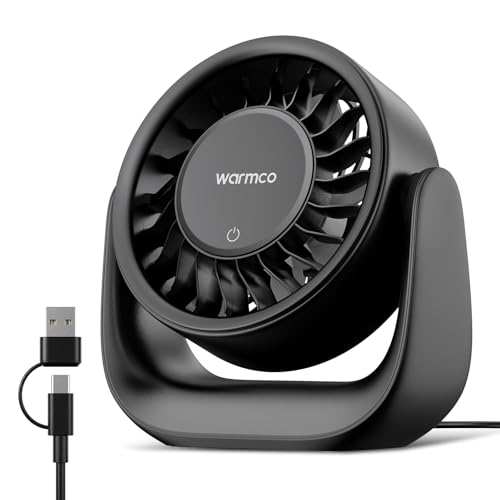
- 6.4-inch plug-in design
- 120° tilt and three speeds
- Includes USB-C/USB-A power cable
Best For: Office, bedside, and study-room cooling
Travel-Ready Airflow

- Five-foot USB cable
- Detachable cover for cleaning
- Three speeds and 90° rotation
Best For: Travel, camping, and flexible desk placement
Quiet Four-Speed Pick
- Noise level as low as 25 dB
- Four speeds with up to 5.2 m/s airflow
- 360° adjustable head and detachable cover
Best For: Quiet bedroom, office, and study cooling
Most Adjustable
DIGIX 100-Speed Rechargeable Desk Fan
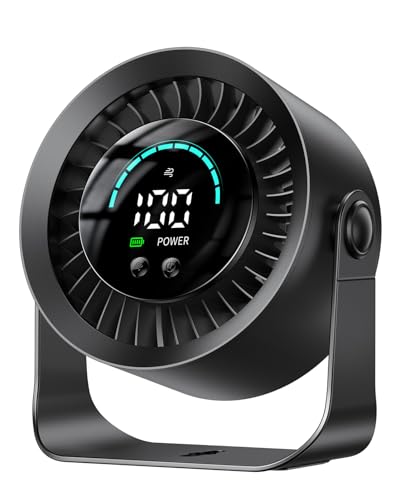
- 100 stepless speed settings
- Up to 17-hour battery life on low
- 360° rotation with tabletop or wall mounting
Best For: Personal cooling at desks, bedsides, and while traveling
Best Simple USB Value

- Three speed settings with one-button control
- 360° adjustable airflow direction
- USB cable included; no battery
Best For: Continuous cooling at offices, study desks, and workstations
Best Lightweight Pick

- Weighs about 6.5 ounces
- Three speeds with airflow up to 4.8 m/s
- 90° tilt and rubber-padded stable base
Best For: Portable personal cooling in offices, dorms, and travel bags
Best Cordless Control
KIMMOO Rechargeable USB Desk Fan

- Rechargeable for up to 8.5 hours
- 100 speed levels with digital display
- Turbo airflow and flexible positioning
Best For: Portable, customizable cooling
Best Two-Pack Value

- Includes two compact fans
- Three speeds with 360° vertical adjustment
- USB-A power with 4.9-foot cords
Best For: Cooling two desks or small spaces
Compact Classic – Gaiatop USB Desk Fan
If you want budget USB desk fans for a small workspace, this lightweight Gaiatop model keeps things simple. It weighs about 4 ounces, offers three speeds, and connects to common USB power sources such as laptops, power banks, car chargers, and AC adapters.
Best For: Small desks, travel, car use, and quiet personal cooling.
Pros:
- Compact design takes up minimal desk space.
- Three speed settings provide adjustable airflow.
- Vertical head adjustment helps aim the breeze up to 30 degrees.
- Noise is listed below 50 dB, even at strong airflow.
Cons:
- The third speed requires a 5V/1A power source.
- Its 30-degree adjustment range is more limited than models with wider tilt ranges.
- No wall adapter is listed among the included components.
This is a practical pick when portability and a small footprint matter most. Its basic push-button controls and USB compatibility make it easy to use, though the limited tilt range may not suit users who need broad positioning flexibility.
Steady Workspace Cooling – Warmco DS1 USB Desk Fan
For shoppers comparing budget USB desk fans for continuous indoor use, the Warmco DS1 is a larger 6.4-inch plug-in option. It provides three speeds, a 120-degree manual tilt range, and a 2-in-1 USB-C/USB-A cable for use with suitable 5V/2A power sources.
Best For: Offices, bedrooms, study areas, and users who prefer plug-in operation without a built-in battery.
Pros:
- Supports both USB-C and USB-A power sources with the included cable.
- 120-degree vertical tilt makes airflow easier to aim.
- Seven-blade design delivers airflow up to 6 m/s.
- Compact body fits desks, nightstands, shelves, and counters.
Cons:
- It has no built-in battery, so it needs a USB power connection.
- The 50 dB noise rating applies to the lowest speed; higher speeds produce more operating noise.
- A suitable 5V/2A power source is required.
The DS1 stands out for flexible positioning and broad USB compatibility. It is a sensible choice for stationary cooling, but less suitable if you need a cordless fan for moving around.
Travel-Ready Airflow – Gaiatop 5.5-Inch USB Desk Fan
This Gaiatop model is among the more travel-friendly budget USB desk fans, with a 5.5-inch body, a five-foot cable, and a weight of about 0.6 pounds. Its three speeds and 90-degree rotation provide adjustable personal airflow from a laptop, power bank, car charger, or other USB source.
Best For: Travel, bedrooms, office desks, camping, and users who want easy cleaning.
Pros:
- Five-foot cable gives added placement flexibility.
- Detachable cover makes cleaning the fan easier.
- Silicone base pads help reduce sliding and tipping.
- Three speeds include a stronger high setting with airflow up to 5.3 m/s.
Cons:
- It requires a 5V/2A power supply for operation.
- No wall charger is included.
- The 90-degree rotation range is narrower than some adjustable desk fans.
With its longer cable, stable base, and removable cover, this fan is well suited to flexible everyday use. Keep a compatible USB power adapter available, since the package includes the cable but not a wall charger.
Quiet Four-Speed Pick – SWEETFULL 5-Inch USB Desk Fan
For buyers prioritizing quiet operation among budget USB desk fans, the SWEETFULL S36 offers four speeds and a listed noise level as low as 25 dB. It uses USB power, includes a 4.9-foot cable, and has a 360-degree adjustable head for more flexible personal cooling.
Best For: Bedrooms, study spaces, offices, travel, and quiet close-range cooling.
Pros:
- Listed noise level as low as 25 dB for quieter use.
- Four speed settings provide more control than three-speed models.
- 360-degree adjustable head helps direct airflow from different positions.
- Detachable rear cover supports easier blade and interior cleaning.
Cons:
- No built-in battery is included, so it must remain connected to USB power.
- The compact fan weighs about 0.61 pounds, making it heavier than the smallest model in this roundup.
- The package does not list a wall charger.
The S36 is a strong option when low noise, flexible positioning, and extra speed control are more important than cordless operation. Its compact size also makes it practical for nightstands, desks, bags, and travel.
Most Adjustable – DIGIX 100-Speed Rechargeable Desk Fan
For shoppers comparing budget USB desk fans, the DIGIX stands out for its unusually precise speed control and cordless flexibility. It offers 100 settings, 360° rotation, a rechargeable 3000mAh battery, and tabletop or wall-mount use.
Best For: Home-office users, sleepers, and travelers who want adjustable cooling without staying near an outlet.
Pros:
- 100 speed levels allow fine control from a gentle breeze to stronger airflow.
- Rechargeable battery provides up to 17 hours on low speed.
- 360° rotation and included adhesive hook support flexible placement.
- LED display shows the speed setting and remaining battery power.
Cons:
- Battery-powered design may cost more than basic USB-only fans.
- Its small size is intended for personal cooling rather than cooling an entire room.
Choose the DIGIX if customization and portability matter more than having the simplest plug-in setup. Its battery indicator, quiet 23 dB operation, and three-year coverage add useful convenience for everyday desk or bedside use.
Best Simple USB Value – SWEETFULL Small USB Desk Fan
The SWEETFULL is a straightforward option among budget USB desk fans for shoppers who already have a USB power source. This compact black fan uses a supplied 4.7-foot cable, offers three speeds, and can be tilted through 360° for targeted airflow.
Best For: Offices, study spaces, and desks where continuous USB-powered cooling is more important than cordless operation.
Pros:
- Works with laptops, power banks, USB adapters, and car chargers.
- 360° adjustment helps direct airflow where needed.
- Under-25 dB operation is designed for quieter work or rest.
- Removable front cover makes cleaning the blades and grille easier.
Cons:
- No battery is included, so it must remain connected to a USB power source.
- Only three speed levels provide less fine control than a stepless fan.
The SWEETFULL makes sense when you want an uncomplicated, lightweight desk fan and already keep a laptop, adapter, or power bank nearby. Its washable front cover and anti-slip base are practical touches for regular office use.
Best Lightweight Pick – Gaiatop 5.5-Inch USB Desk Fan
For a lightweight choice in budget USB desk fans, the Gaiatop combines a small footprint with three speed levels and USB-powered convenience. Its 6.5-ounce body, 4.9-foot cable, 90° tilt, and rubber-padded base suit desks, dorm rooms, and travel bags.
Best For: Students, travelers, and office users who need a compact fan that can run from a laptop, power bank, or USB adapter.
Pros:
- Lightweight 6.5-ounce design is easy to carry.
- Three speeds reach up to 4.8 m/s according to the supplied specifications.
- USB connection works with laptops, power banks, adapters, and car chargers.
- Wide base and four rubber pads help reduce slipping and vibration.
Cons:
- It is USB powered and does not include a built-in battery.
- 90° tilt offers less directional range than a full-rotation model.
- The listed 40 dB noise rating is higher than some competing compact fans.
The Gaiatop is a practical pick when portability and stable placement are priorities. It provides stronger airflow at its top setting while keeping the controls and setup simple for everyday personal cooling.
Best Quiet Pick – Koonie 5-Inch USB Desk Fan
If you want budget USB desk fans for a crowded workspace, the Koonie 5-inch model keeps the setup simple: plug it into USB-C power, choose from three speeds, and adjust the airflow within its 180-degree range. It is a practical choice for personal cooling without taking up much desk space.
Best For: Quiet desktop cooling in a home office, bedroom, or other indoor workspace.
Pros:
- Seven-blade design delivers airflow up to 15.4 ft/s.
- 35dB operation is designed for quieter use, including at higher settings.
- Compact 5-inch design with a stable triangular base and 180-degree adjustment.
- Three speed settings provide a straightforward control setup.
Cons:
- It is not rechargeable and must remain connected to USB power.
- Includes a USB-C cord, but the product notes do not indicate that a wall adapter is included.
The Koonie is a sensible budget option when quiet operation, compact sizing, and adjustable personal airflow matter more than cordless portability.
Best Cordless Control – KIMMOO Rechargeable USB Desk Fan
Among budget USB desk fans, the KIMMOO stands out for users who want rechargeable convenience and precise airflow control. Its 100 speed levels, digital display, and rotating positioning make it more adjustable than a basic three-speed desktop fan.
Best For: Home offices, travel, and indoor or outdoor use when cordless operation is useful.
Pros:
- Rechargeable battery provides up to 8.5 hours of operation per charge.
- 100 speed settings allow fine airflow adjustments from gentle to strong.
- LED display shows battery status and selected wind speed.
- Turbo airflow, flexible positioning, and a protective dual guard rail add versatility.
Cons:
- At 14.72 ounces, it is heavier than the smallest mini desk fans.
- Its feature-rich design may be more than needed for shoppers who only want simple USB-powered cooling.
The KIMMOO is the more flexible pick here for buyers willing to trade some simplicity for battery operation, detailed speed control, and a visible status display.
Best Two-Pack Value – TriPole Mini USB Desk Fans
For shoppers comparing budget USB desk fans by quantity, the TriPole two-pack offers a convenient way to cool two locations at once. Each compact fan uses USB-A power, has three speeds, and includes a long cord for flexible placement near a computer, charger, or power bank.
Best For: Buyers who need simple personal cooling at two desks, nightstands, or travel locations.
Pros:
- Two fans are included in the package for multi-location use.
- Compact 4.5-inch design fits small desks and nightstands.
- Three speed modes and 360-degree vertical angle adjustment help direct airflow.
- Wide base, silicone feet, and detachable cover support stable and easier-to-clean operation.
Cons:
- These fans are USB powered and are not described as rechargeable.
- They use USB-A rather than USB-C connectivity.
- The three-speed control is less precise than a fan with many adjustable levels.
The TriPole is a strong value-oriented choice when getting two compact fans matters more than premium controls or cordless use.
How We Picked These Budget USB Desk Fans
We focused on compact USB-powered fans suited to desks, nightstands, dorm rooms, and small personal spaces. The selected models were compared by their stated power options, speed controls, rotation or tilt features, noise-focused design claims, portability, and useful extras such as rechargeable batteries, digital displays, or multi-pack pricing. Because airflow and noise can vary by setting and environment, treat manufacturer specifications as a starting point and prioritize the features that match your daily use.
Quick Comparison
| Best For | Look For |
|---|---|
| Basic desk cooling | Simple USB power and multiple speeds |
| Quiet work or sleep | Low-speed settings and quiet-operation claims |
| Portable use | Compact body or rechargeable battery |
| Precise airflow | Many speed levels, rotation, or adjustable tilt |
| Shared spaces | Two-pack value or multiple fan units |
Key Buying Factors for Budget USB Desk Fans
Power and Battery Options
A USB-powered fan is convenient at a desk, but it may require a nearby laptop, adapter, or power bank. Rechargeable models offer more freedom for use away from outlets, though runtime depends on speed and battery capacity. Check whether a wall adapter is included before assuming it can plug directly into an outlet.
Airflow Control
Three speeds are enough for straightforward personal cooling, while models with many speed levels let you fine-tune airflow and noise. A “100-speed” design does not automatically move more air than a simpler fan, so consider control precision alongside the fan’s size and motor performance.
Direction, Size, and Stability
Adjustable tilt or rotation helps direct air toward your face or hands instead of across the entire room. Smaller fans save desk space but generally suit personal cooling rather than large-area circulation. A stable base matters if the fan will sit near a keyboard, monitor, or bedside items.
Noise and Maintenance
For calls, studying, or sleep, look for a low setting and a design marketed as quiet. Any fan will be more noticeable at higher speeds. A removable or accessible grille can also make dust removal easier and help maintain airflow over time.
Who Should Buy Which Budget USB Desk Fans?
Choose a simple Gaiatop, SWEETFULL, or Warmco model if you want affordable personal airflow with minimal setup. Consider the DIGIX or KIMMOO if you want rechargeable operation, highly adjustable speeds, or extra control features. The Koonie is a practical choice when strong airflow and quiet operation are priorities. For bedrooms, offices shared by two people, or multiple workstations, the TriPole two-pack can provide better coverage. Whichever model you choose, match its size and power method to the space where you will use it most.