
A charging station can clear a tangle of cables from your desk or counter—but only if it has the right ports, enough room between devices, and a layout you can live with.
These 10 organizers range from compact family docks to 20-port stations. The best choice depends less on the biggest wattage claim and more on what you charge together each day.
Best 10 Sorting Charging Station Organizers Picks for 2026
Mixed-Device Pick
COTOP 10-Port Charging Station

- Five USB-C and five USB-A ports
- Eight short mixed cables included
- Supplied wattage figures conflict
Best For: Shared spaces charging phones, tablets, and accessories
Laptop-Heavy Pick

- Five USB-C ports rated up to 120W each
- Two wide center slots
- Ten mixed cables included
Best For: Shared desks with several USB-C laptops and accessories
Case-Friendly Pick

- Two 65W laptop-charging ports
- Wide slots for cased devices
- Ten short mixed cables included
Best For: Charging cased tablets alongside laptops and phones
Five-Device Pick

- Five USB-A charging ports
- Adjustable removable dividers
- Seven short mixed cables included
Best For: Smaller family setups charging phones and tablets
Best Bamboo Dock Without a Charger
Pezin & Hulin Six-Device Organizer

- Holds up to six devices
- Five cables and watch stand included
- Charger or power supply not included
Best For: Households with an existing USB hub or power strip
Best Bamboo All-in-One Kit
Pezin & Hulin Five-Port Charging Station
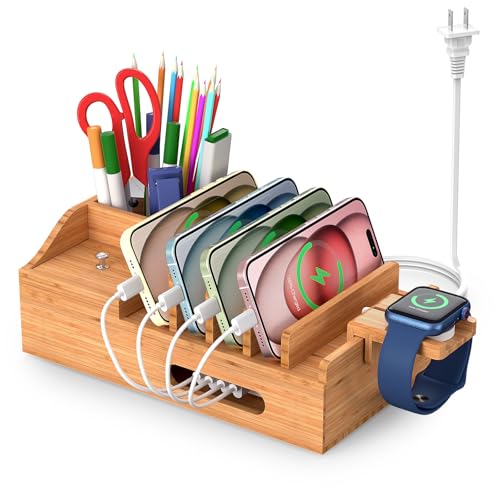
- Five-port USB charger included
- Two accessory compartments
- Five 1-foot cables included
Best For: Shared tabletops needing charging and small-item storage
Best High-Capacity Dock
100W Ten-Port Charging Station

- Five USB-C and five USB-A ports
- Eleven adjustable dividers
- 100W total power shared across ports
Best For: Home or office setups charging many USB devices
Laptop-Friendly Pick
MERGROLY 320W 10-Port Charging Station

- Five USB-C and five USB-A ports
- Two USB-C ports rated at 65W
- Eight short assorted cables included
Best For: Organizing a laptop and family devices
Everyday Family Pick
MSTJRY 6-Port Charging Station

- Charges up to six devices
- Seven removable dividers
- Six mixed short cables included
Best For: Family phones and tablets
High-Capacity Pick

- 10 USB-C and 10 USB-A ports
- 11 removable dividers
- 10 mixed USB cables included
Best For: Shared spaces with many USB devices
Mixed-Device Pick – COTOP 10-Port Charging Station
For households sorting charging station organizers by port variety, this COTOP station offers five USB-C and five USB-A ports, with upright slots to keep devices together. Its 510W total-output claim differs from the 260W figure in the supplied specifications, so confirm its power capacity before buying for several laptops.
Best For: A shared charging spot for phones, tablets, accessories, and an occasional USB-C laptop.
Pros:
- Ten ports split evenly between USB-C and USB-A.
- Includes eight short mixed cables to reduce cord clutter.
- One-piece, flame-retardant ABS housing with listed electrical protections.
Cons:
- Conflicting total-wattage figures make simultaneous high-power use hard to assess.
- The included cable mix may not match every device in a ten-device setup.
The port mix and included cables make this a practical countertop organizer. Check the power rating and cable connectors against your devices before relying on its advertised laptop-charging capacity.
Laptop-Heavy Pick – Zobirez 750W 10-Port Station
If you’re sorting charging station organizers for a desk with multiple USB-C laptops, this Zobirez model stands out for its five USB-C ports, each advertised at up to 120W, alongside five USB-A ports. The stated 750W total output makes it a high-capacity option on paper; actual charging depends on compatible devices and cables.
Best For: A shared desk where laptops, tablets, phones, and USB-A accessories need dedicated ports.
Pros:
- Five USB-C ports rated up to 120W each and five USB-A ports rated up to 30W each.
- Two wider center slots accommodate a laptop or a tablet in a thick case.
- Includes ten mixed cables, including one 3.28-foot 100W USB-C-to-USB-C cable.
Cons:
- Most included cables are 11 inches long, limiting placement away from the station.
- Reaching the stated port speeds requires compatible devices and cables.
This is the strongest fit of the group for organizing several higher-power USB-C devices. Check your devices’ charging requirements and the included cable mix before planning a full ten-device setup.
Case-Friendly Pick – Zobirez 420W 10-Port Station
For shoppers sorting charging station organizers around bulky devices, this Zobirez model pairs ten ports with two wider, taller center slots for a laptop or a tablet in a protective case. It lists up to 420W total output, including two 65W ports for laptop charging.
Best For: A home or office charging area with a mix of cased tablets, laptops, phones, and smaller accessories.
Pros:
- Five USB-C ports, including two rated at 65W, plus five additional 30W ports.
- One-piece ABS dividers include two center slots measuring 1.57 inches wide.
- Includes ten short mixed cables and four nonslip pads underneath.
Cons:
- Its top USB-C ports are rated at 65W, below the 120W-per-port rating of the 750W Zobirez model.
- The supplied cable assortment includes four Micro-USB cables, which may not suit newer devices.
The fixed, wider slots are the main reason to choose this station, especially if removable dividers seem inconvenient. Check that its 65W laptop ports and cable assortment fit your devices.
Five-Device Pick – MSTJRY USB-A Charging Dock
When sorting charging station organizers for a smaller household setup, the MSTJRY dock offers five USB-A ports instead of a ten-port layout. Its removable dividers let you adjust the space for phones or larger tablets, and seven short cables are included.
Best For: A family charging spot for up to five phones, tablets, and small USB-powered devices.
Pros:
- Five ports consolidate charging in one place.
- Removable dividers can make room for tablets in thick cases.
- Includes three Apple-style, two Micro-USB, and two USB-C cables, plus a power switch.
Cons:
- All five ports are USB-A; there are no USB-C output ports for USB-C laptop charging.
- The dividers need to be pressed securely into place during setup.
This is a straightforward organizer if five devices cover your needs and adjustable slots matter more than high-power USB-C output. For laptops or a larger shared charging area, choose a station with suitable USB-C ports.
Best Bamboo Dock Without a Charger – Pezin & Hulin Six-Device Organizer
For shoppers comparing sorting charging station organizers, this Pezin & Hulin bamboo dock gives phones, tablets, a watch, and earbuds designated places on one tabletop. Its magnetic base opens to a compartment for concealing cables and a separate power strip or USB hub.
Best For: Households that already have a suitable power supply and want a bamboo organizer for several devices.
Pros:
- Holds up to six devices.
- Includes five short charging cables and an extra hanging watch stand.
- Magnetic base makes the cable-storage compartment easy to access.
Cons:
- No power supply or charger is included.
- You must provide a compatible hub or power strip to charge devices.
This is primarily a way to sort devices and hide their wiring, not a ready-to-plug-in multiport charger. Choose it if you can supply the charging hardware yourself.
Best Bamboo All-in-One Kit – Pezin & Hulin Five-Port Charging Station
This Pezin & Hulin option stands out among sorting charging station organizers because it includes a five-port USB charger as well as a bamboo dock rack. Two additional compartments give small everyday items, such as earbuds or glasses, a place beside the devices being charged.
Best For: Desks and shared tabletops that need both a USB charging hub and space for small accessories.
Pros:
- Includes a five-port USB power supply for charging up to five devices at once.
- Comes with five 1-foot cables and a hanging smartwatch stand.
- Two extra compartments hold items such as office supplies or earbuds.
Cons:
- Five USB ports limit how many devices can charge simultaneously.
- The included 1-foot cables may not suit every placement.
Unlike a dock that only conceals a separately purchased hub, this kit supplies the charger. Check that its port count and short cables fit your devices before choosing it for a shared space.
Best High-Capacity Dock – 100W Ten-Port Charging Station
If you need sorting charging station organizers for a larger collection of devices, this 100W dock provides five USB-C and five USB-A ports. Eleven adjustable dividers let you set up slots for phones and tablets, including devices in thicker cases.
Best For: Busy home or office charging spots with many USB-powered devices.
Pros:
- Ten ports allow up to ten devices to charge simultaneously.
- Adjustable dividers accommodate different device widths.
- Includes ten cables, a watch stand, and non-slip base pads.
- Fan-assisted ventilation and an intelligent charging chip are listed for heat management and power delivery.
Cons:
- The stated 100W is total power shared across the ports, not 100W per device.
- Confirm that the supplied cable types suit your particular devices.
This is the capacity-focused choice when five ports are not enough. Its adjustable slots add flexibility, but the shared power budget matters when many devices are connected at once.
Laptop-Friendly Pick – MERGROLY 320W 10-Port Charging Station
For sorting charging station organizers that can handle a laptop alongside smaller devices, this MERGROLY dock offers 10 ports: five USB-C and five USB-A. Two USB-C ports are rated at 65W, making it a more suitable choice for compatible laptops than a phone-only USB hub.
Best For: Households organizing a laptop, phones, and tablets at one charging spot.
Pros:
- Two 65W and three 30W USB-C ports offer options for devices with different power needs.
- Includes eight short assorted cables to help reduce cable clutter.
- Raised slots accommodate some thicker devices in protective cases.
Cons:
- The included Apple Watch holder does not include a watch charging cable.
- Only eight cables are included for the 10 ports.
The mix of higher-wattage USB-C ports and upright storage is its main advantage; check your laptop’s charging requirements and bring any additional cables you need.
Everyday Family Pick – MSTJRY 6-Port Charging Station
This MSTJRY model is a straightforward option among sorting charging station organizers for a family’s phones and tablets. Six USB ports, six short mixed cables, and removable upright dividers bring devices together without a collection of separate wall chargers.
Best For: Families that want a compact, organized place to charge up to six USB-powered devices.
Pros:
- Includes two Lightning, three USB-C, and one Micro-USB short cables.
- Seven removable dividers include two extra-tall slots for thicker tablets.
- A power switch makes it easy to turn the station off when not in use.
Cons:
- Six ports may be limiting for larger device collections.
- The stated 2.4A-per-device output is not a substitute for a specified high-wattage laptop charging port.
Choose this one for tidy daily docking rather than high-power laptop charging. Its adjustable dividers are particularly useful when a mix of phones and cased tablets shares the counter.
High-Capacity Pick – 20-Port 270W Charging Station
When sorting charging station organizers for a busy shared space, this 20-port model offers the largest port count in this selection. Its 10 USB-C and 10 USB-A ports provide a central charging point, while 11 removable dividers help separate devices of different sizes.
Best For: Shared spaces managing many phones, tablets, and other USB-powered devices.
Pros:
- Twenty ports offer room for a large collection of devices.
- Removable dividers can be adjusted for slim phones or bulkier cased tablets.
- Includes 10 mixed USB cables and an on/off switch.
Cons:
- Ten included cables do not cover all 20 ports.
- Ports are specified at up to 5V/3A for USB-C and 5V/2.4A for USB-A, rather than as high-wattage laptop-charging ports.
Its strength is consolidating many smaller devices, not maximizing power to one computer. Plan on supplying extra cables if you expect to use more than 10 ports at once.
How We Picked the Best Sorting Charging Station Organizers
We focused on practical differences across the 10 selected stations: port count, stated total power, device slots, cable management, and extras such as watch holders. The lineup includes five- and six-port family docks, several 10-port options, and a 20-port station for larger shared spaces. We did not treat a headline wattage as a guarantee of speed for every connected device; actual charging depends on each port’s rating, the devices connected, and the power they draw at the same time.
Quick Comparison
For a small household setup, start with the five-port MSTJRY or the bamboo station with five cables; the six-port MSTJRY offers another family-sized option. If you need to separate more phones and tablets, compare the 10-port models by their divider layouts and port specifications. The 100W model lists 10 cables and a watch stand, while the Pezin & Hulin station is worth a look if a watch holder is a priority. The 20-port, 270W station targets larger device collections or shared charging areas. Higher-power listings, including the 320W, 420W, 510W, and 750W models, warrant a close check of per-port output before you choose one for a laptop.
Key Buying Factors for Sorting Charging Station Organizers
Ports and Power
Count the devices you routinely charge together, then leave a spare port or two if your collection is growing. Check whether the station has the USB-A or USB-C connections your cables require. Compare per-port ratings and supported charging protocols, not just the total wattage on the listing. For a laptop, confirm that a suitable port explicitly supports the wattage and charging standard your computer needs.
Slots, Dividers, and Footprint
Adjustable dividers can help accommodate thicker cases and mixed device sizes, but check usable slot width before assuming a tablet will fit comfortably. Measure the spot where the organizer will sit, including room for plugs and cable bends. A 20-port station may reduce outlet clutter yet take up more counter space than a small dock.
Cables and Everyday Convenience
Included cables can simplify setup, but confirm their connector types and lengths match your devices. A watch stand is useful only if it fits your watch charger; do not assume the charging puck is included. Look for a layout that keeps screens visible and lets you remove one device without disturbing the rest.
Who Should Buy Which Sorting Charging Station Organizers?
Choose a five- or six-port dock for a few daily devices and a smaller surface. Pick a 10-port organizer if your household shares a counter or you want dedicated slots for phones and tablets. Consider the 20-port option for a classroom, workplace, or large household—but verify its total and per-port power against your charging routine. If laptops are in the mix, make confirmed USB-C power delivery and adequate per-port output your deciding factors rather than the largest advertised total wattage.