
Thermal cameras aren’t just for electricians and inspectors anymore. For content creators, they can add a striking visual layer, reveal heat patterns, and make troubleshooting look polished on camera.
Whether you create tech videos, repair content, or field demos, the right thermal camera should be easy to capture, quick to read, and simple to integrate into your workflow.
Best 10 Thermal Imaging Cameras for Content Creators Picks for 2026
Big Screen Reporter
TOPDON TC004 3.5" Thermal Camera

- 3.5-inch display for easier viewing
- 256x192 resolution boosted with TISR technology
- Wi-Fi app transfer and 64GB storage
Best For: clear on-device viewing and wireless reporting
Pocket Phone Pick
Thermal Master P1 USB-C Thermal Camera

- USB-C support for phones and computers
- 320x240 IR resolution with X³ IR tech
- Tiny, lightweight design with app control
Best For: mobile creators using a phone-based thermal setup
Touchscreen Inspector
HP96 Thermal Imaging Camera with Touch Screen
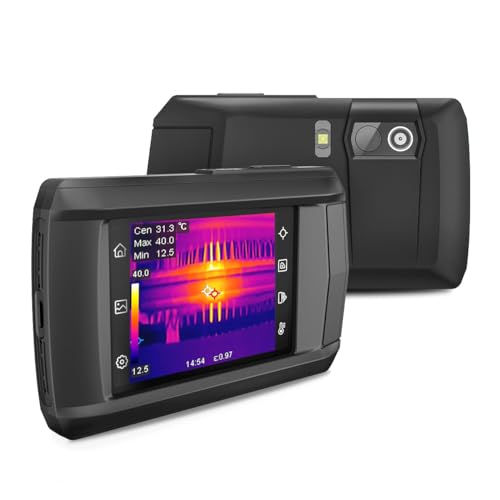
- 3.5-inch touchscreen with phone-like controls
- Dual cameras with five viewing modes
- Live super resolution to 240x240 and audio/video recording
Best For: touchscreen control with flexible inspection modes
Field-Ready Thermal Detail
FOXWELL HT280 320×240 Thermal Camera

- 320×240 LCD with TISR to 260×260
- 25Hz frame rate and 50mK sensitivity
- Stores 20,000+ images or videos
Best For: Creators needing rugged, inspection-focused thermal footage
Pro Imaging Upgrade
Thermal Master Thor002 512×384 Camera

- 512×384 thermal resolution with X³ IR
- 3.5-inch IPS display and 2MP visible camera
- WiFi, USB, and 32GB storage support
Best For: Creators who want higher-resolution thermal imaging and flexible sharing
Pocket Thermal Pick
TOPDON TC004 Mini 240×240 Camera

- Pocket-size body with ergonomic grip
- 240×240 TISR-enhanced thermal output
- 15-hour runtime with IP54 protection
Best For: Creators who need a lightweight camera for quick thermal captures
Mobile Thermal Pick
REVASRI 320x240 Super IR Camera
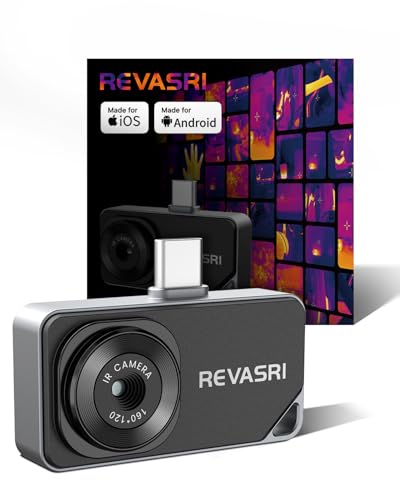
- USB-C phone, tablet, and Windows compatibility
- 320x240 super-resolution with 25Hz refresh
- Picture-in-picture, zoom, and temp alarms
Best For: Creators who want a phone-connected thermal camera for quick portable capture
Desktop Analysis Pick
FOXWELL RT280 Handheld Thermal Imager

- TISR-enhanced thermal detail with 320x240 LCD
- 8GB storage for over 20,000 images
- Windows software for 2D/3D analysis and reports
Best For: Creators who need a handheld thermal camera with desktop review and reporting
Field Work Pick
Firecore 320x240 Super Resolution Imager

- 320x240 super-resolution with dual-camera modes
- 32GB storage for over 30,000 images
- 6+ hour battery with IP54 and 2m drop resistance
Best For: Creators who want a rugged thermal camera with long battery life and multiple viewing modes
AI Fault Finder – HF96 Thermal Camera with AI Scene Detection
If you’re comparing thermal imaging cameras for content creators who also want practical inspection features, the HF96 stands out for its AI scene recognition and easy 3-in-1 layout. It combines a thermometer, thermal camera, and laser pointer, while adding live super resolution, so you can capture clearer thermal visuals without a complicated workflow.
Best For: Creators or DIY-focused buyers who want guided thermal inspections with AI-assisted scene detection.
Pros:
- IntellFault scene recognition helps identify water leaks and insulation gaps faster
- Live super resolution boosts thermal images to 240×240 for clearer viewing and capture
- Laser pointer, tripod hole, and PC software add flexibility for field use and analysis
- Long battery life and built-in storage support extended inspection sessions
Cons:
- No moisture readings are included with the scene detection feature
- More inspection-focused than a simple plug-and-play camera for casual use
- Some advanced features require firmware updates from the manufacturer
The HF96 is a strong fit if you want thermal imaging cameras for content creators that lean toward guided diagnostics and useful documentation tools. Its combination of AI assistance, clear thermal output, and practical accessories makes it easier to work efficiently in the field.
Big Screen Reporter – TOPDON TC004 3.5" Thermal Camera
The TOPDON TC004 is a practical option in thermal imaging cameras for content creators who need clear visuals and fast file transfer. Its larger 3.5-inch display, enhanced thermal resolution, and Wi-Fi app support make it easier to review shots, document findings, and move quickly from capture to reporting.
Best For: Users who want a larger display and easy wireless reporting in the field.
Pros:
- 3.5-inch display gives a more comfortable viewing experience during inspections
- 256×192 infrared resolution, enhanced up to 512×384 with TISR technology
- Wi-Fi connection supports quick file transfer to the TopInfrared mobile app
- 64GB built-in storage helps you save lots of images and videos without stopping
Cons:
- Bulkier than phone accessory-style thermal cameras
- Field-focused design may be more than needed for casual users
- No mention of touchscreen controls or advanced scene automation
If you value a bigger screen and straightforward reporting, the TC004 is an easy model to shortlist. It balances detailed imaging, strong storage, and wireless workflow support for creators who need efficient on-site capture.
Pocket Phone Pick – Thermal Master P1 USB-C Thermal Camera
For thermal imaging cameras for content creators who want the smallest possible setup, the Thermal Master P1 is built around USB-C phone and computer compatibility. It plugs into iOS, Android, and Windows devices, and the app-based control makes it a strong choice when portability matters more than a standalone screen.
Best For: Creators who want a compact thermal camera that works with a USB-C phone or computer.
Pros:
- Supports USB-C smartphones and computers, including iOS, Android, and Windows
- 320×240 IR resolution with X³ IR technology for sharper images
- Very small and light, making it easy to carry in a pocket
- Low power use and 5-8 hours of operation suit mobile workflows
Cons:
- iPhone Lightning users need a separate adapter
- Requires the Thermal Master app for device control
- No built-in screen or standalone body like larger thermal cameras
The P1 makes sense if you want a highly portable thermal tool that stays close to your existing gear. Its compact size and sharper sensor output are especially appealing for quick checks, travel kits, and creator workflows built around a phone.
Touchscreen Inspector – HP96 Thermal Imaging Camera with Touch Screen
The HP96 is a versatile pick for thermal imaging cameras for content creators who want a touchscreen workflow and multiple viewing modes. It adds dual-camera imaging, live super resolution, and scene recognition, giving you more control when you need to inspect, record, and review in one device.
Best For: Buyers who want a touchscreen thermal camera with flexible image modes and recording features.
Pros:
- 3.5-inch touchscreen with phone-like controls makes operation simple
- Dual cameras and five modes, including Thermal, Visual, Fusion, PIP, and Blending
- Live super resolution improves clarity from 96×96 to 240×240 in real time
- Built-in audio/video recording and eMMC storage support richer documentation
Cons:
- Built-in battery lasts up to 4 hours, shorter than some rivals
- No moisture readings are included with the scene recognition feature
- Advanced setup such as firmware updates may be needed for full functionality
If you want a more interactive camera for inspections and visual documentation, the HP96 is one of the more feature-rich choices here. Its touchscreen interface and mixed imaging modes make it easier to balance thermal detail with real-world context.
Field-Ready Thermal Detail – FOXWELL HT280 320×240 Thermal Camera
If you’re comparing thermal imaging cameras for content creators, the FOXWELL HT280 makes sense when you want clear thermal footage, flexible palettes, and easy file transfer for post-shoot review. Its 320×240 LCD, TISR-enhanced 260×260 output, and 25Hz frame rate are aimed at producing smoother, more readable thermal images.
Best For: Creators who need a rugged thermal camera for inspections, walkthroughs, and detailed visual content.
Pros:
- 320×240 LCD with TISR enhancement to 260×260 for clearer thermal detail.
- 25Hz refresh rate and 50mK sensitivity for smoother image capture.
- Built-in storage for over 20,000 images or videos and USB transfer to Windows PC.
- 9 color palettes plus 50°×50° wide field of view for versatile shooting.
Cons:
- PC analysis software is Windows-only and not compatible with Mac.
- No visible-light camera is mentioned in the supplied details.
- Best suited to inspection-style content rather than general-purpose filming.
Overall, the HT280 is a practical choice if your thermal content needs reliable image quality, long battery life, and a durable body that can handle field use.
Pro Imaging Upgrade – Thermal Master Thor002 512×384 Camera
For content creators who want a more advanced look from thermal imaging cameras for content creators, the Thermal Master Thor002 stands out with its 512×384 upgraded thermal resolution, large 3.5-inch IPS display, and 2MP visible light camera. It’s built to deliver sharper thermal visuals and easier review on-device or through connected devices.
Best For: Creators who want higher-resolution thermal imagery and flexible wireless workflow.
Pros:
- Upgraded 512×384 thermal resolution with X³ IR technology.
- 3.5-inch 640×480 IPS display plus 2MP visible light camera.
- WiFi support for smartphones and iPads, plus USB PC analysis.
- 8GB RAM, 32GB storage, and support for photo, video, voice notes, and QR file management.
Cons:
- More advanced feature set may be more than casual users need.
- Larger body may be less pocket-friendly than mini models.
- Top-end resolution comes at a more professional inspection-focused price tier.
If your workflow depends on detailed thermal capture, larger-screen review, and sharing content across devices, the Thor002 is the most capable option in this group.
Pocket Thermal Pick – TOPDON TC004 Mini 240×240 Camera
If you want a compact option among thermal imaging cameras for content creators, the TOPDON TC004 Mini is built around portability without giving up core inspection features. It starts at 128×128 thermal imaging, uses TISR to reach 240×240, and pairs that with a 25Hz refresh rate for smooth, usable thermal visuals.
Best For: Creators who need a lightweight, pocket-friendly thermal camera for quick captures and basic diagnostics.
Pros:
- Mini, pocket-friendly design with an ergonomic grip.
- TISR-enhanced 240×240 resolution and 25Hz refresh rate.
- Automatic photo capture on temperature alerts for faster documentation.
- Up to 15 hours of runtime and IP54/droppable-to-2m durability.
Cons:
- 512MB eMMC storage is limited compared with larger models.
- Only 5 color palettes, fewer than some competing cameras.
- No paper manual is included, so setup relies on the electronic guide.
The TC004 Mini is a smart pick when portability matters most and you want a simple thermal camera that can still handle quick on-site content and inspection work.
Mobile Thermal Pick – REVASRI 320×240 Super IR Camera
If you want thermal imaging cameras for content creators that stay compact and easy to carry, the REVASRI is built around a plug-and-play phone workflow. It connects through USB-C to iPhone, Android, tablets, and Windows devices, and the app-based setup keeps the process simple when you need to capture quick thermal clips or stills on location.
Best For: Creators who want a phone-connected thermal camera for fast, portable thermal capture.
Pros:
- 320×240 super-resolution output with 25Hz refresh for smoother viewing
- 9 color modes plus visible-light picture-in-picture for clearer context
- High/low temperature alarms, temperature tracking, and 15x electronic zoom
- No battery needed; powered directly from your device
Cons:
- Requires the dedicated Camera+ app for use
- USB-C connection limits compatibility to supported devices
- Best suited to quick field use rather than standalone operation
Overall, this is a practical option if you need a lightweight thermal accessory that slots into a mobile content workflow. The image upgrades, multiple viewing modes, and device-powered design make it especially handy for creators documenting heat signatures on the go.
Desktop Analysis Pick – FOXWELL RT280 Handheld Thermal Imager
For content creators comparing thermal imaging cameras for content creators, the FOXWELL RT280 is a stronger choice when you want a handheld tool with built-in storage and PC analysis. Its 2.8-inch screen, 320×240 LCD, and TISR-enhanced thermal output are aimed at capturing detailed visuals, while the Windows software helps turn those captures into usable reports and annotated analysis.
Best For: Creators who need a handheld thermal camera with PC-based review and report generation.
Pros:
- TISR boosts effective thermal detail to 240×180 from 120×90
- 8GB eMMC storage holds over 20,000 images
- Windows software supports point, line, area analysis and 2D/3D views
- 9 color palettes, laser pointer, and LED light help in dark spaces
Cons:
- PC analysis is Windows-only, not compatible with Mac
- Less mobile than a phone-mounted thermal camera
- Screen and body are more inspection-tool focused than creator-friendly gadget style
This model stands out if your workflow includes organized capture, desktop review, and professional-looking output. The combination of onboard storage, alerting, and software analysis makes it a solid step up for creators who document technical subjects in detail.
Field Work Pick – Firecore 320×240 Super Resolution Imager
If you need thermal imaging cameras for content creators that can handle longer shoots and more detailed documentation, the Firecore model leans into rugged field use. It combines 320×240 super-resolution clarity, dual-camera viewing modes, and built-in storage, making it a practical choice for creators recording thermal findings in the field.
Best For: Creators who want a durable thermal camera with long battery life and richer on-device imaging options.
Pros:
- 320×240 super-resolution with 160×120 IR input and <50 mK sensitivity
- Dual camera with Thermal, Visible Light, Picture-in-Picture, and Thermal Mix modes
- 32GB storage for over 30,000 images
- Over 6 hours of runtime plus IP54 and 2-meter drop resistance
Cons:
- PC software is Windows-only
- Smaller 2.4-inch LCD than some alternatives
- More of a dedicated inspection device than a phone-based accessory
For creators who prioritize endurance and flexible image modes, this is the most field-ready option in the group. It offers a strong mix of clarity, storage, and ruggedness for longer sessions where you may need to capture and document multiple scenes.
How We Picked the Best Thermal Imaging Cameras for Content Creators
For this roundup of Thermal Imaging Cameras for Content Creators, we focused on models that are practical for shooting, reviewing, and demonstrating real-world heat differences. That means a balance of resolution, display quality, portability, temperature range, and phone or handheld usability. We also favored options that are easier to use in fast-paced filming environments, where setup time and screen clarity matter.
Quick Comparison
The main split is between handheld cameras and smartphone-connected units. Handheld models are usually better for stand-alone filming, faster on-set checks, and broader field use. Phone-based cameras can be a smart choice for creators who want a compact setup, especially if they already shoot most of their content on mobile devices.
Key Buying Factors for Thermal Imaging Cameras for Content Creators
Resolution and Image Detail
Higher thermal resolution helps heat sources look cleaner on video and makes small differences easier to explain on camera. If your content includes electronics, HVAC, or product teardowns, detail matters more than basic temperature reading.
Screen Size and Workflow
A brighter, larger screen can make framing and live demonstrations easier. Touch controls can also speed up operation when you’re filming solo and need to make adjustments quickly.
Connectivity and Compatibility
USB-C and mobile app support are important if you want to record directly with a phone or keep your gear compact. Make sure the camera matches your device ecosystem before buying, especially if you plan to shoot on iPhone or Android.
Temperature Range and Practical Use
Choose a range that fits your subject matter. A broad range is useful for creators who move between consumer electronics, outdoor gear, mechanical content, and general troubleshooting. For most creators, versatility is more valuable than extreme lab-grade specs.
Portability and Mounting
Lightweight cameras are easier to hold for long takes, carry to job sites, and use in B-roll. If you film on location, compact size can matter as much as resolution.
Who Should Buy Which Thermal Imaging Cameras for Content Creators?
If you want the most flexible all-around option, a high-resolution handheld model is usually the safest pick. If your workflow is mobile-first, a phone-compatible camera may be the better fit. Creators focused on repair, inspection, or educational demonstrations should prioritize image clarity and easy on-screen visibility. If you mainly want a budget-friendly tool for occasional use, a smaller thermal camera can still deliver strong visual impact without complicating your setup.
In short, the best Thermal Imaging Cameras for Content Creators are the ones that save time, look clear on camera, and fit the way you already produce content.