
If you’re on the lookout for the perfect Christmas gift for gamers and creatives, ultrawide monitors could be just what you need. These monitors offer a blend of immersive visuals and expansive workspace, making them ideal for a range of activities. From high-refresh-rate gaming to multitasking on creative projects, there’s something for everyone. Let’s explore some top choices that might suit your needs and preferences.
INNOCN 49″ Curved Ultrawide Gaming Monitor (49C1R)

If you’re a gamer or a creative professional looking for an immersive experience, the INNOCN 49″ Curved Ultrawide Gaming Monitor (49C1R) is a standout choice. With its impressive 49-inch screen and R1800 curvature, this monitor offers a stunning 5120 x 1440 resolution and a 120Hz refresh rate for smooth gameplay. You’ll appreciate its 99% sRGB color gamut and HDR technology, enhancing your visuals. Plus, its versatile connectivity, including USB-C and HDMI 2.1, makes it compatible with various devices. The adjustable height and tilt guarantee you’ll find your perfect viewing angle, making multitasking a breeze with Picture-in-Picture features.
Best For: Gamers and creative professionals seeking an immersive visual experience with superior multitasking capabilities.
Pros:
- High resolution of 5120 x 1440P and a 120Hz refresh rate for smooth gameplay and vibrant visuals.
- Versatile connectivity options, including USB-C, HDMI 2.1, and multiple USB ports for seamless device integration.
- Adjustable settings for height, tilt, and swivel, ensuring optimal comfort and viewing angles.
Cons:
- Large size and weight may require ample desk space and sturdy furniture for support.
- Limited HDR performance with only Display HDR 400 compared to higher standards available in the market.
- Potential eye strain for users not accustomed to extended periods of ultrawide viewing, despite curvature benefits.
INNOCN Ultrawide Monitor 43.8″ WFHD 3840 x 1080p

The INNOCN Ultrawide Monitor 43.8″ WFHD 3840 x 1080p is an excellent choice for both gamers and creatives, thanks to its impressive 120Hz refresh rate and vibrant color performance. With a 32:9 aspect ratio, you get 29% more viewable area than traditional 34-inch monitors, making multitasking a breeze. Its IPS panel offers a 400 cd/m² brightness and 96% DCI-P3 color coverage, ensuring stunning visuals. You’ll appreciate the ergonomic design, allowing tilt, swivel, and height adjustments for comfort. Plus, with multiple connectivity options, including USB-C, it’s versatile for all your devices. Experience enhanced productivity and immersive gaming today!
Best For: Gamers and creatives seeking an immersive experience with extensive screen real estate and vibrant color performance.
Pros:
- High refresh rate of 120Hz for smooth gaming and fluid visuals.
- Wide 32:9 aspect ratio provides 29% more viewable area, perfect for multitasking.
- Multiple connectivity options including USB Type-C for compatibility with various devices.
Cons:
- Flat design may not appeal to users who prefer a curved display for a more immersive experience.
- Only 400 cd/m² brightness might not be sufficient for very bright environments.
- Weight and size may require more desk space and a sturdy setup for optimal use.
LG 29WP60G-B UltraWide Monitor 29″ FHD IPS Display
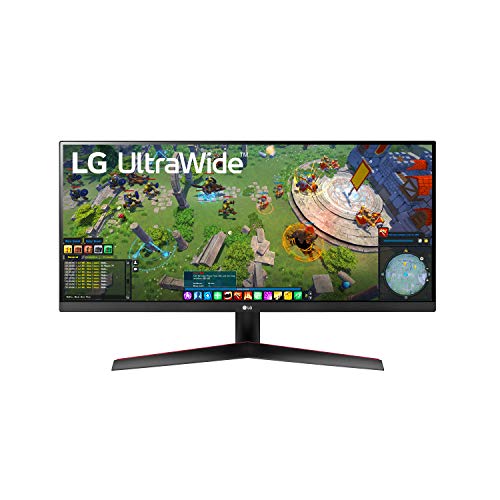
With its impressive 21:9 aspect ratio and Full HD IPS display, the LG 29WP60G-B UltraWide Monitor is perfect for gamers and creatives who crave a wider workspace for multitasking. Its 2560 x 1080 resolution and sRGB 99% color gamut guarantee vibrant visuals, making it ideal for content creation and gaming. The 5-millisecond response time and HDR 10 support enhance your experience, while the 178-degree viewing angle means you’ll always see the action clearly. Plus, with USB Type-C and HDMI connectivity, it’s easy to connect your devices. Weighing just 10.6 pounds, it’s a great addition to any setup.
Best For: Gamers and creatives who need a wider workspace for multitasking and vibrant visuals.
Pros:
- sRGB 99% color gamut ensures vibrant and accurate colors for content creation and gaming.
- 5-millisecond response time provides smooth visuals, reducing motion blur during fast-paced action.
- 178-degree viewing angle allows for clear visibility from multiple positions, making it great for collaborative work.
Cons:
- Limited resolution of 2560 x 1080 may not meet the needs of users seeking higher pixel density for detailed tasks.
- Weight of 10.6 pounds could make it less portable compared to lighter monitors.
- Only one USB 2.0 and two USB 3.0 ports may not be sufficient for users with multiple devices to connect.
LG 34WN650-W UltraWide Monitor (34-Inch FHD IPS Display)

Designed for both gamers and creatives, the LG 34WN650-W UltraWide Monitor offers an expansive 34-inch screen that transforms your viewing experience. With a stunning 2560 x 1080 resolution and 21:9 aspect ratio, you’ll enjoy vibrant colors and wide viewing angles thanks to its IPS technology. The 3-side virtually borderless design enhances immersion, making it perfect for multitasking with features like Screen Split and On-Screen Control. Plus, it supports AMD FreeSync for smoother gameplay. Weighing 16.9 pounds and equipped with USB ports, this monitor is a fantastic addition to any workspace or gaming setup.
Best For: The LG 34WN650-W UltraWide Monitor is best for gamers and creatives seeking an immersive viewing experience with vibrant colors and multitasking capabilities.
Pros:
- Exceptional Viewing Experience: The 2560 x 1080 resolution and IPS technology provide vibrant colors and wide viewing angles.
- Multitasking Features: Screen Split and On-Screen Control enhance productivity by allowing users to manage multiple applications easily.
- Sleek Design: The 3-side virtually borderless design adds a modern touch to any workspace or gaming setup.
Cons:
- Weight: At 16.9 pounds, it may be cumbersome for some users to move or adjust.
- Limited Port Selection: Only two USB ports may not be sufficient for users with multiple devices.
- Resolution for Gaming: Some gamers may find the FHD resolution not as sharp as higher-end 4K monitors.
Factors to Consider When Choosing Ultrawide Monitor Christmas Gifts
When picking the perfect ultrawide monitor for Christmas gifts, you’ll want to take into account several key factors. Think about the screen size, resolution, and panel type that best suits the recipient’s needs. You should also check the refresh rate and available connectivity options to guarantee a smooth and versatile experience.
Screen Size Selection
Choosing the right screen size for an ultrawide monitor can make a big difference in your gaming or creative experience. Ultrawide monitors typically range from 29 to 49 inches, with larger sizes offering more screen real estate for multitasking and immersive gameplay. A 49-inch monitor gives you the space equivalent to two 27-inch screens, making it perfect for extensive productivity or gaming sessions. If desk space is limited, a 34-inch model still enhances your field of view without overwhelming your workspace. Remember to evaluate your viewing distance; larger screens are best viewed from farther away to prevent eye strain. Additionally, the aspect ratio, often 21:9 or 32:9, affects how you perceive the screen size, enhancing immersion.
Resolution and Clarity
Since the resolution of an ultrawide monitor directly influences your viewing experience, it’s essential to take this factor into account when selecting a Christmas gift. Higher resolutions, like 5120 x 1440, deliver sharper images compared to lower ones, such as 2560 x 1080. If the recipient works in graphic design or video editing, consider monitors with higher pixel density for detailed visuals. HDR capabilities enhance contrast and color accuracy, creating a more vivid viewing experience. Also, keep in mind the aspect ratio; a 32:9 ultrawide monitor offers extensive screen real estate without bezels interrupting the view. Finally, features like low blue light technology can reduce eye strain, ensuring comfort during long sessions. Choose wisely!
Panel Type Differences
Understanding the differences between panel types can greatly impact your gift selection for ultrawide monitors. IPS panels shine in color accuracy and wide viewing angles, making them perfect for photo editing and creative tasks. If your recipient values vibrant colors and consistency, an IPS monitor is a solid choice. On the other hand, VA panels excel in contrast ratios and deeper blacks, ideal for gamers and movie enthusiasts. They typically offer faster response times, enhancing fast-paced gaming experiences. Consider how your gift will be used: if it’s for immersive media, lean towards VA; for color-critical work, opt for IPS. Ultimately, aligning the panel type with the user’s primary activities will guarantee a thoughtful and practical gift.
Refresh Rate Importance
When selecting an ultrawide monitor, the refresh rate plays a vital role in enhancing the viewing experience, especially for gamers and multimedia enthusiasts. A higher refresh rate, like 120Hz, delivers smoother motion in games and videos, reducing motion blur and improving overall enjoyment. This is particularly important for fast-paced gaming, where quicker reaction times can make all the difference.
Monitors with refresh rates above 60Hz often feature Adaptive-Sync technology, which further enhances graphics and minimizes screen tearing. A refresh rate of 120Hz can greatly boost performance in competitive scenarios, where every millisecond counts. Additionally, a higher refresh rate can help reduce eye strain during prolonged use, providing a more fluid visual experience that you’ll appreciate during long gaming or creative sessions.
Connectivity Options Available
As you shop for the perfect ultrawide monitor this holiday season, considering the connectivity options is essential to guarantee compatibility with your devices. Look for monitors with HDMI, DisplayPort, and USB-C ports to enhance your setup. USB-C is particularly useful, as it can charge connected devices while transferring data and video signals. If you plan to connect multiple devices like gaming consoles and computers, prioritize models with several HDMI and DisplayPort inputs. Additionally, dedicated USB-A ports offer convenient access for peripherals such as mice and keyboards. Some ultrawide monitors even include RJ45 ports, enabling direct Ethernet connections for a stable internet connection, eliminating the need for extra adapters.
Ergonomics and Adjustability
After ensuring your ultrawide monitor has the right connectivity options, it’s time to think about ergonomics and adjustability. Adjustable features like tilt, swivel, and height can greatly enhance your comfort, reducing strain during long usage sessions. A monitor designed with ergonomics in mind helps maintain proper posture, preventing neck and back pain from extended screen time. Plus, the ability to adjust the viewing angle improves visual clarity and reduces glare, making your experience more enjoyable. If you plan to set up multiple monitors, an ergonomic design facilitates better integration, creating an efficient workspace for multitasking. Ultimately, choosing a monitor with these features allows you to customize your setup to match your individual preferences and needs, boosting overall productivity.
Price and Budget Considerations
Finding the right ultrawide monitor as a Christmas gift can be challenging, especially since prices vary widely based on features like screen size and resolution. Start by establishing a budget; mid-range monitors typically cost between $300 and $800, while high-end models can exceed $1,000. Keep in mind that additional costs for accessories like stands or cables may not be included in the purchase price. Look out for seasonal sales during the holidays—these can help you snag a higher-end model at a more affordable price. Finally, factor in warranty and customer support options, as these can greatly impact the overall value and your recipient’s experience with their new ultrawide monitor.