
A well-chosen under-desk cable tray can turn a tangle of power cords and charging cables into a cleaner, easier-to-manage workspace. The products in this roundup cover clamp-on, no-drill, metal mesh, and extra-deep designs for home offices, gaming setups, studios, and shared workspaces.
Use the guide below to compare capacity, mounting style, dimensions, and weight support before choosing the tray that best fits your desk and equipment.
Best 10 Under-Desk Cable Trays Picks for 2026
Best No-Drill Pick

- Tool-free clamp mounting
- Supports about 15 pounds
- Protective rubber desk pads
Best For: Home offices and standing desks needing flexible, no-drill storage
Best Two-Piece Set
pamo Screw-In Cable Organizers

- Two spacious steel trays
- Easy-access beveled design
- Includes reusable cable ties
Best For: Permanent indoor desk setups with multiple power strips
Best White Clamp Tray
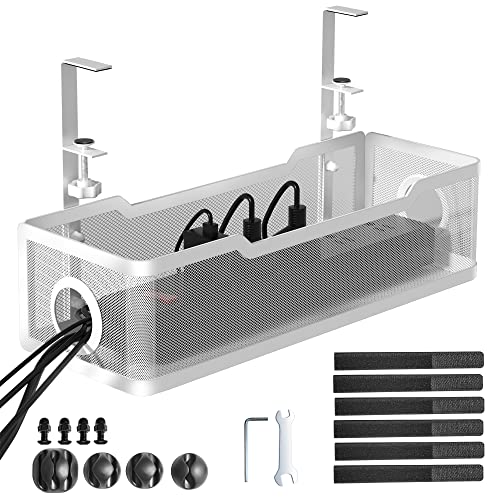
- No-drill repositionable clamp
- Supports up to 10 pounds
- Includes clips and cable ties
Best For: White desks and lighter cable loads
Best Adhesive Two-Pack

- Two 17-inch trays
- No-drill adhesive installation
- 3.5-inch interior for power strips
Best For: Renters and fixed desk layouts
Best Large Clamp-On Tray

- 25-inch metal tray holds approximately 15 pounds
- No-drill clamps fit desks 0.4 to 2 inches thick
- Ventilated mesh with inward or outward mounting
Best For: Standing desks and spacious home-office setups
Best Two-Pack Value
Dual No-Drill Cable Management Trays

- Two trays combine into a 31.4-inch run
- Each metal tray supports up to 10 pounds
- Includes clips and ties for added cable organization
Best For: Long desks and multi-device workstations
Best Low-Profile Pick
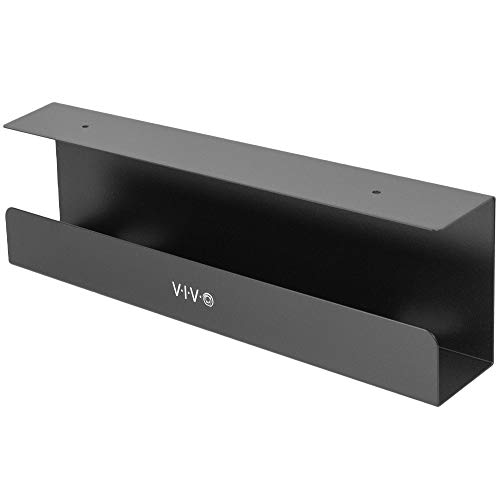
- Compact 16.5-inch metal rack with a 3-inch width
- Supports up to 11 pounds
- Partially closed design conceals cords while keeping front access
Best For: Minimalist setups with wood or particle-board desks
Best Large-Capacity Pick
Univivi 36-Inch Fabric Cable Tray

- Large 36-inch storage capacity
- Clamp-on or screw-in installation
- Foldable fabric design with built-in ties
Best For: Large desks and setups with many adapters or power strips
Best Heavy-Duty Pick
COYACOOL Metal Wire Cable Trays
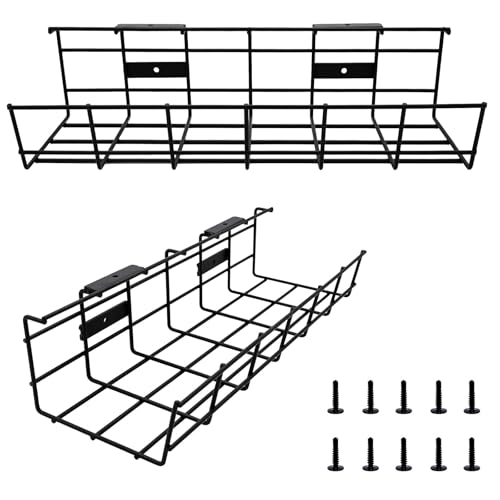
- Includes two metal cable trays
- Supports up to 15 pounds per tray
- Secure screw-in installation
Best For: Two-desk setups and wood or composite work surfaces
Best No-Drill Metal Pick

- Installs without screws, drilling, or glue
- Holds up to 10 pounds
- Includes clips and cable ties
Best For: Renters and desks that need repositionable cable storage
Best No-Drill Pick – Litwaro Clamp-On Cable Tray
Among under-desk cable trays, the Litwaro stands out for tool-free clamp mounting and flexible inward or outward installation. Its metal mesh basket hides power cords, strips, hubs, and transformers while keeping cables accessible through side openings.
Best For: Home offices and standing desks where you want sturdy, no-drill cable storage.
Pros:
- Clamp installation fits flat desks from 0.4 to 2.4 inches thick.
- Carbon-steel construction supports about 15 pounds.
- Rubber clamp pads help protect the desktop from scratches.
- Mesh design helps limit dust buildup and includes two cable-routing holes on each side.
Cons:
- Compatibility depends on having a suitable flat desk edge.
- It is a single 13.4-inch tray rather than a multi-tray set.
The Litwaro is a practical choice when you want strong under-desk organization without drilling into the furniture. Its clamp range and protective pads make it especially useful for movable or standing desks.
Best Two-Piece Set – pamo Screw-In Cable Organizers
This pamo set provides two steel under-desk cable trays for organizing power strips, laptop adapters, and video or power cables. The beveled easy-access design keeps stored equipment reachable, while included cable ties help bundle loose runs.
Best For: Permanent desk setups that need two spacious, screw-mounted organizers.
Pros:
- Includes two 44-by-10-by-12-centimeter trays.
- Coated 1 mm steel is designed to hold larger power strips and laptop supplies.
- Beveled openings provide convenient cable access.
- Six reusable cable ties are included for bundling cable sets.
Cons:
- Screw-in installation requires drilling or fastening into the desk.
- Designed for indoor use.
Choose the pamo set when a two-tray configuration is more useful than a clamp-on design. It offers substantial storage and a tidy, built-in appearance, but is best suited to a desk where permanent mounting is acceptable.
Best White Clamp Tray – Cinati 13.4-Inch Organizer
The Cinati is a white, clamp-mounted option among under-desk cable trays, making it useful when you want organization without drilling. Its welded metal tray holds cords and power strips off the floor, and the included clips and ties help finish the setup.
Best For: White desks or offices needing a movable, no-drill cable tray.
Pros:
- Clamp design fits desks from 0.4 to 2.4 inches thick.
- Can be repositioned and installed with the opening facing inward or outward.
- Metal construction holds up to 10 pounds.
- Includes four cable clips and six cable ties.
Cons:
- The 10-pound capacity is lower than some heavier-duty options.
- As a clamp-mounted tray, it requires a compatible desk edge.
The Cinati combines a clean white finish with flexible clamp installation. It is a good fit for lighter cable loads and users who want to avoid drilling while retaining the option to move the tray later.
Best Adhesive Two-Pack – Scanfield 17-Inch Cable Trays
The Scanfield two-pack uses adhesive mounting instead of screws or clamps, offering a fast way to add under-desk cable trays. Each 17-inch tray has a 3.5-inch interior for power strips, chargers, bundled cords, and transformers.
Best For: Renters or finished desks where drilling and clamp mounting are not practical.
Pros:
- Includes two 17-inch trays for broader cable coverage.
- Self-adhesive installation requires no drilling or extra tools.
- Spacious interior accommodates power strips, chargers, and bundled cords.
- Users reported clean desk aesthetics and sturdy adhesion after curing.
Cons:
- Adhesive mounting requires a 24-hour cure period.
- Placement is less convenient to change after installation.
- Adhesive compatibility may vary by desk surface.
Scanfield is a useful solution when you want two long trays and a drill-free installation. Allowing the adhesive to cure as directed is important, and the fixed placement makes this better for settled desk layouts than frequently rearranged workstations.
Best Large Clamp-On Tray – 25-Inch Under-Desk Cable Tray
If you need under-desk cable trays with room for several cords and power accessories, this 25-inch metal model offers generous length without drilling. Its clamp-on design suits desks from 0.4 to 2 inches thick and can be mounted inward or outward.
Best For: Standing desks and home offices that need a spacious, no-drill cable tray.
Pros:
- 25-inch length and approximately 15-pound weight capacity
- Clamp installation with non-slip pads to help protect the desk
- Ventilated metal mesh helps limit dust buildup and promote airflow
- Open sides make cable routing straightforward
Cons:
- Requires screw assembly at the center before use
- Not suitable for desks outside the 0.4- to 2-inch thickness range
- Listed warranty is limited to three months
This is a practical choice when capacity and easy repositioning matter more than a fully enclosed design. The two-piece assembly is simple, but shoppers should verify desk thickness before ordering.
Best Two-Pack Value – Dual No-Drill Cable Management Trays
Among under-desk cable trays, this two-pack stands out for covering longer desks or multiple work areas. Each metal tray holds up to 10 pounds, and aligning both creates a combined 31.4-inch run for power strips, cables, and small office supplies.
Best For: Long desks, multi-device workstations, and shoppers who want two trays plus basic cable accessories.
Pros:
- Two trays can be aligned for a 31.4-inch cable-management span
- No-drill clamps include anti-scratch mats and fit desks 0.4 to 2.4 inches thick
- Two openings support easier power-strip installation and cable access
- Includes four cable clips and eight cable ties
Cons:
- Each tray supports up to 10 pounds, less than some larger single trays
- The product details list screw-in installation despite describing clamp mounting
- Two separate trays may require more planning for alignment
This kit offers strong flexibility for extended setups, especially where one tray is not enough. Confirm the included mounting hardware and your desk thickness before installation.
Best Low-Profile Pick – VIVO 16.5-Inch Cable Tray
For a compact under-desk cable tray that keeps power strips and AV cables discreet, the VIVO DESK-AC06-1C uses a low-profile 16.5-inch metal rack. Its partially closed design conceals cords while the front opening keeps cable access convenient.
Best For: Wood or particle-board desks where a slim, screw-mounted tray is preferred.
Pros:
- Compact 16.5-inch by 3-inch profile
- Metal construction supports up to 11 pounds
- Partially closed structure helps hide cords and devices
- Includes screws for under-desk mounting
Cons:
- Requires drilling into a wood or particle-board desk
- Shorter and narrower than the larger trays in this roundup
- Designed for indoor use
This tray is a sensible fit for tidy, minimalist workstations with a compatible desktop. Its smaller dimensions trade capacity for a less obtrusive appearance and straightforward access.
Best Large-Capacity Pick – Univivi 36-Inch Fabric Cable Tray
If you need under-desk cable trays with room for large adapters, power strips, and bundled cords, the Univivi tray offers an unusually spacious 36-inch design. Its fabric construction conceals equipment while built-in ties help keep cables in place.
Best For: Desks needing high-capacity cable storage and a choice of clamp-on or screw-in installation.
Pros:
- Large 36-inch tray accommodates adapters, sockets, and other equipment.
- Supports clamp-on or screw-in installation for wood, glass, and metal tabletops.
- Foldable 600D Oxford fabric tray includes ties and bottom support for heavier loads.
Cons:
- Requires at least 5.3 inches of clearance along the desk edges.
- Clamp hardware occupies some tabletop space and is not completely invisible.
The Univivi is a strong choice when capacity matters more than a minimalist footprint. Measure your desk carefully, especially if it has drawers or a rear support rod, before choosing this tray.
Best Heavy-Duty Pick – COYACOOL Metal Wire Cable Trays
For shoppers outfitting multiple workstations, these under-desk cable trays provide two sturdy metal organizers in one pack. Each tray is sized for power cords, Ethernet cables, USB hubs, HDMI cables, and small desk accessories.
Best For: Home or office setups that need two screw-mounted metal trays.
Pros:
- Two-pack helps organize cables beneath multiple desks or separate areas.
- Metal construction supports up to 15 pounds when properly installed.
- Included screws improve stability and help keep equipment off the floor.
Cons:
- Requires drilling four holes per tray for installation.
- Designed to mount beneath wood or wood-composite desks.
- Each tray is smaller than the 36-inch option, measuring 14.5 inches long.
The COYACOOL set is practical when you want durable, straightforward storage and can permanently modify compatible desks. Confirm the dimensions and desk material before drilling.
Best No-Drill Metal Pick – Xpatee Clamp-On Cable Tray
Among under-desk cable trays, the Xpatee stands out for installation that needs no drilling, screws, or adhesive. Its C-clamp attaches to compatible desks without damaging the surface, while the metal mesh design provides space for cords and power strips with ventilation.
Best For: Renters and users who want repositionable cable storage on desks 0.4 to 2.4 inches thick.
Pros:
- No-drill C-clamp installation works with wood, glass, and other desk materials.
- Powder-coated metal tray holds up to 10 pounds and resists rust and dust.
- Includes four cable clips, six cable ties, and a ventilated mesh design.
Cons:
- 10-pound capacity is lower than the COYACOOL trays’ stated 15-pound capacity.
- Clamp fit is limited to desktops between 0.4 and 2.4 inches thick.
- Its 15.7-inch length offers less storage than a full-width tray.
The Xpatee is a convenient choice when protecting the desktop and avoiding permanent installation are priorities. Check the desk thickness and available underside clearance before ordering.
How We Picked the Best Under-Desk Cable Trays
We focused on practical features that affect everyday cable management: mounting method, tray length and depth, construction, weight capacity, adjustability, and included hardware. The selection includes compact organizers for a single workstation, multipacks for larger setups, and longer trays for desks with several power bricks or peripherals.
No-drill and clamp-mounted designs received particular attention because they are suitable for renters, standing desks, and finished furniture where drilling is undesirable. We also considered whether each option is likely to accommodate thicker power cables, surge protectors, and adapters rather than only thin charging leads.
Quick Comparison
| Best For | Look For | Recommended Style |
|---|---|---|
| Small home-office setup | Compact footprint and simple installation | 13- to 17-inch tray |
| Multiple monitors and peripherals | Longer platform and stronger clamps | 25- to 36-inch tray |
| Gaming or studio equipment | Extra depth and higher weight support | Deep metal tray |
| Two desks or a large workstation | More than one organizer | Two-pack |
Key Buying Factors for Under-Desk Cable Trays
Mounting Method
Clamp-on trays attach without screws and are generally the easiest to reposition. Check the advertised clamp range to confirm it fits your desktop thickness. Screw-mounted models can provide a more permanent installation, but they require clearance underneath the desk and compatible hardware.
Size and Capacity
Measure the space between the desk legs and consider where power strips, docking stations, and adapters will sit. Longer trays spread cables across a wide desk, while deeper trays are better for bulky power bricks. Avoid choosing based on length alone: a narrow tray may not hold a surge protector securely.
Construction and Weight Support
Metal mesh or wire trays typically offer good ventilation and durability. Compare the stated weight limit if you plan to store a power strip, heavy adapters, or several bundled cables. Keep heavier items near the clamps or mounting points when possible.
Cable Access and Organization
Look for open sides, cable pass-throughs, or a shape that lets you route cords toward each device without sharp bends. A tray should keep cables off the floor while still allowing you to identify and replace individual cords.
Desk Compatibility
Check for obstructions such as drawers, crossbars, modesty panels, or sit-stand mechanisms. Measure before ordering, especially with long trays and clamp mounts. Leave enough room for the clamps to tighten fully without contacting nearby equipment.
Who Should Buy Which Under-Desk Cable Trays?
Choose a compact 13- to 17-inch tray if you have one monitor, a laptop dock, and a modest number of cables. A two-pack makes more sense for dual workstations, a wide desk, or anyone who wants separate sections for power and data cables. Select a 25- to 36-inch model when your desk supports multiple monitors, speakers, chargers, and a surge protector.
For gaming PCs, recording equipment, or heavier adapters, prioritize extra depth and a clearly stated weight capacity. Renters and users who frequently change their setup should favor no-drill clamp designs. If you want the most secure long-term installation and do not mind making holes, a screw-mounted tray may be the better fit.