
The right guest book camera can turn ordinary event greetings into engaging video, audio, and photo memories that are easy to revisit and share. Whether you are documenting weddings, parties, launches, or client events, the best setup balances simple guest interaction with dependable recording quality.
Our roundup includes video guest book systems, phone-style audio and video recorders, and iPad-compatible photo booth equipment. Use the guide below to compare formats, evaluate practical features, and choose a camera setup that fits your content workflow.
Best 10 Guest Book Cameras for Content Creators Picks for 2026
Best All-in-One Guest Book

- Collects videos, photos, and written notes by QR code
- No app, account, or dedicated device required
- Includes two films and downloadable event memories
Best For: Celebrations needing an easy, phone-based guest content station
Best Flexible Booth Setup
Adjustable iPad and Camera Photo Booth

- Supports compatible iPads and most cameras
- Built-in RGB lighting and flashlight
- Portable flight case, printing, and social-sharing support
Best For: Creators and event operators using their own camera or tablet
Best Video Phone Guest Book
Vintage Video Guest Book Phone

- Captures synchronized high-definition video and audio
- Vintage phone design adds an event focal point
- Built-in display allows personalized wallpapers
Best For: Events wanting a decorative, dedicated video-message phone
Best Audio-First Guest Book

- Records welcome greetings and guest voice messages
- Advertised storage capacity reaches 500 hours
- USB transfer, multilingual manual, and 36-month guarantee
Best For: Events prioritizing clear audio memories over video
Video Keepsake Pick
UKBW 1080P Video Audio Guest Book

- 1080P video and audio recording
- 32GB storage for up to 10 hours
- Customizable display and simple controls
Best For: Event creators capturing expressive video messages
Audio Storytelling Pick
WORVABE Retro Audio Guest Book

- Over 8 hours of recording time
- 32GB storage for 500+ minutes
- USB transfer and simple handset operation
Best For: Creators building voice-led event memories
High-Capacity Video Pick
1080P 64GB Video Audio Guest Book
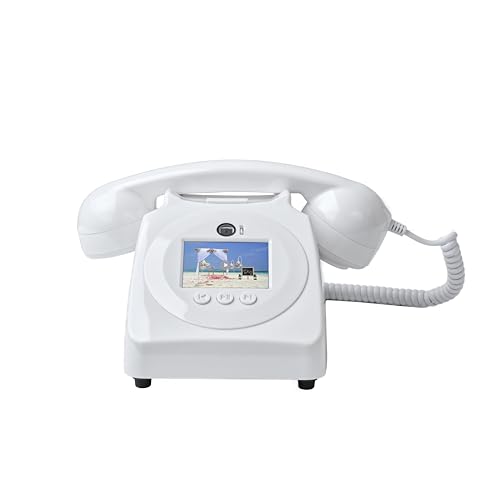
- 1080P video and audio capture
- 64GB memory rated for 100 hours
- Simple controls with included battery
Best For: Large events with many guest recordings
Best Audio Keepsake

- Voice-only recording with a simple handset workflow
- Includes a 32GB Micro TF card
- Retro design suits weddings and celebrations
Best For: Creators prioritizing candid audio messages over video
Best Customizable Video Phone

- Records guest video and audio in 1080P
- Simple receiver-based recording operation
- Supports personalized standby images
Best For: Creators building a polished, visually engaging event station
Best Long-Running Video Guest Book

- Stores over 70 hours of video on a 32GB card
- Runs up to 8 hours on a 5000mAh battery
- Adds photo capture, mirror mode, and slideshow playback
Best For: Creators covering longer events with varied capture needs
Best All-in-One Guest Book – QR Video Guest Book Kit
For creators who want an easy, phone-based option among guest book cameras for content creators, this QR video guest book collects video messages, photos, and written notes without requiring an app or dedicated recording device. Guests scan the QR code with their own phone, while the included dashboard organizes the contributions into downloadable keepsakes.
Best For: Weddings, birthdays, and other celebrations where you want a low-friction way to gather video, photo, and written content.
Pros:
- No app, guest account, or extra recording device is required.
- Includes two edited films, individual downloads, and a PDF of written messages.
- Complete station kit includes signs, QR stickers, a guide, and ambassador badges.
- No monthly subscription is listed for the included features.
Cons:
- Guests need Wi-Fi or mobile data to submit contributions.
- Stored files are automatically deleted three months after the first film is delivered, so downloads must be saved in time.
This is less of a standalone camera than a coordinated content-collection system, but it is a practical choice when participation and easy sharing matter more than controlling the recording hardware.
Best Flexible Booth Setup – Adjustable iPad and Camera Photo Booth
For content creators building a more hands-on station, this adjustable photo booth stand supports compatible iPads and most cameras. It adds adjustable RGB lighting, a flashlight, printing compatibility, and social sharing, making it one of the more equipment-focused guest book cameras for content creators.
Best For: Event rentals, weddings, parties, and creators who already own a compatible iPad or camera and want a portable booth setup.
Pros:
- Works with listed iPad sizes and most Canon, Nikon, Sony, and other cameras.
- RGB frame lighting offers multiple colors plus adjustable brightness and color temperature.
- Supports instant printing and sharing to major social platforms through the compatible setup.
- Flight case with wheels supports transport between indoor and outdoor events.
Cons:
- Tablet and camera are not included.
- At 39 kg, the unit is substantially heavier than a simple guest book accessory.
- It is not water resistant.
This is the strongest fit for creators who want to customize the capture device and workflow. Confirm device compatibility before buying, since the stand depends on your own tablet or camera.
Best Video Phone Guest Book – Vintage Video Guest Book Phone
This vintage-style video guest book phone gives guests a dedicated place to leave on-camera messages. Its built-in camera, synchronized audio and video, and 3.5-inch display make it a distinctive alternative for creators comparing guest book cameras for content creators with more traditional phone-style designs.
Best For: Weddings and milestone events where a visible, interactive phone prop should also capture video messages.
Pros:
- Records guest video and audio together in high definition.
- Vintage 1960s phone styling creates a decorative event focal point.
- Built-in 3.5-inch screen supports personalized wallpapers.
- Compact design weighs 2.6 pounds and includes a battery.
Cons:
- It requires a lithium-ion battery to operate.
- The supplied notes do not specify storage capacity, export method, or recording duration.
- Its dedicated format is less adaptable than a setup built around a separate camera.
This model prioritizes atmosphere and simplicity over extensive creator controls. It is a compelling choice when the phone itself should be part of the guest experience and the main goal is capturing candid video messages.
Best Audio-First Guest Book – Vintage Voice Message Phone
Although it does not record video, this vintage audio guest book phone can complement a creator’s event setup when clear voice messages are the priority. Guests hear a custom greeting, leave a message after the beep, and transfer recordings to a computer using the included USB cable.
Best For: Weddings, showers, birthdays, and other events where reliable voice recording matters more than on-camera content.
Pros:
- Supports a personalized welcome greeting and simple handset-based recording.
- Stores up to 500 hours of content according to the supplied notes.
- Includes a USB cable for transferring recordings to a computer.
- Comes with multilingual instructions and a 36-month quality guarantee.
Cons:
- It records audio rather than video, so it is not a direct substitute for a camera guest book.
- The notes state that iOS is not supported.
- Battery and standby details vary in the supplied specifications, so confirm the expected runtime before an event.
Choose this phone when authentic voices are the desired keepsake. For creators specifically needing visual guest content, pair it with a separate camera or choose a video-capable model instead.
Video Keepsake Pick – UKBW 1080P Video Audio Guest Book
For content creators seeking guest book cameras for content creators, the UKBW combines video recording with a vintage pay-phone-inspired design. Its 1080P recording, customizable display wallpaper, and 32GB storage make it a practical option for capturing visual and audio messages at events.
Best For: Creators documenting weddings, showers, birthdays, and other interactive celebrations with video messages.
Pros:
- Records 1080P video and audio messages.
- 32GB memory stores up to 10 hours of video.
- Customizable 3.5-inch display adds a personal visual element.
- Simple button operation is accessible to children and older guests.
Cons:
- Uses corded electric power, which may limit placement.
- Its large 17 x 11 x 21-inch dimensions require substantial display space.
- No warranty is listed in the supplied details.
This is the strongest fit when visual reactions matter as much as spoken messages. The storage capacity is useful for larger gatherings, though planners should account for its sizable footprint and power setup.
Audio Storytelling Pick – WORVABE Retro Audio Guest Book
Although it is audio-only, this retro phone is a useful companion for content creators who want authentic guest reactions, laughter, and advice. The WORVABE focuses on straightforward recording, long battery life, and easy file transfer for preserving event audio.
Best For: Creators producing sentimental audio recaps or collecting voice messages without video setup.
Pros:
- Captures clear voice recordings after a custom welcome message.
- Over 8 hours of continuous recording supports full-day events.
- 32GB storage holds over 500 minutes of messages.
- USB transfer makes it easy to save and share recordings.
Cons:
- Does not record video, so expressions are not preserved.
- Requires guests to use a handset rather than a camera interface.
- Computer connection is limited to charging and data transfer.
Choose this model if your content plan centers on voices and emotional storytelling rather than visual clips. Its familiar rotary-phone format can also blend naturally into event decor.
High-Capacity Video Pick – 1080P 64GB Video Audio Guest Book
For content creators comparing guest book cameras for content creators, this model emphasizes capacity. It records 1080P video and audio, uses simple controls, and provides 64GB of built-in memory rated for up to 100 hours of video.
Best For: Large events or creators who want substantial onboard capacity for guest video messages.
Pros:
- Records video and audio in 1080P HD.
- 64GB storage is rated for up to 100 hours of video.
- Simple button operation can accommodate a wide range of guests.
- Included lithium-polymer battery supports cordless use.
Cons:
- The supplied details do not specify battery runtime.
- No display size or file-transfer method is listed.
- The product description does not mention a warranty.
This is the capacity-focused choice for busy celebrations where many guests may record messages. Before relying on it for a production workflow, confirm how recordings are transferred and how long the included battery lasts.
Best Audio Keepsake – Retro Audio Guest Book Phone
For creators seeking guest book cameras for content creators, this retro audio guest book phone offers a simpler voice-first alternative. Guests pick up the handset, wait for the beep, and leave messages saved to the included 32GB Micro TF card.
Best For: Wedding and event creators who want candid voice messages without video setup or a language barrier.
Pros:
- Retro telephone design doubles as event décor.
- Simple handset operation is accessible to guests.
- Records clear audio and stores messages on the included 32GB card.
Cons:
- Captures audio only, not video or photos.
- Battery-powered operation may require attention during long events.
This is a practical pick when emotional voices matter more than visual footage. Its straightforward workflow also makes it easy to place at a reception, shower, or party without extensive instruction.
Best Customizable Video Phone – 1080P Retro Video Guestbook
Among guest book cameras for content creators, this 1080P video phone is designed to capture guests’ expressions, voices, and surroundings in one recording. Its familiar retro receiver makes participation simple, while customizable standby images can add a personal touch.
Best For: Event creators who want a visually distinctive guestbook station with video recording and personalized display imagery.
Pros:
- 1080P recording preserves video and sound.
- Pick-up-to-record operation is easy for guests to understand.
- Customizable wallpaper can feature a wedding or family photo.
- Retro styling works as a decorative event focal point.
Cons:
- The supplied notes do not specify storage capacity or runtime.
- Video capture requires more setup and file handling than an audio-only guestbook.
This model balances a nostalgic telephone appearance with modern video capture. It is a strong fit when the finished memories should show not only what guests said, but also how they looked and reacted.
Best Long-Running Video Guest Book – 1080P Video Guestbook Phone
For content creators comparing guest book cameras for content creators, this video guestbook phone combines 1080P recording with substantial onboard storage and battery capacity. Its display can show event photos, while features such as mirror mode and photo capture add creative flexibility.
Best For: Creators covering long celebrations who need extended runtime, high storage capacity, and versatile capture features.
Pros:
- Built-in 32GB card supports more than 70 hours of video.
- 5000mAh battery provides up to 8 hours of runtime.
- 3.5-inch 1080P display supports photo slideshows and playback.
- Includes parental lock, multi-language menus, mirror mode, and photo capture.
Cons:
- At 3.3 pounds, it may be less portable than a basic audio unit.
- Computer connection is limited to charging and data transfer.
- More features may require additional setup time.
This is the most feature-rich option of the three for extended events. Its storage, battery, and capture modes make it well suited to creators who want a self-contained station for preserving both video messages and event moments.
How We Picked These Guest Book Cameras for Content Creators
We focused on the features that matter when an event setup must be easy for guests to use and useful for creators afterward. The selection covers dedicated video guest books, audio guest book phones, and photo booth hardware compatible with tablets or cameras. We considered recording format, advertised video resolution, ease of operation, event versatility, portability, and the likelihood that the system can produce content worth editing or sharing.
Because product specifications and included accessories can vary, confirm the listing details before buying—especially storage capacity, charging requirements, recording limits, microphones, lighting, and export options.
Quick Comparison
| Best For | Recommended Format | What to Prioritize |
|---|---|---|
| Wedding and party memories | Video or audio guest book phone | Simple prompts, clear recording, attractive design |
| Social media content | Video guest book or photo booth | Resolution, lighting, framing, and easy file transfer |
| Large events | Photo booth with iPad or camera support | Adjustable height, flash, stability, and fast guest turnover |
| Low-light receptions | Video system with lighting | Built-in illumination and microphone performance |
Key Buying Factors for Guest Book Cameras for Content Creators
Recording Format and Quality
Choose video when facial expressions and event atmosphere are central to the final content. Audio systems are usually simpler and more discreet, while photo booths can create polished stills and short-form social content. A stated 1080p mode is useful, but lighting and sound quality often have a greater effect on perceived production value.
Guest Usability
Guests should understand the process without extensive supervision. Look for clear controls, a familiar phone-style design, simple recording prompts, and quick reset behavior between messages. For a busy reception, reducing setup friction is often more valuable than adding advanced controls.
Lighting, Sound, and Placement
Place the system away from loud speakers and high-traffic areas whenever possible. Built-in flash or lighting can help in dim venues, while a stable stand and adjustable height improve framing for both children and adults. Check whether the product includes the accessories needed for your planned location.
Storage and Content Workflow
Creators should confirm how recordings are saved and retrieved. Check for internal storage, removable media, app or QR-code delivery, charging options, and file compatibility with your editing software. If guests upload photos or videos through a QR code, reliable venue Wi-Fi or cellular service may be essential.
Who Should Buy Which Guest Book Cameras for Content Creators?
Choose a video guest book if you want emotional testimonials, reactions, and vertical or horizontal clips for future edits. An audio guest book phone is a better fit when you want a nostalgic, low-profile setup that guests can use quickly. Choose an iPad- or camera-compatible photo booth when polished portraits, branded overlays, and high guest volume are priorities.
For occasional private celebrations, prioritize simplicity and included accessories. For creators, event planners, or rental operators, prioritize durability, repeatable setup, lighting, file export, and support for the camera or tablet ecosystem you already use.