
The best professional media label makers make it easier to identify equipment, storage media, cables, files, packages, and workplace supplies. The right model can improve consistency while reducing the time spent writing or reprinting labels.
This roundup covers compact handheld units, connected desktop printers, wide-format models, and industrial options, so you can match printing speed, label size, durability, and connectivity to your workflow.
Best 10 Professional Media Label Makers Picks for 2026
Most Flexible Connectivity

- Bluetooth, Ethernet, Wi-Fi, and USB connectivity
- Up to 110 standard address labels per minute
- LCD supports standalone operation
Best For: Networked offices and fast address-label printing
Best Rugged Handheld

- Designed to resist 6-foot drops
- Portable handheld form with LCD
- Supports professional labeling applications
Best For: Field technicians and mobile labeling
Best Wide-Format Model

- Handles labels up to 4 inches wide
- Wireless, Ethernet, Bluetooth, and USB connectivity
- Includes barcode and database workflow features
Best For: Shipping, postage, and wide barcode labels
Best Simple Portable Bundle

- QWERTY keyboard with one-touch smart keys
- 20+ text formats and 200+ symbols
- Includes three D1 label cassettes
Best For: Home and office organization
Fast Dual-Color Workhorse

- Prints up to 93 labels per minute at 300 dpi
- Creates black-and-red labels with compatible DK media
- USB desktop printing with auto-cutter
Best For: High-volume shipping and office labeling
Industrial Durability Pick

- 300 dpi thermal-transfer labels resist fading and moisture
- Automatic cutter and quick-change cartridges support batch work
- Bluetooth and USB-C connectivity with mobile and PC editing
Best For: Cable, electrical, safety, and facility labeling
Connected Business Organizer

- Includes 175 business templates and extensive design options
- Bluetooth and USB support computer or mobile workflows
- Stores up to 90 labels and previews designs on a color LCD
Best For: Asset, inventory, and merchandise labeling
Best for Field Durability
Brady M210 Portable Label Printer Kit

- Multi-line industrial labeling
- Six-foot drop resistance
- 90+ cartridge compatibility
Best For: Technicians labeling wires, panels, and industrial equipment
Best for Networked Workgroups
Brother PT-P950NW Industrial Label Printer
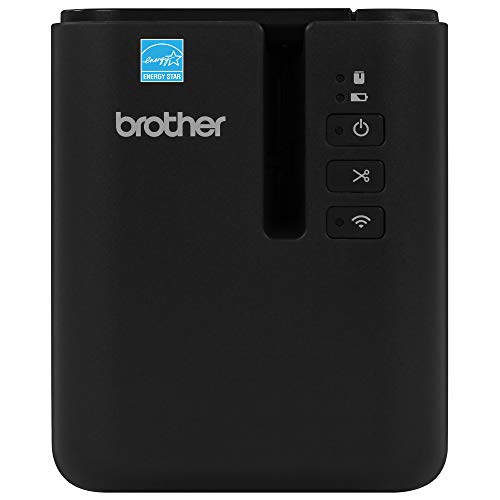
- Wi-Fi, Ethernet, Bluetooth, and USB
- Up to 360 dpi and 3.1 ips
- Durable labels up to 36 mm wide
Best For: Shared facility and professional identification workflows
Best for High-Volume Office Labels
Brother QL-810W Professional Label Printer

- Up to 110 address labels per minute
- USB and wireless mobile printing
- Black-and-red label support
Best For: Shipping desks and offices printing frequent package and file labels
Most Flexible Connectivity – Brother QL-820NWB
For offices that need professional media label makers with several connection options, the Brother QL-820NWB is a versatile monochrome thermal printer. It supports Bluetooth, Ethernet, Wi-Fi, and USB, while its 300-dpi output and fast printing suit everyday address-label workflows.
Best For: Networked offices and users who need fast address labels from computers or mobile devices.
Pros:
- Offers Bluetooth, Ethernet, Wi-Fi, and USB connectivity.
- Prints up to 110 standard address labels per minute.
- LCD supports standalone use, and compatible media can produce black-and-red labels.
Cons:
- Monochrome printing limits color flexibility to compatible black-and-red media.
- Its feature set may be more than needed for occasional basic labeling.
The QL-820NWB stands out when connection flexibility and speed matter. It is a strong professional choice for shared workspaces, especially where wireless or network printing is useful.
Best Rugged Handheld – Brady M210
The Brady M210 is a handheld option among professional media label makers, built for portable labeling rather than high-volume desktop output. Its compact form, LCD, app control, and resistance to 6-foot drops make it practical for mobile professional tasks.
Best For: Field technicians and users who need a portable label maker for professional applications.
Pros:
- Resistant to drops from up to 6 feet.
- Portable handheld design with an LCD display.
- Supports professional use and works with M21-750-499 cartridges.
Cons:
- 203-dpi resolution is lower than some desktop models.
- Listed print speed is only 0.39 pages per minute.
- Maximum media width is 0.75 inch.
The M210 prioritizes durability and portability over speed and broad-format printing. Choose it when labeling happens on the move and the equipment may face demanding work conditions.
Best Wide-Format Model – Brother QL-1110NWB
For shipping departments and businesses needing professional media label makers for larger formats, the Brother QL-1110NWB prints labels up to 4 inches wide. Bluetooth, Ethernet, and Wi-Fi support help it fit into connected workflows, while barcode cropping and database compatibility add useful business features.
Best For: Shipping labels, postage, package addressing, barcodes, and visitor or name badges.
Pros:
- Prints wide-format labels up to 4 inches.
- Supports Bluetooth, Ethernet, Wi-Fi, and USB connections.
- Includes barcode cropping, database compatibility, and network-management tools.
Cons:
- The barcode crop function is specified for Windows.
- Its larger format is unnecessary for small everyday labels.
- It is heavier than a compact handheld label maker at 3.9 pounds.
The QL-1110NWB is the practical pick when standard label makers are too narrow. Its wide media support and integration features make it especially suitable for shipping and barcode workflows.
Best Simple Portable Bundle – DYMO LabelManager 160
The DYMO LabelManager 160 is a straightforward choice among professional media label makers for home and office organization. Its QWERTY keyboard, one-touch smart keys, large display, and included D1 cartridges make it easy to create customized monochrome labels without relying on a computer.
Best For: Home and office organization, equipment identification, and occasional portable label printing.
Pros:
- Includes a QWERTY keyboard and one-touch smart keys.
- Offers more than 20 text formats and over 200 symbols.
- Bundle includes three 1/2-inch D1 label cassettes.
Cons:
- Designed for monochrome printing only.
- Supports label widths up to 1/2 inch in the included cassettes.
- USB is the listed connectivity interface, with no wireless connection noted.
The LabelManager 160 favors convenience and ease of use over network features or high-volume production. It is a sensible bundle for users who want a self-contained label maker with supplies included.
Fast Dual-Color Workhorse – Brother QL-800
The Brother QL-800 is a strong choice among professional media label makers when speed and dependable desktop operation matter. It prints up to 93 labels per minute at 300 dpi, connects by USB to Windows and Mac systems, and supports both black and red printing with compatible media.
Best For: High-volume shipping, office organization, file folders, name badges, postage labels, and attention-getting black-and-red labels.
Pros:
- Fast output of up to 93 labels per minute at 300 dpi.
- Supports black-and-red printing with Brother DK-2251 media.
- Plug & Label integration works with Microsoft Word, Excel, and Outlook without additional software installation.
- Built-in auto-cutter and support for pre-sized or continuous labels up to 3 feet long.
Cons:
- USB connectivity rather than built-in wireless printing.
- Black-and-red output depends on compatible Brother media.
- Designed for labels up to 2.4 inches wide.
Choose the QL-800 if throughput is your priority and you want the flexibility of selective red accents. Its compact desktop format, included starter rolls, and two-year parts-and-labor warranty make it a practical business labeling option.
Industrial Durability Pick – Makeid D50
The Makeid D50 brings industrial-focused features to the professional media label makers category. Its 2-inch thermal-transfer system produces 300 dpi monochrome labels designed to resist fading, while Bluetooth, USB-C, mobile editing, and PC software support flexible workflows.
Best For: Electrical and data-com labeling, cable and wire identification, pipe markers, safety signage, asset tracking, laboratories, warehouses, and equipment labeling.
Pros:
- Thermal-transfer printing is water-resistant and intended to remain clear for up to 10 years.
- Automatic cutter supports efficient batch production.
- Integrated label-and-ribbon cartridges can be changed in about five seconds.
- Rechargeable 2600mAh battery offers standby time of up to 90 days.
Cons:
- Monochrome output only.
- Maximum label width is 2 inches.
- Uses compatible Z-series label cartridges.
The D50 is the better fit when labels need more environmental durability than standard office stickers. Its automatic media matching and portable design also help teams move between field, facility, and desktop labeling tasks.
Connected Business Organizer – Brother PT-D610BT
Brother P-Touch PT-D610BT Business Professional Connected Label Maker with Bluetooth®
Check Price On AmazonThe Brother PT-D610BT is a versatile option for businesses comparing professional media label makers with on-device controls and connected design tools. It combines a QWERTY keyboard, color LCD preview, Bluetooth and USB connectivity, and business-oriented templates for creating labels up to 1 inch wide.
Best For: Asset tracking, inventory organization, merchandise labeling, security seals, and teams that need reusable business templates.
Pros:
- Includes 175 pre-set business templates for asset management and inventory tasks.
- Offers 17 fonts, 17 styles, 160 frames, and 900 symbols.
- Stores up to 90 frequently used labels for quick reprinting.
- Bluetooth and USB connectivity support mobile and computer-based label creation.
Cons:
- Print speed is listed at up to 20 pages per minute.
- Monochrome output and a maximum tape width of 24 mm limit color and size options.
- Uses Brother Genuine TZe label tapes.
Pick the PT-D610BT when design flexibility, repeatable templates, and label preview are more important than maximum print speed. Its built-in keyboard and memory also make it useful for standalone labeling at a desk or workstation.
Best for Field Durability – Brady M210 Portable Label Printer Kit
For technicians who need professional media label makers in demanding environments, the Brady M210 emphasizes portability, durability, and flexible industrial media support. It creates multi-line labels for wires, panels, circuit boards, and other equipment, with a backlit display for low-light work.
Best For: Field technicians, electricians, and industrial identification tasks.
Pros:
- Supports more than 90 cartridges, including continuous tape and pre-sized labels.
- Prints six text sizes from 6 to 40 point and supports 12 material types.
- Reinforced construction and molded rubber bumpers are designed to resist six-foot drops.
- Includes a rechargeable battery, charger, hard case, and starter wire-and-cable labels.
Cons:
- Monochrome output limits color-coded labeling.
- At 4.5 pounds, it is heavier than many compact handheld labelers.
- Its 0.75-inch maximum media width may be limiting for larger labels.
The Brady M210 is a strong choice when equipment labeling and drop resistance matter more than high-speed office printing. Its broad media compatibility and included carrying case make it practical for mobile professional use.
Best for Networked Workgroups – Brother PT-P950NW Industrial Label Printer
The Brother PT-P950NW is one of the more office- and facility-oriented professional media label makers, combining wired network, Wi-Fi, Bluetooth, and USB connectivity. It produces durable laminated labels up to 36 mm wide for environments where resistance to chemicals, UV, abrasion, and water is important.
Best For: Shared workgroups, facilities teams, and professional barcode or identification workflows.
Pros:
- Prints at up to 3.1 inches per second with resolution up to 360 dpi.
- Supports printing from PCs, smartphones, and tablets over multiple connection types.
- Includes P-touch Editor 5 software for customized labels and barcodes.
- Features an automatic cutter, easy-peel function, and drop-in tape cartridge design.
Cons:
- Its desktop form factor is less convenient for mobile labeling than a handheld model.
- The listed starter media is limited to 24 mm extra-strength adhesive tape.
- It provides monochrome output rather than color printing.
Choose the PT-P950NW when several users need access to a fast, high-resolution label printer. Its connectivity and durable laminated media support make it especially suitable for organized, repeatable identification work.
Best for High-Volume Office Labels – Brother QL-810W Professional Label Printer
The Brother QL-810W is a practical option among professional media label makers for fast office and shipping tasks. It prints standard address labels at up to 110 per minute, supports wireless printing from mobile devices, and can produce black-and-red labels with compatible DK media.
Best For: Offices, shipping stations, and businesses producing address, package, folder, or name-badge labels.
Pros:
- Prints up to 110 standard address labels per minute in black text.
- Supports wireless printing through AirPrint and Brother iPrint&Label.
- Can create black-and-red labels using DK 2251 media.
- Includes P-touch Editor software, USB cable, and DK1201 and DK2251 starter rolls.
Cons:
- It is designed for DK label rolls rather than the broader industrial media range of some models.
- Black-and-red output depends on compatible DK 2251 media.
- Its maximum media width is 2.4 inches, which may not suit larger identification labels.
The QL-810W makes the most sense when speed and convenient wireless office printing are priorities. It is less specialized for harsh industrial environments, but its fast output and included starter rolls suit everyday labeling workloads.
How We Picked the Best Professional Media Label Makers
We focused on models suited to demanding office, IT, warehouse, laboratory, retail, and media-management tasks. Our selection considers print speed, label-format flexibility, connectivity, portability, cutter design, software support, and the availability of compatible supplies. We also included both thermal desktop printers and handheld label makers because professional workflows vary significantly.
Product types range from simple portable units to network-ready printers capable of producing large volumes of consistent labels. Before buying, confirm that the model supports the label widths, colors, materials, and symbols your operation requires.
Quick Comparison
| Best For | Recommended Type | Key Advantage |
|---|---|---|
| Networked offices | Connected desktop printer | Shared access and efficient batch printing |
| Warehouses and field work | Industrial handheld model | Portability and durable labels |
| Shipping and barcodes | Wide-format thermal printer | Larger labels and barcode support |
| Basic office organization | Compact handheld label maker | Low-cost, straightforward operation |
| High-volume labeling | Fast desktop thermal printer | Speed and consistent output |
Key Buying Factors for Professional Media Label Makers
Label Size and Material
Check the supported tape or roll widths before choosing a printer. Narrow tapes work well for cables, folders, and small equipment, while wide-format labels are better for shipping, shelving, signage, and barcodes. For industrial use, prioritize supplies rated for heat, moisture, abrasion, chemicals, or outdoor exposure.
Connectivity and Software
USB is sufficient for a single workstation, but Wi-Fi, Ethernet, Bluetooth, or wireless networking can make a major difference in shared environments. Also check whether the software supports templates, imported spreadsheets, barcodes, symbols, and multiple operating systems.
Speed, Automation, and Workflow
For occasional labeling, a handheld keyboard may be all you need. Frequent users should look for fast thermal printing, automatic cutters, batch printing, and pre-sized label support. These features reduce repetitive work and help keep label length and formatting consistent.
Portability and Durability
Handheld models are useful when labels must be created beside equipment, shelves, cables, or inventory. Look for a protective design, comfortable controls, battery options, and label materials that withstand the environment. Desktop models generally offer better speed and layout control but require a fixed workstation.
Who Should Buy Which Professional Media Label Makers?
Choose a compact handheld model if you need occasional organization around an office or home workspace. Select a connected desktop printer for shared office use, inventory systems, or repeatable batches. Wide-format models are the better choice for postage, shipping labels, and large barcodes. For warehouses, technicians, and industrial environments, choose a rugged handheld printer with durable supply options. If your team prints continuously or needs centralized access, prioritize a network-capable professional printer with strong software and consumable availability.