
The right enclosure can make an ELEGOO printing setup easier to manage, but resin and filament printers need different things. A resin setup calls for a sensible plan for fumes and handling; an FDM setup may benefit more from draft protection and a steadier printing environment.
These 10 options include ventilated tents, protective fabric enclosures, and an acrylic model. Before choosing one, check the full working footprint of your printer and how the enclosure will fit into your workspace.
Best 10 3d Printer Enclosure for Elegoo Picks for 2026
Resin Ventilation Pick
YOOPAI Resin Enclosure with Filter and Exhaust

- Carbon filter sheet and exhaust fan
- 28 × 18 × 17-inch enclosure
- Viewing window and insulated interior
Best For: Resin setups needing a cover with filtration and exhaust hardware
LED Visibility Pick
VEVOR 3D Printer Tent with Lighting

- Clear window with LED lighting
- 21.6 × 25.6 × 29.5-inch listed size
- Optional fan installation; fan not included
Best For: Monitoring filament prints in a covered workspace
ELEGOO Resin Match
ELEGOO Enclosure with Fan and Filter

- Fan, filter, and extendable exhaust hose
- Orange viewing window
- Interior clearance not specified
Best For: ELEGOO resin users wanting an insulated cover with exhaust hardware
Filament Setup Pick
YOOPAI Tent with Feed and Exhaust Ports

- Port for external filament feeding
- Opening for DIY exhaust accessories
- Check height including spool holder
Best For: Filament setups using an external spool or planned exhaust add-on
Adjustable Ventilation Pick
Resin Printer Tent with Fan and Filter

- Adjustable-speed 12V fan included
- UV-blocking viewing window
- Filter setup requires a printed adapter
Best For: Resin setups needing included, adjustable ventilation
ELEGOO Resin Pick
Foldable Enclosure with Exhaust Duct

- Fan and exhaust duct included
- 49 × 60 × 72 cm interior
- Foldable metal-frame design
Best For: Mars and Saturn owners wanting included exhaust hardware
Large-Format Pick

- Lists Neptune 4 Plus compatibility
- Built-in LED and viewing window
- Optional fan not included
Best For: Larger printers needing an illuminated tent
Resin Odor Control

- Carbon filter sheet plus exhaust fan and pipe
- Listed for ELEGOO Mars and Saturn
- Front window and insulated interior
Best For: Mars or Saturn resin setups needing odor-management features
Lighted Resin Tent
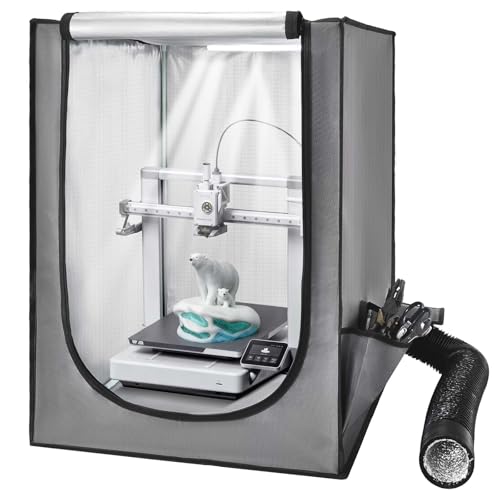
- Mars 3 listed among compatible printers
- Ventilation, viewing window, and LED
- 21.65 x 25.59 x 29.53-inch listed size
Best For: Mars 3 users wanting a lighted, ventilated tent
Rigid-Panel Option

- Neptune 4 Pro listed as compatible
- Three acrylic viewing panels plus LED
- Ventilated; weighs 33.7 pounds
Best For: Neptune 4 Pro setups where panel visibility matters
Resin Ventilation Pick – YOOPAI Resin Enclosure with Filter and Exhaust
If you need a 3d printer enclosure for elegoo resin printing, this YOOPAI cover combines a carbon filter sheet, exhaust fan, and expandable pipe. Its stated enclosure size is 28 × 18 × 17 inches, so check your printer’s full dimensions before ordering.
Best For: Resin-printer owners who want a covered print area with built-in odor filtration and exhaust hardware.
Pros:
- Carbon filter sheet, exhaust fan, and expandable pipe provide options for handling resin odors.
- Large transparent front window lets you check prints without opening the cover.
- Six-sided enclosure shields against dust and resin splashes; internal insulation helps retain warmth.
Cons:
- At 28 × 18 × 17 inches, fit still needs to be checked against the printer and any accessories.
- Its resin-focused features may be unnecessary for a filament printer.
The filter and exhaust components make this the more purpose-built YOOPAI option here for resin setups. Plan where the expandable exhaust pipe will go before buying.
LED Visibility Pick – VEVOR 3D Printer Tent with Lighting
For shoppers comparing a 3d printer enclosure for elegoo models, this VEVOR tent offers a roomy 21.6 × 25.6 × 29.5-inch footprint, a clear viewing window, and built-in LED lighting. Measure your complete printer setup before relying on the listed compatibility.
Best For: Filament-printer users who want to monitor prints inside a dust-resistant, temperature-retaining tent.
Pros:
- LED light and transparent window make print checks easier in low light.
- Enclosed design helps limit dust, accidental contact, and printing noise.
- Heat-resistant, flame-retardant material and a large listed size suit a range of printer setups.
Cons:
- Ventilation holes accommodate an optional fan, but ventilation components are not included.
- The tent’s dimensions require adequate desk space and careful printer measurement.
This is a practical choice when visibility matters as much as enclosure coverage. If you need powered exhaust, budget for separate ventilation components.
ELEGOO Resin Match – ELEGOO Enclosure with Fan and Filter
If you prefer a brand-matched 3d printer enclosure for elegoo resin machines, this ELEGOO model pairs a fan and extendable exhaust hose with a filtration system. The listing names the Saturn 4 Ultra and Mars 5 Ultra among compatible printers, though you should verify fit for your specific setup.
Best For: ELEGOO resin-printer owners seeking an enclosed, insulated print area with supplied exhaust hardware.
Pros:
- Fan, filter, and extendable hose address resin odors through filtration and exhaust.
- Orange viewing window allows print checks while limiting external light exposure.
- Six-sided enclosure guards against dust and splashes; an insulation layer helps retain heat.
Cons:
- The supplied dimensions are package dimensions, not usable interior clearance.
- Its resin-oriented filtration features may be more than a filament-only setup needs.
The combination of exhaust equipment, splash protection, and an orange window is well suited to resin workflows. Confirm enclosure clearance separately, since the notes do not specify interior dimensions.
Filament Setup Pick – YOOPAI Tent with Feed and Exhaust Ports
This YOOPAI 3d printer enclosure for elegoo filament printers provides a covered print space with ports for an external filament feed and a DIY exhaust accessory. Its stated supported printer size is under 29.5 × 25.6 × 21.6 inches, including spool-holder height.
Best For: Filament-printer owners who want a tent that supports external spool placement and a future exhaust add-on.
Pros:
- Left-side filament port supports placing the spool outside the enclosure.
- Right-side opening accommodates compatible fan-based exhaust accessories.
- Six-sided cover helps keep out dust, reduce accidental contact, and muffle printing noise.
- Designed for quick assembly and disassembly.
Cons:
- Exhaust accessories are not described as included.
- Not water resistant; printer and spool-holder dimensions need checking before purchase.
Choose this one for its flexible port layout rather than built-in ventilation. The stated size limit is especially important if your spool holder adds height.
Adjustable Ventilation Pick – Resin Printer Tent with Fan and Filter
If you need a 3d printer enclosure for elegoo resin models, this tent combines a UV-blocking viewing window with an adjustable-speed fan and three-layer filter. The listing names Mars 3/4 and Saturn compatibility, but you should measure your complete printer before ordering.
Best For: Resin printer owners who want an enclosure with an included, adjustable ventilation kit.
Pros:
- Included 12V fan offers adjustable airflow.
- Three-layer filter and UV-blocking window support an enclosed resin-printing setup.
- Stainless-steel frame pipes and a large window make monitoring convenient.
Cons:
- Using the listed three-layer filter with the fan requires printing a replacement plastic adapter.
- Fit depends on the dimensions of your complete printer.
The included ventilation hardware is the main draw; account for the adapter-printing step before choosing it.
ELEGOO Resin Pick – Foldable Enclosure with Exhaust Duct
This ELEGOO 3d printer enclosure for elegoo Mars and Saturn setups provides a 49 × 60 × 72 cm interior, an exhaust fan and duct, and a clear viewing window. It is designed to help contain resin odors and keep dust away from prints.
Best For: Mars or Saturn owners seeking an ELEGOO enclosure with included exhaust hardware.
Pros:
- Included exhaust fan and duct help manage resin odors.
- Rigid metal frame folds for storage or transport.
- Viewing window lets you check prints without opening the enclosure.
Cons:
- Check the stated interior dimensions against your printer and any accessories before buying.
This is a straightforward resin-focused choice if its interior dimensions suit your setup; the exhaust components are a useful distinction from a basic tent.
Large-Format Pick – VEVOR Tent with LED Lighting
For a larger 3d printer enclosure for elegoo, this VEVOR tent measures 27.56 × 29.53 × 35.43 inches and lists the Neptune 4 Plus among compatible models. Its enclosed design aims to maintain a steadier printing temperature, while the window and built-in LED help you watch prints.
Best For: Owners of larger printers who want a spacious, illuminated enclosure and can check their machine’s dimensions first.
Pros:
- Large tent lists Neptune 4 Plus compatibility.
- Built-in LED and clear window improve print visibility.
- Flame-retardant material and enclosed structure help keep dust out.
Cons:
- Ventilation components are not included; side openings are provided for optional fan installation.
- Its large footprint may not suit a compact workspace.
Choose this one for space and visibility rather than ready-to-use fume extraction, and measure both your printer and available workspace before ordering.
Resin Odor Control – Ventilated Resin Printer Tent
If you need a 3d printer enclosure for elegoo resin models, this tent combines a carbon filter sheet with an exhaust fan and expandable pipe. The listing names ELEGOO Saturn and Mars compatibility, though you should check your printer’s measurements before ordering.
Best For: ELEGOO Mars or Saturn owners who want a covered resin-printing space with odor-management features.
Pros:
- Carbon filter sheet, exhaust fan, and expandable pipe offer options for managing resin odors and venting fumes.
- Enclosed design shields the printer from dust and resin splashes.
- Large transparent front window lets you check prints without opening the cover.
- Insulated interior is designed to help maintain a steadier printing temperature.
Cons:
- The listed 3.94 x 1.97 x 3.94-inch product dimensions do not establish usable interior clearance; verify fit before buying.
- The notes do not specify the exhaust pipe length or where it can be routed.
This is the most resin-focused choice here: the filter and venting hardware address a practical concern for covered resin printers. Confirm both enclosure clearance and a suitable exhaust route for your setup.
For shoppers comparing a 3d printer enclosure for elegoo against other small resin-printer tents, this VEVOR model offers a 21.65 x 25.59 x 29.53-inch enclosure with ventilation, an LED, and a viewing window. Its stated compatibility includes the Mars 3, but measure your exact printer before ordering.
Best For: Mars 3 owners who want an enclosed, illuminated printing area with built-in ventilation.
Pros:
- Ventilation system is designed to expel smoke and dust after printing.
- Transparent window and LED help you monitor prints in low light.
- Closed structure helps keep dust out and limits accidental contact.
- Enclosure is designed to maintain a steadier temperature for printing.
Cons:
- The supplied notes name Mars 3, not every ELEGOO model; check dimensions for other printers.
- Ventilation outlet and duct-routing details are not specified.
The LED makes this a practical option when your printer sits in a dim workspace. Its published dimensions are useful for an initial fit check, but also allow room for access and any external components.
If you are shopping for a 3d printer enclosure for elegoo, this VEVOR model is a rigid-panel option worth checking for physical fit rather than assuming model compatibility. Its listing names printers including the Neptune 4 Pro and gives dimensions of 23.6 x 23.6 x 31.5 inches.
Best For: Neptune 4 Pro owners who prefer transparent rigid panels, LED visibility, and ventilation.
Pros:
- Three transparent acrylic panels and an LED provide views of the print area.
- Ventilation system is designed to expel smoke and dust after printing.
- Acrylic panels, PVC foam boards, and a metal frame form an enclosed structure that helps block dust.
- Magnetic closure is specified in the product details.
Cons:
- At 33.7 pounds, it is much heavier than the two tent-style products in this roundup.
- Neptune 4 Pro is the named ELEGOO-compatible model; verify space for other Neptune printers and moving parts.
Choose this one for its clear panel views and more substantial construction, not portability. Check the printer’s full operating footprint against the enclosure dimensions before committing.
How We Picked the Best 3d Printer Enclosure for Elegoo
We organized the 10 selected options around the decisions that matter most: printer fit, resin ventilation, access, visibility, and protection from dust or drafts. The list spans ELEGOO-branded resin kits, third-party ventilated tents, fabric covers, and a transparent acrylic option. A product name is not proof of compatibility, so check the seller’s current dimensions and specifications against your exact printer before buying.
Quick Comparison
For an ELEGOO resin printer, start with the ventilated resin enclosures and compare their fan, filter, and ducting provisions. For an ELEGOO FDM printer, look first at enclosure size, cable routing, access, and draft protection. Fabric tents are generally the simpler, more flexible choice; an acrylic enclosure may appeal if visibility is a priority. Extras such as LED lighting are useful only after the enclosure meets your basic fit and airflow needs.
Key Buying Factors for a 3d Printer Enclosure for Elegoo
Measure the Whole Setup
Measure width, depth, and height with the printer assembled—not just its build volume. Include the moving bed or gantry, raised lid, filament spool, cables, and the room you need to remove prints. For resin printers, allow space to open the cover and handle the build plate without brushing against the enclosure. Check both internal dimensions and the space available on your desk.
Match Ventilation to the Printer
A fan and filter may help manage odors, but they are not a substitute for suitable ventilation. If you plan to duct a resin enclosure outdoors, confirm that it has a usable outlet and that the hose, fan, and window connection suit your setup; these parts may not all be included. Follow the printer and resin makers’ safety guidance. For FDM printing, consider how much airflow the material needs: shielding a print from drafts is different from sealing every opening.
Check Access and Materials
Look for openings that let you reach controls, change resin or filament, and clean spills without dismantling the enclosure. Confirm where power cords and ventilation hoses exit. Fabric tents can be convenient to move or fold, while rigid panels offer a different view and feel; neither style eliminates the need to inspect seams, zippers, and panels. If an enclosure advertises waterproofing or constant temperature, check what those claims cover rather than assuming it is spill-safe or actively heated.
Who Should Buy Which 3d Printer Enclosure for Elegoo?
Choose a ventilated resin model if your ELEGOO printer uses resin and you have a workable airflow plan. Consider an ELEGOO-branded kit if its stated dimensions and features match your machine; brand matching alone does not guarantee fit. Pick a roomy fabric tent for an FDM printer when draft and dust protection matter most, or consider the acrylic option if easy viewing is a priority. The best 3d Printer Enclosure for Elegoo is the one that fits the printer at full travel and supports the way you actually print, ventilate, and maintain it.