
If you want a cleaner, quieter, and more organized print space, a 3D printer workstation with enclosure can make a big difference. These setups combine protection, storage, and better print conditions in one footprint.
Below, we focus on the most useful options for hobbyists, home makers, and small workshops that need space-saving designs with practical features like ventilation, filament storage, and mobility.
Best 10 3d Printer Workstation with Enclosure Picks for 2026
Best for Filament Storage
180L Mobile 3D Printer Enclosure

- Active humidity control helps protect moisture-sensitive filament
- 40-spool sealed cabinet keeps supplies organized and dust-free
- Lockable wheels let you move and then stabilize the whole station
Best For: Makers who want one mobile enclosure with dry storage, printer support, and humidity control.
Best for Organized Print Stations
Heavy Duty 3D Printer Stand with Storage

- Built-in power hub cuts cable clutter
- Steel X-brace frame improves stability
- Drawer and compartments keep supplies organized
Best For: Makers and small studios that want an organized, stable all-in-one printing station.
Best for Bambu Lab A1 Combo

- Stable temperature control helps reduce warping
- Quieter enclosed setup with LED-lit visibility
- Fireproof, dustproof design adds extra protection
Best For: Bambu Lab A1 Combo owners who want a quieter, cleaner, and more controlled print station.
Best for Heavy-Duty Printing
3D Printer Stand with Filament Storage

- 300 lb capacity frame reduces wobble during fast prints.
- Enclosed filament storage helps protect spools from dust and moisture.
- AC/USB power hub, LED lights, and pegboard improve workflow.
Best For: Makers who want a sturdy, organized printing station with protected filament storage and built-in power.
Best for Dual Resin Setups
Large Resin Printer Enclosure with Vent Kit

- Fits a resin printer and curing station together
- Includes carbon filtering plus exhaust fan support
- Clear window and full enclosure improve monitoring and containment
Best For: Resin users who need a roomy, ventilated enclosure for printing and curing in one station.
Best for Everyday Use

- Enclosed cabinet helps reduce noise and dust
- Stores up to 54 filament spools on lower racks
- 140 lb load capacity with stable metal frame
Best For: Makers who want a quiet, organized all-in-one printer station with serious filament storage.
Best for Visibility
VEVOR Acrylic 3D Printer Enclosure with Ventilation

- Transparent panels and LED lighting improve print visibility.
- Ventilation helps remove smoke, dust, and particles quickly.
- Constant-temperature enclosure can reduce warping and clogging.
Best For: Makers who want a visible, ventilated enclosure for compatible mid-size printers.
Best for Dual-Printer Setup
ikkle 3D Printer Cabinet with Enclosure

- Holds two printers and lots of filament in one station
- Enclosed design helps cut dust and noise
- Built-in power strip keeps accessories plugged in
Best For: Makers who want a sturdy enclosed workstation for dual printers and organized filament storage.
Best Heavy-Duty Pick
Crafit 3D Printer Cabinet with Storage
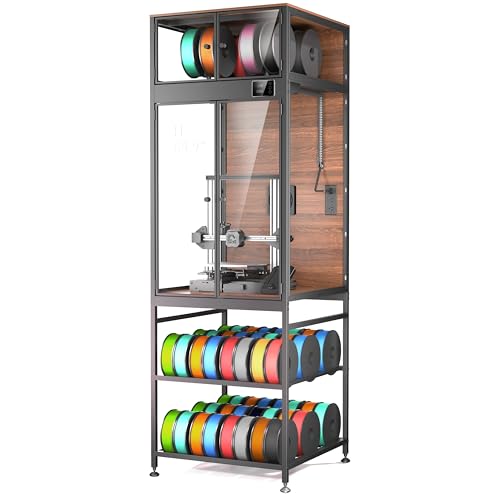
- Holds up to 48 spools in the base plus 8 more up top
- Fits many popular printers, including Bambu Lab, Creality, and Ender models
- LED lighting, ventilation control, and vibration reduction improve day-to-day use
Best For: Makers who want an enclosed printer station with high-capacity filament storage and a cleaner workspace.
Best for All-in-One Setup
Heavy Duty 3D Printer Table with Enclosure

- Combines enclosure, stand, storage, and power in one unit
- Steel frame adds stability and reduces printer shake
- LED lighting and clear window make monitoring easier
Best For: Makers who want an organized enclosed workstation with storage and lighting.
Best for Filament Storage – 180L Mobile 3D Printer Enclosure
If you want a 3d printer workstation with enclosure that does more than block dust, this mobile all-in-one setup adds sealed filament storage and active humidity control in one footprint. It’s a smart pick for makers who need a stable printer base, organized spool storage, and a cleaner environment for PLA, ABS, PETG, and nylon.
Best For: Makers who want a single workstation that combines printer enclosure, mobility, and dry storage for moisture-sensitive filament.
Pros:
- Built-in dehumidifier helps hold low humidity for better filament preservation
- 40-spool sealed cabinet keeps materials organized and protected from dust
- Lockable swivel casters make it easy to move and then secure in place
- Heavy-duty frame and 180L interior suit a full desktop printing station
Cons:
- Bigger footprint may be too large for tight desks or compact rooms
- Assembly is tool-free, but it still requires some setup time
- May be more workstation than casual users need
This is a strong choice if you want a 3d printer workstation with enclosure that doubles as a filament management hub. The combination of mobility, sealed storage, and active humidity control makes it especially appealing for serious hobbyists and small shop workflows.
Best for Organized Print Stations – Heavy Duty 3D Printer Stand with Storage
If you want a practical 3d printer workstation with enclosure-style organization, this stand is built to keep your printer, tools, filament, and power all in one compact hub. It’s a strong fit for makers who need a tidy, heavy-duty setup without giving up storage or desk space.
Best For: Makers, small studios, and office setups that need a stable all-in-one printing station with built-in power and organized filament storage.
Pros:
- Built-in power hub with 2 AC outlets and 2 USB ports reduces cable clutter
- Steel frame with X-bracket reinforcement adds stability for heavier printers
- Three-tier layout plus drawer and compartments keeps filament and tools organized
- Compact footprint fits workshop, studio, or office environments
Cons:
- Not a true enclosed cabinet, so dust and noise control are limited
- Assembly is required and may take some time
- Open design may not suit users who want full enclosure protection
This is a smart pick if you want a 3d printer workstation with enclosure-like organization rather than a fully enclosed cabinet. The combination of storage, power access, and reinforced stability makes it especially useful for creators who print often and want a cleaner, more efficient workspace.
Best for Bambu Lab A1 Combo – TOPCUBE A1 Combo Enclosure
If you want a 3d printer workstation with enclosure that prioritizes temperature stability, noise control, and a cleaner build area, the TOPCUBE enclosure is a strong fit for the Bambu Lab A1 Combo. It combines a stainless steel frame, LED lighting, and a fire-resistant cover to help create a more controlled printing environment.
Best For: Bambu Lab A1 Combo owners who want a dedicated enclosure for quieter, steadier printing and better protection from dust and accidental contact.
Pros:
- Helps maintain a more consistent internal temperature to reduce warping and print issues
- Noise reduction can make a busy print area noticeably quieter
- Large viewing window and built-in LED light improve visibility during prints
- Fireproof, dustproof design adds an extra layer of safety for home use
Cons:
- Made specifically for the Bambu Lab A1 Combo, so compatibility is limited
- Bulky footprint may take up significant desk or workstation space
Overall, this is a practical 3d printer workstation with enclosure for users who want a more controlled and quieter setup without giving up visibility or easy access. It is especially appealing if you print often and want a cleaner, safer workspace around the A1 Combo.
Best for Heavy-Duty Printing – 3D Printer Stand with Filament Storage
If you want a 3d printer workstation with enclosure-style storage and a sturdier-than-average frame, this workstation is built to keep a printer area organized, powered, and easier to use day to day. The enclosed filament compartment helps protect spools from dust and moisture, while the integrated power hub, LED lighting, and pegboard make it feel more like a true maker station than a basic cart.
Best For: Makers who want a heavy-duty 3d printer workstation with enclosure-style filament storage, built-in power, and a mobile setup for garages, studios, or offices.
Pros:
- 300 lb load capacity and a heavy-duty metal frame help reduce printer shake.
- Enclosed filament storage keeps rolls cleaner and more protected from humidity.
- Built-in AC/USB power hub simplifies cable management and device charging.
- LED lighting and pegboard storage improve visibility and tool organization.
Cons:
- Its large footprint may be too big for compact printing areas.
- Assembly will take more time than a simple printer stand.
- The open workbench design is not a fully sealed enclosure for active printing.
Overall, this is a strong pick if you need a 3d printer workstation with enclosure-like storage, dependable stability, and a cleaner all-in-one layout for printing and post-processing.
Best for Dual Resin Setups – Large Resin Printer Enclosure with Vent Kit
If you want a 3d printer workstation with enclosure that can handle messy resin work more safely, this oversized tent is built around ventilation, odor control, and extra room for a printer plus curing station. It’s a practical pick for home users who want to keep fumes, dust, and light exposure contained without giving up visibility.
Best For: Resin printer owners who need a larger enclosed workspace with active ventilation and room for both printing and curing.
Pros:
- Large enough to fit two resin devices side by side
- Built-in carbon filter, exhaust fans, and vent pipe support
- Clear front window makes it easy to monitor prints
- Fully enclosed design helps block dust, splatter, and noise
Cons:
- Size must be measured carefully before buying
- Airflow can slow when passing through the carbon filter
- Best suited to resin printers, not general FDM setups
For resin users who want a more controlled workspace, this 3d printer workstation with enclosure stands out for its dual-machine capacity and ventilation-focused design. It’s less about portability and more about creating a cleaner, safer, and more organized print area.
Best for Everyday Use – Majnesvon 3D Printer Cabinet
If you want a practical 3d printer workstation with enclosure, this Majnesvon cabinet is built to keep your printer quieter, cleaner, and better organized. The enclosed design helps cut dust and noise, while the lower double-layer rack turns wasted space into a serious filament storage zone.
Best For: Makers who need an all-in-one printer stand, enclosure, and high-capacity filament organizer for a home studio, office, or workshop.
Pros:
- Thick acrylic panels and full enclosure help reduce noise and keep dust off prints
- Double-layer storage rack holds up to 54 filament spools for major organization
- Heavy-duty metal frame supports up to 140 lb for stable printer placement
- T-shaped filament bar supports smoother feeding for multi-color printing setups
Cons:
- Large footprint may be too big for compact desks or tight rooms
- Assembly will take more time than a basic open-frame stand
Overall, this is a strong pick if you need a 3d printer workstation with enclosure that does more than just house a printer. It combines workspace, protection, and storage in one unit, making it especially useful for users with multiple filament types or a busy creative setup.
Best for Visibility – VEVOR Acrylic 3D Printer Enclosure with Ventilation
If you want a practical 3d printer workstation with enclosure that helps stabilize prints without hiding the build area, this VEVOR tent is a solid pick. The transparent acrylic panels, LED lighting, and built-in ventilation make it easier to monitor jobs, reduce dust exposure, and keep temperatures more consistent during longer prints.
Best For: Makers who want a visible, well-ventilated enclosure for compatible Bambu Lab, Ender, Neptune, and Kobra printers.
Pros:
- Constant-temperature setup can help reduce warping, cracking, and clogging.
- Transparent acrylic panels and LED light make print monitoring easy.
- Ventilation helps clear smoke, dust, and particles faster after printing.
- Wide compatibility for many popular mid-size 3D printers.
Cons:
- Check dimensions carefully before buying; fit depends on your printer size.
- Acrylic-panel enclosure is more about visibility than heavy-duty industrial protection.
Overall, this is a smart choice if you want a 3d printer workstation with enclosure that balances visibility, airflow, and temperature control. It is especially appealing for hobbyists who print often and want a cleaner, more controlled setup without losing sight of the print process.
Best for Dual-Printer Setup – ikkle 3D Printer Cabinet with Enclosure
If you want a 3d printer workstation with enclosure that can handle two printers, store filament, and keep noise under control, this ikkle cabinet is built for exactly that kind of all-in-one setup. It combines a protected print area with heavy-duty shelving and integrated power, making it easier to keep a home office, studio, or workshop organized.
Best For: Makers who run dual printers and want one sturdy cabinet for enclosed printing, filament storage, and power access.
Pros:
- Fits two printers plus AMS Lite and accessories in one organized workstation
- Fully enclosed design helps reduce dust and operating noise
- Heavy-duty steel frame supports up to 350 lb for stable placement
- Built-in power strip adds AC, USB-A, and USB-C charging convenience
Cons:
- Large footprint may be too big for compact rooms
- Assembly will take time compared with a simple stand
This is a strong pick if you need a 3d printer workstation with enclosure that does more than just house a printer. Its blend of storage, protection, and power makes it especially practical for busy makers who want a cleaner, quieter, more efficient printing station.
Best Heavy-Duty Pick – Crafit 3D Printer Cabinet with Storage
If you want a 3d printer workstation with enclosure that doubles as a serious filament hub, this Crafit cabinet is built to keep everything in one place. It fits many popular printers, adds LED lighting and ventilation control, and turns the base into high-capacity spool storage for a cleaner, more organized setup.
Best For: Makers who want an enclosed printer station with room for multi-spool storage, better print monitoring, and a tidier workspace.
Pros:
- Fits many printers up to 21.6″W x 22″D x 28.7″H, including popular Bambu Lab, Creality, and Ender models
- Holds up to 48 filament spools in the base with up to 8 more in the top compartment
- LED lighting, ventilation control, and PET panels make monitoring easier
- Steel frame and rigid walls help reduce vibration, dust, noise, and drafts
Cons:
- Large footprint may be too much for smaller rooms
- Compatibility still depends on measuring your printer before buying
- Not a simple minimal enclosure if you only need basic dust cover protection
This is a strong pick if your priority is organization as much as print control. For buyers who want a 3d printer workstation with enclosure plus integrated spool storage, it offers a more complete all-in-one layout than a basic cabinet.
Best for All-in-One Setup – Heavy Duty 3D Printer Table with Enclosure
If you want a 3d printer workstation with enclosure that keeps your gear organized and your print environment more controlled, this all-in-one table is a practical pick. It combines a sturdy stand, enclosed printing area, LED lighting, and storage so you can set up a cleaner, more compact printing station.
Best For: Makers who want a single workstation for printing, filament storage, and basic enclosure benefits like dust control, reduced noise, and more stable temperatures.
Pros:
- All-in-one design with enclosure, storage rack, and built-in power strip
- Steel frame and cross support help reduce wobble during printing
- LED light with three color temperatures improves visibility through the clear window
- Enclosure helps with dust, noise, and temperature stability for materials like ABS and ASA
Cons:
- At 30.9 pounds, it may still be bulky to move once assembled
- Fits most FDM printers, but very large models may not be compatible
- Assembly is simple, but it still adds another step before printing
This is a strong value choice if you need a 3d printer workstation with enclosure that does more than just hold a machine. It is especially appealing for users who want cleaner cable management, better print conditions, and storage built into one compact setup.
How We Picked the Best 3d Printer Workstation with Enclosure
We prioritized build quality, enclosure design, storage capacity, airflow or ventilation, lighting, mobility, and how well each unit supports real-world printing needs. Because a 3d Printer Workstation with Enclosure should do more than just cover a machine, we also looked for useful workspace features such as shelves, drawers, power access, and filament management.
Quick Comparison
The best options in this roundup split into a few clear categories: full workstation cabinets for all-in-one storage, compact enclosures for smaller setups, and ventilated models for resin or odor-sensitive environments. If you need maximum organization, look for larger cabinet-style units. If you mainly want dust control and temperature stability, simpler acrylic or tent-style enclosures may be enough.
Key Buying Factors for a 3d Printer Workstation with Enclosure
Size and Printer Compatibility
Check internal dimensions before anything else. A workstation should fit your printer with enough room for bed movement, cable routing, and any AMS, spool holder, or accessory clearance.
Ventilation and Temperature Control
Good airflow matters for resin fumes, odor control, and heat management. For enclosed FDM printing, stable internal temperature can improve consistency, but too much heat buildup can become a problem if ventilation is poor.
Storage and Workflow
The strongest reason to choose an enclosed workstation is convenience. Integrated filament racks, drawers, shelves, and tool storage reduce clutter and keep everything close at hand. If you print often, this can save time every day.
Noise, Dust, and Safety
Enclosures can reduce printer noise and keep dust off sensitive components. If you print at home or in a shared space, choose a model with solid panels, stable construction, and secure access. Fire-resistant materials and sealed designs are worth considering where available.
Who Should Buy Which 3d Printer Workstation with Enclosure?
Choose a large cabinet-style 3d Printer Workstation with Enclosure if you want an all-in-one print station with room for filament, tools, and accessories. Pick a ventilated enclosure if odor control and air handling are your top priorities, especially for resin printing. If you need a budget-friendly or compact solution, a simpler stand-with-enclosure setup may offer the best balance of price and function. For makers who want the cleanest long-term setup, the best choice is usually the one that matches your printer size, workspace layout, and storage needs rather than the largest model available.