
Stable footage can make a home studio look far more polished, whether you film tutorials, livestreams, product demos, or short-form videos. The right gimbal helps reduce shake, improve camera movement, and keep framing consistent without requiring a full production crew.
This roundup covers smartphone gimbals, interchangeable-lens camera stabilizers, action-oriented handles, and compact all-in-one options. Use the guide below to match payload, tracking features, lighting, controls, and workflow compatibility to the way you create.
Best 10 Camera Gimbals for Home Studios Picks for 2026
Best AI-Tracking Phone Gimbal
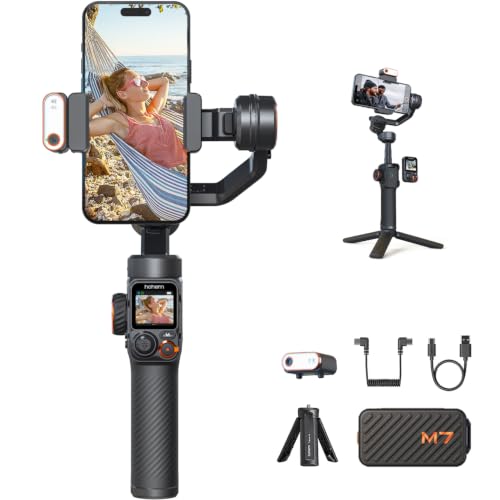
- AI tracking with native-camera support
- Detachable touchscreen remote with 32-foot range
- Built-in extension rod and RGB/CCT fill light
Best For: Solo smartphone creators building hands-free studio shots
Best Compact Camera Gimbal
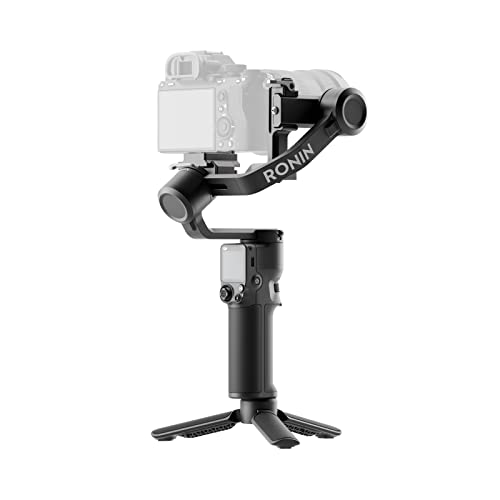
- 795g body with a 2kg tested payload
- Native vertical shooting for social content
- Touchscreen and Bluetooth shutter control
Best For: Mirrorless-camera studio creators needing portable stabilization
Best Budget-Friendly Phone Gimbal

- Three-axis smartphone stabilization
- Built-in RGB light with adjustable color and brightness
- 20cm extension pole and OLED status display
Best For: Phone-based vlogs, tutorials, and compact studio setups
Best Long-Battery Phone Gimbal

- Up to 10 hours of battery life
- Native tracking with audio and lighting capabilities
- Built-in tripod, extension rod, and 360-degree pan
Best For: Long smartphone recording sessions and mobile studio creators
Heavy-Duty DSLR Stability

- 5.5-pound listed payload for compatible DSLR and mirrorless setups
- Multiple handles and built-in folding support bracket
- Up to 10–13 hours of stated runtime with fast charging
Best For: Creators using larger DSLR or mirrorless camera rigs in a home studio
Phone-Creator Convenience

- Three-axis stabilization for iPhone and Android phone filming
- Built-in tripod with ActiveTrack 7.0 subject tracking
- 300-gram design with up to 10 hours of stated use
Best For: Solo phone creators making tutorials, livestreams, or social videos
Light-and-Grip Starter Kit
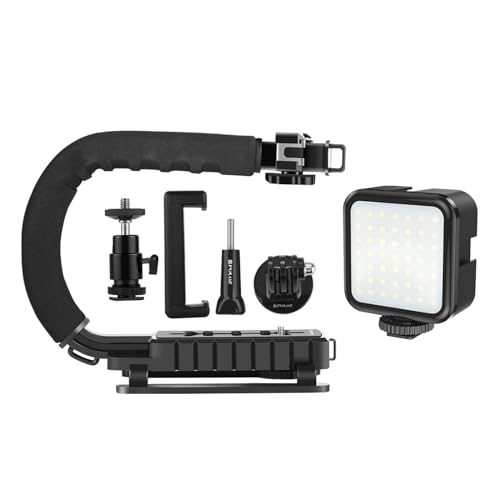
- Handheld C-shaped grip for flexible shooting angles
- Built-in 6500K, 800-lumen LED fill light
- Phone clamp and cold shoe expansion points
Best For: Small home-studio setups needing a grip and basic lighting in one kit
Best All-in-One Camera
Xtra Muse 4K Pocket Gimbal Camera

- 1-inch sensor records 4K at up to 120fps
- 3-axis optical stabilization smooths handheld footage
- Tracking and 2-inch touchscreen simplify framing
Best For: Vloggers wanting a dedicated stabilized camera
Best Stabilizing Handle Kit

- Combines a handheld frame with an LED light
- Works with cameras and smartphones
- Cold shoes and 1/4-inch thread expand the setup
Best For: Creators needing grip support and lighting
Best Smartphone Gimbal
COMITOK L7C Pro Phone Stabilizer

- 3-axis stabilization smooths smartphone video
- AI face and object tracking support hands-free framing
- Folds compactly and requires no leveling
Best For: Phone-based vloggers and home creators
Best AI-Tracking Phone Gimbal – Hohem iSteady M7
For creators comparing camera gimbals for home studios, the Hohem iSteady M7 is a feature-rich smartphone option with AI tracking, a detachable touchscreen controller, built-in extension rod, and adjustable RGB/CCT fill light. Its 500g payload also leaves room for compatible accessories such as a microphone or phone lens.
Best For: Solo smartphone creators who want hands-off tracking, remote monitoring, and integrated lighting for tutorials, vlogs, or livestream-style recordings.
Pros:
- AI tracker works with a phone’s native camera and supports target selection from the detachable touchscreen.
- Remote controller can monitor and control shots from up to 32 feet away.
- Built-in extension rod, tripod, three expansion ports, and customizable CCT/RGB fill light add studio flexibility.
Cons:
- At 629g, it is heavier than several compact smartphone gimbals.
- It is designed for cellphones rather than dedicated cameras.
- It is not water resistant.
The iSteady M7 stands out when your home-studio setup benefits from solo operation and built-in lighting. Choose it over a simpler phone gimbal if remote framing and accessory expandability matter more than minimum weight.
Best Compact Camera Gimbal – DJI RS 3 Mini
The DJI RS 3 Mini is a practical pick among camera gimbals for home studios when you need support for a mirrorless or similar camera setup without moving to a full-size stabilizer. It weighs 795g and supports tested payloads up to 2kg, while offering vertical shooting and a touchscreen interface.
Best For: Camera users who want a lightweight gimbal for product videos, tutorials, portraits, and social content with interchangeable camera-and-lens combinations.
Pros:
- 2kg payload supports a broad range of camera and lens combinations.
- Third-generation RS stabilization is designed for smooth low-angle and flashlight-mode shots.
- Native vertical shooting, Bluetooth shutter control, and a 1.4-inch full-color touchscreen improve workflow flexibility.
Cons:
- It is not water resistant.
- Activation and full functionality require the DJI Ronin app.
- The Ronin app is not available through Google Play and must be downloaded from DJI’s official website.
For a home studio centered on a dedicated camera, the RS 3 Mini offers a stronger payload ceiling than phone-only models while remaining relatively portable. Check camera and lens balance before buying, since payload capacity alone does not guarantee compatibility.
Best Budget-Friendly Phone Gimbal – AOCHUAN Smart X2
The AOCHUAN Smart X2 keeps the essentials straightforward for home-studio creators shopping for camera gimbals for home studios. It combines three-axis smartphone stabilization with a built-in 20cm pole, RGB fill light, OLED status display, and thumb-accessible zoom and focus controls.
Best For: Smartphone vloggers and tutorial makers who want integrated lighting, extra reach, and simple physical controls without carrying separate accessories.
Pros:
- Three-axis stabilization helps reduce hand tremors and walking motion.
- RGB light offers seven color-temperature steps and three brightness levels.
- Built-in pole, tripod, OLED display, and thumb controls support flexible framing and operation.
Cons:
- The phone is sold separately.
- Additional creative modes such as time-lapse and panorama require the AOCHUAN app.
- It is intended for smartphones rather than dedicated cameras.
The Smart X2 is a sensible all-in-one choice for a compact desk or room setup, especially when adjustable mood lighting and quick framing changes are useful. Its phone-focused design makes it less suitable for camera-based production.
Best Long-Battery Phone Gimbal – DJI Osmo Mobile 8
The DJI Osmo Mobile 8 is a lightweight smartphone stabilizer for creators who value quick setup and longer sessions. For camera gimbals for home studios, it brings three-axis stabilization, native tracking, integrated audio and lighting capabilities, 360-degree pan rotation, and a built-in tripod and extension rod.
Best For: Smartphone creators recording tutorials, vlogs, livestreams, or moving subjects who want an easy setup and up to 10 hours of battery life.
Pros:
- Three-axis stabilization and 360-degree horizontal rotation support smooth, flexible shots.
- Native tracking works alongside the multifunction module’s audio and lighting capabilities.
- Built-in extension rod, tripod, phone charging, and 10-hour battery support longer recording sessions.
Cons:
- It is designed for cellphones rather than dedicated cameras.
- The DJI Mimo app is not available through Google Play and must be downloaded from DJI’s official website.
- The multifunction module is part of the feature set, so setup includes more components than a basic gimbal.
The Osmo Mobile 8 is a strong fit for a home studio that also needs portability, especially if recording time and integrated tracking are priorities. Its phone-only compatibility makes it a focused choice rather than a universal camera stabilizer.
Heavy-Duty DSLR Stability – FeiyuTech SCORP-C
For creators building a home studio around a DSLR or mirrorless camera, the FeiyuTech SCORP-C combines three-axis stabilization with a listed 5.5-pound payload. Its integrated handles, folding support bracket, and broad camera compatibility make it suited to controlled studio moves as well as more dynamic shots.
Best For: DSLR and mirrorless camera users who need a high-payload gimbal for polished studio movement.
Pros:
- Supports compatible camera and lens combinations up to 5.5 pounds.
- Integrated hanging handle and tilted handle offer multiple comfortable shooting positions.
- Includes an integral folding bracket, three-axis motor lock, five-way balance adjustment, and Arca quick-release plate.
- Offers trajectory memory, fast-follow, panorama, time-lapse, space, and vertical-shooting modes.
Cons:
- Its camera-focused design is less compact than a phone gimbal.
- Compatibility and control features may vary by camera model and included cable.
- Balancing a larger camera-and-lens setup requires more setup than a handheld phone stabilizer.
With a 2,500mAh battery rated for up to 10–13 hours and 18W fast charging, the SCORP-C is a strong choice for longer home-studio shoots. It makes the most sense when your camera setup benefits from a substantial payload and configurable handling.
Phone-Creator Convenience – DJI Osmo Mobile 7
The DJI Osmo Mobile 7 is a practical pick for phone-based camera gimbals for home studios, especially when you want quick setup and guided shooting tools. Its three-axis stabilization, built-in tripod, and ActiveTrack 7.0 are designed to simplify solo recording with an iPhone or compatible Android phone.
Best For: Phone creators who want lightweight stabilization, subject tracking, and easy solo recording.
Pros:
- Three-axis stabilization helps produce smoother phone footage.
- Foldable design and built-in tripod support hands-free filming.
- ActiveTrack 7.0, ShotGuides, and One-Tap Edit help streamline recording and editing.
- Weighs 300 grams and offers up to 10 hours of stated operating time, plus phone charging through USB-C.
Cons:
- Maximum recommended phone weight is 300 grams.
- The DJI Mimo app must be downloaded from DJI’s official website rather than Google Play, according to the supplied notes.
- The advanced tracking kit is sold separately.
For a compact home-studio setup, the Osmo Mobile 7 prioritizes portability and ease of use over support for dedicated cameras. Its built-in tripod and tracking features are particularly useful for solo presenters, tutorials, and livestream-style content.
Light-and-Grip Starter Kit – PULUZ U/C Shape Stabilizer
The PULUZ U/C Shape Video Action Stabilizing Handle is a simple option for camera gimbals for home studios when you need a steadier handheld grip and built-in lighting rather than motorized three-axis stabilization. Its phone clamp, cold shoe mount, and 6500K LED light support flexible small-camera and smartphone setups.
Best For: Budget-conscious home-studio creators who need a handheld stabilizing grip with integrated fill light.
Pros:
- C-shaped design supports multiple shooting angles and more stable handheld operation.
- Built-in 6500K LED provides 800 lumens of natural-white illumination.
- Works with DSLRs, camcorders, and smartphones between 2.05 and 3.07 inches wide.
- Top cold shoe and included adapters allow expansion with microphones, lights, or tripod accessories.
Cons:
- This is a handheld grip and does not provide motorized three-axis stabilization.
- The listed LED light may require brightness adjustment for different studio scenes.
- It is not water resistant.
The PULUZ kit is best viewed as a lightweight support and lighting accessory for straightforward studio videos. At 60 grams, it is easy to carry, while the non-slip feet, foam handle, and accessory mounts add useful flexibility for compact production setups.
Best All-in-One Camera – Xtra Muse 4K Pocket Gimbal Camera
For creators comparing camera gimbals for home studios, the Xtra Muse combines a camera, optical stabilization, and tracking in one compact handheld setup. Its 1-inch CMOS sensor records 4K video at up to 120fps, while the 3-axis gimbal helps keep footage smooth.
Best For: Vloggers and home-studio creators who want a dedicated camera with built-in stabilization and subject tracking.
Pros:
- 1-inch CMOS sensor with 4K/120fps video capture
- Built-in 3-axis optical gimbal stabilization
- Face/object tracking and Master Follow help maintain framing
- 2-inch touchscreen supports horizontal and vertical shooting
Cons:
- Not water resistant
- Uses digital zoom rather than an optical zoom system
The Xtra Muse is a strong fit when you want more than a phone gimbal: it is a standalone video camera with log recording, a compact design, and included accessories such as a bag, wrist strap, and threaded handle.
Best Stabilizing Handle Kit – PULUZ U/C Shape Camera Grip
For a home studio setup that needs extra grip stability and lighting, the PULUZ U/C Shape kit combines a handheld stabilizer frame with an LED light. It supports cameras and smartphones and adds mounting points for accessories such as microphones.
Best For: Mobile videographers and camera users who need a stable handheld frame with integrated lighting.
Pros:
- U/C-shaped design provides multiple handheld shooting options
- Includes a 104-LED camera light with rotary brightness control
- 1/4-inch thread supports cameras and tripod mounting
- Two cold shoes allow additional microphone or smartphone attachments
Cons:
- Requires four AA batteries or external Type-C power; batteries are not included
- It is a stabilizing handle kit, not a motorized 3-axis gimbal
The PULUZ is best viewed as a practical support-and-lighting accessory rather than a full motorized gimbal. Its foam grip, non-slip feet, and expandable mounting layout can make a home-studio filming position more comfortable and adaptable.
Best Smartphone Gimbal – COMITOK L7C Pro Phone Stabilizer
For phone-based camera gimbals for home studios, the COMITOK L7C Pro offers 3-axis stabilization, AI face and object tracking, and a foldable design. It supports compatible iPhone and Android phones up to 7 inches and 0.62 pounds.
Best For: Smartphone vloggers who want automated tracking and quick, portable setup.
Pros:
- 3-axis stabilization helps produce smoother phone footage
- Face and object tracking are available through the companion app
- Foldable 0.8-pound design requires no leveling
- 2600mAh battery charges fully in about 80 minutes
Cons:
- Phone compatibility is limited to devices under 7 inches and 0.62 pounds
- Several creative modes depend on the Gimbal Pro app
The L7C Pro is a convenient choice for creators who already use a smartphone as their studio camera. Its foldable form and app-based tracking make it easy to move between a desk setup and mobile shooting, provided your phone meets the stated size and weight limits.
How We Picked These Camera Gimbals for Home Studios
We compared these 10 models by looking at the factors that matter most in a controlled indoor filming setup: device compatibility, stabilization design, payload capacity, balancing and setup requirements, tracking or remote-control features, battery practicality, and available lighting or mounting accessories. The selection includes phone-first gimbals, DSLR and mirrorless camera rigs, compact creator cameras, and simpler grip-style stabilizers.
Because home studios vary widely, there is no single best design for everyone. A smartphone creator may value automatic tracking and quick setup, while a camera user may need stronger motors, a broader payload range, and reliable access to focus or shutter controls.
Quick Comparison
| Best For | Look For | Featured Options |
|---|---|---|
| Phone videos and social content | 3-axis stabilization, tracking, app support | DJI Osmo Mobile 7, DJI Osmo Mobile 8, COMITOK L7C Pro |
| Phone filming with lighting | Built-in light, remote control, magnetic accessories | Hohem iSteady M7, AOCHUAN X2 |
| Mirrorless or DSLR cameras | Payload capacity, strong motors, camera compatibility | DJI RS 3 Mini, FeiyuTech SCORP-C |
| Basic handheld support | Grip comfort, phone clamp, accessory mounting | PULUZ stabilizing handle kits |
| Compact all-in-one shooting | Integrated camera, 3-axis stabilization, autofocus | Xtra Muse pocket camera |
Key Buying Factors for Camera Gimbals for Home Studios
Device Compatibility and Payload
Start with the device you actually plan to use. Phone gimbals generally cannot support interchangeable-lens cameras, while camera gimbals have payload limits that must account for the body, lens, microphone, and accessories together. Check the manufacturer’s compatibility list and leave some capacity in reserve for balanced operation.
Stabilization and Movement
Three-axis stabilization is the most useful baseline for walking shots, presentations, and controlled pans. If your studio work is mostly static, a simpler handle may be sufficient. For moving shots, consider motor strength, operating modes, locking or balancing steps, and how smoothly the gimbal transitions between orientations.
Tracking, Controls, and Lighting
Face or object tracking can help solo creators stay framed while demonstrating products or moving around a set. Built-in lights and fill-light accessories are useful when your existing illumination is limited, but they should complement—not replace—a properly positioned key light. Remote controls, touchscreen interfaces, and app features can also reduce the need to touch the rig during recording.
Setup, Battery, and Workspace
A compact gimbal is easier to keep ready in a small studio. Check charging time, runtime, folded dimensions, tripod support, and whether balancing is required each time you change lenses or accessories. A model that takes longer to configure may still be worthwhile for heavier cameras, but convenience matters for frequent short recordings.
Who Should Buy Which Camera Gimbals for Home Studios?
Choose a smartphone gimbal if you prioritize fast setup, vertical video, social content, and automated tracking. Choose a camera gimbal if you use a compatible DSLR or mirrorless body and need more cinematic movement or lens flexibility. Choose a grip-style stabilizer for a lightweight, low-cost way to improve handling and add a phone clamp or LED light. Choose an integrated pocket camera if you want a dedicated compact system without assembling a separate camera and gimbal.