
When it comes to maximizing your productivity, a well-thought-out dual monitor desk setup can make all the difference. In 2025, you’ll find various options that cater to your needs, from ergonomic designs to efficient cable management. Whether you’re a gamer, a designer, or simply juggling multiple tasks, the right setup can enhance your workflow. Let’s explore the ten best choices that promise to elevate your work environment and streamline your daily tasks.
VIVO Dual Monitor Desk Mount (STAND-V002)

The VIVO Dual Monitor Desk Mount (STAND-V002) is perfect for professionals who need to optimize their workspace with dual screens ranging from 13” to 30” and weighing up to 22 lbs each. This mount features impressive adjustability, allowing you to tilt, swivel, and rotate your monitors effortlessly. You can easily switch between portrait and landscape orientations, enhancing your productivity. Installation’s a breeze with detachable VESA bracket plates and necessary hardware included. Choose between a heavy-duty C-clamp or an optional grommet mount to fit your desk. Plus, enjoy peace of mind with a sturdy design backed by a 3-year warranty and friendly tech support.
Best For: Professionals who require a versatile and space-efficient solution for dual monitor setups.
Pros:
- Impressive adjustability with tilt, swivel, and rotation features for optimal viewing angles.
- Compatible with a wide range of monitor sizes (13” to 30”) and weights (up to 22 lbs each).
- Easy installation with included hardware and detachable VESA bracket plates.
Cons:
- May not be suitable for very thick desks if the C-clamp does not fit.
- Limited to VESA 75x75mm or 100x100mm mounting holes, which could restrict compatibility with certain monitors.
- Requires some assembly, which might be challenging for users unfamiliar with desk mounts.
HUANUO Dual Monitor Stand (Adjustable Desk Mount for 13 to 32 Inch Screens)

If you’re seeking an effective way to boost your productivity, the HUANUO Dual Monitor Stand is an excellent choice for anyone using 13 to 32 inch screens. This adjustable desk mount supports monitors weighing between 4.4 to 19.8 lbs, ensuring stability with its unique structural design. You can easily install it using either a C-clamp or grommet base, making it versatile for different desk types. With smooth adjustments for swivel, tilt, and rotation, you can customize your setup to raise monitors to eye level, enhancing your posture and relieving neck strain. Elevate your workspace and maximize productivity with this essential tool!
Best For: Those looking to enhance their workspace ergonomics with a dual monitor setup for screens sized 13 to 32 inches.
Pros:
- Full adjustability with swivel, tilt, and rotation for optimal viewing angles.
- Enhanced stability with a unique structural design, suitable for various desk types.
- Supports a wide range of monitor weights (4.4 to 19.8 lbs) for versatile compatibility.
Cons:
- Not suitable for plastic or glass desks, limiting installation options.
- Requires monitors to have specific VESA mounting hole patterns (75x75mm or 100x100mm).
- Installation may be challenging for those unfamiliar with mounting hardware.
HUANUO Dual Monitor Mount with Power Outlet
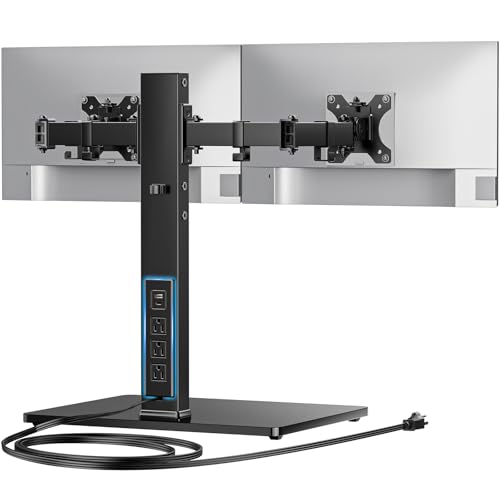
For professionals juggling multiple tasks or gamers seeking an immersive experience, the HUANUO Dual Monitor Mount with Power Outlet is a game changer. It supports 13″-32″ displays, holding up to 22 lbs for each monitor. The integrated power outlet features one USB-A, one USB-C, and three AC outlets, plus a 6.5 ft power cord, keeping your devices charged. With a sturdy tempered glass base and adjustable arms, you can achieve the perfect viewing angle while reducing neck strain. Installation is a breeze, and the mount’s mobility makes it a versatile choice for any workspace. Experience enhanced productivity today!
Best For: Professionals and gamers looking to enhance their workspace with dual monitors and convenient power options.
Pros:
- Integrated power outlet with USB-A, USB-C, and AC outlets for easy device charging.
- Adjustable arms provide flexibility in positioning monitors for optimal viewing angles.
- Sturdy tempered glass base ensures stability and support for heavy monitors.
Cons:
- Limited to monitors up to 32 inches, which may not accommodate larger screens.
- Height adjustment has only four levels, which may not suit all users’ preferences.
- Installation may require additional assistance if users are not comfortable with the setup process.
VIVO Freestanding Dual Computer Monitor and Laptop Combo Desk Stand

Designed for professionals aiming for efficiency, the VIVO Freestanding Dual Computer Monitor and Laptop Combo Desk Stand offers an impressive combination of versatility and stability. It accommodates screens up to 32 inches and laptops up to 17 inches, making it perfect for a triple display setup. With adjustable arms for tilting, swiveling, and rotating, you can customize your view effortlessly. The tempered glass base guarantees stability while protecting your desk from scratches. Installation is a breeze with included hardware, and cable clips help keep your workspace tidy. This stand’s design allows you to maximize productivity without compromising on style.
Best For: Professionals looking to enhance their workspace efficiency with a versatile and stable monitor and laptop stand.
Pros:
- Adjustable arms allow for customized viewing angles with tilt, swivel, and rotation capabilities.
- Sturdy tempered glass base ensures stability and prevents desk scratches.
- Easy installation and cable management features contribute to a tidy workspace.
Cons:
- Limited to screens weighing up to 22 lbs, which may restrict options for heavier monitors.
- Requires careful handling to maintain stability, especially when adjusting monitor positions.
- May take up more desk space compared to wall-mounted alternatives.
BONTEC Dual Monitor Stand Riser with Smartphone Holder

The BONTEC Dual Monitor Stand Riser with Smartphone Holder is perfect for busy professionals and gamers who want to enhance their workspace efficiency. With adjustable lengths from 31.5 to 42.5 inches, it elevates your monitors to eye level, promoting better posture and reducing strain during long hours. This ergonomic wooden organizer features three spacious compartments, keeping your keyboard, mouse, and other essentials tidy. Plus, the built-in smartphone holder and cable management opening keep your devices accessible and clutter-free. Assembly is a breeze, taking just three minutes. Enjoy a stable, organized workspace that supports a healthier workflow!
Best For: The BONTEC Dual Monitor Stand Riser is best for busy professionals and gamers seeking to improve their workspace organization and ergonomic comfort.
Pros:
- Adjustable length accommodates various desk sizes and monitor setups.
- Promotes better posture and reduces strain during extended use.
- Includes storage compartments and a smartphone holder for a clutter-free workspace.
Cons:
- Limited color options may not suit all aesthetic preferences.
- May not support extremely heavy monitors due to its design.
- Assembly, while quick, requires some basic tools and manual dexterity.
VIVO Dual Monitor Desk Mount (STAND-V002O)

Enhancing your workspace with the VIVO Dual Monitor Desk Mount (STAND-V002O) can greatly boost productivity for anyone juggling multiple tasks or projects. This mount accommodates screens from 17 to 32 inches, supporting weights up to 19.8 lbs. You’ll appreciate the mechanical spring adjustment for effortless monitor placement, plus the ability to tilt, swivel, and rotate your screens for customized viewing angles. By elevating your monitors, it reclaims valuable desk space, and with its sturdy C-clamp or grommet mount options, installation is a breeze. All hardware and clear instructions are included, making setup quick and simple. Optimize your workflow today!
Best For: Professionals and gamers looking to enhance their workspace by efficiently managing multiple monitors for improved productivity.
Pros:
- Supports a wide range of monitor sizes from 17 to 32 inches, accommodating both flat and curved screens.
- Easy installation with all necessary hardware and step-by-step instructions included.
- Customizable viewing angles with tilt, swivel, and rotation features for optimal comfort.
Cons:
- Arms extend past the edge of the desk, which may not be suitable for smaller workspaces.
- Weight limit of 19.8 lbs per screen may restrict the use of heavier monitors.
- Requires a sturdy desk to support the C-clamp or grommet mount effectively.
Kado Dual Monitor Setup – 2-Pack 27″ Curved Computer Monitors

If you’re a gamer or a creative professional seeking an immersive experience, the Kado Dual Monitor Setup with its 27″ curved screens is an excellent choice. The 1500R curvature reduces eye strain, letting you work or play longer without discomfort. With a 75Hz refresh rate and fast response times, you’ll enjoy seamless visuals and minimal ghosting during fast-paced action. Plus, the 100% sRGB color gamut guarantees vibrant, true-to-life colors for your projects. Custom gaming modes optimize performance for FPS and RTS games, while built-in speakers save desk space, enhancing both your work and gaming environments.
Best For: Gamers and creative professionals seeking an immersive dual-monitor experience with reduced eye strain and vibrant visuals.
Pros:
- Enhanced 75Hz refresh rate for smooth, responsive gaming and work.
- 1500R curved design minimizes eye strain and neck fatigue during extended use.
- Built-in speakers save desk space while providing quality audio for both gaming and multimedia tasks.
Cons:
- May require additional space on the desk due to the size and curvature of the monitors.
- Limited to 27″ size, which might not suit users preferring larger screens.
- Some users may find built-in speakers lacking in audio quality compared to external sound systems.
ErGear Dual Monitor Stand for 2 Screens up to 32 Inches

For professionals seeking to maximize their workspace, the ErGear Dual Monitor Stand is a game changer. This heavy-duty mount supports two screens up to 32 inches, each weighing up to 17.6 lbs. With adjustable arms and ergonomic features like +/-90° swivel and 360° rotation, you can customize your setup to reduce neck and eye strain. It elevates your monitors to eye level, freeing desk space for other essentials. Installation is straightforward, thanks to the detailed manual and compatibility with various table thicknesses. Plus, integrated cable management keeps your workspace tidy. Elevate your productivity with this versatile stand!
Best For: Professionals and gamers looking to enhance their productivity and workspace efficiency with dual monitor setups.
Pros:
- Heavy-duty support for monitors up to 32 inches and 17.6 lbs each, ensuring stability.
- Ergonomic adjustments reduce neck and eye strain, improving comfort during long hours of use.
- Integrated cable management keeps the workspace organized and clutter-free.
Cons:
- Limited compatibility with monitors that do not have VESA mounting holes or exceed the weight limit.
- Installation may require specific table conditions, potentially limiting where it can be used.
- Arm span may not be suitable for some desk setups, depending on available space and monitor sizes.
VIVO Premium Dual Ultra Wide Monitor Desk Mount (STAND-TS38C)
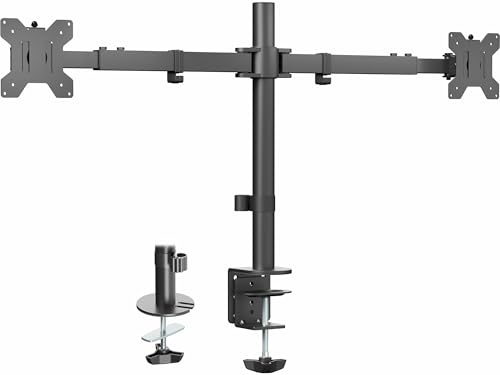
The VIVO Premium Dual Ultra Wide Monitor Desk Mount (STAND-TS38C) is perfect for professionals and gamers who require expansive screen real estate without compromising on desk space. This mount supports two ultrawide monitors up to 38 inches, each weighing up to 22 lbs, with robust VESA compatibility. You can securely attach it to your desk using a heavy-duty C-clamp or grommet mount, accommodating desktop thicknesses up to 3.25 inches. Its patented telescoping arms provide excellent stability and flexibility, allowing for impressive articulation with tilt, swivel, and rotation options. Installation’s a breeze, thanks to detachable VESA brackets and included hardware.
Best For: Professionals and gamers seeking to maximize screen real estate while maintaining an organized workspace.
Pros:
- Supports two ultrawide monitors up to 38 inches, providing ample screen space.
- Adjustable telescoping arms enhance stability and offer flexibility in positioning.
- Simple installation with detachable VESA brackets and included hardware.
Cons:
- Maximum desktop thickness of 3.25 inches may not accommodate all desk types.
- Limited to monitors weighing up to 22 lbs each, which may restrict some options.
- Some users may find the initial setup process time-consuming or complex.
WALI Dual Monitor Stand for Desk (MF002)
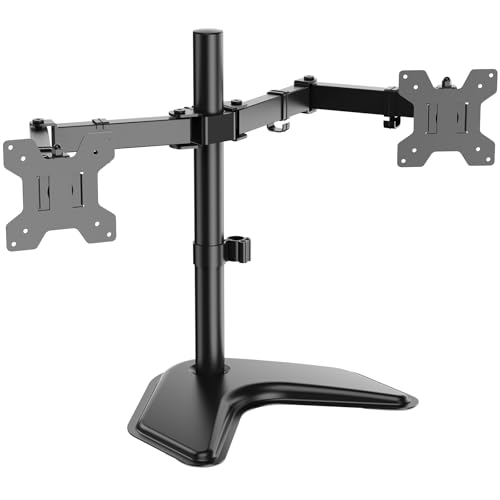
Designed for professionals and multitaskers, the WALI Dual Monitor Stand (MF002) supports two monitors up to 27 inches, making it an ideal choice for anyone looking to enhance productivity. With a sturdy V-Base, it guarantees stability on any desk while allowing full motion adjustments, including a 16” height pole and +/-90° tilt. The adjustable arms help you maintain an ergonomic position, reducing neck and eye strain. Its sleek design fits seamlessly into various environments, from homes to offices. Plus, you’ll receive a complete mounting hardware kit and US-based support, guaranteeing a smooth setup process.
Best For: Professionals and multitaskers looking to enhance productivity with dual monitor setups.
Pros:
- Ergonomic Design: Adjustable arms promote a comfortable viewing position, reducing neck and eye strain.
- Full Motion Adjustments: Features a 16” height pole, +/-90° tilt, swivel, and 360° rotation for optimal monitor positioning.
- Sturdy Construction: The heavy-duty V-Base ensures stability on any desk surface.
Cons:
- Limited Size Compatibility: Supports monitors only up to 27 inches and 22 lbs per arm, which may not suit larger setups.
- Assembly Required: Setup involves installing the mounting hardware, which may be challenging for some users.
- V-Base Footprint: The free-standing base may take up additional desk space compared to clamp-mounted alternatives.
Factors to Consider When Choosing Dual Monitor Desk Setups
When choosing a dual monitor desk setup, you’ll want to contemplate several key factors. Think about monitor size compatibility, weight capacity limits, and any adjustability features that may enhance your workspace. Don’t forget to assess the available mounting options and how much desk space you have to work with.
Monitor Size Compatibility
Choosing the right monitor size is essential for a successful dual monitor desk setup. Look for monitors that fit within the typical size range of 13 to 32 inches for compatibility with most mounts. It’s vital to check the VESA mounting hole specifications—either 75x75mm or 100x100mm—on the back of each monitor to guarantee proper installation. Additionally, consider the monitor arms’ weight capacity, which generally supports monitors weighing between 4.4 lbs and 22 lbs. Don’t forget to assess the range of motion offered by the monitor arms, as features like tilt, swivel, and rotation enhance your viewing experience. Finally, make sure your desk can accommodate the combined weight and dimensions, ensuring a clutter-free setup.
Weight Capacity Limits
One of the most important factors to evaluate in a dual monitor desk setup is the weight capacity limit of your monitor arms. Typically, these limits range from 17.6 lbs to 22 lbs per monitor, so you’ll want to verify your monitors fit within this range. It’s vital that the combined weight of both monitors doesn’t exceed the maximum limit specified by the stand, as doing so can compromise stability and safety. Different mounting methods, like C-clamp or grommet mount, may support varying weight capacities, so understanding these specifications is key. Regularly reassess the weight of your monitors and any accessories, too, because exceeding the limit can lead to mechanical failure or damage that you’d prefer to avoid.
Adjustability Features Available
After ensuring your monitors fit within the weight capacity limits of your desk setup, it’s time to contemplate how adjustability can enhance your experience. Look for dual monitor mounts that offer tilt capabilities from +90° to -90°, allowing you to customize your viewing angles for ideal comfort. Swivel functions with 180° rotation make it easy to share screens or change monitor orientations without moving the entire setup. Full 360° rotation enables you to switch between portrait and landscape modes effortlessly. Height adjustment options along the center pole help position monitors at eye level, reducing neck strain. Some mounts even feature mechanical spring adjustments for tool-free monitor placement, accommodating various tasks and user heights with ease.
Mounting Options Offered
When setting up a dual monitor desk, it’s essential to contemplate the different mounting options available, as they can greatly impact your workspace’s functionality. You typically have two main options: C-clamp and grommet mounts. C-clamp mounts fit desk thicknesses from 0.39 inches to 3.25 inches, securing your monitors while saving desk space. On the other hand, grommet mounts require a pre-drilled hole and accommodate thicknesses of 0.39 to 2.17 inches for stability. If you can’t clamp or drill, consider mounts with heavy-duty bases for free-standing support. Your choice will influence monitor positioning and ergonomic benefits, allowing for adjustments in tilt, swivel, and height to optimize your viewing comfort and productivity.
Desk Space Requirements
Choosing the right desk for your dual monitor setup is just as important as the mounting options. First, measure your desk width to guarantee it can fit both monitors along with any stands or mounts. Don’t forget about desk thickness, especially if you’re using clamp or grommet mounts, as these often require specific thicknesses between 0.59 to 3.54 inches. Depth matters too; aim for 20 to 30 inches for comfortable viewing distances. Check for cross beams or panels beneath the desk, as they can limit your mounting options and affect stability. Finally, consider the overall weight capacity, since larger screens can add significant load. Proper planning guarantees a productive workspace.
Ergonomic Design Considerations
To create a truly productive dual monitor setup, keep ergonomic design at the forefront of your planning. Position the top of each screen at or just below eye level to reduce neck strain during long hours. Aim for monitors about an arm’s length away—20 to 30 inches—to minimize eye fatigue. Using adjustable monitor arms lets you tilt, swivel, and rotate screens for ideal viewing angles, promoting better posture. Make sure your keyboard is at elbow height to maintain a neutral wrist position while typing, which helps avoid strain. Finally, incorporate cable management to keep your workspace tidy, reducing distractions and enhancing your overall comfort and efficiency. Prioritizing these ergonomic factors will greatly boost your productivity.
Installation Process Ease
Ergonomic design plays an essential role in enhancing your dual monitor setup, but the installation process can also impact your productivity. Look for dual monitor stands with detachable VESA bracket plates to simplify mounting and make installation a breeze. Verify the product includes all necessary hardware and clear instructions for a straightforward setup experience. Consider designs with multiple mounting options, like C-clamp or grommet mounts, to fit various desk thicknesses. Freestanding bases require less installation effort and can easily be repositioned on any surface. Finally, select models that offer easy adjustments, such as tool-free height and angle changes, enabling you to quickly arrange your monitors for maximum use without hassle.