
Choosing a home security system can feel complicated when you are comparing sensors, cameras, apps, sirens, and monitoring plans. The best beginner-friendly kits simplify installation while covering the entry points and rooms that matter most.
This roundup compares ten options across DIY setup, wireless connectivity, smart-home compatibility, camera coverage, alerts, and monthly fees, so you can choose protection that fits your home and comfort level.
Best 10 Home Security Systems for Beginners Picks for 2026
Best Expandable Starter Kit

- Includes two keypads, eight contact sensors, and two motion detectors
- App notifications with optional professional monitoring
- Expandable and compatible with Alexa through a Ring Protect Plan
Best For: 2- to 4-bedroom homes needing broad starter coverage
Best Beginner Learning Guide
Home Security Made Easy for Seniors and Beginners

- 142-page guide for choosing and installing security devices
- Explains cameras, smart locks, alarms, sensors, and apps
- Includes troubleshooting guidance in beginner-friendly language
Best For: First-time users who want instruction before buying equipment
Best No-Fee DIY Alarm
21-Piece WiFi Home Alarm System

- 21-piece kit with sensors, remotes, control panel, and siren
- Smart Life/Tuya app alerts and remote control
- No monthly fees; includes battery backup and Alexa compatibility
Best For: DIY users wanting expandable WiFi protection without subscriptions
Best Monitored DIY Starter
Cove 6-Piece Home Security System

- Self-install wireless kit with keypad, sensors, key fob, and motion sensor
- Includes three months of 24/7 professional monitoring
- Choose an indoor camera, outdoor camera, or video doorbell
Best For: Beginners wanting DIY setup with included professional monitoring
Best Camera Coverage
Hiseeu 5MP Wireless Security Camera System

- Four 5MP waterproof cameras with color night vision
- 500GB storage for 24/7 recording
- Expandable 10-channel NVR with app access
Best For: Homeowners wanting multi-camera, continuous video coverage
Best Security Planning Guide
Impenetrable Home Security Guide
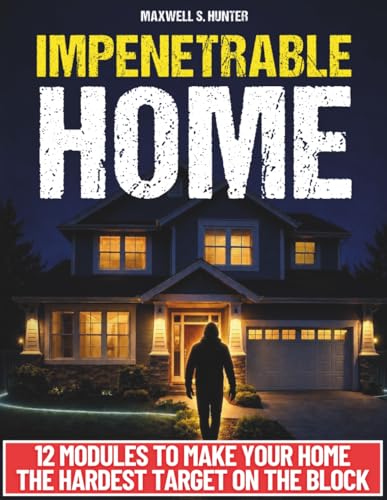
- 12 modules covering common home vulnerabilities
- Includes camera and alarm selection guidance
- Budget plans designed for renters and homeowners
Best For: Beginners who want a practical security plan before buying gear
Best DIY Alarm Starter Kit
PGST 22-Piece Wireless Home Security System

- 22-piece kit with sensors, camera, remotes, and SOS device
- App, WiFi, and optional 4G alert connectivity
- No monthly fees after activation
Best For: Apartment residents wanting a customizable DIY alarm system
Family-Friendly Choice
Touchscreen GSM/WiFi Alarm System

- 4.3-inch touchscreen and multilingual controls
- Pre-paired accessories simplify installation
- WiFi plus 2G/4G connectivity with app alerts
Best For: Families, seniors, and small businesses needing a highly accessible alarm kit
Cellular Backup Pick
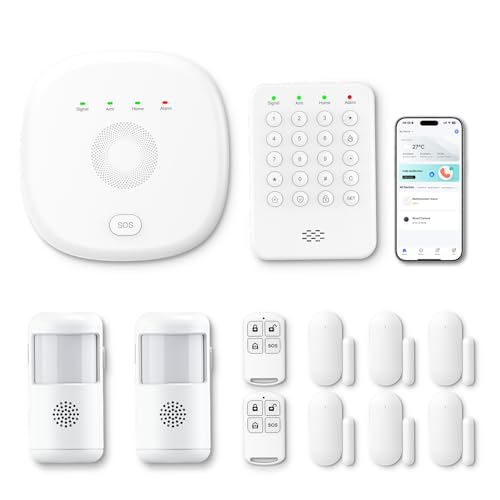
- Includes entry sensors, motion detectors, keypad, and remotes
- Switches to 4G when WiFi disconnects
- App, Alexa, and expandable sensor support
Best For: Three- to five-bedroom homes wanting cellular backup without monthly fees
Best Expandable Starter Kit – Ring Alarm 14-Piece Kit
For beginners comparing home security systems for beginners, the Ring Alarm 14-Piece Kit offers broad starter coverage for a 2- to 4-bedroom home. It includes two keypads, eight contact sensors, two motion detectors, a base station, and a range extender, with app notifications and optional professional monitoring.
Best For: Homeowners who want a well-equipped, expandable system with app control and Alexa compatibility.
Pros:
- Includes sensors for multiple doors and windows plus two motion detectors.
- Keypads and the Ring app provide straightforward arm and disarm control.
- Expandable with additional Ring Alarm sensors and accessories.
- Optional 24/7 professional monitoring and Alexa voice control are available with a compatible Ring Protect Plan.
Cons:
- Some advanced features and professional monitoring require a separately sold Ring Protect Plan.
- The larger kit may provide more equipment than a small apartment needs.
This is a practical starting point when you want more than a minimal alarm kit and expect your security needs to grow. Review the optional-plan costs before buying if professional monitoring is important to you.
Best Beginner Learning Guide – Home Security Made Easy for Seniors and Beginners
For shoppers new to home security systems for beginners, this 142-page guide explains how to choose, install, and use modern security devices. It covers cameras, smart locks, alarms, motion sensors, mobile apps, troubleshooting, and routine system management in accessible language.
Best For: Seniors and first-time users who want step-by-step guidance before choosing or managing a security system.
Pros:
- Written specifically for seniors and beginners.
- Covers selecting and installing cameras, alarms, smart locks, and motion sensors.
- Includes guidance for mobile apps and common troubleshooting tasks.
- Uses practical instructions and real-life examples without emphasizing technical jargon.
Cons:
- This is an educational book, not a security system or monitoring service.
- It cannot provide direct protection, alerts, or emergency response.
- Information may not address every specific brand or device.
This book is best used as a preparation and confidence-building resource. It can help clarify what to look for and how systems generally work, but you will still need to purchase and configure the equipment separately.
Best No-Fee DIY Alarm – 21-Piece WiFi Home Alarm System
For beginners seeking home security systems for beginners without a recurring monitoring fee, this 21-piece WiFi alarm system combines door and window sensors, motion detection, a control panel, remotes, and a siren. It uses the Smart Life or Tuya app for remote control and push notifications over 2.4GHz WiFi.
Best For: DIY users who want app alerts, a loud local siren, and expandable coverage without monthly fees.
Pros:
- Includes 21 pieces with contact sensors, motion detection, remotes, a control panel, and siren.
- No monthly fees or SIM card are required for the WiFi-based setup.
- Supports Smart Life/Tuya app control, Alexa, and customizable sensor names.
- 120dB siren, tamper alerts, and up to 48 hours of battery backup add useful safeguards.
Cons:
- Requires a 2.4GHz WiFi connection for its dedicated connectivity.
- App notifications and remote control depend on the network and compatible app setup.
- The system is DIY-focused and does not list included professional monitoring.
This kit suits buyers who prioritize a large sensor bundle and ongoing cost control. Confirm that your home has suitable 2.4GHz WiFi coverage and that app-based alerts meet your expectations.
Best Monitored DIY Starter – Cove 6-Piece Home Security System
For beginners comparing home security systems for beginners, the Cove 6-Piece DIY system combines self-installation with three months of 24/7 professional monitoring. The kit includes a keypad control panel, three window or door sensors, a key fob, and a motion sensor, plus a choice of indoor camera, outdoor camera, or video doorbell.
Best For: First-time users who want simple wireless setup and a trial period of professional monitoring.
Pros:
- Designed for installation without a technician, wiring, tools, or an appointment.
- Includes three months of 24/7 professional monitoring.
- Lets buyers choose an indoor camera, outdoor camera, or video doorbell.
- App control supports arming, disarming, real-time alerts, and system-status checks.
Cons:
- The kit includes only three door or window sensors and one motion sensor.
- Professional monitoring is included for three months, so ongoing service terms should be reviewed.
- The listed wireless range is 150 feet, which may require consideration in larger homes.
Cove is a strong introductory option when guided DIY installation and professional monitoring matter more than a large initial sensor count. Its expandable design also gives beginners a path to add coverage later.
Best Camera Coverage – Hiseeu 5MP Wireless Security Camera System
For beginners comparing home security systems for beginners, the Hiseeu system offers a practical starting point for monitoring several areas at once. It includes four 5MP cameras, a 500GB hard drive, color night vision, motion alerts, and remote viewing through the HiseeCloud app.
Best For: Homeowners who want continuous recording and multi-camera coverage without assembling a system component by component.
Pros:
- Includes four IP66 waterproof 5MP cameras and a pre-paired NVR.
- 500GB hard drive supports 24/7 recording and more than 45 days of storage, according to the supplied notes.
- Color night vision, motion alerts, two-way audio, and remote smartphone viewing add useful monitoring features.
- The 10-channel NVR can be expanded with additional compatible cameras.
Cons:
- The cameras require corded electric power, so installation still involves running power connections.
- Wireless range and video performance can vary with home layout and signal conditions.
- The system may involve more setup than a simple single-camera solution.
Choose this Hiseeu kit if your priority is broad, always-on video coverage and local storage. Its expandable NVR makes it more flexible than a fixed four-camera package, while the app provides access when you are away.
Best Security Planning Guide – Impenetrable Home Security Guide
For people researching home security systems for beginners, this book provides a nontechnical way to evaluate and improve home protection before buying equipment. Its 12 modules cover doors, windows, garages, alarms, cameras, routines, package theft, and household coordination.
Best For: Renters, homeowners, and families who want a step-by-step security plan that can be adapted to different budgets and living situations.
Pros:
- Explains how to identify common visibility and access weaknesses around a home.
- Includes guidance on choosing and configuring alarms and cameras.
- Offers budget plans ranging from a $50 quick fix to a $500 upgrade.
- Addresses rental properties and HOA restrictions without requiring contractors.
Cons:
- This is a 190-page guide, not a physical alarm, camera, or hardware kit.
- Readers must purchase and install any recommended equipment separately.
- Its usefulness depends on applying the advice to your specific home.
This is a useful first step if you are unsure what protection your home actually needs. It can help beginners prioritize low-cost physical improvements and make more informed choices about cameras and alarms.
Best DIY Alarm Starter Kit – PGST 22-Piece Wireless Home Security System
Among home security systems for beginners, this PGST kit is designed for quick DIY installation and app-based control. The 22-piece package combines door and window sensors, motion detectors, a 2K camera, alarms, remote controls, and WiFi plus 4G connectivity without monthly fees.
Best For: Apartment dwellers and families who want an expandable alarm system with app notifications, optional 4G alerts, and no recurring service charge.
Pros:
- 22-piece package provides multiple sensors, a camera, remotes, and an emergency SOS device.
- Smart Life and Tuya app control supports remote monitoring and custom sensor naming.
- WiFi and 4G connectivity can provide app, phone-call, and SMS alerts after activation.
- Works with Alexa and includes a color screen for system status and related information.
Cons:
- The system supports 2.4GHz WiFi, not 5GHz WiFi.
- A microSD card is sold separately for camera storage.
- Its alarm and 4G functions require configuration, including an inserted SIM card for cellular alerts.
This PGST kit makes sense for beginners who prefer an alarm-focused setup rather than a camera-only system. Its included sensors and no-monthly-fee design offer a straightforward starting point, while the expandable platform leaves room to customize coverage.
Family-Friendly Choice – Touchscreen GSM/WiFi Alarm System
For beginners comparing home security systems for beginners, this 24-piece RenseCum kit focuses on simple controls and broad connectivity. Its 4.3-inch color touchscreen, pre-paired accessories, Smart Life/Tuya app support, and WiFi plus 2G/4G connection give households several ways to manage alerts.
Best For: Families, seniors, or small businesses wanting a beginner-friendly system with many included accessories and cellular backup.
Pros:
- 4.3-inch color touchscreen with a multilingual menu and straightforward arm/disarm controls.
- Factory-pre-paired accessories are designed for a simple three-step setup.
- Supports app push alerts plus SMS or voice calls when a GSM card is used.
- Includes SOS controls and 2.4GHz WiFi with 2G/4G backup connectivity.
Cons:
- 5GHz WiFi is not supported.
- Voice calls and SMS require a GSM card.
- The large 24-piece kit may include more components than a small apartment needs.
This is a practical beginner option when easy operation, emergency controls, and cellular backup matter more than a minimalist setup. The included 24 accessories also give it flexibility for covering multiple entry points.
Smart-Home Starter – Expandable WiFi Alarm Kit
This YISEELE kit is a straightforward entry point for shoppers researching home security systems for beginners. The hub, four door/window sensors, remote, and 120dB siren install wirelessly, while Smart Life app control and Alexa or Google Home compatibility make everyday arming and alerts accessible.
Best For: Apartments, houses, and small businesses that want quick DIY installation, smart-home integration, and room to expand.
Pros:
- Includes four door/window sensors, a remote control, hub, and 120dB siren.
- App provides remote arm/disarm, event records, and instant push notifications.
- Supports Alexa and Google Home voice control for common security modes.
- Can support up to 100 accessories, including motion, smoke, and water-leak sensors.
Cons:
- Works with 2.4GHz WiFi, not 5GHz.
- The listed maximum range is 10 meters.
- Additional accessories are needed for broader coverage beyond the included kit.
With self-adhesive installation estimated at about 15 minutes, this system suits beginners who want a basic starting point without monthly fees and the option to add sensors later.
Cellular Backup Pick – PGST 12-Piece Security Kit
The PGST 12-piece kit is a strong consideration for beginners comparing home security systems for beginners across a three- to five-bedroom home. It combines a keypad, four door/window sensors, two motion detectors, two remotes, and a base station with Smart Life/Tuya app control and automatic 4G fallback when WiFi disconnects.
Best For: Three- to five-bedroom homes or small businesses needing motion detection, cellular backup, and no monthly subscription.
Pros:
- Includes two motion detectors, four entry sensors, two remotes, a keypad, and base station.
- Automatically switches to 4G if the WiFi connection drops.
- Supports Smart Life/Tuya app alerts and Alexa arm/disarm commands.
- Expandable with additional sensors and compatible PGST cameras purchased separately.
Cons:
- Camera monitoring requires separately purchased PGST cameras.
- Uses 2.4GHz WiFi rather than 5GHz.
- The 12-piece configuration may require extra sensors for larger or more complex properties.
This kit balances beginner-friendly wireless installation with broader coverage than a very small starter package. Its WiFi-to-4G switching is particularly useful for shoppers who want the system to stay connected without monthly monitoring charges.
How We Picked the Best Home Security Systems for Beginners
We focused on systems and resources that help first-time buyers understand, install, and manage home protection. Key considerations included wireless setup, included sensors, app control, alarm volume, camera capability, cellular or Wi-Fi connectivity, expansion options, and monitoring requirements. We also noted whether a product appears designed for a complete security installation or mainly for education and planning.
Because product packages and service terms can change, verify the current contents, compatibility, warranty, storage policy, and monitoring price before ordering. A kit with a low upfront cost may require subscriptions for professional monitoring, cloud video, cellular backup, or advanced app features.
Quick Comparison
| What to Compare | Best For | What to Check |
|---|---|---|
| DIY wireless alarm kits | Renters and first-time users | Sensor count, app reliability, Wi-Fi requirements |
| Systems with cellular backup | Homes needing protection during internet outages | SIM service, coverage, and subscription terms |
| Camera-based systems | Visual verification and outdoor monitoring | Resolution, night vision, storage, and privacy controls |
| Professionally monitored systems | People who want emergency-response support | Contract length, monthly fees, cancellation rules |
Key Buying Factors for Home Security Systems for Beginners
Coverage and Installation
Count exterior doors, accessible windows, garages, and high-traffic areas before choosing a kit. Wireless sensors are usually easier to install, but confirm battery access and whether the hub needs a constant power and internet connection. Renters may prefer adhesive mounts and equipment that can move to a new address.
Monitoring and Ongoing Costs
Some alarms work without monthly fees, while others reserve professional monitoring, cellular backup, or video storage for subscribers. Decide whether you want self-monitoring through phone alerts or a service that can contact emergency responders. Read renewal and cancellation terms carefully.
Smart Features and Privacy
Alexa compatibility, mobile alerts, remote arming, schedules, and automation can make a system easier to use. For cameras, review local versus cloud recording, account security, two-factor authentication, microphone controls, and how long footage is retained.
Reliability and Expansion
Look for clear low-battery alerts, tamper detection, loud local alarms, and a dependable app. If you may add smoke, flood, motion, or extra door sensors later, check the supported device limit and accessory compatibility before buying.
Who Should Buy Which Home Security Systems for Beginners?
- Choose a simple wireless alarm kit if you want affordable DIY coverage for doors and windows without a complicated installation.
- Choose a Ring or Cove-style ecosystem if polished apps, guided setup, and optional professional monitoring are more important than avoiding subscriptions.
- Choose a camera-focused system if confirming activity visually, recording events, or monitoring a larger property is your main priority.
- Choose Wi-Fi plus GSM/4G equipment if cellular backup is important, but confirm network support and service activation in your area.
- Choose a beginner security guide if you are still planning coverage, comparing threats, or helping a senior household member learn the basics before purchasing equipment.
For most first-time buyers, start with the smallest system that covers every exterior entry point, then expand only where a clear security gap remains.