
Protecting your home does not have to mean paying for an expensive installation or a long-term monitoring contract. Today’s budget home security systems can combine wireless sensors, app alerts, sirens, cameras, and optional cellular connectivity in flexible DIY kits.
We compare 10 affordable options for apartments, houses, small businesses, and rental properties, focusing on setup, coverage, subscription requirements, remote access, and everyday usability.
Best 10 Budget Home Security Systems Picks for 2026
Best Overall

- Designed for 1- to 2-bedroom homes
- Includes entry, motion, and keypad components
- Optional app upgrades and professional monitoring
Best For: Small homes wanting expandable Ring app security
Best No-Fee Setup
WiFi Alarm System with App Alerts

- No stated monthly subscription fee
- Includes 10 door sensors and a 120dB siren
- Requires 2.4GHz Wi-Fi
Best For: Homes needing broad entry-point coverage on a budget
Best With Camera
SimpliSafe 9-Piece Wireless System

- Includes a 1080p indoor SimpliCam
- Four entry and two motion sensors
- Optional no-contract professional monitoring
Best For: US households wanting camera coverage and monitoring flexibility
Best Simple No-Fee Kit
eufy Security 5-Piece Alarm Kit
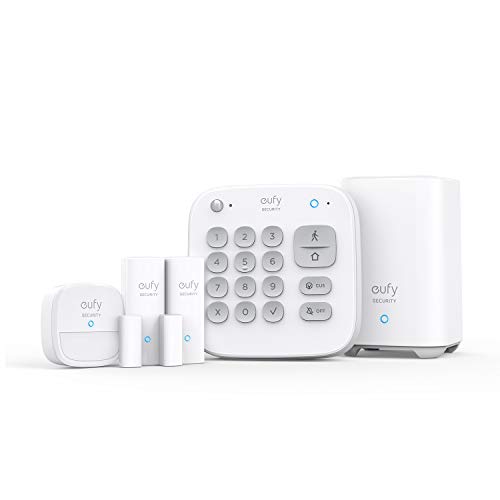
- Includes HomeBase, keypad, motion, and two entry sensors
- DIY wireless installation
- No monthly fees stated
Best For: Small spaces needing basic app-based alarm coverage
Best Overall Coverage
24-Piece Wireless DIY Alarm System
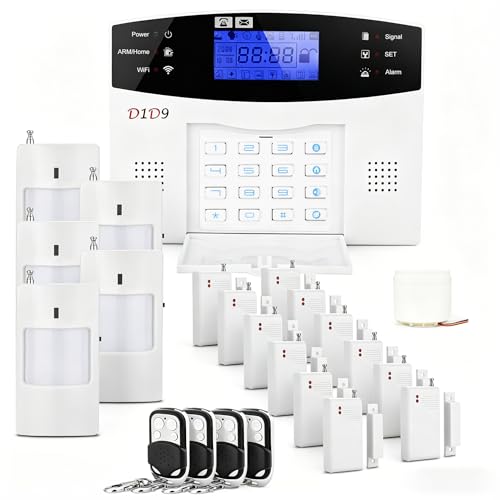
- 24-piece kit covers doors, windows, and rooms
- Wi-Fi/4G app alerts with no monthly fee
- Self-adhesive DIY installation
Best For: Homes and small businesses needing broad starter-kit coverage
Best Smart-Home Pick

- Includes base station, nine contact sensors, and two remotes
- App alerts plus Alexa and Google Assistant control
- Expandable to 20 sensors and five remotes/keypads
Best For: 2.4GHz Wi-Fi homes wanting voice and app control
Best Cellular-Alert Value
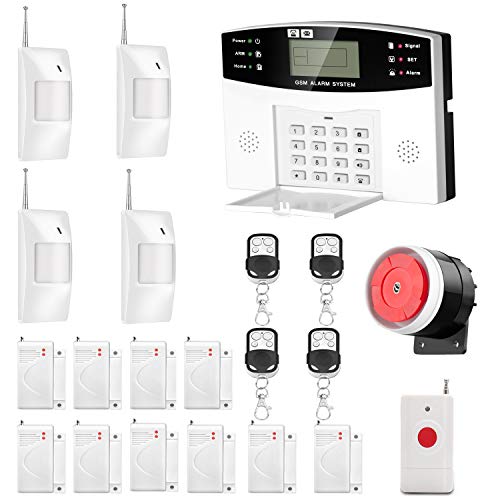
- Sends automated calls and SMS through a GSM SIM
- Supports up to 99 wireless and seven wired zones
- Includes emergency calling and scheduled arm/disarm
Best For: Properties needing expandable cellular alerts without a security contract
Best No-Subscription Value

- Includes 10 door sensors plus motion detection
- App alerts, Alexa support, and 120dB siren
- Expandable with no monthly fees
Best For: Homes needing broad door-entry coverage on a budget
Best Cellular Backup
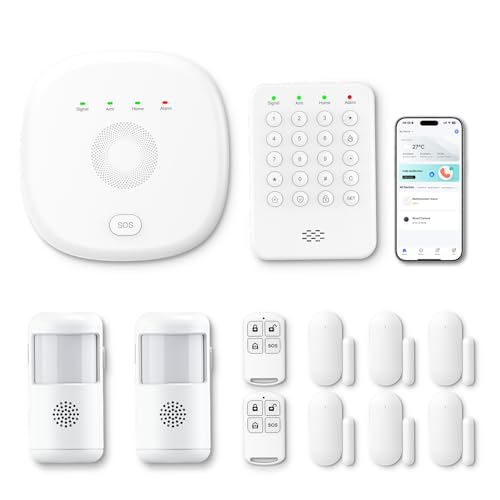
- WiFi automatically switches to 4G
- Includes two motion detectors and four entry sensors
- App, Alexa, and no monthly charges
Best For: Three- to five-bedroom homes needing backup connectivity
Best for Smart-Home Voice Control

- Works with Alexa and Google Home
- Supports up to 100 accessories
- Includes app alerts and remote SOS
Best For: Renters and smaller homes planning to expand
Best Overall – Ring Alarm 8-Piece Kit
For shoppers comparing budget home security systems, the Ring Alarm 8-Piece Kit offers a practical starting point for a 1- to 2-bedroom home. It includes the core sensors and keypad needed for basic entry and motion detection, with app alerts and optional professional monitoring available as your needs grow.
Best For: Small homes that want app control, Alexa compatibility, and optional professional monitoring.
Pros:
- Includes a base station, keypad, four contact sensors, motion detector, and range extender.
- Ring app notifications help you monitor triggered sensors and connected Ring devices.
- Optional Ring Protect features include remote arming, Wi-Fi backup, and 24/7 professional monitoring.
- Additional sensors and accessories can expand coverage.
Cons:
- Some advanced features and professional monitoring require a separately sold Ring Protect Plan.
- The included kit is primarily sized for 1- to 2-bedroom homes.
This is a flexible choice if you want to start with essential protection and add equipment later. Keep the optional subscription costs in mind when comparing total ownership expenses.
Best No-Fee Setup – WiFi Alarm System with App Alerts
This DIY option stands out among budget home security systems for its stated lack of monthly fees and generous sensor count. It combines app alerts, a 120dB indoor siren, backup battery power, and wireless installation, though it requires a 2.4GHz Wi-Fi network.
Best For: Budget-conscious households seeking many entry sensors without subscription costs.
Pros:
- Includes 10 door sensors, a motion sensor, keypad, two remotes, and a Wi-Fi base station.
- Provides mobile app alerts without a monthly fee.
- A 120dB siren and up to 8 hours of backup battery support local protection during outages.
- Supports expansion up to 20 sensors and five remote controls or keypads.
Cons:
- Works only with 2.4GHz Wi-Fi and does not support 5GHz networks.
- App alerts and system operation depend on Wi-Fi connectivity.
- The included motion sensor count is limited to one.
Its large number of door sensors makes this system appealing for covering multiple entry points at a low ongoing cost. Verify your router supports 2.4GHz Wi-Fi before buying.
Best With Camera – SimpliSafe 9-Piece Wireless System
The SimpliSafe 9-Piece System is a strong fit for shoppers seeking budget home security systems with indoor video and an optional monitoring path. Its package combines entry and motion sensors with a 1080p SimpliCam, while the app supports remote arm and disarm control.
Best For: Households wanting an indoor camera, room coverage, and optional no-contract professional monitoring.
Pros:
- Includes four entry sensors, two motion sensors, a wireless keypad, base station, and SimpliCam indoor camera.
- The 1080p camera includes a built-in stainless steel privacy shutter.
- Optional professional monitoring has no long-term contract or hidden fees, according to the supplied notes.
- Works with Amazon Alexa and Google Assistant for smart-home control.
Cons:
- Professional monitoring is an optional paid service after the included free month.
- The camera is a wired indoor model rather than an outdoor camera.
- Products and monitoring are offered and supported only in the US.
This package offers broader room coverage than a basic entry alarm because it includes two motion sensors and an indoor camera. It is particularly useful if visual verification and optional emergency response matter to you.
Best Simple No-Fee Kit – eufy Security 5-Piece Alarm Kit
For a straightforward entry-level choice among budget home security systems, the eufy Security 5-Piece Alarm Kit keeps the setup focused. It includes a HomeBase, keypad, motion sensor, and two entry sensors, with app alerts and no monthly fees stated in the supplied notes.
Best For: Small spaces that need basic door, motion, and keypad protection without recurring fees.
Pros:
- Includes HomeBase, keypad, motion sensor, and two entry sensors.
- Designed for DIY installation using included mounts and adhesive installation.
- eufy states that its security products are one-time purchases with no monthly fees.
- The eufy Security app sends alerts when motion or a breach is detected.
Cons:
- Includes fewer entry sensors than the Ring, SimpliSafe, and tolviviov kits listed here.
- The package includes only one motion sensor.
- No professional monitoring option is specified in the supplied notes.
This compact kit is best for buyers who want essential wireless detection without building a large system. Its smaller sensor count may require additional equipment for larger homes or multiple entry points.
Best Overall Coverage – 24-Piece Wireless DIY Alarm System
For shoppers comparing budget home security systems, this 24-piece kit offers broad coverage with door and window sensors, motion detectors, remotes, and a siren. Its self-adhesive setup is designed for DIY installation, while app alerts work through Wi-Fi or 4G connectivity. A SIM card or Wi-Fi connection is required.
Best For: Families, small businesses, offices, or vacation properties needing a larger starter kit without a monthly subscription.
Pros:
- Includes 24 pieces for covering multiple entry points and areas.
- DIY, self-adhesive installation can be completed without professional installation.
- Supports app alerts and control through 4G or Wi-Fi connectivity.
- Expandable design allows additional sensors or smart-device integration.
Cons:
- Requires a SIM card or Wi-Fi connection.
- Replacement batteries may be needed because the included batteries are described as gifts.
This is a strong fit when coverage and flexible connectivity matter more than a compact setup. Confirm your network and battery requirements before buying.
Best Smart-Home Pick – 12-Piece Wi-Fi Alarm Kit
This 12-piece option is a practical choice among budget home security systems for users who want app access and voice control. The kit includes a base station, nine contact sensors, and two remotes, with expansion support for additional sensors and compatible detectors. It operates on 2.4GHz Wi-Fi only.
Best For: Apartments, homes, garages, or offices where smartphone control and Alexa or Google Assistant compatibility are priorities.
Pros:
- Includes nine door sensors, two remotes, and a base station.
- Provides real-time mobile notifications when sensors are triggered.
- Supports Away, Disarm, and Home voice controls with Alexa and Google Assistant.
- Can expand to up to 20 sensors and five remotes or keypads.
Cons:
- Works only with 2.4GHz Wi-Fi, not 5GHz networks.
- The base station must remain connected to AC power; backup battery support is listed for eight hours.
Choose this kit if smart-home integration is more important than cellular backup. Its included contact sensors make it especially suitable for monitoring multiple doors and windows.
Best Cellular-Alert Value – GSM Auto-Dial Alarm System
Among budget home security systems, this AGSHOME kit stands out for GSM calling and SMS alerts instead of relying on Wi-Fi. After inserting a compatible GSM SIM card, the panel can call or text preset contacts when a sensor is triggered. It also supports extensive zone expansion and tool-free setup.
Best For: Homes or larger properties that need cellular alarm notifications, emergency calling, and substantial sensor-zone capacity.
Pros:
- Uses a GSM SIM card to send SMS alerts and place automated calls.
- Supports up to 99 wireless zones and seven wired zones.
- Allows up to six preset alarm-call numbers and two help-SMS numbers.
- Includes emergency controls, scheduled arm/disarm functions, and a 10-second voice recording.
Cons:
- GSM SIM card is not included and requires cellular service charges.
- Setup depends on reading and configuring the supplied manual.
- Maximum listed range is 20 meters.
This system is best when cellular communication and expandability outweigh app-based convenience. Verify SIM compatibility and coverage with your carrier before installation.
Best No-Subscription Value – 15-Piece DIY WiFi Alarm Kit
For shoppers comparing budget home security systems, this 15-piece kit offers broad entry-point coverage without a monthly fee. It combines app control, door sensors, a motion sensor, remotes, and a 120dB siren in a wireless DIY setup.
Best For: Households wanting many door sensors and straightforward no-subscription protection.
Pros:
- Includes 10 door sensors, one motion sensor, two remotes, and a keypad.
- App control and real-time smartphone alerts support remote management.
- Expandable to up to 20 sensors and five remotes or keypads.
- Works with Alexa and includes a loud 120dB siren.
Cons:
- Works only with 2.4GHz WiFi, not 5GHz networks.
- Uses battery power and alkaline cells.
This is a strong budget pick when the included door sensors matter most. Confirm that your home network supports 2.4GHz WiFi before buying.
Best Cellular Backup – PGST 12-Piece WiFi and 4G Kit
This PGST kit stands out among budget home security systems by combining 2.4GHz WiFi with 4G connectivity. Its automatic switch to 4G when WiFi disconnects can help keep the system connected, while app controls and alerts avoid recurring subscription charges.
Best For: Three- to five-bedroom homes seeking WiFi and 4G connectivity in one expandable kit.
Pros:
- Includes a base station, keypad, four door or window sensors, two motion detectors, and two remotes.
- Automatically switches to 4G when WiFi disconnects.
- Supports Smart Life or Tuya app control, Alexa, and mobile notifications.
- No monthly fees or subscription charges are listed.
Cons:
- Additional sensors and PGST cameras are purchased separately.
- WiFi connectivity is specified as 2.4GHz.
Choose this model if connection continuity is a priority and you want app-based control without monthly charges. Its included motion detectors also provide more varied coverage than a door-sensor-only starter kit.
Best for Smart-Home Voice Control – Expandable WiFi Alarm System
Among budget home security systems, this YISEELE kit is a compact option for apartments, houses, and small businesses. It pairs Smart Life app alerts with Alexa and Google Home compatibility, a 120dB siren, and an expandable hub that supports up to 100 accessories.
Best For: Renters or homeowners who want voice control, quick adhesive installation, and room to expand.
Pros:
- Includes four door or window sensors, a remote, and a hub with a rechargeable backup battery.
- Supports Alexa and Google Home voice commands.
- Expands to up to 100 accessories, including motion, smoke, and water-leak sensors.
- Offers app alerts, SOS on the remote, and a stated two-year replacement warranty.
Cons:
- Requires 2.4GHz WiFi; 5GHz is not supported.
- The included kit has fewer sensors than the 12- and 15-piece alternatives.
- Additional accessories are needed for broader protection.
This is a practical starter system when smart-home integration and future expansion matter more than the number of included sensors. Its self-adhesive installation is also suited to renters and smaller spaces.
How We Picked These Budget Home Security Systems
We focused on the features that matter most when choosing affordable security equipment: sensor count, wireless range, app functionality, alarm volume, backup communication, installation requirements, and ongoing fees. The list includes systems with no required subscription as well as kits offering optional professional monitoring.
Because product bundles vary, check the current listing carefully before buying. A “12-piece” or “15-piece” package may count the control panel, remotes, siren, and sensors separately. Compatibility with Alexa, Wi-Fi bands, cellular networks, and third-party cameras can also differ between versions.
Quick Comparison
| Best For | Look For | Typical Advantage |
|---|---|---|
| Simple DIY protection | Wi-Fi hub, door sensors, app alerts | Easy installation and low upfront cost |
| Professional monitoring | Optional 24/7 service | Emergency response support when you are away |
| Large homes | More sensors and expandable zones | Coverage for multiple doors, windows, and rooms |
| Rural or unreliable internet | GSM or 4G backup | Alerts may continue during an internet outage |
| No-subscription security | Local siren and app notifications | Lower long-term ownership cost |
Key Buying Factors for Budget Home Security Systems
Coverage and Expandability
Count every entry point you want to protect, including doors, accessible windows, garages, and detached spaces. Extra sensors are useful, but only if the hub supports enough zones and the accessories are compatible with the system.
Monitoring and Monthly Costs
Some systems work with app alerts and a local siren at no recurring cost. Others add optional professional monitoring, cloud video storage, or cellular service. Compare the total cost over the first year and confirm which features stop working without a subscription.
Connectivity and Backup
Wi-Fi is convenient for app control, but a system with GSM or 4G capability can offer an additional communication path. This is especially useful where internet service is inconsistent. Confirm cellular compatibility in your region before purchasing.
Installation and Daily Use
Look for peel-and-stick or screw-mounted sensors, a clearly labeled app, adjustable entry delays, and accessible controls. A system is more effective when everyone in the household can arm and disarm it correctly.
Alert Quality and Privacy
Check whether alerts identify the specific sensor, support multiple users, and allow customizable notifications. For camera-equipped systems, review storage options, account security, privacy controls, and whether video requires a paid plan.
Who Should Buy Which Budget Home Security Systems?
Choose a basic Wi-Fi kit if you want inexpensive entry-point alerts for an apartment, rental, or small home. A larger wireless bundle makes more sense for houses with several doors and windows. Buyers who want emergency-response assistance should prioritize a reputable platform with optional professional monitoring and no-contract terms.
If internet outages are a concern, select a model with GSM or 4G support. For the lowest ongoing cost, choose a no-subscription system that provides dependable local alarms and app notifications. Whichever kit you select, place sensors securely, test every alert, and update the system’s app and passwords regularly.