
Keeping a home studio organized is easier when every cable, bin, shelf, and supply has a clear label. The right label printer can save time, reduce clutter, and make your workspace feel more professional.
In this roundup, we focused on compact, easy-to-use options that fit creative studios, craft rooms, and small workspaces without adding complexity.
Best 10 Label Printing Systems for Home Studios Picks for 2026
Smart Home Labeling
SUPVAN T50M Pro Bluetooth Label Maker

- Prints 3/4" to 2" labels
- Free app with 30+ fonts and 660+ icons
- Inkless thermal printing with auto size recognition
Best For: Home studios and small setups that need wider, customizable labels
Portable Classic
DYMO LetraTag 100H Handheld Label Maker

- Compact handheld design for easy carry
- Preview labels on the graphical display
- Includes 3 starter LT label tapes
Best For: Quick, portable labeling for home offices and studios
Pocket Organizer
NIIMBOT D110 Mini Bluetooth Label Maker

- Pocket-size and lightweight for easy carry
- Bluetooth app printing on iOS and Android
- Waterproof, oil-proof label refills
Best For: Small spaces and smartphone-based home studio labeling
Connected Color Taping
Brother PT-N25BT Personal Label Maker

- Bluetooth plus Design&Print2 app support
- Built-in cutter for clean label edges
- Uses colorful 12mm Brother Btag tapes
Best For: Portable labeling with color tape and keyboard input
Inkless Everyday Labeler
P0 Thermal Label Maker for Home & Office

- Inkless thermal printing with no ink or toner.
- Free app access with no subscription fees.
- Rechargeable battery and durable label stock.
Best For: Budget-minded home studio users who want a portable, no-ink label maker for general organization.
Hybrid Keyboard Labeler

- Keyboard mode handles quick frequent labeling.
- Bluetooth app adds fonts, frames, icons, and templates.
- Compact, rechargeable design with low margins.
Best For: Users who want fast, frequent labeling plus app-based customization in one portable machine.
Pocket Creative Labeler
Phomemo D30 Mini Bluetooth Printer

- Pocket-sized and lightweight for easy carry.
- Large app library with templates, fonts, and icons.
- Supports 6mm to 15mm continuous and die-cut tapes.
Best For: Creative users who want a tiny Bluetooth label maker with lots of app-based customization.
Kitchen-Ready Labeling
SUPVAN E12 Keyboard & Bluetooth Label Maker
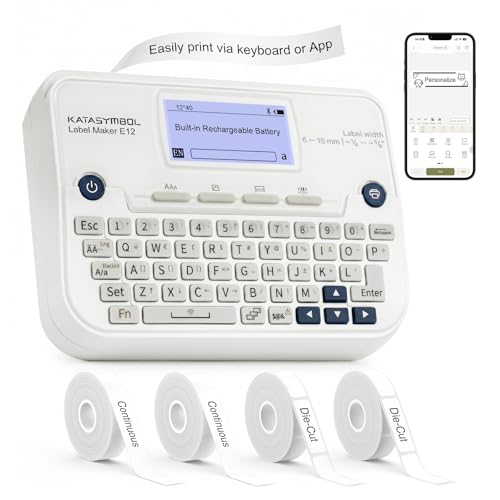
- Keyboard and Bluetooth app printing
- Rechargeable battery with portable design
- Low-margin printing saves tape
Best For: Compact, rechargeable labeling for home-studio shelves and supplies
Pocket Portable Pick
ORGSTA S001 Portable Bluetooth Label Maker

- Pocket-size body with carrying ring
- 203 DPI thermal printing without ink
- App adds QR, barcode, and template tools
Best For: Portable labeling for creators who want easy carry and quick app-based printing
Template-Heavy Organizer
Nelko P21 Bluetooth Label Printer

- Huge app library of templates and icons
- Lightweight Bluetooth design for phones
- Fixed-size thermal labels with no ink
Best For: Phone-based organization with lots of design templates and quick batch labels
Smart Home Labeling – SUPVAN T50M Pro Bluetooth Label Maker
For label printing systems for home studios, the SUPVAN T50M Pro is a flexible pick if you want one device that can handle storage, bottles, jars, cables, and basic small-business labels. Its Bluetooth app support, free editing tools, and inkless thermal printing make it practical for fast, repeat label runs without dealing with toner or ink.
Best For: Home studios, craft rooms, and small setups that need wider label options and app-based customization.
Pros:
- Prints labels from 3/4″ to 2″ wide for a broad range of organizing tasks
- App includes 30+ fonts, 50+ frames, and 660+ icons at no extra cost
- Auto label size recognition helps speed up setup
- Inkless thermal printing keeps operation simple and low-maintenance
Cons:
- Monochrome output only
- Relies on the companion app for most customization
- Best fit for labels, not general document printing
Overall, this model stands out when your home studio needs customizable labels with more width flexibility than a pocket-size unit. It is a strong organization tool if app editing and no-ink convenience matter most.
Portable Classic – DYMO LetraTag 100H Handheld Label Maker
If you want a straightforward option for label printing systems for home studios, the DYMO LetraTag 100H keeps things simple and portable. The handheld design, preview screen, and included starter tapes make it easy to label supplies, bins, and office items without a complicated setup.
Best For: Quick, portable labeling for home offices, studios, and everyday household organization.
Pros:
- Compact and lightweight handheld design
- Graphical display helps preview labels before printing
- Customizable with 5 font sizes, 7 print styles, and 8 box styles
- Includes 3 starter LT tapes to begin organizing right away
Cons:
- Handheld format is less app-driven than Bluetooth models
- Label customization is functional but more basic than larger connected systems
- Designed around smaller label jobs
This is a solid choice if you prefer a no-fuss handheld label maker and value portability over advanced features. It is especially appealing when you want to label quickly in different areas of the home or studio.
Pocket Organizer – NIIMBOT D110 Mini Bluetooth Label Maker
For label printing systems for home studios where portability matters most, the NIIMBOT D110 is a tiny Bluetooth thermal printer built for everyday organizing. It works through the NIIMBOT app on iOS and Android, supports batch printing, and uses waterproof, oil-proof label refills for common home, school, and office tasks.
Best For: Small spaces, on-the-go labeling, and basic home studio organization from a smartphone.
Pros:
- Very compact and lightweight at 149 g
- Bluetooth app control supports iOS and Android
- 203 DPI thermal printing with no ink or toner needed
- Automatically recognizes supported label tape and offers batch printing
Cons:
- Does not work with computers
- Monochrome output only
- Built for basic label making rather than advanced desktop workflows
This model makes sense when you want a pocketable label maker that is easy to recharge and easy to move around. It is a practical fit for simple, fast labeling from a phone.
Connected Color Taping – Brother PT-N25BT Personal Label Maker
When you want label printing systems for home studios with a more hands-on layout, the Brother PT-N25BT combines a QWERTY keyboard, Bluetooth app support, and built-in cutter in a compact handheld design. It prints on Brother Btag tapes in colorful varieties, making it a good fit for organized, visually clear labeling around a studio, dorm, or home office.
Best For: Users who want portable, app-connected labeling with color tape options and a keyboard.
Pros:
- Bluetooth connection plus Brother Design&Print2 app support
- Built-in cutter creates clean label edges
- Works with colorful Brother Btag tapes in 17 varieties
- QWERTY keyboard and preview screen make label creation quick
Cons:
- Requires AAA batteries or a separately sold adapter
- Limited to 12mm wide Btag tapes
- Best suited to labels rather than broader printing tasks
This model is a strong middle ground between a traditional handheld label maker and a connected app-based unit. It is especially useful if you want colorful, easy-peel labels with simple on-device control.
Inkless Everyday Labeler – P0 Thermal Label Maker for Home & Office
If you want label printing systems for home studios that stay simple and affordable, the P0 is built around fast app-based setup, inkless thermal printing, and broad everyday use. It fits well for organizing cables, storage bins, supplies, and small-business items without adding ink or subscription costs.
Best For: Budget-minded home studio users who want a portable, no-ink label maker for general organization.
Pros:
- Inkless thermal printing keeps ongoing costs down.
- Free app access with no subscription fees or hidden feature locks.
- Rechargeable 1800mAh battery reduces charging hassle and battery waste.
- Durable labels are liquid-proof, tear resistant, and designed to leave no adhesive marks.
Cons:
- Prints monochrome labels only.
- Maximum media size is limited to small label widths.
- Requires the app for customization rather than a built-in keyboard.
Overall, the P0 is a practical pick if your studio needs straightforward labeling with low operating costs and waterproof durability. It favors simplicity and portability over advanced hardware extras.
Hybrid Keyboard Labeler – SUPVAN E11 with 4 Tapes
For label printing systems for home studios, the SUPVAN E11 stands out because it offers both a direct keyboard mode and Bluetooth app printing. That makes it useful when you need quick labels for bins, tools, files, or supplies, but still want the option to customize layouts from your phone.
Best For: Users who want fast, frequent labeling plus app-based customization in one portable machine.
Pros:
- Keyboard printing is ideal for fast, repeat labeling jobs.
- Bluetooth app support adds templates, fonts, frames, and icons.
- Low 0.2″ margins help reduce wasted label material.
- Rechargeable 1200mAh battery and compact design improve portability.
Cons:
- Battery capacity is smaller than some larger label makers.
- Best suited to labeling rather than broader printing tasks.
- Some advanced design flexibility still depends on the app.
In practice, the E11 is a strong middle-ground option if you want speed for routine labels and enough creative control for more customized organization. Its blend of keyboard convenience and app editing makes it especially flexible for busy workspaces.
Pocket Creative Labeler – Phomemo D30 Mini Bluetooth Printer
If you’re comparing label printing systems for home studios, the Phomemo D30 is the most compact, design-heavy option in this group. It uses a Bluetooth app with a large library of templates, icons, and fonts, making it a good fit for labeling supplies, cables, jars, and small product packaging.
Best For: Creative users who want a tiny Bluetooth label maker with lots of app-based customization.
Pros:
- Very lightweight, pocket-sized design for easy carrying.
- Large app feature set with many templates, fonts, icons, and languages.
- Supports continuous and die-cut tapes from 6mm to 15mm.
- Rechargeable USB-C battery keeps it convenient for mobile use.
Cons:
- Prints black text only.
- Cannot print while charging.
- Best for short labels rather than wider-format labeling.
The D30 is a smart pick when portability and customization matter more than size or speed. It is especially appealing for home studios that want a compact label maker for detailed organization and small-scale product labeling.
Kitchen-Ready Labeling – SUPVAN E12 Keyboard & Bluetooth Label Maker
If you want label printing systems for home studios that can handle both quick, repeat-use labeling and more customized projects, the SUPVAN E12 is a flexible pick. You can type directly on the built-in keyboard for fast labels, or switch to the Bluetooth app for more creative layouts, fonts, frames, and icons.
Best For: Studio owners who want a compact, rechargeable label maker for shelves, supplies, pantry-style storage, and everyday organization.
Pros:
- Keyboard input and Bluetooth app control make it useful for both fast and custom labeling.
- Rechargeable 1200mAh battery avoids disposable batteries and supports portable use.
- Minimal 0.2-inch margin helps reduce wasted label material.
- App includes 30+ fonts, 50+ frames, 660+ icons, and 17 languages.
Cons:
- Prints monochrome labels only.
- Designed for smartphones and does not list computer support.
Overall, the E12 is a practical all-rounder for home-studio organization if you want straightforward on-device printing plus the option to design more polished labels in the app.
Pocket Portable Pick – ORGSTA S001 Portable Bluetooth Label Maker
For label printing systems for home studios where portability matters most, the ORGSTA S001 is a strong grab-and-go option. Its pocket-sized body, built-in metal ring, and Bluetooth app control make it easy to create labels and stickers from anywhere without ink or toner.
Best For: Creators who want a very small, rechargeable label maker for on-the-go organization and quick labeling.
Pros:
- Compact, pocket-friendly design with a metal ring for easy carrying.
- Direct thermal printing delivers 203 DPI output without ink or toner.
- Built-in 2000mAh rechargeable battery supports long-lasting use.
- App supports text, QR codes, barcodes, images, borders, and template options.
Cons:
- Monochrome output only.
- Maximum media size is 0.47 inches, so it is limited to narrower labels.
The S001 works well when you need a tiny, practical labeler for quick organization tasks, especially if you value waterproof, oil-proof, and scratch-resistant laminated labels.
Template-Heavy Organizer – Nelko P21 Bluetooth Label Printer
If you need label printing systems for home studios with lots of design options, the Nelko P21 leans heavily into app-based customization. It connects by Bluetooth to iOS and Android phones, and the app includes thousands of icons, borders, materials, and templates for organizing supplies, tags, and storage.
Best For: Users who want a lightweight, Bluetooth label maker with a large template library for home, office, or school organization.
Pros:
- Very portable design that is smaller and lighter than traditional label makers.
- 203 DPI direct thermal printing requires no ink or toner.
- App offers 3600+ icons, 700+ borders, 5500+ materials, 750+ templates, and 29 languages.
- Includes multiple fixed-size label formats for batch printing.
Cons:
- Does not work with computers.
- Not compatible with Google phones running Android 14.
- Uses fixed label sizes only, so continuous label tapes are not supported.
The P21 is a good fit if your studio labeling needs are driven by phone-based design and you want a broad set of ready-made layouts rather than a more basic printer.
How We Picked These Label Printing Systems for Home Studios
We prioritized models that are practical for everyday studio use: compact footprints, Bluetooth or keyboard input for quick labeling, easy tape loading, and label styles that hold up on storage bins, drawers, cables, and tools. We also looked for a balance of portability, app support, and tape availability so the systems are convenient to use long term.
Quick Comparison
For Label Printing Systems for Home Studios, the best choice usually depends on how you work. App-based Bluetooth models are ideal if you want flexible designs and printing from a phone. Keyboard-enabled label makers are better if you want fast, standalone operation without relying on an app. If your studio needs durable labels for repeated handling, look for tape types designed to resist smudging, peeling, and moisture.
Key Buying Factors for Label Printing Systems for Home Studios
Connectivity and Workflow
Bluetooth models are convenient for fast editing and more layout options, while handheld keyboard units can be simpler for quick labeling sessions. Choose the workflow that matches how often you label and whether you prefer a phone app or physical keys.
Label Durability
Home studios often involve dust, movement, and frequent reorganization. Look for labels that stay readable on plastic bins, cables, and containers, especially if you plan to relabel items over time.
Size and Portability
Smaller devices are easier to store in a drawer or carry between rooms. This matters if your workspace doubles as a craft area, editing desk, or storage room.
Cost of Tapes
The machine price is only part of the equation. Check tape compatibility, replacement cost, and whether starter bundles give you enough variety to get organized right away.
Ease of Use
The best systems feel intuitive from the first setup. Simple app navigation, clear label previews, and straightforward tape installation are all helpful if you want a hassle-free experience.
Who Should Buy Which Label Printing Systems for Home Studios?
If you want the most flexible design options, choose a Bluetooth label maker with app control. If you want fast, no-fuss labeling, a keyboard-based model may be the better fit. Studio owners who label lots of storage and supplies should lean toward durable tape systems with strong accessory support. For very small spaces, compact mini label printers are usually the easiest to live with.
Overall, the best Label Printing Systems for Home Studios are the ones you will actually use regularly. Pick the format that matches your workflow, tape needs, and storage habits, and your workspace will stay easier to manage all year.