
Professional artists need label printing systems that keep supplies, archives, packaging, and studio workflows organized without slowing creative work.
From compact Bluetooth label makers to color-capable desktop printers, this roundup focuses on the best options for clean results, durability, and everyday studio use.
Best 10 Label Printing Systems for Professional Artists Picks for 2026
Fast dual-color desktop
Brother QL-800 Professional Printer

- 93 labels per minute at 300 dpi
- Black and red printing on DK labels
- USB Plug & Label for Windows and Mac
Best For: Fast studio labeling with standout two-color output
Color label production

- CMYK pigment ink with color output
- Up to 4 inches per second printing
- Auto cutter for finished labels
Best For: Color product and packaging labels
Portable creative labeler

- Bluetooth printing from mobile devices
- Templates with fonts, frames, and symbols
- Lightweight with built-in battery
Best For: Portable small-format labeling for creative workspaces
Industrial in-house label system
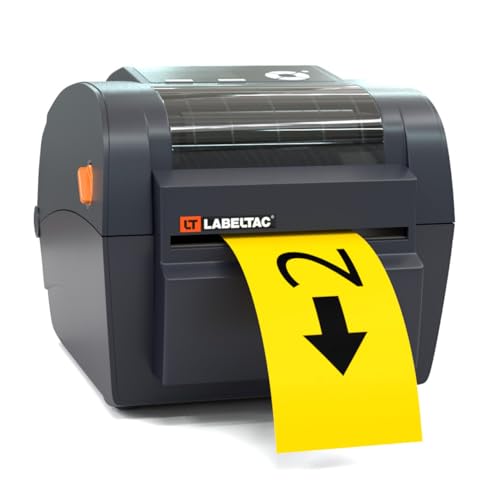
- 300 DPI thermal transfer printing
- Accepts 1/2 to 4 inch supplies
- Includes LabelSuite design software
Best For: Durable studio and workshop labeling
Bluetooth-Connected Label Maker
Brother P-Touch PT-D610BT Connected Label Maker

- Bluetooth and USB support for flexible use
- 17 fonts, 160 frames, and 900 symbols
- Stores up to 90 frequently used labels
Best For: Artists and small teams needing fast monochrome organization labels
Full-Color Print-and-Cut System
IColor 250 Inkjet Color Label Printer & Cutter
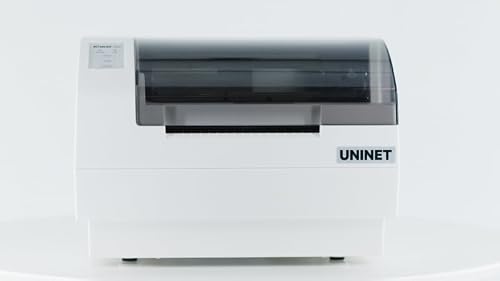
- Full-color printer with built-in cutter
- CustomCUT software supports print and cut workflows
- Works with dye or pigment cartridges
Best For: Short-run makers needing custom-shaped full-color labels
Ultra-Flexible Network Label Printer
Brother QL-820NWB Professional Monochrome Printer

- Bluetooth, Ethernet, wireless, and USB support
- Prints up to 110 address labels per minute
- Standalone LCD operation with black/red label support
Best For: Studios that need very fast, network-ready monochrome labeling
Archival-Grade Small-Format Labeling
NIIMBOT M2 Thermal Transfer Label Maker

- Thermal transfer labels last 8–10 years.
- 300 dpi for clearer text and images.
- App and PC support with many templates.
Best For: Studio organization and durable small-format labeling.
High-Durability Desktop Labeling
Makeid D50 Industrial Label Maker

- Thermal transfer labels last up to 10 years.
- Auto cutter helps with bulk labeling.
- Mobile app and PC software support editing.
Best For: Durable desktop labeling in studios and workshops.
Fast dual-color desktop – Brother QL-800 Professional Printer
If you need label printing systems for professional artists that can handle studio organization fast, the Brother QL-800 is a practical desktop option. It prints up to 93 labels per minute, supports pre-sized DK labels, and can even print in black and red for labels that stand out on supplies, files, and shipping materials.
Best For: Artists and small studios that want a fast USB label printer for shipping, file, and inventory labels.
Pros:
- Prints up to 93 labels per minute at 300 dpi.
- Supports black and red printing with Brother Genuine DK-2251.
- Works with Windows and Mac, plus Plug & Label from Word, Excel, and Outlook.
- Built-in auto-cutter helps finish labels cleanly.
Cons:
- Requires USB connectivity.
- Designed for Brother Genuine DK pre-sized labels and continuous tape, which narrows supply choices.
- Monochrome output limits full-color branding.
For artists who value speed and tidy workflow organization, the QL-800 delivers a strong mix of convenience and professional-looking results. The black-and-red output is especially useful when you want important labels to stand out without moving to a larger color system.
Color label production – Epson ColorWorks CW-4000
For label printing systems for professional artists that need color output, the Epson ColorWorks CW-4000 is built for production-style label work. It uses CMYK pigment ink, prints up to 4 inches per second, and includes an auto cutter for creating finished labels with a matte look.
Best For: Artists or creative businesses that need durable color labels for products and packaging.
Pros:
- Color inkjet output with CMYK pigment ink.
- High resolution up to 1200 x 1200 dpi.
- Prints up to 4 inches per second.
- Auto cutter adds convenience for batch label work.
Cons:
- Larger, more specialized machine than a desktop label maker.
- Maximum media size is 4.41 inches.
- WiFi is optional rather than built in.
This model makes sense when label presentation matters as much as speed. If your art business needs color product labels or packaging labels with a polished matte finish, the CW-4000 is a capable step up from basic monochrome devices.
Portable creative labeler – Brother P-touch CUBE Plus
The Brother P-touch CUBE Plus is a compact choice for label printing systems for professional artists who need flexible labeling on the go. It connects by Bluetooth to Apple or Android devices, supports creative templates, and prints labels up to 24mm wide for organizing supplies, storage, and small business items.
Best For: Artists who want a lightweight Bluetooth label maker for studio, home office, or craft packaging labels.
Pros:
- Bluetooth printing from mobile devices or desktop.
- Supports labels up to 24mm wide.
- Includes template software with fonts, frames, and symbols.
- Very lightweight at 1.4 pounds and includes a built-in battery.
Cons:
- Monochrome output only.
- Best suited to smaller labels rather than large-volume production.
- Requires TZe tape.
For artists who want a portable labeling tool with creative options, this model is easy to live with and simple to move between workspaces. It is strongest when your priority is quick organization and attractive small-format labels rather than high-throughput printing.
Industrial in-house label system – LabelTac LT4 Thermal Transfer
If you are comparing label printing systems for professional artists who need shop-ready durability, the LabelTac LT4 is built for in-house industrial labeling. It prints 300 DPI labels, accepts supplies from 1/2 inch to 4 inches wide, and comes with software for designing barcodes, warning labels, and signage.
Best For: Studios, maker spaces, or workshops that want durable labels and signage in-house.
Pros:
- Industrial-quality thermal transfer printing with 300 DPI resolution.
- Accepts 1/2 inch to 4 inch wide compatible supplies.
- Includes LabelSuite design and print software.
- Lifetime transferable warranty adds long-term value.
Cons:
- Prints monochrome labels only.
- More of an industrial workstation tool than a casual desktop label maker.
- Requires compatible LT4/LTPX supplies and ribbon changes.
The LT4 stands out when durability and flexibility matter more than decorative features. For artists managing a studio, warehouse corner, or workshop, it offers a practical way to produce professional labels and signs without outsourcing.
Bluetooth-Connected Label Maker – Brother P-Touch PT-D610BT Connected Label Maker
Brother P-Touch PT-D610BT Business Professional Connected Label Maker with Bluetooth®
Check Price On AmazonIf you need label printing systems for professional artists that can handle frequent design changes and quick reprints, the Brother P-Touch PT-D610BT is built for practical day-to-day organization. It connects by Bluetooth or USB, works with mobile devices and computers, and offers a wide range of fonts, frames, symbols, and templates for polished, readable labels.
Best For: Artists, studios, and small businesses that want a fast monochrome label maker for inventory, asset tags, and organized workspace labeling.
Pros:
- Bluetooth and USB connectivity for shared use across devices
- 17 fonts, 17 styles, 160 frames, and 900 symbols for custom label design
- Built-in memory stores up to 90 frequently used labels
- Large 20-character, 2-line color LCD preview helps reduce mistakes
Cons:
- Prints monochrome labels rather than full-color graphics
- Best suited to labels up to 1 inch wide
For professional labeling where speed, clarity, and easy repeat printing matter, this Brother model is a strong fit. It leans more toward efficient organization than decorative output, but its templates and design tools make it versatile for studio and business use.
Full-Color Print-and-Cut System – IColor 250 Inkjet Color Label Printer & Cutter
For label printing systems for professional artists who want full-color output and custom shapes, the IColor 250 is a compact print-and-cut solution built for short-run production. It combines an inkjet label printer with a built-in cutter, and its CustomCUT software supports print only, cut only, or print-and-cut workflows for more creative label layouts.
Best For: Creators and small businesses that need full-color, shape-flexible labels for short production runs and shelf-ready packaging.
Pros:
- Full-color inkjet printing with built-in cutter in one desktop unit
- CustomCUT software supports print only, cut only, and print-and-cut modes
- Can model labels into desired shapes and contour cuts
- Uses either dye or pigment cartridge options for different label needs
Cons:
- Media is not included
- Digital cutting requires UNINET IColor 250 media
- Mac software support is more limited than PC use
This is the most design-forward option in the group, especially if you need color labels that can stand out on retail shelves. It is aimed at short-run professional production rather than simple office labeling, so it makes sense when appearance and cut shape matter.
Ultra-Flexible Network Label Printer – Brother QL-820NWB Professional Monochrome Printer
If your studio needs label printing systems for professional artists that are quick, reliable, and easy to share across devices, the Brother QL-820NWB is a strong practical choice. It supports Bluetooth, Ethernet, wireless, and USB connections, prints very fast, and can run standalone thanks to its LCD screen.
Best For: Busy studios and teams that need fast monochrome labels with multiple connection options and stand-alone use.
Pros:
- Bluetooth, Ethernet, wireless, and USB connectivity for flexible setup
- Prints up to 110 standard address labels per minute
- Easy-to-read monochrome LCD supports standalone use
- Can print black/red labels with compatible DK-2251 media
Cons:
- Monochrome output only for standard labels
- Maximum label length is 3 feet, so it is not built for very large-format output
This model is all about speed and connectivity rather than decorative flexibility. For organized studios, inventory, and address-style labels, it offers a very efficient workflow without much setup friction.
Archival-Grade Small-Format Labeling – NIIMBOT M2 Thermal Transfer Label Maker
If you need label printing systems for professional artists, the NIIMBOT M2 is a compact option built for durability rather than short-term labels. Its thermal transfer technology is designed to keep prints readable for 8–10 years, with waterproof, oil-proof, scratch-resistant, and temperature-resistant labels that suit demanding studio and inventory workflows.
Best For: Artists and makers who need durable labels for storage, tools, cables, supplies, and long-term organization.
Pros:
- Thermal transfer printing helps labels last 8–10 years without fading.
- 300 dpi resolution supports clearer text and images.
- Works with iOS and Android, and also connects to PC via USB.
- Supports a wide range of templates, including QR codes, barcodes, and images.
Cons:
- Only works with M2-series thermal transfer labels, not standard NIIMBOT thermal labels.
- Printable width is limited to 48 mm, so it is not meant for larger-format labels.
For artists who want a portable system with long-lasting labels and flexible design tools, the M2 is geared toward practical studio organization. Just make sure you buy the correct M2 consumables, since compatibility is specific to this model.
Commercial Color Label Printing – Epson TM-C3500 Color Label Printer
For label printing systems for professional artists who need full-color output, the Epson TM-C3500 is a commercial printer built for labels rather than general document work. It prints in color with USB or Ethernet connectivity, making it a fit for larger labeling workflows where color coding or branded labels matter.
Best For: Small shops and studios that need color label printing for product, inventory, or organizational use.
Pros:
- Prints color labels with CMYK ink support.
- USB and Ethernet connectivity suit office or workstation setups.
- Commercial-focused label printer with a 100-sheet capacity.
- High-speed output and 720 x 360 dpi resolution.
Cons:
- Large desktop footprint and 12 kg weight make it less portable.
- Designed for Windows systems with supported USB or Ethernet devices.
This model makes sense when color is part of your labeling system and you want a dedicated commercial device. It is less about portability and more about reliable in-studio output for established workflows.
High-Durability Desktop Labeling – Makeid D50 Industrial Label Maker
If you’re comparing label printing systems for professional artists, the Makeid D50 is aimed at heavier-duty organization and identification tasks. Its thermal transfer printing is built for labels that stay clear for up to 10 years, and the 2-inch desktop format with auto cutter is useful when you need to produce many consistent labels quickly.
Best For: Artists, makers, and studios that need durable labels for assets, cables, tools, and equipment.
Pros:
- Thermal transfer labels are designed to stay readable for up to 10 years.
- 300 DPI output helps produce sharper prints with minimal margins.
- Automatic cutter speeds up bulk label production.
- Mobile app and PC software support flexible editing and printing.
Cons:
- Uses exclusive consumables, so label and ribbon compatibility is specific.
- Two-inch print head limits it to smaller-format label applications.
The D50 is a strong pick when your workflow values durability, speed, and repeatable output over portability. It fits well in a studio or workshop where organized labeling needs to hold up over time.
How We Picked These Label Printing Systems for Professional Artists
We focused on models that fit real creative workflows: dependable output, clear text, durable labels, useful connectivity, and formats that work for files, materials, inventory, and shipping. For Label Printing Systems for Professional Artists, speed matters, but so do consistency and ease of use in busy studios.
Quick Comparison
Choose compact label makers if you need fast organization for bins, cables, tools, and archival boxes. Pick thermal transfer printers for tougher labels that resist handling and moisture. Choose inkjet color label printers when branding, product packaging, or color-coded systems matter. If you need one printer for mixed tasks, look for broader media support and multiple connection options.
Key Buying Factors for Label Printing Systems for Professional Artists
Print Durability
Archival storage, transport boxes, and studio equipment labels benefit from smudge-resistant or thermal transfer output. If labels may face sunlight, abrasion, or frequent handling, durability should outweigh pure speed.
Label Size and Media Flexibility
Artists often need more than one label format: slim asset tags, medium bin labels, and larger shipping or product labels. Make sure the printer supports the widths and materials you actually use.
Color Versus Monochrome
Color helps with branding, retail presentation, and visual organization, while monochrome is usually more efficient for internal studio use. The right choice depends on whether the labels are client-facing or purely functional.
Connectivity and Workflow
Bluetooth, USB, Wi-Fi, and mobile apps can save time when moving between workstations or labeling on the go. For shared studios, network support is especially useful.
Software and Ease of Setup
Simple templates, barcode support, and easy formatting matter more than flashy features. The best systems reduce setup time and help you produce consistent labels quickly.
Who Should Buy Which Label Printing Systems for Professional Artists?
If you want a compact everyday solution, choose a portable label maker with Bluetooth and simple templates. If your studio needs rugged, long-lasting labels, thermal transfer is the safer bet. If you sell prints, products, or packaged goods, a color label printer will make the strongest presentation. For most professionals, the best Label Printing Systems for Professional Artists are the ones that match workflow first and feature list second.