
Small studios need creative displays that deliver accurate color, responsive pen input, and useful workspace without overwhelming a desk. The best options balance screen size, resolution, connectivity, and ergonomics for illustration, photo editing, design, and other visual work.
This roundup compares 10 pen-enabled displays, from dedicated drawing tablets with screens to portable monitors and professional color-focused models. Use the guide below to match features and form factors to your workflow.
Best 10 Pen Display Monitors for Small Studios Picks for 2026
Compact Workflow Pick

- 13.3-inch fully laminated FHD display
- 16,384 pressure levels with 60° tilt
- Dial, eight keys, and broad OS support
Best For: Compact illustration and animation work
Color-Accuracy Pick

- 15.6-inch 4K IPS touchscreen
- 100% sRGB and Delta E < 2 calibration
- Wacom EMR pen with ASUS Dial
Best For: Portable, color-sensitive creative work
Large-Screen Value Pick

- 15.6-inch laminated anti-glare display
- 125% sRGB and 16,384 pressure levels
- Two pens, quick dial, and adjustable stand
Best For: Spacious everyday illustration workflows
Premium Studio Monitor

- 26.5-inch 4K QD-OLED at 120Hz
- 99% DCI-P3 and Delta E < 1.5
- 96W USB-C, Auto KVM, ergonomic stand
Best For: High-end color and multi-device studio work
Travel-Ready 4K Pick
15.6-inch 4K Touchscreen Monitor

- 4K IPS display with 100% DCI-P3 coverage
- MPP 2.0 stylus and 10-point touch included
- Slim 2.4-pound portable design with kickstand
Best For: Mobile creators needing a portable color-focused pen display
Compact Drawing Specialist

- 11.6-inch Full HD IPS drawing display
- Battery-free 8192-pressure-level pen
- Six shortcut keys and programmable touch bar
Best For: Compact workstations and entry-level creative setups
Large-Surface Studio Choice
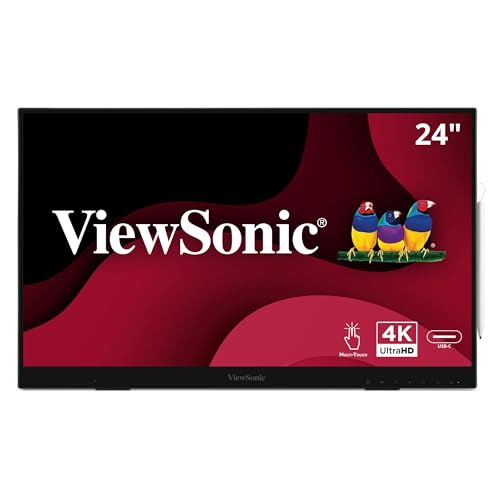
- 24-inch 4K UHD IPS touchscreen
- 8192-pressure-level active stylus included
- USB-C, HDMI, DisplayPort, and USB hub
Best For: Desktop studios needing a spacious touch-and-pen canvas
Travel-Ready Touch Studio

- 2.5K IPS panel with 100% sRGB and 90Hz refresh rate
- 10-point touch with included stylus support
- Portable dual-screen design with USB-C and HDMI
Best For: Mobile creatives and compact studios needing a versatile second screen
Collaborative Desk Setup
ViewSonic TD2455 Touch Monitor Pair

- Two 24-inch FHD IPS touch displays
- Included stylus pens and 10-point touch
- USB-C, daisy chaining, and ergonomic adjustment
Best For: Permanent small-studio workstations and collaborative workflows
Color-Critical Portable Pick

- 4K OLED panel with 100% DCI-P3 coverage
- Included 4096-level MPP stylus and 10-point touch
- 1.3-pound body with USB-C, HDMI, and travel sleeve
Best For: Windows creators needing portable, detail-rich color work
Compact Workflow Pick – XPPen Artist 13.3 Pro V2
For small studios seeking pen display monitors for small studios, the XPPen Artist 13.3 Pro V2 offers a compact, focused drawing workspace that connects to a computer or laptop. Its fully laminated 13.3-inch display, shortcut controls, and tilt-sensitive battery-free stylus support efficient illustration and design work.
Best For: Artists, students, animators, and small-studio creators who want a portable pen display with direct shortcut controls.
Pros:
- Fully laminated FHD screen with 88% NTSC color coverage and a 178-degree viewing angle.
- Battery-free stylus provides 16,384 pressure levels and up to 60 degrees of tilt recognition.
- Red dial and eight customizable shortcut keys can streamline common drawing tasks.
- Supports Windows, macOS, Chrome OS, Linux, and major creative software.
Cons:
- It is not standalone and must connect to a computer or laptop.
- The 13.3-inch workspace may feel limited for users who prefer a larger canvas.
This is a practical choice when desk space and workflow controls matter more than screen size. The included stand, pen holder, replacement nibs, and connection cables make it well equipped for a compact studio setup.
Color-Accuracy Pick – ASUS ProArt PA169CDV
The ASUS ProArt PA169CDV is a portable option among pen display monitors for small studios, combining a 15.6-inch 4K touchscreen with professional color validation. Its Wacom EMR pen, built-in controls, and flexible kickstands make it suited to detailed creative work in changing workspaces.
Best For: Color-conscious illustrators, photographers, and designers who need a portable 4K pen display.
Pros:
- 4K UHD IPS panel delivers detailed visuals with 100% sRGB coverage.
- Calman Verified and factory calibrated to Delta E < 2 for color-focused workflows.
- Bundled Wacom EMR pen and 10-point multitouch support pen and touch interaction.
- ASUS Dial, Virtual Control Panel, built-in speakers, and two viewing-angle kickstands add flexibility.
Cons:
- The 15.6-inch display runs at a 60Hz refresh rate.
- Its portable format and professional features may be more than needed for basic sketching.
For a small studio that values dependable color and portability, this ProArt display is a strong fit. The included calibration report, connectivity options, and five-year warranty with registration further support professional use.
Large-Screen Value Pick – VEIKK Studio 16
The VEIKK Studio 16 gives small studios a larger drawing surface without losing the direct-on-screen workflow expected from pen display monitors for small studios. Its 15.6-inch laminated display, two included pens, customizable controls, and adjustable stand are designed for extended illustration and design sessions.
Best For: Illustrators and designers who want a spacious screen, high pen sensitivity, and flexible ergonomic setup.
Pros:
- 15.6-inch full-laminated screen with anti-glare glass and 125% sRGB coverage.
- Battery-free pen supports 16,384 pressure levels and 60-degree tilt recognition.
- Includes two pen shapes, five shortcut keys, and a quick dial for workflow customization.
- Three-position adjustable stand and simplified USB-C connectivity support comfortable setup.
Cons:
- It must connect to a computer or laptop and is not a standalone device.
- Compatibility requires supported Windows, macOS, or Linux systems and suitable ports.
This model is appealing when a small studio wants more drawing room and useful physical controls at the desk. Its anti-fingerprint coating, included stand, and two stylus options add convenience for longer creative sessions.
Premium Studio Monitor – ASUS ProArt PA279CDV
For a small studio that needs a premium shared display rather than a compact tablet, the ASUS ProArt PA279CDV brings 4K QD-OLED image quality, wide-gamut color, and extensive connectivity. It fits pen display monitors for small studios discussions best as a high-end visual production monitor paired with a separate input device.
Best For: Professional photo, video, design, and multi-computer workflows that prioritize color, contrast, and desk connectivity.
Pros:
- 26.5-inch 4K QD-OLED panel offers 120Hz refresh and a 0.1ms response time.
- Provides 100% sRGB, 99% DCI-P3, true 10-bit color, and Delta E < 1.5 calibration.
- USB-C supports up to 96W power delivery, while Auto KVM simplifies switching between computers.
- Ergonomic height, tilt, swivel, and pivot adjustments support varied studio setups.
Cons:
- The supplied notes describe a monitor, not an integrated pen display or included stylus.
- Its larger professional format may be excessive for a small desk or basic drawing needs.
This is the strongest option here for a studio centerpiece focused on accurate viewing and workstation connectivity. Buyers specifically seeking pen-on-screen input should plan to pair it with a separate drawing tablet or pen display.
Travel-Ready 4K Pick – 15.6-inch 4K Touchscreen Monitor
For small studios that need a flexible second screen, this portable display combines a 15.6-inch 4K IPS panel with touch and included pen input. Its 100% DCI-P3 gamut, 400-nit brightness, and slim aluminum design make it a practical option for mobile photo editing, video work, and sketching.
Best For: Mobile creators and small studios needing a color-focused pen display that can also serve as a portable second monitor.
Pros:
- 4K UHD IPS display with 100% DCI-P3 coverage, HDR10, and 10-bit color depth.
- Includes an MPP 2.0 stylus and supports 10-point capacitive touch.
- Portable 2.4-pound aluminum design with built-in kickstand and useful cables included.
- Offers USB-C and HDMI connectivity for compatible computers and devices.
Cons:
- Mac users need the UPDD driver for touch and stylus functionality.
- Touch and stylus input are not supported on listed gaming consoles or iPhone/iPad connections.
- Glossy screen finish may be less suitable for brightly lit workspaces.
This is a strong fit when portability and high-resolution color work matter more than a large drawing surface. Check device compatibility before buying, particularly for Mac and mobile workflows.
Compact Drawing Specialist – XP-PEN Artist12
The XP-PEN Artist12 is a compact, purpose-built option for small studios choosing among pen display monitors for small studios. Its 11.6-inch Full HD screen, battery-free pen, customizable controls, and broad creative-software compatibility suit drawing, photo editing, animation, and 3D work.
Best For: Budget-conscious artists, students, and compact workstations that prioritize drawing controls over a large display.
Pros:
- 11.6-inch 1920×1080 IPS display with 72% NTSC and 100% sRGB color coverage.
- Battery-free pen provides 8192 pressure levels and includes an eraser end.
- Six customizable shortcut keys and a programmable touch bar can speed up creative tasks.
- Works with Windows, Mac, Linux, and popular applications including Photoshop and Clip Studio.
Cons:
- Must be connected to a computer to operate.
- Requires available HDMI and USB-A ports or additional adapters.
- The 11.6-inch workspace is less spacious than larger studio displays.
Its smaller footprint makes the Artist12 easy to place in a shared or home studio, while the shortcut keys and passive pen keep the setup focused on drawing. It is best suited to users who already have a compatible computer and value compactness.
Large-Surface Studio Choice – ViewSonic ID2456-4K
For small studios that want a full-size workspace, the ViewSonic ID2456-4K pairs a 24-inch 4K UHD IPS touchscreen with an active stylus and built-in kickstand. USB-C, HDMI, DisplayPort, and a USB hub give it the connectivity needed for desktop creative and collaborative setups.
Best For: Studio desks, classrooms, and office-based creative teams that need a larger touch-and-pen canvas.
Pros:
- 24-inch 3840×2160 IPS display provides a spacious 4K UHD work area.
- Included stylus supports 8192 pressure levels for varied stroke thickness.
- Supports 10-point PCAP touch and works with Windows, Android, and Mac, with vTouch required on Apple platforms.
- Includes USB-C, HDMI, DisplayPort, a six-port USB hub, and a three-year limited warranty.
Cons:
- Its 9.7-pound weight and desktop dimensions make it less portable than compact pen displays.
- 250-nit brightness is modest for demanding bright-room work.
- The 14-millisecond response time is not aimed at high-refresh creative or gaming use.
The ID2456-4K is a practical choice when drawing space and desktop connectivity outweigh portability. Its larger canvas and included stand suit shared studio work, annotation, and detailed creative tasks.
Travel-Ready Touch Studio – X2 Air Dual Portable Display
For small studios that need flexible pen display monitors for small studios, the EHOMEWEI X2 Air combines a portable dual-screen setup with touch and stylus support. Its 2.5K IPS panel, 100% sRGB coverage, and 90Hz refresh rate suit mobile creative work and multitasking.
Best For: Small creative teams and freelancers who need a portable second-screen setup for drawing, writing, presentations, and productivity.
Pros:
- 2.5K IPS display with 100% sRGB coverage, 400-nit brightness, and a 1500:1 contrast ratio.
- 10-point touch and included stylus support intuitive navigation and precise creative work.
- USB-C, HDMI, and Thunderbolt compatibility support laptops, desktops, phones, and consoles.
- Dual-screen design includes landscape and portrait orientation options in a slim aluminum body.
Cons:
- Its 14.2-inch individual screens provide less drawing area than a full-size desktop display.
- Portable dual-screen hardware may be more setup than a studio needs for a fixed workstation.
The X2 Air is a strong choice when portability and multitasking matter as much as pen input. Its color coverage and touch features are useful for studio work, while the built-in stand helps it adapt to travel or compact desks.
Collaborative Desk Setup – ViewSonic TD2455 Touch Monitor Pair
The ViewSonic TD2455 2-pack gives small studios two 24-inch touch displays for a spacious collaborative or dual-monitor workstation. With included stylus pens, wide viewing angles, USB-C connectivity, and daisy-chain support, it is designed for shared productivity and interactive creative tasks.
Best For: Small studios building a permanent dual-monitor setup for design review, annotation, presentations, and multitasking.
Pros:
- Two 24-inch FHD IPS touch monitors provide substantially more workspace than a portable display.
- 10-point in-cell touch and included stylus pens support drawing, notes, and interactive work.
- USB-C offers video, data, audio, and up to 65W charging, with display daisy-chaining support.
- Ergonomic adjustments, speakers, Flicker-Free technology, and a Blue Light Filter support extended use.
Cons:
- 60Hz refresh rate and 1080p resolution are more modest than higher-resolution creative displays.
- At 250 nits, brightness is suited to typical indoor studio environments rather than especially bright spaces.
- The glossy finish may be less forgiving under strong overhead or window lighting.
This bundle makes sense when a studio values screen area and shared workflows over portability or maximum pixel density. Its touch features and adjustable stands add practical flexibility to a two-person or multitasking workstation.
Color-Critical Portable Pick – 14-Inch 4K OLED Touch Monitor
For creators comparing pen display monitors for small studios, this 14-inch portable OLED emphasizes detail and color accuracy in a compact format. Its 4K resolution, 100% DCI-P3 coverage, 10-point touch, and included MPP stylus make it suited to Windows-based creative workstations and mobile editing.
Best For: Detail-focused Windows creatives who need a lightweight touch display for photo editing, color grading, graphic design, and travel.
Pros:
- 4K UHD OLED panel delivers 3840×2400 resolution, 100% DCI-P3 coverage, and a 100,000:1 contrast ratio.
- 10-point touch and a 4096-level pressure-sensitive MPP stylus support precise drawing and note-taking.
- Lightweight 1.3-pound aluminum body includes a kickstand, sleeve, cables, and power adapter.
- USB-C and HDMI connectivity supports Windows laptops, MacBooks, compatible phones, and consoles.
Cons:
- Touch and stylus use is recommended for Windows; on Mac, input activates when the cursor is on the monitor.
- iPhone and iPad devices support video display but not touch or stylus functions.
- Separate USB-C power may be needed to address intermittent flickering in some setups.
This monitor offers unusually high pixel density and OLED contrast for a travel-friendly pen-enabled display. It is particularly compelling for Windows users who prioritize color and detail, while platform-specific touch limitations should be checked before purchase.
How We Picked the Best Pen Display Monitors for Small Studios
We focused on displays that can support serious creative work in limited spaces. The selection includes dedicated pen displays, touch-enabled monitors, and portable screens with stylus support. We considered screen size, resolution, color coverage, pen technology, connectivity, portability, and desk ergonomics. Models with USB-C, built-in stands, touch input, or compact footprints received extra attention because those features can simplify a small studio setup.
Specifications can vary by configuration, operating system, and included accessories, so confirm compatibility with your computer and preferred creative applications before buying.
Quick Comparison
- Best for compact dedicated drawing: XPPen Artist 13.3 Pro V2 and XP-PEN Artist12.
- Best for professional color work: ASUS ProArt PA169CDV and PA279CDV.
- Best for a larger interactive workspace: ViewSonic ID2456-4K.
- Best for portable setups: the 15.6-inch 4K touchscreen, EHOMEWEI X2 Air, and 14-inch 4K OLED monitor.
- Best for multi-screen workflows: the ViewSonic TD2455 two-pack or EHOMEWEI dual-screen design.
Key Buying Factors for Pen Display Monitors for Small Studios
Screen Size and Desk Footprint
Displays around 11.6 to 16 inches are easier to position beside a keyboard and reference monitor. A 24- or 27-inch model offers more room for timelines, panels, and large canvases but requires substantially more desk space.
Resolution and Color
Full HD can be sufficient on smaller screens, while 2.5K or 4K produces sharper line work and more usable workspace. For color-sensitive design, prioritize wide gamut coverage, factory calibration, low Delta E, and a workflow that supports color management.
Pen, Touch, and Compatibility
Check pressure sensitivity, tilt support, parallax, battery requirements, and replacement-pen availability. A battery-free stylus is convenient for daily use. Also verify driver support, display outputs, USB requirements, and whether touch or pen input works with your operating system and software.
Connectivity and Ergonomics
USB-C can reduce cable clutter, but some systems require a USB-C port with DisplayPort video and sufficient power. HDMI models may need separate USB connections. Adjustable stands, built-in kickstands, VESA support, and a comfortable viewing angle matter during long sessions.
Who Should Buy Which Pen Display Monitors for Small Studios?
Choose a compact dedicated pen display if drawing is your primary task and you want direct-on-screen control without giving up much desk space. Choose a ProArt model if color accuracy, high resolution, and professional monitor features matter more than portability. Choose a large ViewSonic touch display if you prefer a spacious canvas and gesture-based control. Choose a portable 4K or dual-screen option if you work between locations or need a flexible second display. Finally, choose the two-monitor bundle if your studio benefits from separate spaces for canvas work, references, tools, or timelines.