
The best pen display monitors for content creators combine accurate color, responsive pen input, and a comfortable workspace for illustration, photo editing, video production, and design. The right choice depends on whether you prioritize a large desktop canvas, portability, touch control, or professional calibration.
We’ve gathered 10 options across 4K desktop displays, portable touchscreen monitors, OLED panels, and budget-friendly drawing screens. Use the guide below to compare specifications and identify the features that matter most for your workflow.
Best 10 Pen Display Monitors for Content Creators Picks for 2026
Studio Precision

- 4K IPS display with 99.43% Adobe RGB coverage
- Two battery-free pens and 8,192 pressure levels
- 40 shortcut keys plus OLED controller and dial
Best For: Professional creators building a color-focused desktop studio
Portable OLED Canvas

- 16-inch 4K OLED panel with 100% DCI-P3 coverage
- 10-point touch with MPP and USI stylus support
- Lightweight design with integrated adjustable stand
Best For: Creators who need a portable touch display for travel or hybrid work
Touch Workflow Hub
ViewSonic ID2456-4K Touch Display
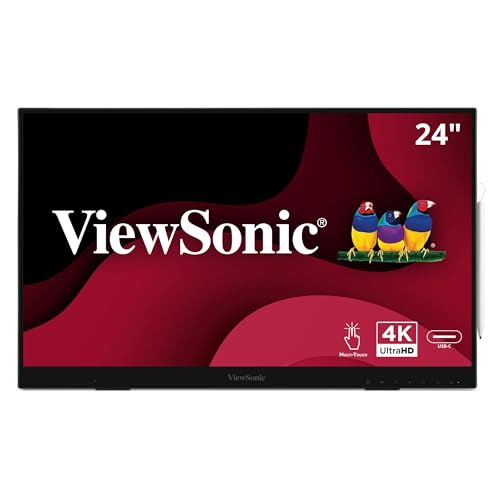
- 24-inch 4K IPS touchscreen with 10-point touch
- Included 8,192-pressure-level active stylus
- USB-C, USB hub, kickstand, HDMI, and DisplayPort
Best For: Creators who combine drawing, annotation, and desktop productivity
Compact Starter Display
XP-PEN Artist12 Drawing Monitor

- 11.6-inch Full HD IPS screen with 100% sRGB
- Battery-free 8,192-pressure-level pen with eraser
- Six shortcut keys and programmable touch bar
Best For: Students, beginners, and creators with limited desk space
Best Value 4K Touch Pen Display
Portable 15.6-inch 4K Touchscreen Monitor

- 4K IPS panel with 100% DCI-P3 coverage
- MPP 2.0 stylus and 10-point touch included
- USB-C and HDMI connectivity with travel accessories
Best For: Mobile Windows creators who need color-focused drawing and editing
Best Professional Pen Display
ASUS ProArt PA169CDV 4K Portable Monitor

- Calman Verified and PANTONE Validated color performance
- Wacom EMR ProArt Pen with 10-point multitouch
- ASUS Dial and Virtual Control Panel for creative shortcuts
Best For: Professional creators prioritizing calibrated color and pen control
Best Bright Premium Display
espresso Displays Pro 15 4K Touchscreen

- 4K touchscreen with 100% Adobe RGB coverage
- Bright 550-nit panel in a 9mm aluminum body
- Single USB-C cable carries power and display
Best For: Color-focused mobile workflows across Mac, Windows, and compatible iPads
Best Large-Screen Pick

- 32-inch 4K IPS display with HDR
- 10-point capacitive multi-touch
- Five-axis adjustable desktop arm
Best For: Desktop creators needing maximum workspace and flexible positioning
Best Portable Value

- FHD IPS touchscreen with 10-point response
- MPP 2.0 stylus included
- Lightweight body with stand and sleeve
Best For: Windows creators working on annotations, sketches, and presentations
Best OLED Detail

- 4K OLED panel with 100% DCI-P3 coverage
- MPP stylus with 4096 pressure levels
- 1.3-pound portable aluminum design
Best For: Mobile photo, video, and graphic design workflows needing high contrast
Studio Precision – Xencelabs Pen Display 24
The Xencelabs Pen Display 24 is a premium choice among pen display monitors for content creators who need a spacious, color-accurate canvas for illustration, animation, design, and photo work. Its 4K IPS panel, anti-glare etched surface, and included shortcut controller are built for extended studio sessions.
Best For: Professional artists, illustrators, animators, and designers who want a large calibrated display and extensive workflow controls.
Pros:
- 4K UHD IPS display with 99.43% Adobe RGB coverage and Pantone and SkinTone validation.
- Two battery-free pens with 8,192 pressure levels, tilt recognition, and different form factors.
- Forty programmable shortcut keys, an OLED display, and a multifunction dial support efficient workflows.
- Anti-glare etched glass, fanless operation, and an adjustable 16-to-72-degree stand suit long sessions.
Cons:
- Its 23.8-inch size and approximately 6 kg weight make it more suitable for a permanent workspace than travel.
- It is a wired display designed to connect to a compatible computer rather than operate independently.
Choose this model when color coverage, drawing comfort, and customizable controls matter more than portability. Hardware calibration support and Linux compatibility add flexibility for established creative setups.
Portable OLED Canvas – Magedok PI-X9 16-Inch 4K OLED
The Magedok PI-X9 brings a compact OLED touchscreen to the pen display monitors for content creators category. It combines a 16-inch 4K panel, touch input, and MPP or USI stylus support in a lightweight design that can extend a laptop or desktop setup.
Best For: Mobile creators, photographers, designers, and office users who need a detailed secondary display with touch and stylus input.
Pros:
- 4K OLED resolution, 100% DCI-P3 coverage, and Delta E below 1 are designed for vivid, detailed imagery.
- 10-point capacitive touch works with Windows 8/10 and later, while Linux and macOS support single touch.
- MPP and USI stylus compatibility enables writing and drawing directly on the screen.
- Lightweight construction, an integrated adjustable stand, and USB-C, HDMI, and Mini DisplayPort inputs support flexible use.
Cons:
- The 16-inch working area is considerably smaller than a desktop pen display.
- Stylus support is protocol-based, so a compatible MPP or USI pen may be required separately.
- The glossy finish may be less forgiving of reflections than a matte surface.
This is a practical pick when portability and OLED image quality are priorities. Verify your computer’s ports and stylus compatibility before buying, especially if you plan to use it as a primary drawing screen.
Touch Workflow Hub – ViewSonic ID2456-4K Touch Display
The ViewSonic ID2456-4K is a versatile option among pen display monitors for content creators, pairing a 24-inch 4K IPS touchscreen with an active stylus and multiple connection options. It is suited to creators who also want touch interaction, USB hub functionality, and a built-in kickstand.
Best For: Illustrators, educators, office creators, and designers who want a large touch-enabled screen for drawing, annotation, and desktop work.
Pros:
- 24-inch 3840×2160 IPS display provides a spacious 4K canvas.
- Included active stylus offers 8,192 pressure levels for varied stroke weight.
- 10-point touch works across Windows, Android, and Mac OS, with vTouch software required on Apple platforms.
- USB-C can provide touch recognition and power over one cable, and the display includes a USB hub and built-in kickstand.
Cons:
- Its 250-nit brightness and 1,300:1 contrast ratio are more practical for general desktop work than high-end HDR viewing.
- Apple users need vTouch software for touch functionality.
- The 14 ms response time is not aimed at high-refresh creative or gaming use.
The ID2456-4K is a balanced choice for creators who value touch and connectivity alongside drawing capability. Its 3-year limited warranty and included pen charger add convenience for a shared studio, classroom, or office.
Compact Starter Display – XP-PEN Artist12 Drawing Monitor
The XP-PEN Artist12 is a compact, approachable entry in pen display monitors for content creators. Its 11.6-inch Full HD screen, battery-free pen, programmable shortcut keys, and broad software compatibility make it suitable for drawing, photo editing, animation, and remote teaching.
Best For: Students, beginners, teachers, and creators who want an affordable-size screen tablet for a computer-based workflow.
Pros:
- 11.6-inch 1920×1080 IPS display offers 100% sRGB coverage and an anti-reflective protector.
- Battery-free pen provides 8,192 pressure levels and includes an eraser at the end.
- Six customizable shortcut keys and a programmable touch bar support quick zooming and scrolling.
- Works with Windows, Mac, and Linux and supports popular software including Photoshop, Illustrator, Clip Studio, and Painter.
Cons:
- The 11.6-inch screen provides less workspace than larger pen displays.
- It must be connected to a computer and requires available HDMI and USB-A ports or suitable adapters.
- The listed 72% NTSC color gamut is less expansive than the coverage offered by professional 4K displays.
For learners and space-conscious creators, the Artist12 delivers the core benefits of screen-based drawing without a large footprint. Check your computer connections before purchase, then use the customizable controls to streamline everyday creative software.
Best Value 4K Touch Pen Display – Portable 15.6-inch 4K Touchscreen Monitor
For content creators seeking pen display monitors for content creators, this portable 15.6-inch model combines 4K resolution, touch input, and an included MPP 2.0 stylus. Its 100% DCI-P3 coverage, 400-nit brightness, and IPS panel suit photo editing, video work, sketching, and mobile creative setups.
Best For: Windows-based creators who want a travel-friendly 4K touchscreen with pen support and broad color coverage.
Pros:
- 4K IPS display with 100% DCI-P3 color gamut and 10-bit color depth
- Includes an MPP 2.0 stylus and supports 10-point capacitive touch
- Useful travel package with kickstand, sleeve, cables, and power adapter
- USB-C and HDMI connectivity support a range of laptops and PCs
Cons:
- Mac users need the UPDD driver for touch and stylus functionality
- Touch and stylus functions are not supported on listed gaming consoles or iPhone/iPad devices
- Glossy finish may be less suitable for bright environments than a matte screen
This is a practical option when portability and included accessories matter as much as image quality. Windows Ink compatibility makes it especially convenient for annotation and sketching, while the connectivity limitations should be checked before purchase.
Best Professional Pen Display – ASUS ProArt PA169CDV 4K Portable Monitor
The ASUS ProArt PA169CDV is one of the more specialized pen display monitors for content creators, pairing a 4K anti-glare touchscreen with Wacom EMR pen technology. Factory calibration, Calman Verification, PANTONE validation, and ProArt controls make it well suited to color-sensitive creative workflows.
Best For: Professional illustrators, photographers, and video editors who want calibrated color and Wacom-style pen input in a portable format.
Pros:
- 4K IPS panel with 100% sRGB coverage and factory Delta E < 2 calibration
- Bundled ProArt Pen uses Wacom EMR technology for a pen-on-paper-like experience
- ASUS Dial and Virtual Control Panel provide shortcuts in compatible creative software
- Includes dual kickstands, built-in speakers, and a five-year warranty with registration
Cons:
- USB-C or HDMI connection is required; it is not a standalone computer
- Its professional feature set may be more than casual creators need
- The listed brightness specification may be presented in lumens rather than the more familiar nits
Among these options, the PA169CDV offers the strongest emphasis on professional validation and pen technology. It is a compelling choice for creators who value calibrated sRGB output and programmable workflow controls over the simplest plug-and-play setup.
Best Bright Premium Display – espresso Displays Pro 15 4K Touchscreen
For creators comparing pen display monitors for content creators, the espresso Displays Pro 15 focuses on a slim, premium second-screen experience rather than an included active pen. Its 4K touchscreen, 100% Adobe RGB coverage, and 550-nit brightness are designed for color-conscious work, while single-cable USB-C simplifies mobile setups.
Best For: Mac, Windows, and compatible iPad users who want a bright, lightweight touchscreen for editing, drawing, and multitasking.
Pros:
- 4K touchscreen with 100% Adobe RGB coverage and 550-nit brightness
- Ultra-thin 9mm CNC-machined aluminum construction
- Single USB-C cable handles power and display for a clean setup
- Includes an adjustable magnetic espressoStand+ for flexible positioning
Cons:
- The supplied notes do not list an included stylus or active pen
- Connectivity is limited to USB-C
- Extended iPad display requires an iPad Pro with M1 or later and iPadOS 16+
This model stands out for brightness, Adobe RGB coverage, and a particularly thin design. It makes the most sense for users who already have a compatible pen or prefer touch interaction, and who want a streamlined USB-C display for travel or dual-screen work.
Best Large-Screen Pick – 32-Inch 4K Touch Monitor
For content creators who want a spacious desktop canvas, this 32-inch 4K IPS monitor combines detailed UHD resolution with 10-point capacitive touch. Its wide screen, HDR support, and adjustable five-axis arm make it a practical option for editing, organizing creative software, and interacting directly with compatible applications.
Best For: Desktop-based content creators who prioritize screen size, 4K detail, and flexible positioning.
Pros:
- 32-inch 3840 x 2160 IPS display provides ample workspace for creative applications.
- 10-point multi-touch supports gestures such as zooming and writing.
- Five-axis arm offers three-dimensional positioning and angle adjustment.
- 1.07 billion colors, HDR, and hardware-level blue-light reduction support extended viewing.
Cons:
- At 32 inches, it is intended for a permanent or semi-permanent desktop setup rather than travel.
- The 60Hz refresh rate is suited to productivity and creative work, not high-refresh gaming.
- Its glossy screen finish may produce more reflections in bright environments.
This is the strongest fit for creators who want a large touch-enabled 4K display and an ergonomic arm in one setup. It is less compelling for mobile workflows or users seeking a compact pen-focused monitor.
Best Portable Value – 15.6-Inch FHD Pen Display
This portable 15.6-inch monitor is a practical entry point for content creators who need pen input without carrying a full-size display. It pairs a 1080p IPS touchscreen with an included MPP 2.0 stylus, Windows Ink support, and a built-in stand, while its 2.4-pound design suits mobile and hybrid work.
Best For: Windows users who need a portable screen for annotation, light sketching, presentations, and everyday creative tasks.
Pros:
- Included active stylus supports writing, annotation, and basic sketching.
- 10-point touch, full lamination, and tempered glass support responsive interaction.
- 100% sRGB coverage and 178-degree viewing angles suit general creative and productivity work.
- Lightweight 2.4-pound body includes a stand, sleeve, cables, and power adapter.
Cons:
- FHD resolution offers less workspace and detail than 4K alternatives.
- Mac users must install the free UPDD driver for touch and stylus functionality.
- Touch and stylus input are not supported on iPhone, iPad, or gaming consoles.
For creators who value portability and practical pen functionality, this model offers a well-rounded feature set. Windows users get the simplest setup, while Mac buyers should account for the required driver before purchasing.
Best OLED Detail – 14-Inch 4K OLED Pen Display
For creators who put color and fine detail first, this 14-inch portable OLED monitor delivers 4K UHD resolution, 100% DCI-P3 coverage, and a 100,000:1 contrast ratio. It also includes 10-point touch and a 4096-level pressure-sensitive MPP stylus, making it a compelling pen display monitor for content creators who work across locations.
Best For: Photo editors, video creators, graphic designers, and travelers who need high-contrast color in a compact display.
Pros:
- 4K 3840 x 2400 OLED panel delivers deep blacks and vivid contrast.
- 100% DCI-P3 coverage is designed for demanding photo, video, and design workflows.
- Included MPP stylus offers 4096 pressure levels for drawing and precise notes.
- At 1.3 pounds, it is highly portable and includes a kickstand and protective sleeve.
Cons:
- The 14-inch screen provides less physical workspace than larger desktop displays.
- Mac touch and stylus input require the cursor to be positioned on the monitor screen.
- Separate power through the secondary USB-C port may be needed to address intermittent flickering.
This is the premium portability choice in the group, especially for creators who benefit from OLED contrast and wide-gamut color. Its smaller canvas and connection requirements are worth considering if it will serve as a primary display rather than a travel companion.
How We Picked the Best Pen Display Monitors for Content Creators
We evaluated this selection by focusing on the features that affect real creative work: display resolution, color coverage, pen compatibility, touch response, connection options, screen size, ergonomics, and portability. We also considered whether each model suits a dedicated studio, a hybrid office, or mobile production setup.
Because these products serve different roles, the list includes professional pen displays, touchscreen monitors that support active styluses, and portable second screens. A monitor with a built-in drawing experience should not be judged by exactly the same criteria as a travel display, so match the specifications to your software and working habits.
Quick Comparison
| Type | Best For | What to Look For |
|---|---|---|
| Large desktop pen display | Illustration and detailed design | 4K resolution, wide-gamut color, adjustable stand, shortcut controls |
| Portable touchscreen display | Travel and flexible workspaces | USB-C connectivity, low weight, stylus support, reliable power requirements |
| OLED portable monitor | Contrast-sensitive creative work | Deep blacks, brightness control, color accuracy, protective handling |
| Budget drawing monitor | Beginners and home creators | Battery-free pen, pressure levels, driver support, included accessories |
| Large touch monitor | Collaborative or hands-on workflows | Multi-touch support, stable stand or arm, useful viewing angles |
Key Buying Factors for Pen Display Monitors for Content Creators
Resolution and Screen Size
A 4K panel provides sharper text and finer detail, especially on 24-inch or larger screens. A 15.6-inch or smaller display is easier to carry, while a 24- to 32-inch model offers more room for timelines, palettes, reference images, and canvases.
Color Accuracy
Creators working for print, branding, photography, or professional video should prioritize broad color coverage and dependable factory calibration. Adobe RGB coverage is particularly useful for print-oriented work; for general web content, accurate sRGB performance may be sufficient.
Pen and Touch Performance
Check whether the display includes a compatible active pen or supports a specific standard such as MPP. Pressure sensitivity, low latency, tilt recognition, and a comfortable grip affect drawing control. Multi-touch can speed up zooming, panning, and navigation, but it is less important if you prefer keyboard shortcuts.
Connections and Setup
USB-C is convenient for portable setups, but confirm whether the port supports video, data, and enough power. HDMI-based displays may need additional USB and power cables. Also verify compatibility with your operating system and creative applications before buying.
Ergonomics and Portability
For desk use, look for a stable kickstand, adjustable stand, or compatible arm mount. Portable displays should be thin and light without becoming awkward to position. A screen protector, carrying sleeve, or pen holder can also make mobile use more practical.
Who Should Buy Which Pen Display Monitors for Content Creators?
Choose a large 4K pen display if illustration, photo retouching, or detailed design is your primary work and you have a permanent workstation. Choose a portable 4K or OLED touchscreen if you move between locations or need a second screen that can double as a sketching surface.
Choose a budget 11.6-inch drawing monitor for learning digital art, occasional editing, or a compact home setup. Choose a large touchscreen monitor if you value direct manipulation, collaboration, and a generous workspace more than maximum portability.
Before purchasing, confirm pen compatibility, included cables, power requirements, mounting options, and software support. Those details often determine whether a promising display fits smoothly into your existing creative setup.