
The best professional pen display monitors make detailed drawing, photo editing, annotation, and design work feel more direct than using a mouse or standard monitor. This roundup covers large interactive displays, portable 4K screens, compact drawing monitors, and versatile touch models.
Consider your software, desk space, preferred screen size, pen technology, and connection requirements before choosing. The right display should provide accurate visuals and responsive input without complicating your setup.
Best 10 Professional Pen Display Monitors Picks for 2026
Reliable Signature Workhorse

- 24-inch Full HD LCD workspace
- Battery-free pen with 2048 pressure levels
- Adjustable stand and VESA mounting
Best For: Desktop drawing, annotation, teaching, and signature capture
Portable 4K Touch Studio

- 4K IPS panel with 100% DCI-P3
- MPP 2.0 stylus and 10-point touch
- USB-C and HDMI connectivity
Best For: Mobile creative work, editing, annotation, and Windows Ink
Large-Scale Collaboration Hub
Samsung WA86D 86-inch Interactive Display

- 86-inch 4K UHD screen
- Up to 40 simultaneous touchpoints
- Dual pens and wireless device sharing
Best For: Classrooms, training rooms, and collaborative presentations
Color-Critical Travel Display

- 4K touchscreen with 100% Adobe RGB
- 550-nit brightness and slim aluminum body
- Single-cable USB-C connectivity
Best For: Portable color-critical editing, design, and multitasking
Premium 4K Touch Workstation
- 24-inch 4K IPS touchscreen
- 8192-level pressure-sensitive stylus
- USB-C, HDMI, and DisplayPort inputs
Best For: Large-format creative desks, offices, and classrooms
Compact Drawing Starter

- 11.6-inch Full HD IPS display
- 8192-level battery-free stylus
- Six shortcut keys and programmable touch bar
Best For: Students, teachers, and space-conscious creators
Portable Color-Critical Pro

- 15.6-inch 4K IPS display with 100% sRGB
- Wacom EMR pen and 10-point touch
- Calman Verified and Delta E below 2
Best For: Mobile photo, video, and design professionals
Portable Touch Pick
15.6-inch FHD Touchscreen Monitor

- FHD IPS screen with 10-point touch
- MPP 2.0 stylus supports Windows Ink
- Lightweight design with stand and sleeve
Best For: Mobile Windows productivity, annotations, and basic sketching
Dual-Display Workstation
ViewSonic TD2455 Touch Monitor 2-Pack

- Two 24-inch FHD 10-point touch displays
- USB-C video, data, audio, and 65W charging
- Ergonomic stands and daisy-chain support
Best For: Multi-monitor office and interactive creative workstations
Color-Critical Travel Pick

- 4K OLED panel with 100% DCI-P3 coverage
- MPP stylus with 4,096 pressure levels
- 1.3-pound body with kickstand and sleeve
Best For: Portable photo, video, and graphic design workflows
Reliable Signature Workhorse – Wacom DTK-2451
The Wacom DTK-2451 is a large-format option among professional pen display monitors, combining a 24-inch Full HD LCD with a cordless, battery-free pen. Its adjustable stand, VESA mounting holes, and DVI connectivity make it suited to desktop drawing, writing, annotation, and signature capture.
Best For: Students, teachers, offices, and designers who want a spacious pen-enabled display for drawing, writing, or digital signatures.
Pros:
- Large 24-inch LCD workspace with 1920×1080 resolution
- Battery-free pen with 2048 pressure levels
- Adjustable stand and VESA mounting support
- Works with compatible Windows and Mac systems
Cons:
- Uses DVI video connectivity rather than newer USB-C
- At 15.9 pounds, it is less portable than smaller displays
- Full HD resolution is lower than 4K alternatives
The DTK-2451 emphasizes a comfortable working area and dependable pen input over portability or high-resolution color work. It is a practical choice when a stable, mountable desktop display is the priority.
Portable 4K Touch Studio – 15.6-inch MPP 4K Monitor
This 15.6-inch portable display brings 4K resolution, 100% DCI-P3 coverage, touch input, and an included MPP 2.0 stylus to the professional pen display monitors category. Its USB-C and HDMI connections, built-in kickstand, and included cables support flexible use at home, in the office, or while traveling.
Best For: Mobile designers, photo editors, video creators, and professionals who need a high-resolution touch display with Windows Ink support.
Pros:
- 3840×2160 IPS display with 100% DCI-P3 coverage
- Included MPP 2.0 stylus and 10-point capacitive touch
- 400-nit brightness, HDR10, and 178-degree viewing angles
- Portable aluminum body with kickstand and broad accessory bundle
Cons:
- Mac users need the UPDD driver for touch and stylus functions
- Touch and stylus are not supported on listed gaming consoles or iPhone/iPad devices
- Glossy finish may reflect surrounding light
With its strong color specifications and compact design, this monitor is particularly versatile for creative work away from a permanent desk. Check device compatibility before buying, especially if you plan to use it with macOS or mobile hardware.
Large-Scale Collaboration Hub – Samsung WA86D 86-inch Interactive Display
The Samsung WA86D is a classroom and meeting-room interactive display rather than a conventional desk-sized pen monitor. Its 86-inch 4K screen supports up to 40 simultaneous touchpoints, dual-pen operation, wireless screen sharing, and Android-based access to Google services.
Best For: Schools, training rooms, boardrooms, and other collaborative environments where multiple users need to write or share content on one large screen.
Pros:
- 86-inch 4K UHD display for large-room visibility
- Up to 40 simultaneous touchpoints
- Dual-pen function enables two writing tools without changing settings
- EDLA certification, Google services, wireless sharing, and OPS expansion
Cons:
- Very large and heavy at 163.8 pounds
- Wall mounting and substantial installation space are required
- Designed for collaborative presentation and education rather than portable individual drawing
The WA86D makes sense when collaboration, visibility, and integrated classroom features matter more than a personal creative workstation. Its size and mounting requirements make it unsuitable for typical desk setups.
Color-Critical Travel Display – espresso Displays Pro 15
The espresso Displays Pro 15 is a slim 4K touchscreen aimed at professionals and creatives who need accurate color and a portable second screen. Its 100% Adobe RGB coverage, 550-nit brightness, USB-C single-cable connection, and included magnetic stand support flexible mobile workflows.
Best For: Photographers, designers, editors, and laptop users who want a lightweight, high-brightness touchscreen for color-conscious work.
Pros:
- 4K UHD resolution with 100% Adobe RGB coverage
- 550-nit display suited to bright working environments
- Responsive multi-touch for drawing, annotation, and multitasking
- Thin aluminum construction and single-cable USB-C setup
Cons:
- USB-C is the listed connectivity option
- Glossy screen finish can produce reflections
- Extended iPad display requires an iPad Pro with M1 or later and iPadOS 16+
The Pro 15 is a strong fit for users who value portability without giving up 4K resolution or wide color coverage. Its device-specific iPad requirements are worth checking before purchase.
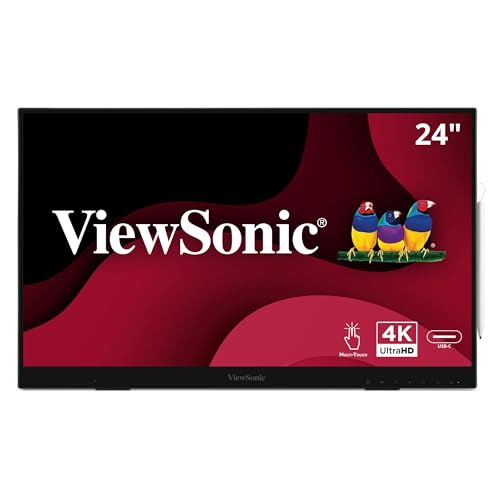
Premium 4K Touch Workstation – ViewSonic ID2456-4K
The ViewSonic ID2456-4K is a large-format option among professional pen display monitors, combining a 24-inch 4K IPS touchscreen with a pressure-sensitive stylus. Its USB-C, HDMI, and DisplayPort connectivity makes it practical for creative desks, office work, and classroom use.
Best For: Artists and professionals who want a spacious 4K interactive display with touch input and flexible connectivity.
Pros:
- Sharp 3840×2160 4K UHD resolution on a 24-inch IPS panel.
- 10-point touch support and an included stylus with 8192 pressure levels.
- USB-C can provide touch recognition and power through one cable.
- Built-in kickstand, USB hub, and broad Windows, Mac, and Android compatibility.
Cons:
- The 14ms response time is less specialized for fast-paced gaming.
- Apple platforms require vTouch software for touch functionality.
This is a strong choice when screen size and 4K workspace matter more than portability. The combination of touch, pen input, and multiple video connections gives it broad utility beyond drawing.
Compact Drawing Starter – XP-PEN Artist12
The XP-PEN Artist12 is a compact, computer-connected choice among professional pen display monitors. Its 11.6-inch Full HD IPS screen, customizable shortcut keys, touch bar, and battery-free pen support drawing, photo editing, animation, and online teaching.
Best For: Students, teachers, and creators who need an affordable, portable-size pen display for a connected computer setup.
Pros:
- Full HD 1920×1080 IPS display with 100% sRGB coverage and 72% NTSC gamut.
- Battery-free stylus provides 8192 levels of pressure sensitivity and includes a digital eraser.
- Six customizable shortcut keys and a programmable touch bar improve workflow efficiency.
- Includes a pen holder, replacement nibs, and drawing glove.
Cons:
- It must be connected to a computer to operate.
- HDMI and USB-A ports are required, or an additional adapter may be needed.
- The 11.6-inch screen offers less working space than larger professional displays.
The Artist12 keeps the core pen-display experience straightforward while adding useful controls and accessories. It is particularly practical for beginners, remote instruction, and creators who value a smaller footprint.
Portable Color-Critical Pro – ASUS ProArt PA169CDV
The ASUS ProArt PA169CDV stands out among professional pen display monitors as a portable 15.6-inch 4K display with Wacom EMR pen technology. Its factory-calibrated color, 10-point touch, ASUS Dial, and dual kickstands make it suited to professional creative work on the move.
Best For: Photographers, video editors, and designers who need a portable, color-accurate pen display with advanced workflow controls.
Pros:
- 4K UHD IPS panel with 100% sRGB coverage and Delta E below 2 factory calibration.
- Wacom EMR ProArt Pen delivers a pen-on-paper-style drawing experience.
- ASUS Dial and Virtual Control Panel provide customizable creative shortcuts.
- Portable 2.4-pound design, two viewing-angle kickstands, and a five-year warranty with registration.
Cons:
- USB-C is central to the design, so users should verify device port compatibility.
- The 15.6-inch screen provides less physical workspace than a full-size desktop display.
The PA169CDV is aimed at professionals who prioritize color consistency and mobility. Its 4K resolution, Wacom pen technology, and dedicated controls make it a more specialized tool than a basic portable monitor.
Portable Touch Pick – 15.6-inch FHD Touchscreen Monitor
For shoppers comparing professional pen display monitors, this portable 15.6-inch model emphasizes flexible Windows touch and pen input in a travel-friendly design. Its FHD IPS screen, 10-point touch, included MPP 2.0 stylus, and built-in stand make it suited to notes, annotations, presentations, and basic sketching.
Best For: Windows users who need a lightweight touchscreen monitor for mobile productivity, document markup, and casual creative work.
Pros:
- 15.6-inch 1920×1080 IPS display with 100% sRGB coverage and 178-degree viewing angles.
- Included MPP 2.0 active stylus supports Windows Ink, pressure sensitivity, and precise annotation.
- Lightweight 2.4-pound design includes a kickstand, sleeve, USB-C connectivity, HDMI, and necessary cables.
- Blue-light reduction and flicker-free technology support longer viewing sessions.
Cons:
- Mac users must install the free UPDD driver for touch and stylus functionality.
- Touch and stylus input are not supported on iPhone, iPad, or gaming consoles.
- FHD resolution is less detailed than higher-resolution pen displays.
This is a practical choice when portability and Windows Ink compatibility matter more than advanced studio features. The included accessories make it convenient for mobile work, while the 15.6-inch size provides more working room than smaller travel displays.
Dual-Display Workstation – ViewSonic TD2455 Touch Monitor 2-Pack
For buyers building a larger professional pen display monitor setup, this ViewSonic TD2455 bundle provides two 24-inch FHD touchscreen displays with included stylus pens. It combines 10-point touch, wide viewing angles, USB-C connectivity with 65W charging, ergonomic adjustment, and daisy-chain support for a more organized multi-monitor workspace.
Best For: Offices, creative workstations, and users who want two adjustable touch displays for multitasking and interactive workflows.
Pros:
- Two 24-inch 1920×1080 IPS displays with 10-point in-cell touch and included stylus pens.
- USB-C supports video, data, audio, and up to 65W charging, with display daisy-chaining.
- Ergonomic flexibility includes height, swivel, and tilt adjustment.
- Integrated speakers, AMD FreeSync, flicker-free technology, and a blue-light filter add versatility.
Cons:
- Both displays are limited to FHD resolution and a 60Hz refresh rate.
- The bundle has a glossy screen finish, which may be less suitable for bright environments.
- Its two-monitor size is less convenient for portable or compact setups.
This bundle is strongest for users who value workspace capacity and ergonomic adjustability. It offers a capable touch-and-pen experience across two screens, although professionals seeking higher resolution or a single dedicated drawing canvas may need a more specialized display.
Color-Critical Travel Pick – 14-inch 4K OLED Pen Display
Among professional pen display monitors, this 14-inch portable OLED model stands out for its high pixel density and wide color coverage. The 4K UHD panel, 100% DCI-P3 gamut, 10-point touch, and 4,096-level MPP stylus make it appealing for detailed photo, video, and graphic work while traveling.
Best For: Creative professionals who need a lightweight, color-focused secondary display for Windows laptops and portable editing setups.
Pros:
- 4K UHD OLED resolution delivers deep blacks, vivid color, and a 100,000:1 contrast ratio.
- 100% DCI-P3 coverage and 10-point touch support detailed creative workflows.
- Included MPP stylus provides 4,096 pressure levels for drawing and precise note-taking.
- Lightweight 1.3-pound aluminum design includes a kickstand, sleeve, cables, and power adapter.
Cons:
- At 14 inches, the working area is smaller than many desktop pen displays.
- Desktop text and web content may appear slightly softer because system scaling is typically used at this pixel density.
- Separate power through the secondary USB-C port may be needed to resolve intermittent flickering.
This display is a compelling portable option when color and sharpness take priority. Its compact size and OLED panel suit travel and detailed media work, while the included stylus adds direct input; however, users who need a large canvas may prefer a desktop-sized monitor.
How We Picked These Professional Pen Display Monitors
We selected models across the main categories professionals consider: dedicated pen displays for illustration, touch monitors for editing and annotation, portable USB-C screens for mobile workflows, and larger interactive displays for collaborative or educational environments. We compared advertised resolution, screen size, touch and stylus support, connectivity, portability, and practical workstation fit.
Specifications can vary by computer, operating system, app, and included accessories. Confirm compatibility with your preferred creative software and check whether the listed pen supports pressure sensitivity, tilt, or battery-free operation.
Quick Comparison
| Best For | Look For | Typical Advantage |
|---|---|---|
| Illustration and design | Pressure-sensitive pen, low parallax, color coverage | Natural drawing control |
| Photo and video editing | 4K resolution, accurate color, touch shortcuts | Detailed previews and efficient navigation |
| Travel and hybrid work | USB-C, slim design, modest power needs | Easy setup away from a desk |
| Teaching and collaboration | Large panel, multitouch, speakers, broad connectivity | Shared viewing and annotation |
Key Buying Factors for Professional Pen Display Monitors
Display Quality and Size
Choose Full HD for compact screens and general annotation, while 4K is more valuable on 15-inch and larger panels used for detailed artwork, retouching, or high-resolution video. Larger displays provide more workspace but require more desk depth and a stable stand.
Pen and Touch Performance
Check pressure levels, tilt support, reported latency, active area, and whether the stylus needs batteries. A laminated display can reduce the visible gap between the pen tip and cursor. Touch input is useful for panning, zooming, and shortcuts, but it should be easy to disable when drawing.
Connections and Compatibility
USB-C simplifies portable setups, although some computers require a cable that supports video, data, and sufficient power. HDMI and DisplayPort can be more dependable for desktop systems. Also verify driver support, available ports, and compatibility with Windows, macOS, ChromeOS, or other devices.
Ergonomics and Accessories
A built-in kickstand, adjustable stand, matte surface, glove, pen holder, and included cables can significantly improve daily use. For long sessions, prioritize viewing angles, stable positioning, and a screen size that does not force awkward posture.
Who Should Buy Which Professional Pen Display Monitors?
Choose a dedicated Wacom, XP-PEN, or similar drawing display if illustration and pressure-sensitive input are your main priorities. Select a 4K portable model if you travel, work from multiple locations, or need a second screen with occasional pen input. A large interactive display is better for classrooms, meeting rooms, and collaborative annotation than for a personal mobile workstation.
For color-critical creative work, prioritize 4K resolution, color specifications, calibration options, and a reliable connection over the lowest price. If you mainly annotate documents, navigate applications, or make quick edits, a Full HD touch display may deliver better value and simpler performance.