
The best portable pen display monitors combine accurate pen input with the convenience of a travel-friendly second screen. They can help artists, designers, students, and multitasking professionals work comfortably without being tied to a traditional drawing tablet or desktop monitor.
This roundup covers compact touchscreen displays, color-focused creator models, and larger portable screens with stylus support. Compare resolution, compatibility, connectivity, ergonomics, and intended use before choosing the right fit.
Best 10 Portable Pen Display Monitors Picks for 2026
Best for OLED Detail
14-Inch 4K Touchscreen Pen Display

- 4K OLED panel with 100% DCI-P3 color coverage
- Includes 4,096-level MPP active stylus
- Lightweight 1.3-pound design with kickstand
Best For: Color-sensitive creative work and travel
Best for Desktop Drawing
ViewSonic 24-Inch 4K Pen Display
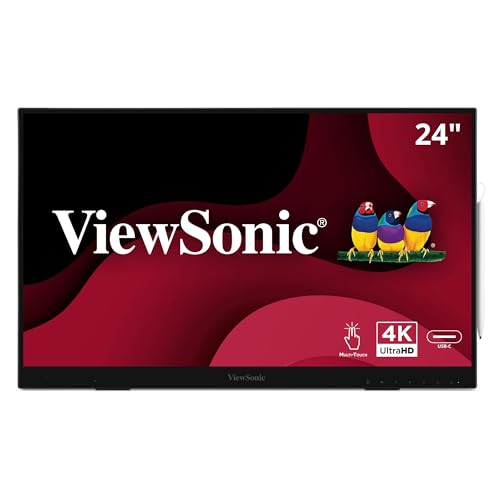
- 24-inch 4K IPS touchscreen with 10-point touch
- 8,192-level active stylus included
- USB-C, HDMI, DisplayPort, and USB hub connectivity
Best For: Large-format drawing and office or classroom use
Best Value Travel Touchscreen
CAPERAVE 15.6-Inch FHD Display

- 15.6-inch FHD IPS touchscreen with 10-point touch
- HDMI and USB-C connectivity for multiple device types
- Built-in kickstand and speakers for mobile use
Best For: Portable productivity, gaming, and touch-enabled second-screen use
Best Professional Pen Display

- 15.6-inch 4K IPS touchscreen with 100% sRGB
- Wacom EMR pen included
- ASUS Dial and professional color validation
Best For: Professional digital artists and photo editors
Best Touchscreen Value

- 4K IPS panel with 100% DCI-P3
- MPP 2.0 stylus and 10-point touch
- Includes cables, sleeve, and kickstand
Best For: Windows users needing a versatile creative second screen
Best Lightweight OLED Option

- 1.3-pound aluminum design
- 4K OLED with 100% DCI-P3 and deep contrast
- Active stylus and 10-point touch included
Best For: Traveling creators who prioritize low weight and OLED image quality
Best Pen-Ready Pick
15.6-inch FHD Touchscreen with MPP Stylus

- Includes an MPP 2.0-compatible active stylus
- Windows Ink support with no extra driver required
- FHD IPS display with 10-point touch
Best For: Windows users needing a portable monitor for pen input and annotation
Best Versatile Touch Monitor
INNOCN 15.6-inch FHD Portable Display

- 100% sRGB IPS display with up to 470-nit brightness
- 10-point touch with USB-C and mini HDMI connectivity
- Protective case included, but no internal battery
Best For: Travel, work, gaming, and multimedia across multiple device types
Best High-Refresh Option
17.3-inch 300Hz Touchscreen Monitor

- 300Hz refresh rate for fast-moving visuals
- 17.3-inch FHD IPS screen with 100% sRGB
- Capacitive stylus included; MPP stylus is not
Best For: Gamers wanting a large, smooth portable touchscreen
Best for OLED Detail – 14-Inch 4K Touchscreen Pen Display
For creators who want color-rich visuals in a travel-friendly format, this 14-inch OLED model is one of the most advanced portable pen display monitors in the lineup. Its 4K resolution, 10-point touch support, and included MPP stylus suit photo editing, graphic design, sketching, and detailed note-taking.
Best For: Windows-based creative work, color-sensitive editing, and travelers who want a lightweight 4K display with pen input.
Pros:
- 4K OLED panel with 100% DCI-P3 coverage and a 100,000:1 contrast ratio.
- Includes an active MPP stylus with 4,096 pressure levels.
- Lightweight 1.3-pound aluminum design with kickstand and protective sleeve.
- Supports USB-C and HDMI connectivity, with cables and power adapter included.
Cons:
- Touch and stylus functionality has platform-specific limitations, especially on iPhone and iPad.
- High-PPI desktop text may appear slightly softer because system scaling is typically used.
- Separate USB-C power may be needed to prevent intermittent flickering.
This is the strongest option here for creators prioritizing resolution and color quality in a compact package. Check your device’s USB-C video and touch compatibility before buying, particularly if you use macOS or mobile devices.
Best for System Monitoring – 12.3-Inch Stretched Touch Display
This compact stretched display takes a different approach to portable pen display monitors. Rather than focusing on drawing, it provides a wide, low-profile touchscreen for secondary information, multitasking, and real-time CPU or GPU monitoring.
Best For: Windows users who want a narrow second screen for AIDA64 system statistics, workspace expansion, or quick controls.
Pros:
- 12.3-inch FHD IPS panel with a 1920×720 resolution and 178-degree viewing angle.
- Stretched bar design fits neatly alongside a primary monitor or laptop screen.
- Touch support is available through USB-C, with HDMI and USB-C connectivity.
- Built-in stereo speakers and compatibility with standard 75x75mm wall mounts.
Cons:
- It is a secondary monitoring display rather than a dedicated stylus drawing monitor.
- Touch is not supported on iOS or iPadOS, while macOS supports only two-point touch.
- AIDA64 software is not included and must be downloaded separately.
Choose this model when screen shape and system visibility matter more than pen precision. Its narrow format can be especially useful for keeping performance data or secondary tools visible without taking over your main workspace.
Best for Desktop Drawing – ViewSonic 24-Inch 4K Pen Display
For users who want a larger canvas rather than maximum portability, the ViewSonic ID2456-4K combines a 24-inch 4K touchscreen with an active stylus. It is a substantial choice among portable pen display monitors, better suited to a fixed desk, classroom, or office setup than frequent travel.
Best For: Desktop drawing, office annotation, classroom use, and creators who prefer a large 4K touchscreen with extensive connectivity.
Pros:
- 24-inch 3840×2160 IPS display with 10-point touch support.
- Included stylus offers 8,192 pressure levels for varied stroke thickness.
- Works with Windows, Android, and macOS, with vTouch software required on Apple platforms.
- Includes HDMI, DisplayPort, USB-C, a USB hub, and a built-in kickstand.
Cons:
- At 9.7 pounds, it is considerably less travel-friendly than smaller portable displays.
- Its 250-nit brightness and 1,300:1 contrast ratio are more conventional than OLED alternatives.
- Apple users need vTouch software for touch functionality.
The ID2456-4K is a good fit when workspace size and stylus control take priority over weight. Its broad input selection and three-year limited warranty also make it appealing for a more permanent professional or educational installation.
Best Value Travel Touchscreen – CAPERAVE 15.6-Inch FHD Display
The CAPERAVE is a straightforward second-screen option for travelers, students, gamers, and remote workers. Among portable pen display monitors, it emphasizes touchscreen convenience and broad device compatibility rather than an included pressure-sensitive stylus.
Best For: Portable productivity, gaming, video viewing, and adding touch control to compatible Windows or macOS laptops.
Pros:
- 15.6-inch Full HD IPS display with a 178-degree viewing angle.
- 10-point capacitive touch works with compatible Windows and macOS connections.
- Supports HDMI and USB-C, with compatibility for laptops, desktops, consoles, and smartphones.
- Includes a built-in kickstand, speakers, blue-light reduction, and flicker-free technology.
Cons:
- No active pen or pressure-sensitivity features are listed.
- Devices without USB-C DP Alt Mode require separate HDMI, power, and USB connections for touch.
- At 1.93 kg, it is heavier than the smaller 14-inch OLED option.
This is a practical choice for users who mainly need a portable touchscreen rather than a true pen-based drawing surface. Confirm your laptop’s port capabilities before purchase so you know whether a single USB-C cable or a multi-cable setup will be required.
Best Professional Pen Display – ASUS ProArt PA169CDV
The ASUS ProArt PA169CDV is a strong choice among portable pen display monitors for creators who prioritize high resolution, color accuracy, and professional pen input. Its 15.6-inch 4K IPS touchscreen combines Wacom EMR pen technology with useful creative controls, including an ASUS Dial and Virtual Control Panel.
Best For: Professional photo editors, illustrators, and designers who need accurate color and programmable workflow controls.
Pros:
- 4K UHD IPS touchscreen with 100% sRGB coverage and factory calibration to Delta E < 2.
- Bundled Wacom EMR pen provides a pen-on-paper-like drawing experience.
- ASUS Dial, Virtual Control Panel, dual kickstands, and a five-year warranty add practical value.
- PANTONE Validated and Calman Verified for professional color workflows.
Cons:
- At 2.4 pounds, it is less lightweight than some smaller portable displays.
- The 60Hz refresh rate is geared toward creative work rather than high-refresh gaming.
- Its professional feature set may be more than casual users need.
The PA169CDV stands out when color consistency and pen performance matter more than minimum weight. Its 4K resolution, Wacom EMR input, and built-in workflow controls make it particularly compelling for serious mobile creative work.
Best Touchscreen Value – 15.6-inch 4K Stylus Monitor
This 15.6-inch 4K model is one of the more versatile portable pen display monitors for Windows users who want a large canvas for drawing, annotation, and second-screen work. It pairs a 100% DCI-P3 IPS panel with 10-point touch and an included MPP 2.0 stylus.
Best For: Windows creatives, students, and office users who need touch interaction, stylus support, and broad connectivity.
Pros:
- 4K IPS display offers 100% DCI-P3 coverage, 400-nit brightness, and 178-degree viewing angles.
- Included MPP 2.0 stylus supports Windows Ink, handwriting, sketching, and document annotation.
- 10-point capacitive touch and full lamination provide responsive gesture control.
- Includes USB-C, HDMI, cables, power adapter, protective sleeve, and adjustable kickstand.
Cons:
- Mac users need the free UPDD driver for touch and stylus functionality.
- Touch and stylus are not supported when used with gaming consoles or iPhone/iPad devices.
- The glossy screen may reflect more ambient light than a matte display.
This monitor offers a well-rounded feature set for mobile creative and productivity work, especially on Windows. Its main limitation is device-specific compatibility, so check your host system before buying.
Best Lightweight OLED Option – 14-inch 4K OLED Pen Monitor
For shoppers seeking lightweight portable pen display monitors, this 14-inch OLED model combines a 1.3-pound aluminum design with 4K resolution, 10-point touch, and an active stylus. Its OLED panel delivers a 100,000:1 contrast ratio and 100% DCI-P3 coverage for vivid creative work on the go.
Best For: Traveling creators who want an especially light display with OLED contrast and high pixel density.
Pros:
- Lightweight 1.3-pound design is easy to carry.
- 4K OLED panel provides true blacks, 100% DCI-P3 coverage, and a 1ms response time.
- Includes active stylus, 10-point touch, adjustable kickstand, protective sleeve, and cables.
- Supports USB-C and HDMI connections across compatible laptops, Macs, smartphones, and consoles for video.
Cons:
- Touch and stylus support varies by device; iPhone and iPad support video output only.
- Windows creative workstations are recommended for the best pen experience.
- PD 30W power is recommended, and a second USB-C power connection may be needed if flickering occurs.
This is the most travel-friendly option in the group, with OLED contrast and a notably light chassis. Its device-dependent input support and power requirements deserve attention, but it is an appealing choice for mobile creators who value portability.
Best Pen-Ready Pick – 15.6-inch FHD Touchscreen with MPP Stylus
For shoppers seeking portable pen display monitors for note-taking, annotation, and light sketching, this 15.6-inch model combines a 1080p IPS touchscreen with an included MPP 2.0-compatible stylus. It is especially practical for Windows users who want plug-and-play Windows Ink support in a travel-friendly package.
Best For: Windows users who need a portable touchscreen monitor with a bundled stylus for documents, presentations, and basic creative work.
Pros:
- 10-point capacitive touch and a full-lamination tempered-glass screen support precise gestures and pen tracking.
- Included active stylus works with Windows Ink and supports annotation, note-taking, and sketching.
- 15.6-inch FHD IPS display offers 100% sRGB coverage, 178-degree viewing angles, and eye-comfort features.
- Built-in stand, protective sleeve, USB-C, HDMI, and included cables make it travel-ready.
Cons:
- Mac users must install the free UPDD driver for touch and stylus functionality.
- Touch and stylus input are not supported on iPhone, iPad, or gaming consoles.
This is the most complete choice for buyers who specifically want a pen included with their portable display. Its Windows Ink compatibility is a strong advantage, while Mac users should account for the required driver installation.
Best Versatile Touch Monitor – INNOCN 15.6-inch FHD Portable Display
This INNOCN model is a practical option among portable pen display monitors when broad device compatibility and touchscreen control matter more than a bundled pen. Its 15.6-inch FHD IPS panel supports USB-C and mini HDMI connections for laptops, tablets, smartphones, and consoles.
Best For: Users who want a bright, color-capable portable touchscreen for work, entertainment, gaming, and travel.
Pros:
- FHD IPS display delivers 100% sRGB color, 178-degree viewing angles, and up to 470-nit brightness.
- 10-point touch technology is designed for precise response without an app or driver on supported setups.
- USB-C and mini HDMI inputs support a wide range of laptops, consoles, smartphones, and mini PCs.
- Protective case, low-blue-light technology, and flicker-free viewing add practical travel and comfort benefits.
Cons:
- No built-in battery, so it requires power from an adapter, USB-C source, or power bank.
- A stylus pen is not listed among the supplied accessories.
- Touch may not work with gaming devices or phones lacking full-featured USB-C.
The INNOCN is a flexible second-screen solution with strong connectivity and vivid color coverage. Choose it if touch is important but you already have a compatible stylus or do not need dedicated pen input.
Best High-Refresh Option – 17.3-inch 300Hz Touchscreen Monitor
For buyers comparing portable pen display monitors who also want fast gaming performance, this 17.3-inch Magedok display stands out with a 300Hz refresh rate and 1ms claimed response time. It adds 10-point touch and a capacitive stylus for finer control, although an MPP stylus is not included.
Best For: Gamers and desktop users who want a large portable FHD touchscreen with an unusually high refresh rate.
Pros:
- 300Hz refresh rate and FreeSync support target smooth, fast-moving gameplay.
- Large 17.3-inch FHD IPS screen provides 100% sRGB coverage and a wide viewing angle.
- 10-point touch and included capacitive stylus support finer commands without requiring a driver.
- Thin design, magnetic leather case, built-in speakers, and VESA mounting holes add flexibility.
Cons:
- The included pen is capacitive rather than an MPP pressure-sensitive stylus.
- At 17.3 inches, it is less compact than the 15.6-inch alternatives.
- Brightness is listed at 300 cd/m², which may be less suitable for very bright environments.
This model makes the most sense when high refresh performance and screen size are priorities. It can handle touch-based productivity and basic drawing, but buyers seeking a more natural pressure-sensitive pen experience should look elsewhere.
How We Picked These Portable Pen Display Monitors
We focused on the features that matter most when a display must serve as both a monitor and a drawing surface. The selection includes models with active stylus support, touchscreen controls, USB-C or HDMI connectivity, and screen sizes suited to travel or flexible desk setups. We also considered resolution, color coverage, panel type, portability, built-in stands, and compatibility with common laptops and operating systems.
Because these products serve different users, the list includes compact secondary displays, high-resolution OLED and 4K options, professional pen displays, and a high-refresh-rate model for gaming and general portable use. Specifications can vary by seller and configuration, so confirm included cables, stylus support, power requirements, and operating-system compatibility before purchase.
Quick Comparison
| Best For | What to Prioritize | Models to Consider |
|---|---|---|
| Digital artists and designers | Pressure-sensitive pen support, color accuracy, and 4K resolution | ASUS ProArt PA169CDV, ViewSonic ID2456-4K |
| Travel and mobile work | Low weight, USB-C connectivity, and simple setup | CAPERAVE, INNOCN, 14-inch portable models |
| Premium image quality | OLED contrast, wide color gamut, and UHD resolution | 14-inch 4K OLED options |
| Gaming and entertainment | Refresh rate, response time, and broad device compatibility | 17.3-inch 300Hz portable monitor |
| Extra workspace | Screen size, stand stability, and multitouch controls | ViewSonic, 15.6-inch touchscreen models |
Key Buying Factors for Portable Pen Display Monitors
Pen Compatibility and Drawing Performance
Check whether the stylus is included and whether it uses an active protocol such as MPP or Wacom technology. Pressure sensitivity, tilt recognition, parallax, and driver support affect how naturally the display feels for sketching, retouching, and handwriting. A touchscreen alone does not guarantee useful pen input.
Resolution, Panel Quality, and Color
Full HD is practical for basic work and reduces power demand, while 4K provides sharper detail for illustration, photo editing, and design. OLED panels deliver deeper blacks and strong contrast, but IPS displays can offer dependable viewing angles and value. Creators should also look for wide color coverage and a color profile suitable for their workflow.
Connectivity and Power
USB-C is convenient, but not every USB-C port supports video. Some displays require a separate power connection or HDMI cable, particularly at higher brightness or resolution. Confirm the ports on your laptop, tablet, phone, or game console and check whether an adapter is needed.
Size, Weight, and Ergonomics
A 12- to 14-inch model is easier to carry, while 15.6 inches or more provides a more comfortable canvas and multitasking area. A built-in kickstand or adjustable case can make a major difference during long sessions. Remember to account for the display, cables, stylus, and protective accessories when assessing portability.
Who Should Buy Which Portable Pen Display Monitors?
Choose a compact Full HD model if you mainly need a portable second screen for documents, travel, or occasional touch input. Choose a 4K OLED or professional Wacom-equipped display if detailed artwork, color-sensitive design, and premium pen control are priorities. Choose a larger 15.6- or 17.3-inch model if workspace and immersion matter more than minimum carry weight. Finally, choose a high-refresh-rate display if gaming is central and stylus features are secondary.