
The best premium pen display monitors combine accurate color, responsive pen input, and a comfortable workspace for drawing, design, photo editing, and other creative tasks.
This roundup compares 10 options ranging from large 4K professional displays to compact touchscreen monitors, helping you match screen size, connectivity, and stylus support to your workflow.
Best 10 Premium Pen Display Monitors Picks for 2026
Professional Color Studio

- 4K IPS display with 99.43% Adobe RGB coverage
- Two battery-free pens with 8,192 pressure levels
- 40 customizable keys, OLED controls, and adjustable stand
Best For: Professional artists needing a spacious, color-accurate workspace
Touchscreen Workstation
ViewSonic ID2456-4K Touch Display
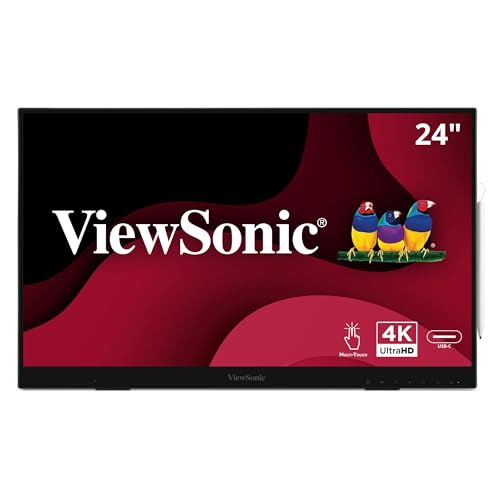
- 24-inch 4K IPS touchscreen with 10-point touch
- 8,192-level active stylus included
- USB-C, HDMI, DisplayPort, and built-in USB hub
Best For: Creative and office users who want touch and pen input
Compact Starter Display
XP-PEN Artist12 11.6-inch Display

- 11.6-inch Full HD IPS screen with 100% sRGB
- Battery-free 8,192-level pen with digital eraser
- Six shortcut keys and programmable touch bar
Best For: Students, beginners, and compact creative workspaces
Portable ProArt Canvas
ASUS ProArt PA169CDV 4K Monitor

- 15.6-inch 4K IPS display with 100% sRGB
- Wacom EMR pen and 10-point multitouch
- ASUS Dial, dual kickstands, and extended warranty
Best For: Traveling professionals needing calibrated pen input
Travel-Ready Touch Pick
Portable 15.6-Inch MPP Pen Monitor

- 15.6-inch FHD IPS touchscreen with 10-point response
- MPP 2.0 stylus and Windows Ink compatibility
- 2.4-pound design with stand, sleeve, and cables
Best For: Mobile Windows note-taking, annotation, and light sketching
Professional Color Pick
ASUS ProArt 32-Inch 4K QD-OLED

- 31.5-inch 4K QD-OLED panel with 120Hz refresh
- Factory-calibrated color with Delta E<1.5
- USB-C 96W power delivery and Auto KVM
Best For: Color-critical photo, video, and design work
Dual-Screen Touch Pick
ViewSonic TD2455 24-Inch Bundle

- Two 24-inch FHD IPS 10-point touch monitors
- Stylus pens and USB-C daisy-chain connectivity included
- Adjustable stands, speakers, and eye-care features
Best For: Dual-screen interactive office and multimedia setups
OLED Stylus Value Pick
DAMRAPT 14-Inch 4K OLED Monitor

- 4K OLED with 100% DCI-P3
- Included MPP stylus and 10-point touch
- Only 1.3 pounds with kickstand
Best For: Windows creatives seeking portable pen input and OLED contrast
Color-Critical Travel Pick

- 15.6-inch 4K touchscreen
- 100% Adobe RGB and 550 nits
- Lightweight aluminum body with stand
Best For: Mobile creatives needing bright, Adobe RGB-focused color
Professional Color Studio – Xencelabs Pen Display 24
For artists who need a large, color-accurate workspace, this Xencelabs model is a strong premium pen display monitor choice. Its 23.8-inch 4K screen, anti-glare Super-AG Etching, broad color coverage, and included workflow controls are designed for extended illustration, animation, and design sessions.
Best For: Professional artists, illustrators, animators, and designers who want a spacious calibrated display.
Pros:
- 4K UHD IPS display with 99.43% Adobe RGB coverage and Pantone and SkinTone validation.
- Includes two battery-free pens with different designs, 8,192 pressure levels, and tilt recognition.
- 40 customizable quick keys, an OLED display, and a multifunction dial support efficient workflows.
- Anti-glare etched glass and an adjustable 16-to-72-degree stand improve comfort.
Cons:
- Its large 23.8-inch format is less portable than smaller pen displays.
- Requires a wired or wireless computer connection and is aimed at a higher-end creative setup.
The Pen Display 24 prioritizes screen quality, ergonomic adjustment, and shortcut access. It is particularly compelling when accurate color and a generous drawing surface matter more than compact size.
Touchscreen Workstation – ViewSonic ID2456-4K Touch Display
The ViewSonic ID2456-4K combines a 24-inch 4K touchscreen with pen input, making it a versatile option among premium pen display monitors for creative work, presentations, and interactive desktop use. Its USB-C connectivity and built-in kickstand simplify setup with compatible computers.
Best For: Creators, educators, and office users who want touch, stylus input, and a large 4K screen.
Pros:
- 24-inch 4K UHD IPS display with a matte finish, thin bezels, and 178-degree viewing angles.
- Included active stylus provides 8,192 pressure levels for varied line thickness.
- Supports 10-point PCAP touch across Windows, Android, and Mac OS, with vTouch software required on Apple platforms.
- USB-C can provide touch recognition and power over one cable, while the USB hub adds connectivity.
Cons:
- Its 250-nit brightness and 60Hz refresh rate are suited to general creative and office use rather than high-refresh applications.
- Apple users need vTouch software for touch functionality.
This model is a practical hybrid display for users who value touch interaction as much as pen input. The included cables, stylus, kickstand, and three-year limited warranty add to its workstation appeal.
Compact Starter Display – XP-PEN Artist12 11.6-inch Display
The XP-PEN Artist12 is a compact, approachable option for shoppers comparing premium pen display monitors but needing a smaller setup. Its 11.6-inch Full HD screen, battery-free pen, customizable controls, and broad software compatibility suit drawing, photo editing, online teaching, and remote work.
Best For: Students, teachers, beginners, and mobile-minded artists who prefer a compact screen tablet.
Pros:
- 11.6-inch 1920×1080 IPS display offers 100% sRGB coverage and an anti-reflective protector.
- Battery-free pen includes a digital eraser and 8,192 pressure levels.
- Six customizable shortcut keys and a programmable touch bar support common actions.
- Works with Windows, Mac, and Linux plus popular creative and video-conferencing software.
Cons:
- Its smaller Full HD screen provides less workspace and resolution than larger 4K models.
- Requires HDMI and USB-A connections, or an appropriate adapter for systems without those ports.
The Artist12 focuses on essential pen-display functionality in a compact form. It is a sensible choice when desk space, portability, and straightforward compatibility outweigh the need for a large professional canvas.
Portable ProArt Canvas – ASUS ProArt PA169CDV 4K Monitor
For creators who work between locations, the ASUS ProArt PA169CDV brings a 15.6-inch 4K touchscreen and Wacom EMR pen technology to a portable format. It stands out among premium pen display monitors with factory color calibration, built-in creative controls, and flexible USB-C connectivity.
Best For: Traveling designers, photographers, and video editors who need accurate pen input away from a fixed studio.
Pros:
- 4K UHD IPS display is factory calibrated to Delta E less than 2 and covers 100% sRGB.
- Wacom EMR ProArt Pen supports a pen-on-paper-like drawing experience without battery charging.
- 10-point multitouch, ASUS Dial, and Virtual Control Panel add flexible creative controls.
- Two kickstands provide different viewing angles, and the extended warranty can reach five years with registration.
Cons:
- The 15.6-inch screen is smaller than desktop-focused 24-inch pen displays.
- Its portable workflow depends on compatible HDMI or USB-C devices and available cabling.
The PA169CDV is tailored to professionals who want a calibrated 4K canvas without staying tied to a studio desk. Its compact build, Wacom EMR pen, and programmable controls make it a strong travel-oriented option.
Travel-Ready Touch Pick – Portable 15.6-Inch MPP Pen Monitor
For shoppers comparing premium pen display monitors, this portable 15.6-inch model emphasizes mobility, touch control, and included pen input. Its FHD IPS panel, built-in stand, and broad accessory package make it a practical choice for Windows-based note-taking, annotation, and light sketching away from a fixed desk.
Best For: Mobile Windows users who need a lightweight touchscreen for notes, document markup, presentations, and basic creative work.
Pros:
- 15.6-inch FHD IPS display with 10-point capacitive touch, full lamination, and tempered glass.
- Included MPP 2.0 active stylus supports Windows Ink, pressure sensitivity, and low-latency writing.
- Lightweight 2.4-pound design includes a built-in stand, sleeve, USB-C, HDMI, and power accessories.
Cons:
- Mac touch and stylus functions require the free UPDD driver.
- Touch and stylus input are not supported with iPhone, iPad, or gaming consoles.
- Its 1920×1080 resolution and 60Hz refresh rate are more suited to everyday work than high-end display production.
This is the most travel-friendly option in the group, combining convenient pen input with a compact footprint. Windows Ink compatibility is a major advantage, while Mac users should plan for the additional driver installation.
Professional Color Pick – ASUS ProArt 32-Inch 4K QD-OLED
Among premium pen display monitors, the ASUS ProArt PA329CDV stands out as a large professional monitor for color-critical work rather than an integrated pen display. Its 4K QD-OLED panel, factory calibration, high brightness, and extensive connectivity suit demanding photo, video, design, and multitasking setups.
Best For: Creative professionals who prioritize accurate color, 4K detail, fast motion performance, and flexible workstation connectivity.
Pros:
- 31.5-inch 4K QD-OLED panel offers 120Hz refresh, 0.1ms response time, and up to 1000 nits peak brightness.
- Calman Verified and factory-calibrated with Delta E<1.5, 99% DCI-P3, and 100% sRGB coverage.
- USB-C provides 96W power delivery, while Auto KVM, daisy-chain DisplayPort, and the USB hub support complex setups.
- Fully adjustable stand and a five-year warranty with online registration add long-term flexibility.
Cons:
- The supplied notes do not identify an included stylus or touchscreen functionality.
- At 15.5 pounds with a 31.5-inch panel, it is intended for a permanent workstation rather than travel.
- Its professional specifications may be more than needed for basic office or casual viewing.
The PA329CDV is the strongest choice here for large-format visual quality and professional color workflows. Buyers specifically seeking direct pen interaction should note that the supplied specifications focus on display performance and connectivity, not pen input.
Dual-Screen Touch Pick – ViewSonic TD2455 24-Inch Bundle
For buyers exploring premium pen display monitors in a multi-screen setup, this ViewSonic bundle provides two 24-inch touch monitors with included stylus pens. The FHD IPS screens emphasize responsive in-cell touch, ergonomic adjustment, daisy chaining, and simplified USB-C connectivity for interactive office or multimedia work.
Best For: Users building a dual-monitor touch workstation for presentations, note-taking, collaborative work, and general multimedia use.
Pros:
- Two 24-inch FHD IPS monitors include 10-point touch and stylus pens for precise interaction.
- USB-C supports video, data, audio, daisy chaining, and up to 65W charging.
- Thin bezels help create continuity across the dual-screen setup, with 178-degree viewing angles.
- Height, swivel, and tilt adjustments combine with speakers, FreeSync, flicker-free operation, and a blue-light filter.
Cons:
- FHD resolution and a 60Hz refresh rate are less suited to high-resolution creative production.
- The two-monitor bundle requires more desk space and setup planning than a single portable display.
- The glossy finish may reflect more ambient light than a matte panel.
This bundle makes the most sense when two touch-enabled screens are more valuable than maximum resolution. Its stylus support, ergonomic stands, and USB-C features create a flexible interactive workstation, while creative professionals may prefer a higher-resolution display for detailed editing.
Flagship Large-Format Pick – espresso Displays 17 Pro
For shoppers comparing premium pen display monitors, the espresso Displays 17 Pro stands out with a spacious 17.3-inch 4K touchscreen, 100% DCI-P3 coverage, and a slim aluminum design. Its USB-C connectivity supports a clean, portable setup for demanding creative and productivity work.
Best For: Professionals and creatives who want a large, color-focused touchscreen display that can travel.
Pros:
- 17.3-inch 4K UHD screen with 100% DCI-P3 coverage
- Responsive touchscreen supports editing, multitasking, and presentations
- Ultra-thin 0.35-inch CNC-machined aluminum design
- USB-C plug-and-play compatibility with Mac, Windows, and other devices
Cons:
- At 1.5 kg, it is heavier than smaller portable displays
- Glossy finish may not suit every lighting environment
- Touchscreen pen support is not specified in the supplied details
The 17 Pro is a strong premium choice when screen area and portability matter more than minimum weight. Its 4K resolution, wide color gamut, and high-end construction make it well suited to mobile creative workflows.
OLED Stylus Value Pick – DAMRAPT 14-Inch 4K OLED Monitor
Among premium pen display monitors, this DAMRAPT model combines a 14-inch 4K UHD OLED panel with 10-point touch and an included MPP stylus pen. Its 100% DCI-P3 coverage, deep contrast, and compact 1.3-pound design make it particularly appealing for mobile Windows creative setups.
Best For: Windows users who want an ultraportable OLED touchscreen with included pen functionality.
Pros:
- 4K UHD OLED display with 100% DCI-P3 and 100,000:1 contrast
- 10-point touch and included 4096-level-pressure MPP stylus
- Lightweight 1.3-pound aluminum body with adjustable kickstand
- Includes cables, power adapter, and protective sleeve
Cons:
- Touch and stylus functionality are primarily recommended for Windows USB-C setups
- iPhone and iPad devices support video display but not touch or stylus input
- Separate USB-C power may be needed to address intermittent flickering
This is the most directly pen-oriented option in the group, pairing an included stylus with OLED image quality. Buyers should verify device compatibility and power requirements before choosing it for a mixed-platform workflow.
Color-Critical Travel Pick – espresso Displays Pro 15
The espresso Displays Pro 15 is a polished choice for premium pen display monitors, offering a 15.6-inch 4K touchscreen with 100% Adobe RGB coverage and 550-nit brightness. Its single-cable USB-C setup and included magnetic stand are designed for streamlined creative work on the move.
Best For: Creatives who prioritize Adobe RGB color coverage, brightness, and a tidy portable workstation.
Pros:
- 4K touchscreen with 100% Adobe RGB and 550-nit brightness
- Responsive multi-touch supports drawing, annotation, and multitasking
- Thin, lightweight 9mm aluminum construction weighing 0.8 kg
- Single-cable USB-C connection and included adjustable espressoStand+
Cons:
- Stylus or pressure sensitivity is not specified in the supplied details
- USB-C connectivity may require compatible host hardware
- iPad extended display requires an iPad Pro with M1 or later and iPadOS 16+
The Pro 15 balances professional color coverage with portability and an unusually simple setup. It is a compelling option for image-focused work, provided your laptop or tablet supports the required USB-C display connection.
How We Picked the Best Premium Pen Display Monitors
We focused on displays that support pen-based creative work while also functioning as capable monitors. Our comparison considered resolution, color coverage, touch and stylus compatibility, screen size, connectivity, ergonomics, portability, and suitability for professional software. Models with 4K resolution, wide-gamut color, USB-C connectivity, built-in stands, or pressure-sensitive pen support received particular attention.
Because these products serve different users, the list includes full-size pen displays, portable USB-C monitors, touchscreen displays, and standard professional monitors that can complement a separate drawing tablet. Always confirm the included pen, operating-system support, and required cables before buying.
Quick Comparison
| Best For | What to Look For |
|---|---|
| Professional illustration | Large 4K panel, strong color coverage, low-latency pen input |
| Photo and video work | Accurate color, high resolution, calibration options |
| Travel and flexible setups | Portable design, USB-C power and video, compatible stylus |
| Beginners and smaller desks | Compact size, included accessories, simple connectivity |
| Touch-based productivity | Reliable multi-touch, adjustable stand, broad device support |
Key Buying Factors for Premium Pen Display Monitors
Screen Size and Resolution
A 15- or 16-inch display is easier to transport, while 24 inches offers a more natural desktop drawing area. Larger 27- to 32-inch screens provide room for artwork and tool panels but require more desk space. 4K resolution delivers sharper line work and more workspace; Full HD can still be practical on smaller panels.
Pen Performance
Check pressure sensitivity, tilt recognition, tracking accuracy, and whether the pen requires batteries. A battery-free stylus is convenient for daily use. Also verify whether the monitor is a true pen display or simply a touchscreen that works with a compatible active stylus.
Color and Panel Quality
Artists and photographers should prioritize wide-gamut coverage, factory calibration, viewing angles, and uniform brightness. IPS panels are common for consistent color, while OLED can provide deeper blacks and stronger contrast. Professional specifications matter most when your work will be printed or delivered for color-critical production.
Connections and Ergonomics
USB-C can simplify portable setups, but not every USB-C port carries both video and power. HDMI, DisplayPort, USB hubs, and daisy-chaining may be valuable in a desktop studio. An adjustable stand or built-in kickstand also improves drawing comfort and reduces neck strain.
Who Should Buy Which Premium Pen Display Monitors?
Choose a large professional pen display if you create detailed illustrations, 3D work, or long-form design projects and want to draw directly on screen. A compact portable model is better for mobile creators, students, and professionals who move between a home office and other locations. Touch-focused displays suit users who want gesture controls alongside pen input, while a color-accurate professional monitor paired with a separate tablet may be the better choice for photographers, editors, and designers who do not need an integrated drawing surface.