
A home studio can quickly become crowded with power strips, audio interfaces, monitor cables, USB leads, and instrument connections. The right under-desk cable tray keeps that wiring off the floor and makes changes easier when your setup grows.
We compared 10 under-desk cable trays for home studios across mounting styles, capacity, durability, and installation flexibility to help you choose a cleaner, more accessible workspace.
Best 10 Under-Desk Cable Trays for Home Studios Picks for 2026
Best No-Drill Pick

- No-drill clamp installation
- Supports about 15 pounds
- Fits 0.4–2.4-inch flat desks
Best For: Renters and compact studio desks
Best Long Mesh Net
VIVO 36-Inch Under-Desk Holder

- 35.8-inch mesh storage area
- Holds up to 11 pounds
- Includes Velcro straps
Best For: Wide desks with multiple power supplies
Best Large-Capacity Hybrid

- 36-inch fabric storage tray
- Clamp-on or screw-in mounting
- Built-in ties secure equipment
Best For: Large studio setups needing flexible mounting
Best Value Two-Pack

- Two metal trays included
- 33 inches of combined space
- Pre-drilled with mounting hardware
Best For: Multi-device setups needing separate storage zones
Large-Capacity Steel Pick

- 32-inch ventilated steel tray
- C-clamp or screw installation
- Holds power strips and assorted cords
Best For: Cable-heavy home studio desks needing flexible mounting
Value Two-Piece Setup

- Two 17-inch metal trays
- 10-pound stated load capacity
- Wide openings for power strips
Best For: Studios needing separated or adjustable cable-storage zones
Drill-Free Fabric Organizer
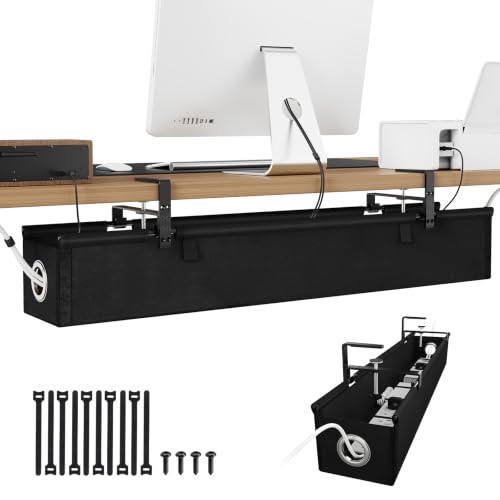
- Roomy fabric tray for multiple power strips
- Three-level clamps fit 0–2.5-inch desks
- Raised sides contain cords quietly
Best For: Large, quiet studio setups needing clamp-on installation
Best Fabric Organizer
Large Clamp-or-Screw Cable Tray

- Fabric tray helps conceal power strips and adapters
- Clamp-on or screw-in installation options
- Includes cable ties and fiber tubes
Best For: Home studios wanting flexible installation and enclosed cable storage
Best Two-Pack Value
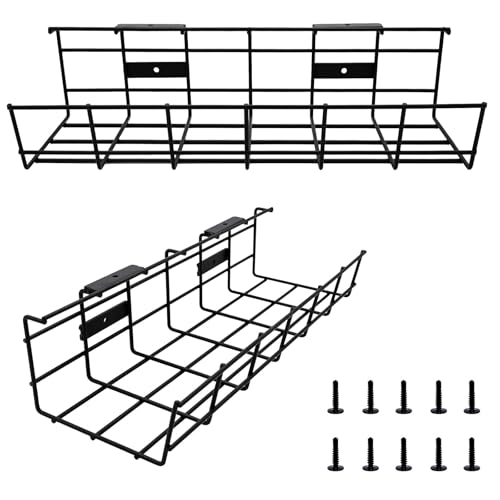
- Includes two metal cable management trays
- Supports up to 15 pounds when properly installed
- Designed for cables, power strips, hubs, and accessories
Best For: Permanent multi-desk setups using wood or composite desks
Best No-Drill Metal Tray
25-Inch Clamping Cable Organizer
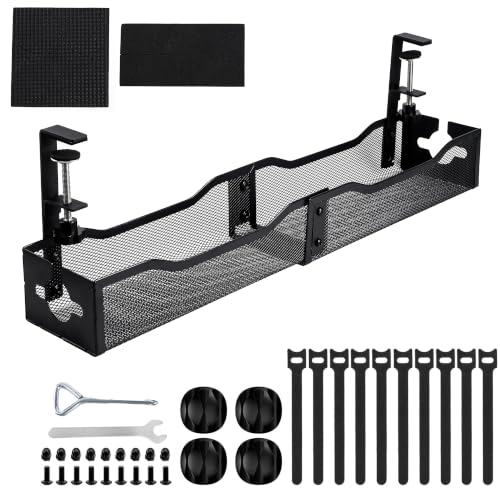
- Installs with padded clamps instead of drilling
- 25-inch length holds a full-size power strip
- Open mesh steel design supports ventilation
Best For: Renters and standing-desk users needing removable, high-capacity storage
Best No-Drill Pick – Litwaro Clamp-Mount Mesh Tray
For home studios that need under-desk cable trays for home studios without drilling into furniture, the Litwaro uses edge clamps to create a compact home for power cords, outlet strips, USB hubs, and transformers. Its metal mesh construction and two cable pass-through holes keep wiring accessible and off the floor.
Best For: Renters, standing desks, and setups where a drill-free installation is important.
Pros:
- No-drill clamp installation can be assembled in about three minutes.
- Carbon-steel construction supports approximately 15 pounds.
- Rubber clamp pads help protect the desk surface.
- Fits flat-edge desks from 0.4 to 2.4 inches thick.
Cons:
- The 13.4-inch length offers less capacity than full-width trays.
- Clamp installation requires a compatible flat desk edge.
This is a practical choice for smaller studio workstations where you want sturdy storage without permanent mounting. Check the desk thickness and edge shape before ordering.
Best Long Mesh Net – VIVO 36-Inch Under-Desk Holder
The VIVO DESK-AC36MH-S is a long mesh option for under-desk cable trays for home studios, with room for power strips, power bricks, and multiple cable types. Its low-profile netting promotes airflow and includes hook-and-loop straps to help secure the contents.
Best For: Wide desks and studio setups with several power cables or larger power supplies.
Pros:
- Nearly 36 inches of mesh storage space.
- Holds up to 11 pounds.
- Flame-resistant material and airflow-friendly mesh design.
- Includes mounting hardware and instructions.
Cons:
- Requires screw mounting to a desktop at least 0.8 inches thick.
- Its 36-inch length may be excessive for smaller desks.
Choose this model when broad, flexible storage matters more than a rigid basket. The screw-on installation makes it better suited to permanent studio workstations than rental furniture.
Best Large-Capacity Hybrid – Univivi 36-Inch Cable Tray
For larger home studio rigs, the Univivi provides a 36-inch fabric tray that can hold adapters, sockets, and other under-desk equipment. It supports either clamp-on or screw-in installation, while built-in ties help keep items secured inside the flame-retardant Oxford fabric organizer.
Best For: Large equipment loads and desks where you want both temporary and permanent mounting options.
Pros:
- Large 36-by-5.5-inch storage area.
- Offers clamp-on and screw-in installation.
- Foldable design makes adding or removing items easier.
- Bottom support helps maintain its shape under heavier loads.
Cons:
- Needs at least 5.3 inches of clear edge space when drawers or back rods are present.
- Clips occupy some tabletop-edge space and are not completely invisible.
- Fabric construction may be less rigid than a metal tray.
This is a versatile pick for a busy studio desk, especially when installation flexibility and capacity are priorities. Measure the underside and check for drawers or rear supports before buying.
Best Value Two-Pack – DELAMU Metal Cable Trays
The DELAMU two-pack is a useful choice among under-desk cable trays for home studios when you want to divide equipment across two mounting points. Each metal tray has a wide opening for access and ventilation, while the included hardware supports screw installation under a desk or on a wall.
Best For: Multi-device setups that benefit from two separate organizers or flexible tray spacing.
Pros:
- Two metal trays provide a combined 33 inches of cable-management space.
- Pre-drilled holes and included screws and anchors simplify installation.
- Wide openings make cables easier to add or remove.
- Can also hold small gadgets or stationery with the included plastic sheets.
Cons:
- Requires drilling or screw installation.
- No warranty is listed in the supplied details.
- The two-piece layout requires planning for tray spacing.
This value pack works well when a studio needs separate storage zones for power strips, adapters, and smaller accessories. It is best for permanent setups where screw mounting is acceptable.
Large-Capacity Steel Pick – Univivi 32-Inch Cable Tray
For home studios that need to corral power strips, chargers, and signal cables, the Univivi is a spacious option among under-desk cable trays for home studios. Its ventilated steel design supports airflow, while the enlarged cable holes make routing cords from either side more convenient.
Best For: Larger studio desks with multiple power strips and a preference for either clamp-on or screw mounting.
Pros:
- 32-inch, widened tray provides substantial storage for power strips, power cords, data cables, and chargers.
- Ventilated construction helps dissipate heat around power strips and cables.
- Offers no-drill C-clamp mounting as well as screw mounting.
- Enlarged cable holes support flexible front- or back-side cable routing.
Cons:
- The supplied details identify it as a steel tray weighing 2.45 kg, so it may be less convenient to handle than lighter organizers.
- Screw mounting requires drilling, while clamp compatibility depends on the desk setup.
The Univivi stands out when capacity and ventilation matter most. It is a practical fit for a cable-heavy studio, especially if you want the option of a reversible installation approach.
Value Two-Piece Setup – DELAMU 2-Pack Cable Trays
The DELAMU two-pack is a flexible choice among under-desk cable trays for home studios, giving you two shorter metal trays to position around desk legs or other obstacles. The open design accommodates power strips and promotes ventilation, while pre-drilled holes simplify screw installation.
Best For: Studio setups that benefit from separated cable-storage zones or adjustable placement across a wider desk.
Pros:
- Two 17-inch trays provide a combined 34 inches of cable-management space.
- Metal construction has a stated 10-pound load capacity.
- Wide openings make surge protectors easier to insert or remove and support ventilation.
- Includes screws, anchors, and plastic sheets for installation and tray organization.
Cons:
- Installation is screw-based rather than drill-free.
- The two-piece layout requires more positioning and installation decisions than a single continuous tray.
- The stated 0.6-inch screw guidance assumes a desk thicker than 0.5 inch.
Choose the DELAMU when modular placement and value are more useful than a single long tray. Its two-piece format can help distribute studio cables while keeping power equipment off the floor.
Drill-Free Fabric Organizer – KEEGH 36-Inch Cable Tray
The KEEGH offers a roomy, enclosed alternative among under-desk cable trays for home studios. Its Oxford-fabric body and raised side panels contain tangled cords quietly, while the adjustable clamps provide drill-free mounting for compatible flat-edged desks.
Best For: Home studios with several power strips that need a quiet, high-capacity organizer without scratching the desktop.
Pros:
- 36-inch by 5.3-inch by 5.9-inch interior provides space for several full-size power strips, adapters, and cords.
- Three-level clamps fit desks from 0 to 2.5 inches thick.
- Supports both clamp-on and screw mounting.
- Elevated side panels help keep cables from spilling out, and the fabric construction avoids metal rattling.
Cons:
- Clamp installation works best with a flat desktop edge.
- Oxford fabric may not provide the same rigid structure as a metal tray.
- The large dimensions may be more organizer than smaller studio desks require.
The KEEGH is a strong match for dense, cable-heavy workstations where quiet operation and contained cords are priorities. Its clamp range also makes it appealing for renters or anyone avoiding drilled mounting.
Best Fabric Organizer – Large Clamp-or-Screw Cable Tray
For home studios that need flexible under-desk cable trays for home studios, this Cotohim organizer combines a fabric tray with clamp-on or screw-in installation. Its roomy design is intended to conceal power strips, adapters, and loose wires while helping keep cables away from the floor.
Best For: Home studios and standing desks needing a versatile, fabric-covered organizer with optional no-drill installation.
Pros:
- Offers both clamp-on and screw-mounted installation.
- Thickened flame-retardant Oxford fabric helps provide dust protection and conceal wiring.
- Can hold power supplies, extension cords, adapters, and assorted cables.
- Includes cable ties and fiber tubes for additional organization.
Cons:
- Clamp compatibility is limited to desktops from 0.4 to 2.4 inches thick.
- The fabric construction may not suit shoppers specifically seeking a rigid metal tray.
This is a practical choice when you want broad desk compatibility and a softer, enclosed look. Measure your desktop first, then choose the clamp or screw installation method that best fits your studio.
Best Two-Pack Value – Heavy-Duty Metal Cable Trays
This COYACOOL two-pack is a straightforward option for under-desk cable trays for home studios, especially when you need separate storage under more than one desk or workspace. The metal trays are designed to hold cables, power strips, USB hubs, adapters, and related accessories.
Best For: Studio owners who want two sturdy, screw-mounted trays for wood or wood-composite desks.
Pros:
- Two-pack provides cable storage for multiple workstations.
- Metal construction is rated to hold up to 15 pounds when properly installed.
- Can accommodate power cables, Ethernet, HDMI, USB hubs, and accessories.
- Includes ten screws to support a secure installation.
Cons:
- Installation requires drilling four small holes per tray.
- Designed to be fixed to most wood or wood-composite desks, limiting material compatibility.
- Each tray is 14.5 inches long, so it may offer less room than a longer single tray.
The main appeal is its durable metal build and two-tray format. It is a good fit for permanent studio setups, but confirm your desk material and available underside space before drilling.
Best No-Drill Metal Tray – 25-Inch Clamping Cable Organizer
For renters, standing-desk users, and home studios seeking under-desk cable trays for home studios without drilling, this EVIYRA tray uses padded steel clamps. Its 25-inch length is designed to hold a full-size surge protector along with chargers, adapters, and a docking station.
Best For: Home studios and sit-stand desks that need a removable, tool-free cable tray with substantial capacity.
Pros:
- Clamps on without screws or drilling and can be removed cleanly.
- 25-inch tray accommodates a power strip, charging bricks, router, and adapters.
- Powder-coated steel resists bending, cracking, and heat buildup.
- Open mesh supports ventilation around power adapters.
Cons:
- Clamps fit desktops from 0.4 to 1.6 inches thick.
- Clamp installation may not work with desks outside that thickness range.
- The supplied dimensions list an unusual 25-inch width, so verify the product measurements before ordering.
This tray stands out for combining a long metal basket with renter-friendly installation. It is particularly useful for sit-stand setups because the tray remains attached to the desktop as it raises and lowers.
How We Picked the Best Under-Desk Cable Trays for Home Studios
We focused on the features that matter in a studio environment: sturdy construction, useful cable capacity, dependable mounting, and access for maintenance. The selection includes clamp-mounted trays for renters or temporary setups, screw-on models for a more permanent installation, and multi-packs for desks with separate power and signal zones.
We also considered tray length, weight support, open versus fabric-style designs, and whether the layout can accommodate thick power cables alongside smaller USB, MIDI, monitor, or network cables. Product descriptions and stated specifications were compared carefully, but actual performance can vary with desk thickness, hardware, and installation quality.
Quick Comparison
| Best For | Look For | Why It Helps |
|---|---|---|
| Renter-friendly setup | No-drill clamp mount | Installs without permanent holes |
| Permanent studio desk | Screw-on metal tray | Strong, stable support |
| Large workstations | 32- to 36-inch length | Organizes more of the desktop footprint |
| Multiple cable zones | Two-pack design | Separates power, audio, and data runs |
| Frequent cable changes | Open mesh or wire construction | Improves access and airflow |
Key Buying Factors for Under-Desk Cable Trays for Home Studios
Mounting Method
No-drill clamp trays are the easiest choice for rented spaces and desks you may rearrange. Check the clamp range before buying, and confirm that the underside has enough clearance. Screw-mounted trays are generally better for heavier power strips or a fixed recording workstation, but they require accurate placement and suitable hardware.
Size and Cable Capacity
Measure the usable underside of your desk rather than relying only on the advertised length. A 32- or 36-inch tray can cover a broad workstation, while a shorter 25-inch model may suit compact desks. Leave room for cable bends and power adapters; a tray that is technically long enough may still feel crowded if it carries bulky plugs.
Construction and Access
Metal mesh and wire trays offer ventilation and make it easier to trace or swap cables. Fabric-style organizers can conceal wiring and reduce visual clutter, but may provide less rigid support. For audio setups, avoid sharply bending sensitive cables and keep power wiring separated from signal cables where practical.
Desk Compatibility
Confirm the tray’s mounting clearance, clamp depth, screw requirements, and underside shape. Desks with drawers, crossbars, beveled edges, or unusually thick tops may limit placement. Before installation, plan where the power strip, interface, computer, and monitor cables will enter and leave the tray.
Who Should Buy Which Under-Desk Cable Trays for Home Studios?
Choose a no-drill clamp model if you rent, share a workspace, or expect to change your desk layout. Pick a screw-on metal tray for a permanent home studio with heavier equipment and a stable desk. A 36-inch tray is a strong fit for wide desks with several connected devices, while a 25-inch option works better for compact workstations.
Two-pack trays are useful when you want separate routing for power and audio/data cables, or when you have more than one desk. For quick troubleshooting and frequent equipment swaps, favor an open mesh or wire design. Whichever style you choose, measure first and avoid overloading the tray beyond its stated capacity.