
The Smart 10.1-inch Digital Calendar is a family command center that combines shared scheduling, chore tracking, meal planning, to-do lists, and a photo frame.
This Smart Digital Calendar review focuses on whether that combination is useful for households trying to make busy routines more visible.
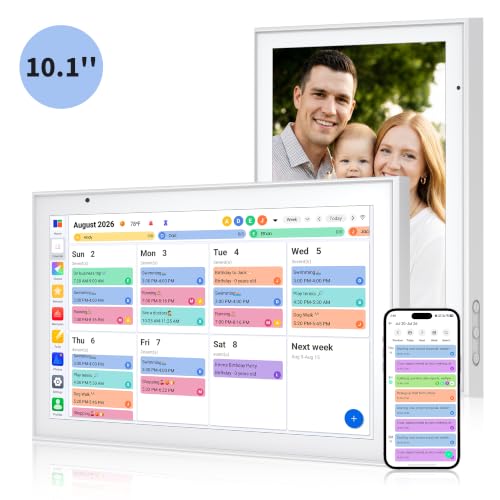
Smart Digital Calendar Review Summary
The main reason to buy the Smart Digital Calendar is consolidation: instead of keeping appointments, household jobs, weekly meals, and reminders in separate places, the listing describes one touchscreen display for all of them.
It is best suited to families who want a shared visual board in a kitchen or common area, especially when different people use Google, iCloud, Outlook, Cozi, or Yahoo calendars.
The 10.1-inch format is positioned for a counter, desk, or wall, and the display can become a digital photo frame when planning information is not on screen.
The strongest appeal is visibility. A calendar everyone can see is easier to use for household coordination than a schedule that lives only on one person’s phone.
Custom colors for family members are intended to make overlapping plans easier to distinguish, while the chore chart gives children a tap-based way to mark tasks complete.
The tradeoff is that this is a feature-rich household organizer rather than a simple calendar display, so buyers should be comfortable setting up connected accounts and maintaining another shared device.
Review Scorecard
| Category | Editorial score | Buyer-focused assessment |
|---|---|---|
| Shared calendar usefulness | 9/10 | Supports Google, iCloud, Outlook, Cozi, and Yahoo calendars in one display. |
| Family organization | 9/10 | Combines appointments, chores, meals, and to-do items for household visibility. |
| Child engagement | 8/10 | An interactive chore chart lets children tap to check off completed tasks. |
| Display versatility | 8/10 | Works as a calendar and can transition to a photo frame for photos and videos. |
| Placement flexibility | 8/10 | The compact 10.1-inch design is described for desk, counter, or wall use. |
| Setup confidence | 6/10 | Wi-Fi and multiple calendar connections add capability, but the listing provides no detailed setup guidance. |
These are editorial buyer assessments based on the supplied product information, not laboratory measurements or hands-on testing.
For the right household, the breadth of functions matters more than having a traditional paper-style calendar.
Key Features and Specifications of Smart Digital Calendar
Connected family scheduling
The central feature is real-time syncing across several calendar ecosystems.
The listing says the Smart Digital Calendar can merge appointments from Google, iCloud, Outlook, Cozi, and Yahoo, with dual-band Wi-Fi used for updates.
That makes it more adaptable than a display tied to one calendar provider.
Families can also assign custom colors to each member, a practical detail when multiple schedules appear together.
This color-coding is particularly useful for identifying ownership at a glance.
A parent can see a child’s activity, a shared appointment, or another family member’s commitment without opening individual calendars.
The database record does not specify the exact sync process, supported account limits, or whether every calendar service offers identical functionality, so buyers should treat compatibility as a stated listing feature and confirm their preferred setup before purchase.
Touchscreen chore chart
The built-in chore chart is designed around participation rather than passive reminders.
According to the listing, children can use the responsive touchscreen to check off completed tasks.
That interaction may make recurring responsibilities more visible and give younger household members a simple ownership loop: view the task, complete it, and mark it done.
The product information does not describe reward settings, recurring-task controls, user permissions, or notification options.
Its clear value is the shared, paperless checklist—not a guaranteed behavior-change system.
Families looking for a highly configurable chore-reward platform should verify those details, while families wanting an easy shared chore board may find the concept more approachable than a list hidden in an app.
Meal planning and to-do lists
Meal planning and to-do lists extend the calendar beyond appointments.
The listing presents the meal planner as a place to map out a weekly menu and grocery needs, while the to-do list provides a central spot for household reminders.
Keeping these items near the schedule can help connect plans with practical preparation: what the family is doing, what it intends to eat, and what needs to be purchased or completed.
There are no supplied details about recipe storage, automatic grocery generation, task assignment, or list sharing rules.
The safest assessment is that these are integrated planning surfaces, not necessarily a full meal-planning service.
Their usefulness will depend on whether the family values a visible weekly overview and is willing to keep it current.
Photo frame and placement options
When it is not being used as a schedule, the device is described as automatically transitioning into a digital photo frame that cycles through photos and videos.
The companion app is said to support uploading new memories from anywhere.
This gives the screen a second household role and may make it easier to keep a shared display powered on rather than treating it as an occasional planning tool.
The 10.1-inch size is described as compact enough for a kitchen counter or desk, with an included stand, while wall mounting is also supported.
The record does not provide the unit’s depth, mounting hardware details, display resolution, or storage capacity.
Those omissions matter if the buyer has a tight shelf, a particular wall-mounting requirement, or a large photo library.
Pros and Cons of Smart Digital Calendar
Pros
- Broad calendar compatibility: The listing names Google, iCloud, Outlook, Cozi, and Yahoo, which can help mixed-platform families share one view.
- One visible household hub: Scheduling, chores, meals, and to-do items are brought together on one touchscreen.
- Useful family visual system: Custom colors are intended to make each person’s plans easier to identify.
- Child-friendly task interaction: Tapping to complete chores may be more engaging for children than a paper checklist.
- Flexible everyday role: It can display photos and videos when the family is not actively planning.
- Multiple placement choices: The included stand supports desk or counter use, while wall placement is also described.
Cons
- Feature details are limited: The supplied listing does not explain account limits, permissions, storage, or advanced scheduling controls.
- Requires ongoing upkeep: A shared digital board only stays useful when calendars, chores, meals, and lists remain updated.
- Connectivity is part of the experience: Syncing depends on Wi-Fi and connected services, so it is less self-contained than a paper calendar.
- Not a hands-on-tested recommendation: No hands-on notes were supplied, so responsiveness, setup speed, and long-term reliability cannot be independently assessed here.
- May be more device than some homes need: Buyers who only want a basic monthly calendar may not use its extra planning and photo features.
Who Should Buy Smart Digital Calendar?
The best buyer is a busy household that needs a common visual reference point.
Families with several calendars, children who need visible chores, and households that plan meals and errands together are the clearest fit.
It also makes sense for buyers who want an organizational display that can serve as home decor between planning sessions.
It should appeal to mixed-platform families because the listing names several major calendar services rather than limiting the product to one ecosystem.
A kitchen counter, desk, or wall in a shared area is a better location than a private office: the value comes from repeated visibility and collective participation.
Skip it if you want a no-maintenance solution. The product’s benefits depend on syncing accounts and keeping shared information accurate.
It may also be a poor match for shoppers who need detailed specifications about mounting, display quality, local operation, storage, or advanced chore rules before deciding.
Those buyers should confirm the missing details with the seller or choose a product whose documentation is more explicit.
How the Smart Digital Calendar Fits a Family Routine
Morning schedule check
The combined calendar view is designed to give the household a quick starting point.
Color-coded appointments can show who has commitments, while the shared display keeps the day’s structure in a common location rather than distributing it across individual phones.
Weekly planning session
The meal planner and to-do list are most useful when reviewed alongside upcoming appointments.
A family can map out meals and grocery needs while looking at the week’s schedule, though the record does not establish whether the device automates those connections.
Children’s responsibility loop
The touchscreen chore chart creates a simple check-off moment for children.
Its role is clearest as a visible accountability board; buyers should not assume advanced rewards or notifications without additional product confirmation.
Between planning tasks
The photo-frame mode gives the display a continuing purpose.
Cycling through photos and videos, with uploads through the companion app, may help the device blend into a living space instead of looking like a dedicated office tool.
Alternatives to Smart Digital Calendar
For buyers who prioritize a broader smart-home display, compare the Amazon Echo Show line.
It may be a better direction for shoppers who want voice-assistant features alongside calendar information, while the Smart Digital Calendar is more explicitly organized around a family command-center layout.
The Skylight Calendar is another credible comparison for shoppers focused on a dedicated family scheduling screen.
Buyers should compare supported calendars, chore and meal features, display size, and any required services against the Smart model’s stated combination of functions.
For households that mainly want shared tasks and lists, consider a Google Nest Hub.
It is a sensible alternative when smart-home interaction is more important than a dedicated chore-chart and photo-frame presentation.
Verify the calendar and family-management features that matter most before choosing.
Is Smart Digital Calendar Worth It?
The Smart Digital Calendar is worth considering when a household wants one visible touchscreen for schedules, chores, meals, to-do items, and family photos.
Its strongest differentiators are the stated support for multiple calendar platforms, custom family colors, interactive chore checkoffs, and flexible counter, desk, or wall placement.
Buy it if shared visibility is the problem you are trying to solve. The product is less compelling for shoppers seeking a simple calendar or fully documented productivity system, because the supplied evidence does not cover advanced controls, storage, or setup specifics.
Overall, it is a promising family-organizing display for buyers who value an all-in-one household hub and are comfortable confirming the remaining technical details before purchase.