
A good desk fan should deliver noticeable airflow without taking over your workspace. The best premium USB desk fans combine quiet operation, useful speed control, adjustable positioning, and convenient USB power for offices, bedrooms, dorms, and travel.
This roundup compares 10 standout models, from compact single-speed metal fans to rechargeable designs with digital controls and wide rotation. Use the guide below to match features, size, and performance with the way you work or relax.
Best 10 Premium USB Desk Fans Picks for 2026
Most Adjustable
DIGIX 100-Speed Rechargeable Desk Fan
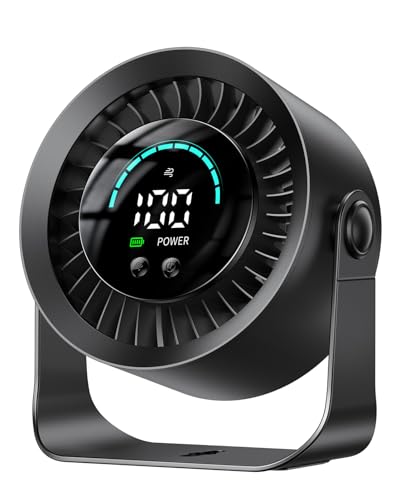
- 100 stepless speeds and 360° rotation
- Up to 17 hours of battery life on low
- Tabletop or wall-mountable design
Best For: Cordless, precisely adjustable cooling
Best Metal Base
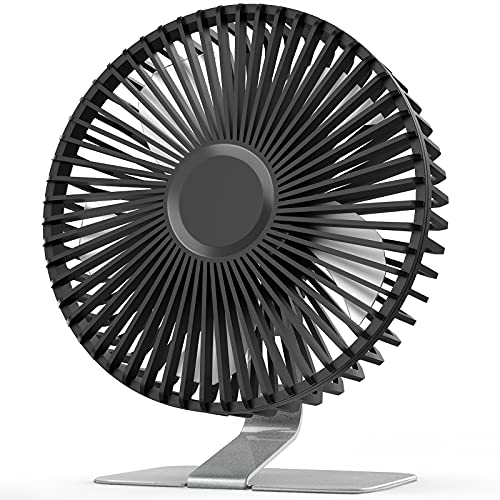
- Stable vintage metal base
- Four speeds with a super-wind setting
- 0°–90° tilt and removable front cover
Best For: Stable, adjustable cooling at a desk
Quiet Compact Pick

- Three speeds with airflow up to 5.3 m/s
- Detachable cover and silicone-padded base
- Lightweight design with a five-foot USB cable
Best For: Personal cooling at desks, bedside tables, and while traveling
Retro Metal Pick

- Large 9-inch frame with 360-degree rotation
- Polished metal construction and silicone feet
- Two speeds with a listed 40 dB noise level
Best For: Home-office users wanting durable styling and directional airflow
Two-Pack Value Pick

- Two compact fans included
- Three speeds with 360-degree angle adjustment
- Stable silicone-padded bases and detachable covers
Best For: Equipping two desks, nightstands, or personal spaces
Most Customizable
KIMMOO 100-Speed Rechargeable Fan

- 100 speed levels with digital controls
- Up to 8.5 hours of battery cooling
- 35dB low-speed operation
Best For: Precise airflow control and cordless desk use
Best Metal Design
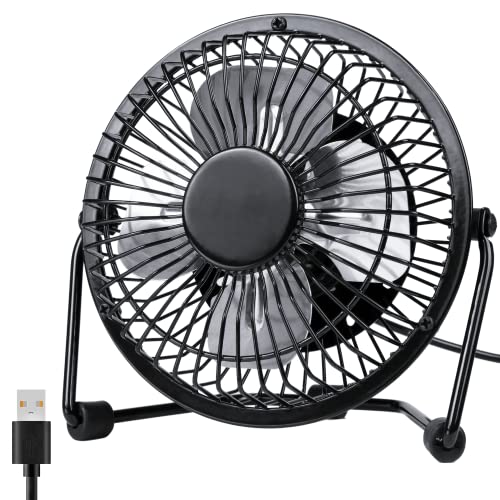
- Compact metal frame with aluminum blades
- 360-degree adjustable rotation
- Two-speed USB-powered operation
Best For: Stylish close-range cooling at a desk or bedside
Best Simple Plug-In
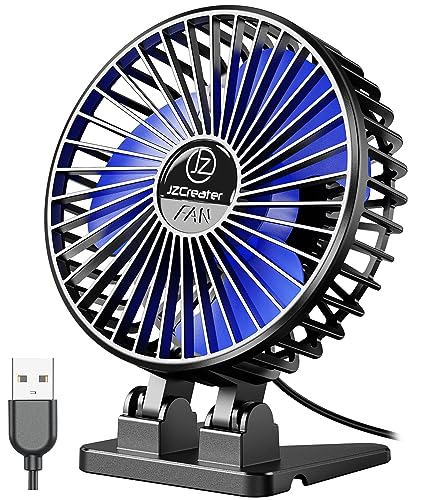
- Three adjustable speed levels
- Lightweight 160g portable design
- Removable front cover for cleaning
Best For: Simple USB-powered cooling at home, work, or while traveling
Most Adjustable – DIGIX 100-Speed Rechargeable Desk Fan
The DIGIX is a versatile pick among premium USB desk fans for shoppers who want cordless convenience and highly precise airflow control. Its rechargeable battery, 100 speed settings, and 360° rotation make it easy to tailor cooling for a desk, bedroom, or travel bag.
Best For: Users who want a rechargeable, highly adjustable fan for home offices, bedrooms, or travel.
Pros:
- Offers 100 stepless speeds for fine airflow adjustments.
- Rotates 360° and can sit on a table or mount to a wall.
- 3000mAh battery provides up to 17 hours on low speed.
- Quiet 23dB operation and an LED display show settings and battery status.
Cons:
- Its compact size may not circulate as much air as a larger fan.
- Battery life varies with the selected speed.
With cordless operation, detailed controls, and a three-year coverage period, the DIGIX is a strong choice when flexibility matters more than maximum room-wide airflow.
Best Compact Airflow – Koonie Ultra-Quiet USB Desk Fan
The Koonie is a practical option among premium USB desk fans for small workspaces. Its seven-blade design delivers airflow up to 15.4 feet per second, while the compact body and adjustable angle help it fit neatly on a crowded desk.
Best For: Desk users who need compact, corded cooling with straightforward speed controls.
Pros:
- Seven-blade design produces airflow up to 15.4ft/s.
- Three speeds offer simple soft-to-strong cooling control.
- 180° adjustment helps direct airflow where needed.
- 35dB operation is designed for relatively quiet use.
Cons:
- It is not rechargeable and must remain connected via USB.
- Only three speed settings are available.
The Koonie balances a small footprint with useful airflow, making it a sensible choice for offices, bedrooms, and other spaces where outlet-powered simplicity is preferred.
Best Metal Base – SLENPET 6-Inch USB Desk Fan
The SLENPET brings a sturdier, more traditional feel to premium USB desk fans with its vintage metal base and six-inch format. It offers four speed levels, a 90° tilt range, and USB power for use with computers, chargers, or power banks.
Best For: Shoppers who want a stable metal desk fan with stronger airflow and multiple speed choices.
Pros:
- Four speed settings include a high super-wind mode.
- Heavy-duty metal base helps keep the fan stable.
- Fan head tilts from 0° to 90° for directional airflow.
- Removable front cover makes blade cleaning easier.
Cons:
- It is corded and not battery powered.
- Noise can reach up to 50dB at the stated maximum.
- The highest setting requires output current up to 2A.
The SLENPET is well suited to users who prioritize a stable, classic-looking fan and stronger control over airflow, provided a USB power source is always available.
Best Vintage Design – HOLMES 4-Inch Heritage Desk Fan
The HOLMES Heritage is a compact choice among premium USB desk fans for buyers who value simple controls and a decorative metal finish. Its single-speed motor, adjustable 100° head tilt, and small footprint make it easy to position on a desk, dorm table, or bedside surface.
Best For: Users seeking a compact, stylish USB fan with uncomplicated operation.
Pros:
- Metal construction and brushed copper finish provide a vintage appearance.
- 100° adjustable head tilt directs airflow where needed.
- Small footprint is suitable for desks and travel.
- 30dB noise rating supports quieter personal cooling.
Cons:
- Only one speed setting is available.
- It requires USB power and is not rechargeable.
- Uses a mini-USB connection rather than USB-C.
The HOLMES is a good fit when appearance, portability, and simple personal airflow matter more than multiple speed levels or cordless operation.
Quiet Compact Pick – Gaiatop 5.5-Inch USB Desk Fan
For shoppers seeking premium USB desk fans in a compact format, the Gaiatop combines three speed settings, a 90-degree rotating design, and a brushless motor in a lightweight 5.5-inch frame. Its detachable cover also makes routine cleaning easier.
Best For: Personal cooling at a desk, bedside table, or while traveling.
Pros:
- Three speeds range from a gentle breeze to stronger cooling airflow.
- Brushless motor produces wind speeds up to 5.3 m/s with listed noise levels of 30–50 dB.
- Stable silicone-padded base, detachable cover, and five-foot USB cable improve everyday usability.
- Works with USB power sources such as laptops, power banks, and compatible chargers.
Cons:
- No wall charger is included.
- Requires a 5 V / 2 A power supply, according to the product notes.
- Its small size is intended for personal airflow rather than cooling a whole room.
The Gaiatop is a practical choice when quiet operation, portability, and easy cleaning matter more than broad-room circulation. Its compact footprint suits crowded workspaces and travel bags.
Retro Metal Pick – EasyAcc 9-Inch USB Desk Fan
The EasyAcc stands out among premium USB desk fans with its larger 9-inch format, polished metal frame, and 360-degree rotation. It is USB-powered only, making it convenient for laptops, power banks, and other compatible USB supplies.
Best For: Users who want durable styling and broad directional airflow for a home office or desk.
Pros:
- Large 9-inch design and 360-degree rotation help direct airflow around a workspace.
- Metal mesh frame with a polished, electroplated finish provides a sturdy retro look.
- Brushless motor is rated at 2.5 watts and listed at 40 dB noise.
- Includes an on/off switch, two speed settings, and soft silicone feet.
Cons:
- Only two fan speeds are available.
- USB power is required; an AC wall adapter is not listed as included.
- Its larger, heavier construction is less compact than a mini personal fan.
Choose the EasyAcc if you prioritize a substantial metal build and flexible positioning over the smallest possible footprint. Its 360-degree rotation is particularly useful when airflow needs to cover more than one direction.
Two-Pack Value Pick – TriPole Mini USB Desk Fans
The TriPole two-pack offers a flexible way to equip multiple work areas with premium USB desk fans. Each compact 4.5-inch fan has three speeds, a 360-degree adjustable head, a stable silicone-padded base, and a detachable cover for cleaning.
Best For: Cooling two desks, nightstands, or personal spaces with compact fans.
Pros:
- Two fans are included, making it easy to cool separate locations.
- Three wind modes provide adjustable personal airflow.
- 360-degree vertical adjustment helps aim air where needed.
- Wide bases and four silicone pads help reduce movement and vibration.
Cons:
- The fans use USB-A power and do not include a wall charger in the supplied details.
- They have unremovable cords, which may limit placement flexibility.
- The mini 4.5-inch size is designed for personal cooling rather than whole-room circulation.
The TriPole is a sensible option when quantity and space efficiency matter. Its two-fan configuration works well for shared spaces or for keeping one fan at a desk and another beside the bed.
Most Customizable – KIMMOO 100-Speed Rechargeable Fan
For shoppers seeking premium USB desk fans with highly precise airflow control, the KIMMOO stands out with 100 speed settings, a digital display, and rechargeable convenience. Its compact design and adjustable airflow make it practical for desks, bedrooms, travel, and occasional outdoor use.
Best For: Users who want finely tunable airflow, quiet operation, and cordless portability.
Pros:
- Offers 100 speed levels, from a gentle breeze to turbo airflow.
- Runs at 35dB on its lowest setting for quiet relaxation, work, or sleep.
- Rechargeable battery provides up to 8.5 hours of use and recharges in about 2.5 hours.
- Digital display shows wind speed and battery status.
Cons:
- Its small tabletop format may not circulate air as broadly as a larger room fan.
- Requires charging when used away from a USB power source.
The KIMMOO is the most feature-rich option here, combining detailed speed control, a battery, and a clear display in a lightweight body. It is a strong fit for buyers who value flexibility more than a simple plug-in setup.
Best Metal Design – Zuvas 4-Inch USB Desk Fan
The Zuvas is a compact choice among premium USB desk fans, pairing a metal exterior with a small footprint and straightforward USB power. Its two-speed control, quiet operation, and 360-degree rotation suit close-range cooling at a desk, bedside table, or home office.
Best For: Buyers who prefer a refined metal look and simple plug-in operation.
Pros:
- Metal frame and aluminum blades give it a more substantial, textured appearance.
- 360-degree rotation helps direct airflow where needed.
- USB cable works with adapters, hubs, computers, laptops, and power banks.
- Quiet operation is rated below 40dB on the strongest setting in the product notes.
Cons:
- Only two speed settings provide less control than multi-speed alternatives.
- It is USB-powered rather than battery-powered, so it needs a connected power source.
Choose the Zuvas when appearance and compact construction matter as much as cooling. It does not offer the range of controls found on more advanced models, but its metal styling and flexible positioning make it a polished desk accessory.
Best Simple Plug-In – JZCreater 3-Speed Mini Fan
The JZCreater offers a practical, budget-friendly approach to premium USB desk fans, with three speed levels, a compact body, and plug-and-play USB power. Its lightweight construction makes it easy to move between a desk, bedroom, car, or travel setup.
Best For: Users who want a lightweight USB fan with simple three-speed control and no battery maintenance.
Pros:
- Three speed settings provide more adjustment than basic two-speed models.
- Lightweight 160g design is convenient for desks, travel, camping, and car use.
- Brushless motor provides strong airflow while remaining below 50dB at high speed.
- Front cover can be removed for cleaning.
Cons:
- It has no built-in battery and must remain connected to USB power.
- Its plastic construction may feel less substantial than a metal fan.
- It lacks the digital display and fine-grained speed control of more advanced models.
The JZCreater is a sensible everyday option for buyers who prioritize portability and uncomplicated controls. Its cleaning-friendly design and three speeds add useful practicality, while the USB-only setup works best in locations with a nearby power source.
How We Picked the Best Premium USB Desk Fans
We focused on the features that matter most in everyday desktop cooling: airflow control, noise-conscious operation, adjustability, portability, construction, power options, and ease of use. The selection includes compact personal fans, larger 9-inch models, rechargeable units, and multipacks so shoppers can compare different approaches rather than one narrow design.
Product claims such as “quiet,” “strong wind,” and “ultra-quiet” can vary by speed setting and room conditions. For that reason, consider the overall feature set instead of relying on a single performance label.
Quick Comparison
| Best For | Models to Consider | Standout Features |
|---|---|---|
| Most control | DIGIX; KIMMOO | 100 speeds, rechargeable designs, rotating heads |
| Quiet compact cooling | Koonie; Gaiatop; JZCreater | Small footprints, multiple speed settings |
| Metal construction | HOLMES; EasyAcc; Zuvas | Metal frames or housings and adjustable positioning |
| Shared or multi-location use | TriPole | Two-fan package for separate work areas |
| Larger desktop airflow | EasyAcc | 9-inch size and 360-degree rotation |
Key Buying Factors for Premium USB Desk Fans
Speed Control and Airflow
More speed settings make it easier to balance cooling power and noise. A 100-speed design offers very fine adjustment, while a two- or three-speed fan is simpler and faster to operate. Larger blades or a larger fan diameter may move more air, but they also require more desk space.
Noise and Nighttime Use
If the fan will sit beside a monitor, microphone, or bed, prioritize quiet operation and low-speed control. A fan advertised as quiet may still become audible at maximum power, so look for several lower settings rather than only a high top speed.
Power, Battery, and Placement
USB-powered models are convenient for laptops, power banks, wall adapters, and desktop hubs. Rechargeable fans provide more freedom from a cable, while plug-in models can run continuously without battery maintenance. Check whether the product includes a cable and whether your intended USB source supplies adequate power.
Rotation, Tilt, and Build
Adjustable tilt helps aim airflow at your face or upper body, while 90- or 360-degree rotation can cool a wider area. Metal construction may improve durability and appearance, whereas lightweight plastic designs are often easier to carry.
Who Should Buy Which Premium USB Desk Fans?
Choose the DIGIX or KIMMOO if precise speed control and rechargeable convenience are priorities. The Koonie, Gaiatop, or JZCreater fit shoppers who want compact personal cooling with straightforward controls.
For a sturdier metal look, consider the HOLMES or Zuvas. The EasyAcc is the better fit when you have room for a larger fan and want broader airflow. If you need cooling in two locations, the TriPole two-pack offers a practical solution. The SLENPET suits buyers seeking a small fan with four speed options and a modest desktop footprint.