
A cluttered bundle of power and data cables can make even a well-organized desk feel messy. The best budget under-desk cable trays create a dedicated route for cords without requiring expensive furniture or complicated installation.
This roundup compares 10 affordable options, including no-drill clamp designs, metal mesh trays, compact organizers, and deeper models for larger power bricks. Use the buying guide below to narrow your choice by desk size, equipment, and setup needs.
Best 10 Budget Under-Desk Cable Trays Picks for 2026
Best No-Drill Pick

- No-drill clamp installation
- 15-pound metal mesh capacity
- Fits desks 0.4–2.4 inches thick
Best For: Renters and flexible home-office setups
Best Long Single Tray

- 25-inch organizer for long setups
- No-drill clamp mounting
- Holds approximately 15 pounds
Best For: Standing desks with multiple cables and sockets
Best Two-Pack Value

- Two metal trays plus cable accessories
- Aligns to create 31.4 inches of storage
- 10-pound capacity per tray
Best For: Wide desks and multi-device workstations
Best Low-Profile Design
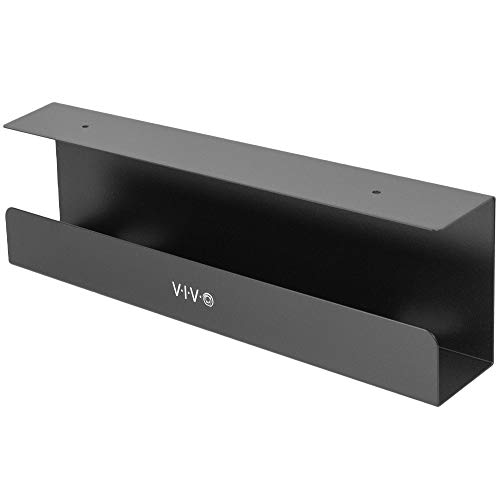
- Compact 16.5-inch metal rack
- Partially closed cord-hiding design
- Supports up to 11 pounds
Best For: Neat indoor setups on wood or particle-board desks
Best Clamp-On Value
Cinati 13.4-Inch Metal Cable Tray
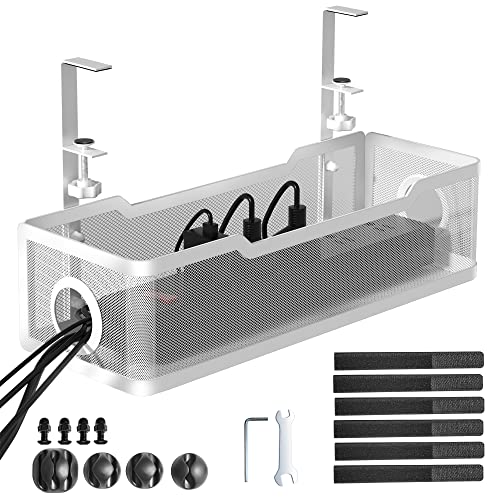
- No-drill clamp installation
- Supports up to 10 pounds
- Includes clips and cable ties
Best For: Renters and compact home-office setups
Best Long Tray
LOVJOYSE 25.3-Inch No-Drill Organizer

- Extra-long 25.3-inch design
- Supports up to 15 pounds
- Open mesh with two access holes
Best For: Large desks, gaming setups, and multiple-device workspaces
Best Two-Pack
Scanfield 17-Inch Adhesive Cable Trays

- Includes two 17-inch trays
- Tool-free adhesive installation
- 3.5-inch interior for bulky cords
Best For: Two-zone desk setups and adhesive-only installation
Best with Extra Features

- No-drill, no-screw installation
- Holds up to 10 pounds
- Includes clips and cable ties
Best For: Renters and compact desk setups
Best for Standing Desks

- Moves with height-adjustable desks
- 24.4-inch steel tray
- Hides power supplies and cables
Best For: Sit-stand workstations
Best Large-Capacity Value

- 25.3-inch cable basket
- Clamp-on, no-drill mounting
- Fits power strips and bulky adapters
Best For: Gaming setups and cable-heavy desks
Best No-Drill Pick – Litwaro Clamp-On Cable Tray
If you want budget under-desk cable trays without drilling into your furniture, the Litwaro clamp-on tray offers a straightforward setup. Its metal mesh basket supports up to 15 pounds and fits flat-edged desks between 0.4 and 2.4 inches thick.
Best For: Renters, home offices, and standing desks needing flexible clamp-on cable storage.
Pros:
- No-drill installation can be completed in about three minutes.
- Rubber clamp pads help protect the desk from scratches.
- Supports inward or outward mounting and includes cable pass-through holes.
- Mesh construction helps limit dust buildup.
Cons:
- Only one 13.4-inch tray is included.
- Designed for flat desk edges within a specific thickness range.
With its adjustable mounting direction and 15-pound capacity, this is a practical choice when you want accessible cable storage without permanently modifying the desk.
Best Long Single Tray – Mzmaxy 25-Inch Cable Tray
For shoppers comparing budget under-desk cable trays, the Mzmaxy stands out with a 25-inch span for storing longer power strips and several cords. Its clamp mount avoids drilling, while the ventilated metal mesh helps keep cables and power supplies organized.
Best For: Standing desks and workstations that need one long tray for multiple cables and sockets.
Pros:
- 25-inch length provides substantial cable storage space.
- Supports approximately 15 pounds.
- Clamp fits desks from 0.4 to 2 inches thick and includes non-slip pads.
- Can be mounted inward or outward.
Cons:
- The tray arrives in two sections that require screw assembly.
- The supplied warranty is limited to three months.
- Its length may be excessive for compact desks.
This model is a strong value when a single extended tray is more useful than several smaller organizers, especially for standing-desk power-strip setups.
Best Two-Pack Value – Xpatee Dual Cable Trays
If your setup needs coverage across a wider desk, these budget under-desk cable trays provide two metal organizers plus clips and cable ties. Each tray holds up to 10 pounds, and placing them together creates an extra-long 31.4-inch storage run.
Best For: Wide desks, multiple devices, and shoppers who want two separate mounting points.
Pros:
- Two trays, four cable clips, and eight cable ties are included.
- Aligned trays create a 31.4-inch organizer for long power strips.
- Open sides make power-strip installation easier without unplugging.
- Anti-scratch mats help protect the desk surface.
Cons:
- Each tray supports up to 10 pounds, less than some single-tray options.
- The product details list screw-in installation, so mounting may require desk hardware.
- Each individual tray is 15.7 inches long.
The included accessories and two-tray layout make this a versatile choice for separating power supplies or extending storage across a larger workstation.
Best Low-Profile Design – VIVO Extra-Deep Cable Tray
Among budget under-desk cable trays, the VIVO Extra Deep model suits desks where a clean, unobtrusive appearance matters. Its 16.5-inch metal rack supports up to 11 pounds and uses a partially closed design to conceal power strips and AV cables.
Best For: Wood or particle-board desks that need a compact, low-profile cable rack.
Pros:
- Low-profile 16.5-by-3-inch design blends into home and office setups.
- Partially closed construction helps hide cords and devices.
- Front opening allows cables to be added or removed easily.
- Includes screws for under-desk mounting and supports 11 pounds.
Cons:
- Installation requires drilling or driving screws into a wood or particle-board surface.
- It is shorter and narrower than the larger tray options.
- Intended for indoor use.
This is the better fit when visual discretion and a compact footprint matter more than maximum capacity or tool-free installation.
Best Clamp-On Value – Cinati 13.4-Inch Metal Cable Tray
If you want budget under-desk cable trays without drilling into your furniture, this Cinati model uses adjustable clamps and fits desks from 0.4 to 2.4 inches thick. Its compact metal frame is suited to organizing power strips, cords, and data cables beneath a home-office or standing desk.
Best For: Renters and home-office users who want a repositionable, no-drill tray for a compact desk setup.
Pros:
- Clamp installation avoids drilling and allows the tray to be repositioned.
- Fits wood, glass, and other desk materials, with anti-scratch mats for added surface protection.
- Powder-coated metal construction supports up to 10 pounds and includes clips and cable ties.
Cons:
- The 13.4-inch length offers less capacity than larger trays.
- It requires a desk edge between 0.4 and 2.4 inches thick.
This is a practical budget pick when flexible placement matters more than maximum storage. The included accessories also make it easier to tidy cables immediately after installation.
Best Long Tray – LOVJOYSE 25.3-Inch No-Drill Organizer
Among budget under-desk cable trays, the LOVJOYSE stands out for its 25.3-inch length and no-tool clamp installation. The open metal design provides room for power strips, adapters, USB hubs, and bundled cords while keeping them off the floor.
Best For: Larger desks, gaming stations, and users who need one long tray for several cables or a power strip.
Pros:
- Long 25.3-inch tray provides generous organization space.
- Clamps onto desks up to 2 inches thick without drilling, with rubber pads to help prevent scratches.
- Supports up to 15 pounds and includes two access holes for cable routing.
Cons:
- Its clamp limit excludes desks thicker than 2 inches.
- The listed warranty is only three months.
Choose this model when capacity is the priority. Its longer frame and 15-pound support rating make it a strong fit for multi-device workspaces, provided your desk is compatible with the clamp.
Best Two-Pack – Scanfield 17-Inch Adhesive Cable Trays
The Scanfield two-pack offers a simple alternative for budget under-desk cable trays: strong adhesive backing instead of clamps or screws. Each 17-inch tray has a 3.5-inch interior, giving you space to hide power strips, chargers, transformers, and bundled cords.
Best For: Users who need two separate cable-storage areas and prefer adhesive installation over drilling or desk-edge clamps.
Pros:
- Two trays provide flexible coverage across a larger desk or multiple work areas.
- Self-adhesive installation requires no drilling or additional tools.
- Spacious interior accommodates power strips, chargers, transformers, and bundled cords.
Cons:
- Adhesive installation is less convenient to reposition than a clamp-on design.
- Each tray is 17 inches long, so individual capacity is smaller than the 25.3-inch option.
This is a useful value choice when buying two trays matters more than adjustable placement. Allow the adhesive to complete its stated 24-hour cure before loading the organizers.
Best with Extra Features – Xpatee Clamp-On Cable Tray
For shoppers comparing budget under-desk cable trays, the Xpatee is a flexible no-drill option that clamps onto desks without screws or glue. Its welded metal frame holds up to 10 pounds and includes basic cable-routing accessories.
Best For: Renters, home offices, and desks where you want a repositionable tray without drilling.
Pros:
- No assembly, drilling, screws, or glue required for installation
- Fits desks 0.4 to 2.4 inches thick, including wood and glass
- Includes four cable clips and six cable ties
- Mesh and guardrail design supports ventilation and plug routing
Cons:
- Its 15.7-inch length provides less storage than the larger trays here
- White finish may not suit every desk setup
The Xpatee stands out for damage-free installation and easy repositioning. It is a practical compact choice when protecting the desktop matters more than maximizing tray capacity.
Best for Standing Desks – Monoprice Steel Cable Tray
Among budget under-desk cable trays, the Monoprice Workstream model is designed to keep power supplies, surge protectors, and cables organized as a height-adjustable desk moves. Its powder-coated steel construction suits straightforward office setups.
Best For: Height-adjustable desks that need cable storage that moves with the desktop.
Pros:
- Designed to move with height-adjustable desks
- Can hold cables, power strips, surge protectors, and power adapters
- Powder-coated steel construction supports durability
- Minimalist design helps hide cable clutter
Cons:
- Designed for wood or wood-composite tabletops
- Installation details are less tool-free than the clamp-on options described here
With its 24.4-inch length and slim profile, this Monoprice tray offers useful coverage for a sit-stand workstation. Choose it when desk movement and a clean, understated appearance are priorities.
Best Large-Capacity Value – NoetixCo 25.3-Inch Cable Tray
For budget under-desk cable trays with extra room, the NoetixCo provides a 25.3-inch clamp-on basket for power strips, bulky adapters, and computer cables. It installs without drilling, though the two tray sections must be joined with the included screws.
Best For: Gaming desks and home offices with several adapters or a larger power strip.
Pros:
- Long 25.3-inch tray offers generous cable and adapter capacity
- Clamp installation avoids drilling holes in the desk
- Open metal mesh helps prevent heat buildup
- Includes a cable-management kit
Cons:
- Requires connecting the two sections with screws before use
- At 4.5 inches wide, it may offer less depth than some larger baskets
- Listed manufacturer warranty is three months
The NoetixCo is a strong capacity-focused option for cluttered computer or gaming setups. Its clamp mount protects the desktop, while the sectional design makes shipping and storage easier but adds a brief assembly step.
How We Picked These Budget Under-Desk Cable Trays
We focused on practical value rather than appearance alone. The selection covers common desk setups and compares mounting method, tray length, construction, supported load, cable access, and suitability for power strips or larger adapters. No-drill and clamp-mounted models receive particular attention because they are convenient for renters, standing desks, and workstations where drilling is undesirable.
We also included both compact organizers and longer trays so shoppers can match the product to their available underside space. Before buying, check the listed dimensions carefully; nominal lengths can vary significantly, and desk frames, drawers, or crossbars may limit usable space.
Quick Comparison
| Feature | What to look for | Best suited to |
|---|---|---|
| Mounting | Clamp or no-drill installation | Renters, standing desks, and flexible setups |
| Length | About 13 to 17 inches for compact use; 25 to 31 inches for wider desks | Small accessories or multiple cables and power strips |
| Construction | Steel or metal mesh with a firm frame | Heavier adapters and long-term durability |
| Capacity | Deeper trays or higher load ratings | Large power bricks, surge protectors, and dense cable bundles |
Key Buying Factors for Budget Under-Desk Cable Trays
Mounting and Desk Compatibility
Clamp-mounted trays are usually the easiest to install and remove, but they need enough unobstructed desk-edge depth. Confirm that the clamps will clear aprons, drawers, cable grommets, and standing-desk mechanisms. Screw-mounted designs can be more stable, though they require tools and may not suit every desktop.
Size and Usable Capacity
Measure the space beneath your desk, not just the desktop width. A long tray is useful for several cables or a power strip, while a short tray is less likely to interfere with knees, drawers, or adjustable frames. If your setup includes bulky laptop chargers, look for extra depth and an open mesh design rather than a shallow channel.
Weight Support and Construction
Metal trays generally provide better rigidity than lightweight plastic, but the mounting hardware is equally important. Check the stated weight limit and distribute heavy items instead of placing one large power brick at the center of a lightly supported tray.
Cable Access and Airflow
Open sides or mesh bottoms make it easier to route individual cords and allow heat to escape around power supplies. Consider whether you need front access for frequently changed USB, monitor, or charging cables.
Who Should Buy Which Budget Under-Desk Cable Trays?
Choose a compact 13- to 17-inch tray if you only need to lift a few monitor, keyboard, or charging cables off the floor. A 25- to 31-inch model is better for a full workstation with a power strip, speakers, laptop dock, and multiple displays. For heavier equipment, prioritize a deeper steel tray with a clearly stated load rating, such as the extra-deep VIVO option.
Clamp-mounted models are the practical choice for renters, temporary offices, and height-adjustable desks. A two-pack can make sense for dual workstations or for separating power cables from signal cables. If a clean, fixed installation matters more than tool-free setup, a screw-mounted steel option may provide the most secure result.
Whichever of these Budget Under-Desk Cable Trays you choose, route cables with a little slack for desk movement, keep power adapters ventilated, and avoid overloading the tray. Those small details usually make a bigger difference than choosing the longest model available.