
Finding the right labeling setup can make a studio feel more organized, efficient, and professional. The best choices balance speed, label durability, and ease of use without adding extra clutter to your workflow.
Below, we’ve rounded up 10 of the best studio label printing systems for 2026, with options for portable use, desktop convenience, and connected printing from your phone or keyboard.
Best 10 Studio Label Printing Systems Picks for 2026
Industrial Contractor Kit
Brother PT-E110BP for electrical labeling

- Includes 3 tapes and a carry case
- Quick keys for cable wrap, flag, and faceplate labels
- Portable USB thermal label printer
Best For: electricians, contractors, and MRO labeling
Keyboard + App Maker
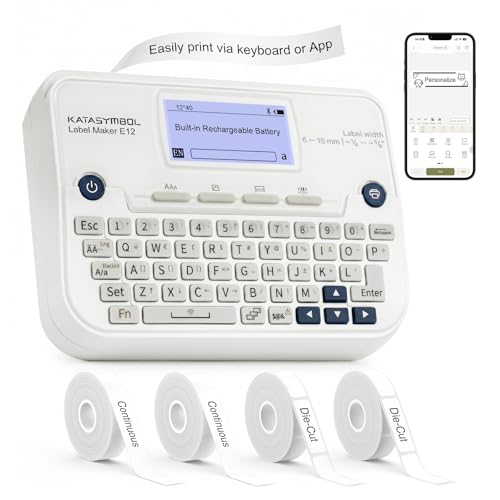
- Keyboard printing or Bluetooth app control
- Backlit LCD and rechargeable battery
- 30+ fonts, 50+ frames, and 660+ icons
Best For: home, office, and school organization
Portable Industrial Maker
Makeid P31S for harsh environments

- Supports 30+ label sizes and materials
- 300 DPI thermal transfer printing
- ANSI and TIA/EIA-606-A compliant
Best For: durable electrical, datacom, and asset labeling
Home Office Bundle

- Lightweight portable label maker
- QWERTY keyboard and easy-view display
- Bundle includes four label tapes
Best For: home and home office organization
Industrial Desktop Labeling
Makeid D50 2-Inch Auto-Cut Printer

- 2-inch thermal transfer printer for many label types
- 300 DPI output with long-lasting clarity
- Auto cutter and quick-change consumables
Best For: Industrial, lab, warehouse, and equipment labeling
Portable Color Labeling
Brother PT-N25BT Bluetooth Label Maker

- Bluetooth label maker with app-based customization
- Built-in cutter and preview screen help reduce waste
- Portable with plug-in or battery power options
Best For: Home, dorm, school, and personal organization
Bluetooth Retail Labeling
NIIMBOT B21 2-Inch Thermal Printer

- Supports 0.8 to 2-inch labels for many uses
- App includes batch printing, templates, and image recognition
- Thermal printing avoids ink and toner costs
Best For: Small businesses, retail tags, and home organization
Home & Small Business Labeling
SUPVAN T50M Pro Bluetooth Label Maker Machine with 3 Tapes, Set 1

- Prints 3/4" to 2" labels for many uses
- Free app with fonts, frames, and icons
- Inkless thermal printing with auto size recognition
Best For: Home, office, and small business labeling
Portable Pocket Labeling
ORGSTA S001 Portable Bluetooth Label Maker

- Pocket-sized design with metal ring for carrying
- 203 DPI direct thermal printing without ink
- App supports templates, QR codes, and barcodes
Best For: Portable home, office, and classroom labeling
Smart Batch Labeling
PM240 Label Maker Machine with 3 Tapes, Label Printer Black, Set 1

- Three rolls included for quick setup
- App supports Excel import and batch printing
- Works with iOS, Android, and PC
Best For: Batch labeling across home, school, and small business use
Industrial Contractor Kit – Brother PT-E110BP for electrical labeling
The Brother PT-E110BP is a practical fit for studio label printing systems when your work leans toward cables, faceplates, and low-voltage organization. This portable thermal label printer comes as a contractor kit with three tapes, a carry case, and a wrist strap, making it ready for jobsite use right out of the box.
Best For: electricians, contractors, and MRO teams that need a compact, portable label printer for cable and panel labeling.
Pros:
- Includes 3 tapes plus a carrying case and wrist strap for added value
- Quick application keys for cable wrap, cable flag, and faceplate labels
- Supports label widths from 3.5mm to 12mm for small jobs
- Lightweight, portable design with USB connectivity
Cons:
- Requires AAA batteries, which are not included
- Prints monochrome only
- Hand-cut strips may be less convenient for high-volume runs
For focused electrical and low-voltage labeling, this Brother kit emphasizes speed, portability, and field-ready organization over general-purpose versatility. It is a straightforward choice if you want a dependable labeler for structured, repeatable contractor tasks.
Keyboard + App Maker – SUPVAN E12 with Bluetooth
The SUPVAN E12 is a flexible option for studio label printing systems if you want quick keyboard entry plus app-based customization. It is aimed at everyday labeling jobs like office files, pantry items, and school supplies, while offering a backlit display and a rechargeable battery for easier use.
Best For: home, office, and school users who want a compact label maker with both keyboard and Bluetooth app printing.
Pros:
- Prints directly from the keyboard or through a Bluetooth app
- Backlit LCD helps visibility in bright or low-light settings
- Built-in rechargeable 1200mAh battery reduces battery buying
- Minimal 0.2″ margin helps save label material
Cons:
- More geared to general organization than industrial labeling
- Small-format output may not suit larger label needs
Overall, this model stands out for convenience and customization rather than heavy-duty field use. It makes sense if you want a low-friction label maker that can handle frequent everyday projects with extra editing flexibility.
Portable Industrial Maker – Makeid P31S for harsh environments
The Makeid P31S is built for studio label printing systems that need more durability and more control over industrial labeling. With thermal transfer printing, a 300 DPI output, and support for many tape types, it is designed for wire, cable, equipment, and asset tagging in tougher environments.
Best For: industrial users who need durable, weather-resistant labels for electrical, datacom, IT, and asset identification.
Pros:
- Supports 30+ label sizes and multiple materials, including vinyl and heat shrink tubing
- Thermal transfer labels are weather-resistant, oil-proof, and waterproof
- 300 DPI printing with barcode, QR code, and bulk data import support
- Meets ANSI and TIA/EIA-606-A labeling standards
Cons:
- Limited maximum media size of 0.8 inches x 1.57 inches
- More specialized than a simple home label maker
This is the strongest industrial option in the group for users who care about standards compliance and label durability. If your projects demand rugged labels that hold up under harsh conditions, the P31S is the most purpose-built choice here.
Home Office Bundle – Brother PT-M95 with 4 tapes
Brother PT-M95 P-Touch Monochrome Label Maker Bundle (4 Label Tapes Included),White
Check Price On AmazonThe Brother PT-M95 is a simple, portable choice for studio label printing systems focused on home and home office organization. It uses a QWERTY keyboard and an easy-view display, and the bundle adds four label tapes so you can start labeling files, folders, school items, and gift bags right away.
Best For: home users and home office organizers who want a lightweight label maker bundle with multiple tape rolls included.
Pros:
- Lightweight and portable for everyday use
- QWERTY keyboard and easy-view display make it straightforward to operate
- Includes 4 label tapes for added value
- Offers type styles, frames, symbols, and Deco Mode patterns
Cons:
- Designed mainly for home and home office use
- Limited to 1 or 2 lines of text
- Monochrome label output only
If you want an approachable label maker for everyday organization, this Brother bundle keeps things simple and useful. It is best viewed as a practical starter solution rather than a specialized industrial system.
Industrial Desktop Labeling – Makeid D50 2-Inch Auto-Cut Printer
If you need studio label printing systems that can handle heavier-duty jobs, the Makeid D50 is built around speed, durability, and flexibility. Its 2-inch thermal transfer setup is a practical fit for cable labels, asset tags, lab markings, warehouse IDs, and other high-precision labeling tasks where clean output matters.
Best For: Teams and makers who need a desktop label printer for industrial, office, lab, or warehouse labeling.
Pros:
- 2-inch print head supports a wide range of labeling applications, from cables to safety and equipment IDs.
- 300 DPI thermal transfer printing is designed for sharp labels that stay clear for up to 10 years.
- Automatic cutter speeds up bulk label jobs and makes finishing easier.
- Mobile app and PC software compatibility give you flexible editing options.
Cons:
- Uses exclusive consumables, so you’ll need compatible label and ribbon cartridges.
- It is a desktop-style printer, so it is less portable than handheld models.
Overall, the D50 stands out for users who want reliable, professional-looking output and faster workflow features in a compact desktop unit. The auto-template matching and integrated cartridge design add convenience for repeat label work.
Portable Color Labeling – Brother PT-N25BT Bluetooth Label Maker
For studio label printing systems that lean toward portability and everyday organization, the Brother PT-N25BT is a simple Bluetooth label maker with plenty of customization. It’s designed for home, dorm, school, and light office use, with app-based editing and a built-in cutter for quick label creation.
Best For: People who want a compact, easy-to-carry label maker for personal organization and creative labels.
Pros:
- Bluetooth connectivity and the Design&Print2 app make label creation straightforward from a phone.
- Built-in cutter helps produce clean label edges without extra steps.
- Portable power options support plug-in or battery use for flexibility.
- Includes fonts, frames, symbols, and preview tools to reduce mistakes and waste.
Cons:
- Works only with Brother Btag tapes, which limits consumable choice.
- Print width is limited to 12mm, so it is not meant for larger labels.
The PT-N25BT is a good fit if you want a compact, user-friendly label maker with creative features rather than a heavy-duty desktop system. Its small footprint and app support make it easy to use for quick, personalized labels.
Bluetooth Retail Labeling – NIIMBOT B21 2-Inch Thermal Printer
Among studio label printing systems aimed at small business use, the NIIMBOT B21 focuses on fast Bluetooth printing and easy app control. It supports 0.8 to 2-inch labels for price tags, barcode labels, shipping details, and general retail or craft organization.
Best For: Small business owners and home organizers who want a compact Bluetooth label printer for everyday labeling.
Pros:
- Supports label widths from 0.8 to 2 inches for flexible small-business and home uses.
- NIIMBOT app offers template matching, image recognition, batch printing, and text conversion from photos.
- Thermal printing removes the need for ink, toner, or carbon tape.
- Battery-powered operation and automatic shutoff help support efficient use.
Cons:
- Prints in monochrome, so it is not intended for color labels.
- It is primarily app-driven, which may not suit users who prefer onboard controls.
The B21 is a strong value choice if you want a compact label maker for repetitive business labeling and quick setup. Its software tools and thermal format make it especially practical for everyday price, barcode, and organization tasks.
Home & Small Business Labeling – SUPVAN T50M Pro Bluetooth Label Maker Machine with 3 Tapes, Set 1
If you want studio label printing systems that stay simple but still look polished, the SUPVAN T50M Pro is built for everyday organizing and light business labeling. It prints 3/4″ to 2″ labels, supports app-based editing from a phone, tablet, or PC, and does not require ink or toner.
Best For: Home organizers, small business owners, and office users who need waterproof, monochrome labels for bins, jars, shipping details, QR codes, and file labels.
Pros:
- Prints a wide range of label sizes for home, office, school, and small business use
- Free app includes 30+ fonts, 50+ frames, and 660+ icons for custom layouts
- Auto label size recognition helps speed up setup
- Inkless thermal printing keeps operation simple and low-maintenance
Cons:
- Monochrome printing only, so it is not meant for color labels
- Maximum print width is limited to 1-5/8″ x 1-3/16″ media
Overall, this is a practical pick if you need a versatile label maker that handles everyday organization and small-business basics without extra consumables. The app tools and label compatibility make it especially useful for fast, tidy labeling projects.
Portable Pocket Labeling – ORGSTA S001 Portable Bluetooth Label Maker
For compact studio label printing systems that can travel with you, the ORGSTA S001 focuses on portability and quick label creation. It uses direct thermal printing at 203 DPI, connects through Bluetooth, and pairs with the Snap & Tag app for making labels and stickers with text, QR codes, barcodes, images, and borders.
Best For: Users who want a pocket-sized label maker for home, office, or classroom organization with waterproof, scratch-resistant labels.
Pros:
- Very compact design with an attached metal ring for easy carrying
- 203 DPI thermal printing with no ink or toner required
- Built-in 2000 mAh rechargeable battery for extended standby time
- App supports templates, QR codes, barcodes, and custom label lengths
Cons:
- Built for direct thermal monochrome output rather than color printing
- Best fit for smaller, portable labeling tasks rather than high-volume jobs
This is a strong choice if portability matters more than desktop-style features. It is easy to carry, quick to print, and well suited to everyday labeling across home, office, and school settings.
Smart Batch Labeling – PM240 Label Maker Machine with 3 Tapes, Label Printer Black, Set 1
Among studio label printing systems, the PM240 stands out for app features and batch-friendly labeling. It prints at 203 DPI, includes three label rolls, and works with iOS, Android, and PC, making it useful when you need organized labels for home, school, or small business tasks.
Best For: Users who want a portable thermal label maker with app templates, Excel import, and broad compatibility for labels, tags, and QR codes.
Pros:
- Includes three label rolls and supports 1-2 inch square, round, and transparent labels
- App offers 2500+ icons, 3800+ templates, 430 fonts, OCR, and Excel import
- Compatible with iOS, Android, and PC via Bluetooth or USB
- Lightweight, rechargeable, and easy to carry for classroom or office use
Cons:
- Monochrome printing only, with no color output
- Bluetooth and USB cannot be used at the same time
- PC setup requires the supplied driver and proper USB connection
If you need a more feature-rich label maker for repetitive tasks, the PM240 has the software tools to help. Its batch-printing support and auto size detection make it a practical option for users who label in volume.
How We Picked the Best Studio Label Printing Systems
We focused on practical features that matter in real studio use: print quality, tape availability, setup simplicity, portability, and whether the device can keep up with frequent labeling. We also favored models that are easy to integrate into busy workflows, especially for cable labels, storage bins, gear cases, shelves, and general asset tagging.
Quick Comparison
For light personal organization, compact handheld models are usually the easiest starting point. For more frequent or production-style labeling, desktop and industrial-style units tend to offer better consistency, sharper output, and stronger tape options. Bluetooth-enabled models are a strong middle ground if you want fast editing from a phone without giving up portability.
Key Buying Factors for Studio Label Printing Systems
Print Durability
Look for labels that resist smudging, peeling, and handling. If your labels will live on cases, cords, shelving, or equipment, durable tape and strong adhesive matter more than extra features.
Label Size and Format
Think about what you label most often. Narrow tapes are great for cables and small containers, while wider formats work better for storage, signage, and highly readable asset labels.
Connectivity and Workflow
Keyboard-based units are fast for straightforward text, while app-connected models usually give you more design flexibility. If multiple people will use the printer, simple pairing and intuitive software can save time.
Portability Versus Desktop Stability
Portable models are ideal if you move around a studio, work on location, or need a grab-and-go labeler. Desktop systems are better if you want a dedicated station for heavier labeling jobs.
Running Costs
Always check replacement tape prices and availability before buying. A lower upfront cost can be offset by expensive consumables if you label often.
Who Should Buy Which Studio Label Printing Systems?
If you want the simplest setup for occasional labeling, choose a compact handheld model. If you need more control and better output for frequent studio organization, look at Bluetooth or industrial-style options. For shared environments or larger labeling tasks, a sturdier desktop system is usually the most efficient choice.
In short, the best Studio Label Printing Systems are the ones that match your space, your volume, and your workflow—not just the fanciest spec sheet.
