
Choosing a first security system can feel complicated, especially when kits vary by sensor count, app features, cellular backup, cameras, and subscription requirements.
These 10 smart home security systems for beginners emphasize straightforward DIY installation and useful everyday alerts. Use the guide below to compare coverage, connectivity, ongoing costs, and the best fit for your home.
Best 10 Smart Home Security Systems for Beginners Picks for 2026
Best Overall Coverage

- 14-piece kit for 2- to 4-bedroom homes
- App alerts, keypads, and expandable sensors
- Optional professional monitoring and Alexa control
Best For: Homeowners needing broad starter coverage and expansion options
Best No-Fee Starter
eufy Security Essential Alarm System

- Seven-piece kit with HomeBase Mini and 64GB storage
- No monthly fees or lock-ins
- In-app setup, alerts, and expandable design
Best For: Users wanting local storage and simple ownership without subscriptions
Best for Apartments
X-Sense AS05 Smart Security System

- Compact five-piece wireless starter kit
- Adhesive or screw installation options
- App, keypad, schedules, and expandable devices
Best For: Renters and smaller spaces needing flexible installation
Best Large Sensor Bundle

- Includes 10 door sensors and two remotes
- App, Alexa, and 120 dB siren support
- No monthly fees and expandable sensor capacity
Best For: Homes needing extensive door and window coverage
Most Expandable

- 22-piece kit with camera, sensors, remotes, and SOS button
- Smart Life/Tuya app control with Alexa and Google support
- Wi-Fi and optional 4G alerts without monthly fees
Best For: Larger homes needing broad coverage and expansion options
Best Starter Kit
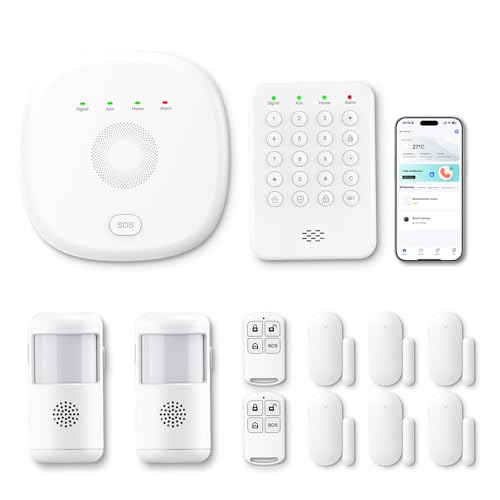
- Includes sensors, motion detectors, keypad, base station, and remotes
- Smart Life/Tuya app alerts with Alexa voice control
- Wi-Fi and 4G connectivity with no monthly charges
Best For: Three- to five-bedroom homes wanting balanced coverage
Easiest Interface
Touchscreen Alarm System with Camera

- 2.4-inch touchscreen shows system status, temperature, and weather
- 13-piece kit includes camera, sensors, remotes, and RFID tags
- Supports app, touch, and voice control with a 120dB siren
Best For: Users wanting a visual touchscreen and included indoor camera
Flexible Camera Coverage
PGST 22-Piece WiFi+4G Security System

- 2K camera with optional microSD recording
- WiFi plus 4G calls and SMS alerts
- Expandable DIY kit with no monthly fee
Best For: Apartment residents wanting camera monitoring and cellular backup
Easy Touchscreen Control
Hapippofa GEN 2 16-Piece Alarm Kit

- Touchscreen hub with simple arm modes
- Six entry sensors and three motion detectors
- WiFi/app alerts with optional 4G backup
Best For: Families wanting broad sensor coverage and simple controls
Best Overall Coverage – Ring Alarm 14-Piece Kit
For beginners comparing smart home security systems for beginners, the Ring Alarm 14-Piece Kit offers broad starter coverage for a 2- to 4-bedroom home. It includes two keypads, eight contact sensors, two motion detectors, a range extender, and app-based alerts in a wireless setup.
Best For: Families or homeowners who want extensive entry-point coverage, app control, and the option of professional monitoring.
Pros:
- Includes 14 pieces for substantial coverage in a 2- to 4-bedroom home.
- Mobile notifications and Ring app control help you monitor the system remotely.
- Expandable with additional sensors and accessories.
- Optional Ring Protect features include professional monitoring and Alexa voice control.
Cons:
- Some advanced features and professional monitoring require a compatible Ring Protect Plan sold separately.
- The larger kit may include more components than a small apartment needs.
This is a strong starting point when you want room-by-room coverage and a path to expand. Keep the optional subscription cost in mind when comparing long-term ownership expenses.
Best No-Fee Starter – eufy Security Essential Alarm System
The eufy Security Essential Alarm System is a straightforward choice for beginners seeking smart home security systems for beginners without a monthly fee. Its seven-piece kit includes a HomeBase Mini with 64GB local storage, a keypad, four entry sensors, and one motion sensor.
Best For: Budget-conscious users who prefer local storage, free app alerts, and a simple wireless installation.
Pros:
- No monthly fees or lock-ins are required for the core system.
- Includes 64GB of local HomeBase Mini storage.
- Step-by-step in-app guidance supports installation in minutes.
- Can be expanded with additional eufy sensors and accessories.
Cons:
- The included kit has only one motion sensor.
- Its coverage is focused on key entry points rather than a larger multi-room installation.
With local storage and app control included, this kit keeps the basic ownership model simple. It is a practical starting point if you want essential entry and motion detection without committing to recurring fees.
Best for Apartments – X-Sense AS05 Smart Security System
The X-Sense AS05 is a compact option for beginners evaluating smart home security systems for beginners in apartments, rentals, dormitories, or smaller homes. The wireless five-piece kit includes a base station, keypad, two door sensors, and one motion sensor, with app alerts and multiple security modes.
Best For: Renters and small-space users who want flexible adhesive installation, app control, and basic expansion.
Pros:
- Adhesive or screw mounting supports less permanent installation.
- App and keypad control offer Home, Away, and Disarm modes.
- Supports multiple passwords, schedules, and a keypad panic button.
- Can expand with additional sensors, keypads, and environmental devices.
Cons:
- Requires a 2.4 GHz Wi-Fi network and does not support 5.0 GHz Wi-Fi.
- The five-piece kit provides more limited coverage than larger bundles.
The AS05 keeps installation approachable and gives renters useful placement flexibility. Confirm that your Wi-Fi router provides a 2.4 GHz network before choosing this system.
Best Large Sensor Bundle – 15-Piece WiFi Alarm Kit
This 15-piece WiFi alarm kit is aimed at beginners who want many entry sensors in one package when shopping for smart home security systems for beginners. It includes a base station, keypad, motion sensor, 10 door sensors, and two remote controls, along with app alerts and a 120 dB siren.
Best For: Larger homes or users who want to monitor many doors and windows while avoiding monthly fees.
Pros:
- Includes 10 door sensors for extensive entry-point coverage.
- Offers app, remote, and Alexa control options.
- No monthly fees are required.
- Supports expansion by up to 20 sensors and five remote controls or keypads.
Cons:
- Works only with 2.4 GHz Wi-Fi, not 5 GHz networks.
- Includes one motion sensor, so additional motion coverage may require expansion.
- The large number of sensors may be more than needed for a small home.
Its main advantage is quantity: the included door sensors make it easy to cover numerous entry points immediately. Verify your network compatibility and plan sensor placement before installation.
Most Expandable – 22-Piece WiFi+4G Alarm System
For beginners comparing smart home security systems for beginners, this 22-piece PGST kit offers a broad starting setup with app control, door/window sensors, motion detectors, a camera, and emergency controls. It connects through 2.4GHz Wi-Fi or an optional 4G SIM and supports Alexa and Google voice control.
Best For: Larger homes or households that want plenty of included sensors, app alerts, and room to expand without monthly fees.
Pros:
- Includes 22 pieces, including a 2K HD camera, sensors, remotes, and an SOS button.
- Supports Smart Life or Tuya app control, custom sensor naming, and additional PGST accessories.
- Wi-Fi plus 4G connectivity can provide calls and SMS alerts when paired with a SIM card.
- 110dB alarm, tamper protection, and app, phone, and SMS alerts add layered notifications.
Cons:
- Only supports 2.4GHz Wi-Fi, not 5GHz.
- 4G phone and SMS functions require a compatible SIM card.
- The larger kit may be more equipment than a small apartment needs.
This is the most comprehensive option of the three for beginners who want a highly expandable, no-monthly-fee alarm setup. Its many components and multiple alert channels are useful, though initial pairing and configuration may take longer than with a smaller kit.
Best Starter Kit – 12-Piece PGST Smart Alarm
This 12-piece PGST kit is a straightforward entry point for shoppers researching smart home security systems for beginners. It combines a base station, keypad, sensors, motion detectors, and remotes with Smart Life or Tuya app control, Alexa compatibility, and Wi-Fi-to-4G connectivity.
Best For: Three- to five-bedroom homes that want a balanced starter package with simple expansion and no subscription charges.
Pros:
- Includes four door/window sensors, two motion detectors, two remotes, a keypad, and base station.
- App notifications and remote arm/disarm control are available through Smart Life or Tuya.
- Automatically switches to 4G when Wi-Fi disconnects, helping keep the system connected.
- Supports stay, away, and emergency modes, plus Alexa voice commands.
Cons:
- The system uses 2.4GHz Wi-Fi.
- Visual monitoring requires separately purchased PGST cameras.
- 4G backup functionality depends on network availability and the required SIM setup.
Among these options, this kit offers the clearest balance between included coverage and beginner-friendly controls. It is less camera-focused than the larger package, but its expandable sensor design makes it a practical foundation for a typical family home.
Easiest Interface – Touchscreen Alarm System with Camera
Beginners who prefer a visual control panel may find this DEEPVIGLX system approachable. It includes a 2.4-inch full-touch display, indoor camera, motion and door/window sensors, remotes, RFID tags, and Alexa-compatible app and voice controls for a compact wireless setup.
Best For: Apartments, homes, garages, or offices where a touchscreen interface and included indoor camera are priorities.
Pros:
- Touchscreen panel displays system information along with temperature and weather conditions.
- 13-piece package includes an indoor camera, four contact sensors, two motion sensors, remotes, and RFID tags.
- Offers app, touch, and voice control with Alexa and Google Assistant compatibility.
- 120dB siren provides a strong audible alarm.
Cons:
- The supplied notes do not specify subscription-free operation.
- The kit has fewer included pieces than the 22-piece option.
- Installation is listed as screw-in rather than fully adhesive wireless mounting.
This system stands out for its touchscreen panel and included indoor camera, which can make everyday operation more intuitive. It is a good fit for beginners who value a modern interface, although buyers wanting clearly stated no-fee operation may prefer one of the PGST kits.
Flexible Camera Coverage – PGST 22-Piece WiFi+4G Security System
For beginners comparing smart home security systems for beginners, the PGST kit combines app control, a 2K camera, entry sensors, and motion detection in one expandable package. It connects through 2.4GHz WiFi or optional 4G for calls and SMS, with no ongoing monthly fee after activation.
Best For: Apartment residents and beginners who want camera monitoring, cellular alerts, and broad DIY expansion.
Pros:
- Includes a 2K camera for remote visual monitoring; MicroSD storage is supported up to 256GB, sold separately.
- Supports Smart Life or Tuya app control, Alexa-compatible voice control, and customizable sensor naming.
- Offers WiFi and 4G connectivity, phone/SMS/app alerts, SOS controls, and no monthly fees after activation.
- Includes 22 pieces and supports additional PGST sensor accessories.
Cons:
- Only 2.4GHz WiFi is supported; 5GHz networks are not compatible.
- A compatible 4G SIM card and plan are required for cellular calls and SMS, and the SIM is not included.
- The MicroSD card for camera recording must be purchased separately.
This is a feature-rich starter kit for users who want more than basic entry alarms. Its camera, backup 4G option, and expandable design add flexibility, while the number of features may require a little more initial setup than a simpler alarm-only system.
Easy Touchscreen Control – Hapippofa GEN 2 16-Piece Alarm Kit
The Hapippofa GEN 2 is a practical choice among smart home security systems for beginners because its touchscreen hub provides clear Stay, Away, Disarm, and SOS controls. The pre-paired wireless accessories cover multiple entry points and rooms without requiring professional installation.
Best For: Families and first-time users who want touchscreen operation and broad whole-home sensor coverage.
Pros:
- Includes six door/window sensors, three PIR motion detectors, remote controls, RFID cards, an SOS button, and a wired siren.
- Touchscreen hub simplifies daily arming, disarming, status checks, and SOS access.
- Uses Smart Life app alerts and supports 2.4GHz WiFi plus optional 4G calls and SMS.
- Wireless accessories arrive pre-paired, helping reduce setup time.
Cons:
- 5GHz WiFi is not supported.
- A compatible 4G SIM card and cellular plan are sold separately.
- The listed installation method is screw-in, so some mounting requires basic tools.
With its large accessory set and straightforward touchscreen interface, this kit is well suited to beginners securing several rooms at once. It lacks camera monitoring, but it emphasizes simple controls, strong audible alerts, and multiple detection zones.
Simple Expandable Alarm – YISEELE WiFi DIY Security System
For shoppers seeking smart home security systems for beginners, the YISEELE kit keeps the starting setup simple: a hub, four door/window sensors, and a remote control. It adds Smart Life app alerts, Alexa and Google Home compatibility, and support for up to 100 accessories as your security needs grow.
Best For: Renters, small homes, and beginners who want an affordable expandable entry-alarm foundation.
Pros:
- Installation is wireless and self-adhesive, with the supplied notes describing setup in about 15 minutes.
- Smart Life app supports remote arm/disarm, event records, and push notifications.
- Works with Alexa and Google Home for voice-controlled arm and disarm modes.
- Supports up to 100 accessories, including motion, smoke, water-leak, keypad, and siren options.
Cons:
- The base kit includes four door/window sensors but no camera or motion detector.
- Only 2.4GHz WiFi is supported; 5GHz networks are not compatible.
- Additional accessories are needed for broader coverage beyond the included entry sensors.
This is the most approachable starting point of the three for users who primarily need entry-point alerts and plan to expand later. Its app and voice-assistant support make everyday control convenient, while the basic bundle may be too limited for larger homes without added sensors.
How We Picked the Best Smart Home Security Systems for Beginners
We focused on complete DIY kits that include the core equipment needed to get started, such as a central hub, entry sensors, motion detection, alarms, keypads, or remote controls. We also considered setup simplicity, app-based alerts, wireless connectivity, expansion options, and whether each system can continue working without a recurring monitoring plan.
Because homes and budgets differ, the selection includes compact starter kits as well as larger packages with cameras, cellular connectivity, and more sensors. Product names and included accessories can vary by listing or generation, so confirm the current box contents before purchasing.
Quick Comparison
- Best for a recognizable ecosystem: Ring Alarm offers a polished app experience and broad expansion potential.
- Best for avoiding monthly fees: eufy Security and several generic Wi-Fi alarm kits emphasize local control and no required subscription.
- Best for larger homes: 15-piece, 16-piece, and 22-piece kits provide more entry sensors and accessories from the outset.
- Best for backup connectivity: Wi-Fi plus GSM/4G systems can be useful if an internet outage would otherwise disable remote alerts.
- Best for camera coverage: Kits with included 2K cameras add visual verification, but require more attention to placement, privacy, and storage.
Key Buying Factors for Smart Home Security Systems for Beginners
Coverage and Sensor Count
Count exterior doors, accessible windows, garages, and high-traffic rooms before choosing a kit. A smaller package may be easier to configure, while a larger kit can reduce the need to buy add-on sensors immediately.
Connectivity and Backup
Wi-Fi is convenient for app control, but systems with GSM or 4G backup may maintain communication during an internet outage. Check whether cellular service requires a plan and whether it is available in your region.
Subscriptions and Storage
“No monthly fee” usually means the basic alarm and local functions do not require a subscription. Camera cloud storage, professional monitoring, extended history, and advanced notifications may still cost extra. Review the provider’s current terms before relying on a feature.
Installation and Daily Use
Look for adhesive or screw-mount options, clear arming modes, dependable phone notifications, and a hub that is easy to reach during setup. Alexa compatibility can add convenience, but voice control should not replace a keypad or physical access method.
Privacy and Reliability
Use strong account credentials, enable two-factor authentication when available, and place cameras away from private areas. Test every sensor, alarm, notification, and battery backup after installation.
Who Should Buy Which Smart Home Security Systems for Beginners?
Apartment dwellers and first-time users should start with a compact wireless kit that covers the main door and key rooms without creating unnecessary complexity.
Families or owners of larger homes may benefit from a 15-piece or larger package, particularly when several windows, doors, or detached areas need protection.
Budget-conscious buyers should compare the full cost over two years, including monitoring, camera storage, replacement batteries, and optional accessories—not just the initial kit price.
Homes with unreliable internet should prioritize Wi-Fi and cellular backup, while camera-focused buyers should choose a kit with clear video specifications and a storage plan that fits their privacy preferences.