
Protecting your home does not have to mean paying for complicated installation or an expensive long-term contract. Today’s budget smart home security systems can combine wireless sensors, app notifications, loud sirens, and optional professional monitoring in flexible packages.
We compare 10 DIY-friendly options for apartments, houses, and small businesses, focusing on setup, connectivity, expansion, monitoring costs, and the features that matter most in daily use.
Best 10 Budget Smart Home Security Systems Picks for 2026
Flexible Family Coverage

- 14-piece kit covers multiple entry points and rooms
- App alerts with optional professional monitoring
- Expandable and Alexa-compatible with a plan
Best For: Families securing 2- to 4-bedroom homes
Simple Monitored Security
SimpliSafe 8-Piece Wireless System

- No-drill DIY installation
- Optional 24/7 monitoring without long-term contracts
- Includes entry, motion, and panic protection
Best For: Users wanting easy setup and optional emergency response
Subscription-Free Expansion

- 21-piece kit with six entry sensors
- No monthly or hidden subscription fees
- 48-hour backup battery and 120dB siren
Best For: Larger homes wanting extensive no-fee coverage
Best Overall Value
Ring Alarm 8-Piece Kit (2nd Gen)

- Designed for 1- to 2-bedroom homes
- Includes four contact sensors and a motion detector
- Optional app features and professional monitoring
Best For: Small homes wanting an expandable alarm ecosystem
Best No-Monthly-Fee Camera System
PGST 22-Piece WiFi+4G Alarm Kit

- Includes a 2K camera and multiple sensors
- Offers Wi-Fi and 4G alert connectivity
- No monthly fees after activation
Best For: Apartments needing camera monitoring without subscriptions
Best Sensor Coverage
Tolviviov 15-Piece WiFi Alarm Kit

- Includes ten door sensors and one motion sensor
- Supports expansion up to 20 sensors
- No monthly fees and Alexa compatibility
Best For: Homes prioritizing broad door and window coverage
Best No-Subscription Coverage
PGST 12-Piece WiFi+4G Security Kit
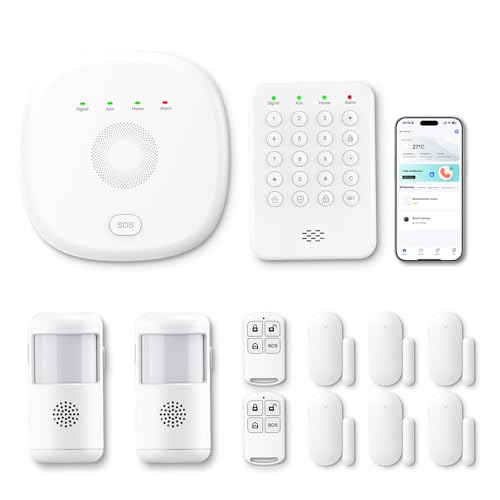
- 12-piece kit covers doors, windows, and movement
- App control with WiFi-to-4G switching
- Expandable and Alexa compatible without monthly fees
Best For: Families needing broad, expandable coverage for a 3- to 5-bedroom home
Best Touchscreen Starter Kit
GEN 2 16-Piece DIY Alarm System

- Touchscreen hub with Stay, Away, Disarm, and SOS modes
- Six entry sensors, three motion detectors, and SOS accessories
- WiFi app control with optional 4G calls and SMS
Best For: DIY users wanting a large kit and touchscreen operation
Flexible Family Coverage – Ring Alarm 14-Piece Kit
For shoppers comparing budget smart home security systems, the Ring Alarm 14-Piece Kit offers broad entry-point coverage for a 2- to 4-bedroom home. It includes two keypads, eight contact sensors, two motion detectors, a base station, and a range extender, with app alerts and optional professional monitoring.
Best For: Families wanting a larger starter kit with Ring app control and room to expand.
Pros:
- Includes 14 pieces for substantial door, window, and room coverage.
- Mobile notifications let you monitor triggered alerts through the Ring app.
- Expandable with additional Ring Alarm sensors and accessories.
- Supports optional 24/7 professional monitoring and Alexa voice control with a compatible Ring Protect Plan.
Cons:
- Some advanced features, including professional monitoring and Alexa arm/disarm, require a separately sold subscription plan.
- The larger kit may be more equipment than smaller homes need.
This is a practical choice when you want extensive sensor coverage from the start and do not mind evaluating Ring’s optional subscription features.
Low-Cost DIY Pick – Tolviviov 8-Piece WiFi Alarm Kit
This tolviviov kit is a straightforward option among budget smart home security systems, pairing five door and window sensors with two remotes and an alarm station. It offers app notifications, voice control, and expansion for up to 20 sensors without a subscription fee.
Best For: Apartment dwellers and budget-focused users who want basic entry alerts without monthly fees.
Pros:
- Includes five door and window sensors, two remote controls, and an alarm station.
- DIY setup uses wireless, self-adhesive installation without tools.
- Supports app notifications, remote control, and voice operation.
- Can expand to up to 20 sensors and five remotes or keypads.
Cons:
- Works only with a 2.4GHz WiFi network, not 5GHz.
- The alarm station must remain connected to AC power; its backup battery lasts about eight hours.
Its no-subscription design and tool-free installation make it appealing for renters or small households, provided your router supports 2.4GHz WiFi.
Simple Monitored Security – SimpliSafe 8-Piece Wireless System
SimpliSafe keeps the setup simple for shoppers evaluating budget smart home security systems. The wireless package includes a base station, keypad, four entry sensors, a motion sensor, and a panic button, while optional professional monitoring is available without a long-term contract.
Best For: Homeowners who want easy installation with the option of professional emergency response.
Pros:
- Installs without wiring or drilling by plugging in the base station and placing sensors.
- Includes four entry sensors, a motion sensor, keypad, and panic button.
- App supports remote arming and disarming.
- Works with Amazon Alexa and Google Assistant for at-home control.
Cons:
- Professional monitoring is optional but requires a paid plan after the included free month.
- The listed system is sold and supported only in the United States.
This system stands out for approachable installation and flexible monitoring, making it a strong fit if you want security now and the choice to add emergency-response services later.
Subscription-Free Expansion – Hapippofa 21-Piece WiFi Alarm
This 21-piece Hapippofa kit is designed for shoppers seeking budget smart home security systems with extensive sensor coverage and no recurring subscription. It combines six door and window sensors, motion detection, remotes, a keypad-equipped hub, app alerts, and a claimed 48-hour backup battery.
Best For: Larger homes needing many entry sensors and local alarm protection without monthly fees.
Pros:
- Includes a broad 21-piece package with six door and window sensors, motion detection, and three remotes.
- No monthly fees or hidden subscription costs are required for the listed app alerts.
- Built-in rechargeable backup battery is rated for up to 48 hours during outages.
- Supports Smart Life or Tuya app control, Alexa, and additional sensors.
Cons:
- Works only with 2.4GHz WiFi.
- The hub requires drilled mounting with included hardware, unlike adhesive-only systems.
- Remote notifications depend on a stable WiFi connection.
With its large component count, loud siren, and no-subscription approach, this kit can be cost-effective for broad indoor coverage, though installation is less renter-friendly.
Best Overall Value – Ring Alarm 8-Piece Kit (2nd Gen)
Ring Alarm 8-piece kit (2nd Gen) - home security system with optional 24/7 professional monitoring
Check Price On AmazonFor shoppers comparing budget smart home security systems, the Ring Alarm 8-piece kit is a straightforward option for smaller homes. It includes the core components needed to monitor doors, windows, and movement, with app notifications and optional paid features for remote control and professional monitoring.
Best For: 1- to 2-bedroom homes wanting a recognizable, expandable alarm system.
Pros:
- Includes a base station, keypad, four contact sensors, motion detector, and range extender.
- Ring app notifications help you monitor triggered events from your phone.
- Additional sensors and accessories can be added as your needs grow.
- Optional Ring Protect features include remote arming and 24/7 professional monitoring.
Cons:
- Some remote-control and professional-monitoring features require a separately sold Ring Protect subscription.
- Alexa voice control requires a Ring Protect subscription.
This kit is a practical starting point when you want a compact setup from an established ecosystem. Factor the optional subscription into the long-term cost if you want remote arming, continued connectivity during Wi-Fi outages, or professional response.
Best No-Monthly-Fee Camera System – PGST 22-Piece WiFi+4G Alarm Kit
This PGST kit stands out among budget smart home security systems by combining a 2K camera, sensors, app control, and Wi-Fi plus 4G connectivity. It is designed for DIY installation and offers alerts through the app, phone calls, and SMS without ongoing monthly fees after activation.
Best For: Apartment residents who want camera monitoring, broad sensor coverage, and no recurring subscription charge.
Pros:
- Includes a 2K Wi-Fi camera for remote visual monitoring.
- Supports Smart Life or Tuya app control and can connect with Alexa.
- Wi-Fi and 4G connectivity support app alerts, calls, and SMS notifications.
- Includes a color screen, tamper protection, SOS function, and a siren rated up to 120 dB.
Cons:
- Only supports 2.4GHz Wi-Fi; 5GHz networks are not supported.
- A microSD card for camera storage is sold separately.
- A 4G SIM card is needed for cellular calling and SMS functions.
With its included camera and cellular option, this is a feature-rich choice for buyers prioritizing coverage without monthly fees. Setup remains DIY-friendly, but confirm your Wi-Fi band and account for separate storage and SIM requirements.
Best Sensor Coverage – Tolviviov 15-Piece WiFi Alarm Kit
For budget smart home security systems focused on entry-point coverage, this Tolviviov kit provides ten door sensors, a motion sensor, a keypad, and two remote controls. It supports app, remote, and Alexa control, while its DIY design and lack of monthly fees help keep setup and ownership costs down.
Best For: Homes needing many door and window sensors on a simple 2.4GHz Wi-Fi setup.
Pros:
- Includes ten door sensors, one motion sensor, keypad, two remotes, and a Wi-Fi base station.
- Supports app alerts and remote control when you are away.
- Expandable to up to 20 sensors and five remotes or keypads.
- Offers a 120 dB siren and works with Alexa without monthly fees.
Cons:
- Works only with 2.4GHz Wi-Fi and does not support 5GHz networks.
- Its listed maximum range is 100 feet.
- It does not include a camera in the supplied kit.
This system makes sense when sensor quantity matters more than video features. It is especially useful for covering multiple doors and windows, though buyers should verify the 2.4GHz network requirement and whether the stated range fits their layout.
Best No-Subscription Coverage – PGST 12-Piece WiFi+4G Security Kit
For shoppers comparing budget smart home security systems, the PGST 12-piece kit offers broad starter coverage for a 3- to 5-bedroom home. It combines app control, WiFi and 4G connectivity, multiple sensors, and Alexa compatibility without monthly fees.
Best For: Families wanting expandable entry and motion protection with WiFi backup through 4G.
Pros:
- Includes four door/window sensors, two motion detectors, two remotes, a keypad, and base station.
- Smart Life and Tuya app support provides alerts and remote arm/disarm control.
- Automatically switches to 4G when WiFi disconnects; no monthly subscription is required.
- Supports Alexa and additional PGST sensors or cameras.
Cons:
- Compatible cameras are purchased separately.
- 4G functionality depends on network availability and any required service arrangements.
Its sizable sensor mix and dual-network design make this a practical value pick for larger homes. Consider it if you want a flexible alarm foundation rather than a professionally installed camera system.
Best Touchscreen Starter Kit – GEN 2 16-Piece DIY Alarm System
Among budget smart home security systems, this 16-piece DIY kit stands out for its touchscreen hub and large accessory bundle. It supports Smart Life app alerts over 2.4GHz WiFi, while a compatible 4G SIM can add calls and SMS notifications.
Best For: Renters and homeowners who want touchscreen controls, extensive included accessories, and DIY installation.
Pros:
- Includes six door/window sensors, three motion detectors, two remotes, two RFID key fobs, an SOS button, and a wired siren.
- Touchscreen offers Stay, Away, Disarm, and SOS modes.
- Pre-paired wireless accessories simplify setup, with a 120dB wired siren for audible alerts.
- No monthly subscription is required for hub and Smart Life app use.
Cons:
- 5GHz WiFi is not supported.
- SIM card and cellular plan for 4G calls and SMS are sold separately.
- The supplied details list the wired siren at 120dB in the feature description and 100dB in specifications.
This is the most accessory-rich option of the group and offers particularly straightforward on-panel control. Budget for a compatible SIM and plan if you want cellular calling or SMS alerts.
Best Expandable Compact System – YISEELE Smart WiFi Alarm Kit
This YISEELE kit is a compact choice for shoppers seeking budget smart home security systems with simple installation and smart-home integration. The hub, four door/window sensors, and remote connect through the Smart Life app, with Alexa and Google Home support and no monthly fee.
Best For: Apartments, small homes, garages, and small businesses needing expandable entry-point protection.
Pros:
- Includes a hub with rechargeable backup battery, four door/window sensors, and a remote.
- Smart Life app provides remote control, event records, and push notifications.
- Works with Alexa and Google Home for voice-controlled arm and disarm modes.
- Supports up to 100 accessories, including motion, smoke, water-leak, and additional entry sensors.
Cons:
- Only 2.4GHz WiFi is supported.
- The included kit does not include motion detectors, smoke sensors, or water-leak sensors.
- The listed maximum range is 10 meters.
Its small footprint and self-adhesive installation make it approachable for renters and smaller spaces. The ability to add up to 100 accessories also leaves room to build a more complete system over time.
How We Picked the Best Budget Smart Home Security Systems
We evaluated these systems by looking at the essentials of affordable home protection: the number and type of included sensors, wireless setup, mobile-app control, alert speed, hub connectivity, expandability, and ongoing costs. We also considered whether each kit supports professional monitoring, cellular backup, voice assistants, cameras, or no-subscription operation.
Because product bundles vary, check the exact contents before ordering. A larger piece count does not always mean better coverage; some packages count remotes, key fobs, or accessories alongside door, window, and motion sensors.
Quick Comparison
| Best for | Look for | Potential trade-off |
|---|---|---|
| Simple apartment protection | Compact wireless sensor kit and app alerts | Fewer expansion options |
| Whole-home DIY coverage | Multiple entry sensors, motion detection, and a loud siren | More setup and sensor placement |
| Flexible monitoring | Optional professional monitoring with no long-term contract | Recurring fees for monitored service |
| Low ongoing cost | Local alarms, app notifications, and no required subscription | Usually less emergency-service support |
Key Buying Factors for Budget Smart Home Security Systems
Coverage and Sensor Placement
Start with every exterior door, accessible window, garage entry, and major hallway. Contact sensors protect entry points, while motion sensors help cover larger rooms. Avoid relying on a high piece count if the kit lacks enough sensors for your floor plan.
Wi-Fi, Cellular Backup, and Power
Wi-Fi is convenient for app control but depends on your internet connection. Systems with GSM or 4G backup may continue communicating during an outage, though cellular service can involve separate requirements or fees. Also confirm whether the hub and siren have battery backup.
Monitoring and Subscription Costs
Some systems work without a monthly plan, while others reserve features such as professional dispatch, cloud video storage, or advanced alerts for subscribers. Calculate the first-year and ongoing cost instead of comparing only the purchase price.
Smart-Home Compatibility and Privacy
If you use Alexa, Google Assistant, or other connected devices, verify compatibility before buying. Use a strong unique account password, enable two-factor authentication when available, and keep the hub and app updated.
Who Should Buy Which Budget Smart Home Security Systems?
Choose a Ring Alarm kit if you want a recognizable ecosystem, straightforward app control, and the option to add professional monitoring or compatible accessories over time.
Choose a SimpliSafe system if flexible monitoring, no-contract service, and a guided DIY experience are higher priorities than extensive smart-home integration.
Choose a larger Wi-Fi or Wi-Fi-plus-4G kit if you need sensors for several rooms and want cellular connectivity or a built-in camera. Confirm network support and app quality before relying on these features.
Choose a basic no-subscription kit if your main goals are entry alerts, a local siren, and low recurring costs. These systems work best when you are comfortable responding to notifications yourself.
For any option, map sensor locations before installation and test every contact, motion detector, alert, and backup power feature after setup. The best system is the one that covers your actual entry points and fits your willingness to manage alerts and monitoring.