
Choosing among 360-degree cameras for professional studios means balancing image quality, reframing flexibility, audio and meeting features, durability, and post-production workflow. The right model depends on whether your studio creates immersive content, virtual tours, live events, or collaborative video calls.
This roundup compares 10 notable options across professional imaging, action capture, and all-in-one conferencing, so you can narrow the field by resolution, sensor size, stabilization, connectivity, and practical studio needs.
Best 10 360-Degree Cameras for Professional Studios Picks for 2026
Studio Image Specialist

- Dual 1-inch sensors and 23MP 360 stills
- RAW workflow, HDR, and 4K stabilized video
- 51GB internal storage for extended capture
Best For: Real-estate photography, virtual tours, and detail-focused studio production
Meeting Room Collaborator

- 1080p 360 conferencing with six display modes
- Built-in omnidirectional microphone
- USB plug-and-play compatibility with major apps
Best For: Meeting rooms, online classes, and hybrid collaboration
High-Resolution Production Tool

- 11K stills up to 60MP and 5.7K video
- HDR-DNG RAW for professional editing
- Touchscreen, GPS, replaceable battery, and external memory
Best For: High-resolution photography, mapping, virtual tours, and field production
AI-Enhanced 8K Creator

- 8K50fps video with dual 1/1.1-inch sensors
- 10-bit color and AI-assisted editing tools
- 140-minute battery and replaceable lenses
Best For: Fast-turnaround immersive video, vlogging, and action-oriented studio content
Premium Low-Light Pick

- 1-inch imaging with 8K/30fps 360-degree video
- Built-in 105GB storage and up to 190 minutes of recording
- Four microphones with direct DJI transmitter support
Best For: High-resolution studio, event, and low-light immersive video
Lightweight Workflow Pick
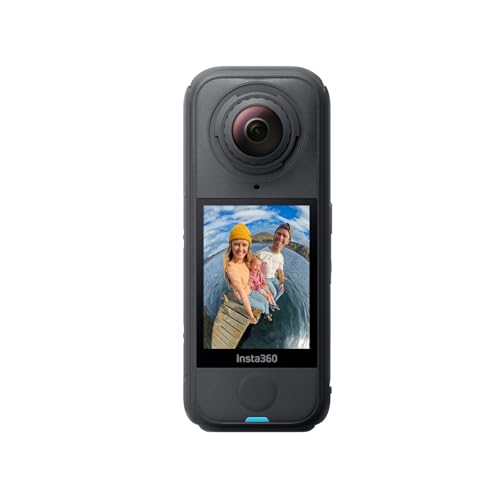
- 165g body for easy mobile production
- 8K/30fps capture with shoot-first reframing
- FlowState stabilization and replaceable lenses
Best For: Portable shoots and flexible post-production reframing
Creator Tracking Pick

- 5.7K 360-degree video with dual 48MP sensors
- AI subject tracking and Horizon Steady stabilization
- Includes charging case and invisible selfie stick
Best For: Creator studios and stabilized tracking shots
Integrated Meeting Hub

- All-in-one 360-degree meeting camera with speaker and mic array
- Auto-speaker focus plus dual 180-degree viewing modes
- Plug-and-play conferencing with local MicroSD recording
Best For: Small to medium hybrid meeting rooms
High-Resolution Production Pick

- 8K30 360-degree video with dual large sensors
- Triple AI processing for improved low-light footage
- Replaceable lenses, stabilization, and waterproof construction
Best For: High-resolution immersive and action-focused production
Flexible Budget 360 Camera

- 5.7K 360 Active HDR with AI-assisted reframing
- 4K single-lens mode and 170-degree MaxView option
- Waterproof body with stabilization and Horizon Lock
Best For: Portable studio content and general-purpose 360-degree capture
Studio Image Specialist – Ricoh Theta Z1 51GB
For professional studios creating virtual tours, real-estate content, or premium 360-degree cameras for professional studios workflows, the Ricoh Theta Z1 emphasizes image quality over rugged action-camera features. Its dual 1-inch sensors, 23MP stills, RAW support, and HDR processing make it particularly suited to controlled, detail-focused production.
Best For: Real-estate photography, virtual tours, high-quality event coverage, and studio 360 video production.
Pros:
- Dual 1-inch back-illuminated sensors capture detailed 23MP, approximately 7K still images.
- RAW development, Lightroom Classic support, and dedicated stitching software support advanced editing.
- 51GB of internal storage holds approximately 6,350 JPEG stills or 110 minutes of 4K video.
- HDR processing and dynamic-range correction help manage bright and dark areas in interior and exterior scenes.
Cons:
- Video resolution is limited to 4K compared with newer high-resolution 360 cameras.
- It is not water resistant, so it is better suited to controlled studio and indoor environments.
The Z1 is a strong choice when still-image quality, RAW flexibility, and virtual-tour output matter more than interchangeable storage or extreme durability. Image stabilization and four-channel audio also make it capable for polished 360 video.
Meeting Room Collaborator – j5create 360 Meeting Webcam
The j5create 360 Degree All Around Meeting Webcam is designed for conference rooms rather than cinematic capture. For 360-degree cameras for professional studios used in meetings, classes, and remote collaboration, its 1080p output, omnidirectional microphone, and multiple viewing modes provide a practical plug-and-play setup.
Best For: Small meeting rooms, online classes, hybrid collaboration, and video conferencing.
Pros:
- Six display modes can show full-room, host, dual-host, single-view, or wide-angle perspectives.
- Built-in omnidirectional microphone supports room-wide audio pickup.
- USB UVC/UAC plug-and-play connectivity works with Zoom, Teams, Meet, Skype, and other listed platforms.
- Touch controls let users specify participants’ locations.
Cons:
- 1080p resolution and a 2MP sensor are less suitable for high-detail production work.
- Fixed focus and no image stabilization limit flexibility for moving or cinematic shots.
- App permissions or a firmware update may be required for optimal operation.
This webcam makes sense for studios prioritizing straightforward group communication over high-resolution 360 capture. Its compatibility and viewing modes are useful, but production teams seeking immersive media or high-quality stills should consider a dedicated 360 camera instead.
High-Resolution Production Tool – Ricoh Theta X 11K 360 Camera
The Ricoh Theta X is built for professional 360 capture where resolution, on-camera control, and flexible media matter. Among 360-degree cameras for professional studios, its 60MP stills, 11K capture, 5.7K video, RAW recording, and large touchscreen make it well suited to demanding photography and videography workflows.
Best For: Professional 360 photography, mapping, virtual tours, vlogging, sports, and storytelling.
Pros:
- Captures 11K 360 still images at up to 60MP for detailed reframing and immersive presentations.
- Records 5.7K video at 30fps and 4K video at up to 60fps.
- HDR-DNG RAW recording supports substantial post-production control.
- Interchangeable battery, external memory, built-in GPS, and a 2.25-inch touchscreen support extended field and studio operation.
Cons:
- Some 5.7K recording configurations require wireless LAN to be off or external AC power.
- The supplied notes identify a 1/2-inch sensor, which may offer less low-light latitude than larger-sensor alternatives.
- It is a compact camera rather than a system with interchangeable lenses or mounts.
The Theta X is a versatile professional option for teams that need very high-resolution stills and direct camera operation without relying entirely on a smartphone. Its GPS and expandable storage are especially useful for mapping and extended location work.
AI-Enhanced 8K Creator – Insta360 X6 Essentials Bundle
The Insta360 X6 combines high-resolution capture with fast, automated editing features. For creators evaluating 360-degree cameras for professional studios, its dual 1/1.1-inch sensors, native 8K video, 10-bit color, tracking tools, and included accessories support both polished studio content and mobile production.
Best For: Professional vlogging, immersive video, action content, and fast-turnaround social or marketing production.
Pros:
- Dual 1/1.1-inch sensors and a triple AI-chip system target improved 360 image quality.
- Records native 8K video at 50fps and supports 10-bit color with selectable profiles and filters.
- AI Director, Auto Edit 2.0, and InstaFrame 2.0 can streamline editing, tracking, and flat-video creation.
- Includes a 140-minute Xtreme Battery, replaceable lenses, wind-protected microphones, and a selfie stick.
Cons:
- Its action-camera design and fisheye lens may be less suited to traditional locked-off studio photography.
- The supplied specifications list a 1-year warranty.
The X6 is compelling for studios that need high-resolution video and efficient delivery across 360 and conventional formats. Its editing automation and bundled accessories reduce setup time, while replaceable lenses and extended battery capacity support more demanding shoots.
Premium Low-Light Pick – DJI Osmo 360 Essential Combo
For professional studios evaluating 360-degree cameras for professional studios, the DJI Osmo 360 stands out for its 1-inch 360-degree imaging, 8K/30fps recording, and built-in 105GB storage. It is a strong option when image quality, long recording sessions, and flexible audio connectivity matter.
Best For: Studios producing high-resolution immersive video, event coverage, travel content, and low-light footage.
Pros:
- 1-inch imaging and 8K/30fps 360-degree video support detailed footage, including in low light.
- Built-in 105GB storage and up to 190 minutes of recording reduce preparation time.
- Four microphones and direct support for up to two DJI microphone transmitters offer flexible audio capture.
- 120MP 360-degree photos and magnetic quick-release mounting expand creative options.
Cons:
- The DJI Mimo app must be downloaded from the official DJI website because it is unavailable on Google Play.
- The included feature set and accessories may be more than needed for simple 360-degree projects.
The Osmo 360 is the most specification-rich choice here for studios prioritizing resolution, storage, audio options, and low-light performance in one compact camera.
Lightweight Workflow Pick – Insta360 X4 Air
The Insta360 X4 Air is a practical choice among 360-degree cameras for professional studios that need a lightweight setup and a flexible reframing workflow. Its 165g design, 8K/30fps capture, FlowState stabilization, and AI-powered editing make it well suited to fast-moving production environments.
Best For: Mobile studio teams, creators who reframe footage after recording, and stabilized daytime video production.
Pros:
- At approximately 165g, it is easy to carry and position for extended shoots.
- 8K/30fps recording supports detailed 360-degree footage and shoot-first, frame-later editing.
- FlowState stabilization and 360-degree Horizon Lock help keep footage smooth and level.
- Replaceable lenses can reduce downtime if a lens is damaged.
Cons:
- It is not water resistant according to the supplied specifications.
- The invisible selfie stick effect requires a separately sold selfie stick.
- The standard bundle includes only the camera.
The X4 Air emphasizes portability and post-production flexibility, making it a useful fit when operators want to capture broadly and decide the final framing later.
Creator Tracking Pick – AKASO 360 Creator Combo
The AKASO 360 Creator Combo offers a capable entry point for teams comparing 360-degree cameras for professional studios, especially when stabilization, subject tracking, and included accessories are priorities. It records 5.7K 360-degree video and includes an invisible selfie stick for ready-to-shoot creative angles.
Best For: Creator studios, tracking shots, action content, and teams wanting a bundled setup without adding a separate selfie stick.
Pros:
- 5.7K 360-degree video and dual 1/2-inch 48MP sensors provide detailed capture.
- 360-degree SuperSmooth stabilization and Horizon Steady help reduce shake and keep footage level.
- AI subject tracking can keep a subject centered in reframed footage.
- The combo includes a battery, charging case, invisible selfie stick, and USB-C cable.
Cons:
- Its maximum video resolution is lower than the 8K options in this roundup.
- The Creator Combo does not include a microSD card.
- At approximately 0.54kg, it is heavier than the Insta360 X4 Air.
The AKASO is a sensible value-oriented studio tool for creators who want useful tracking and stabilization features, strong still-photo resolution, and core accessories in one package.
Integrated Meeting Hub – PANOCORE360 Conference Camera
For professional studios that host hybrid meetings, the PANOCORE360 is a practical all-in-one option. It combines 360-degree cameras for professional studios with an omnidirectional microphone array, speaker, auto-speaker focus, and USB plug-and-play connectivity in a compact desktop design.
Best For: Small to medium meeting rooms with up to 12 participants that need a single device for video, audio, and remote collaboration.
Pros:
- Combines four cameras, three microphones, and a speaker in one integrated unit.
- Captures a full 4K 360-degree view and outputs 1080p video.
- Offers auto-speaker focus, dual 180-degree views, AI voice processing, and local MicroSD recording.
- Works without drivers with Zoom, Teams, Webex, and Google Meet.
Cons:
- Designed for small to medium rooms rather than large studio spaces.
- Video output is limited to 1080p despite 4K 360-degree capture.
- Requires a USB power adapter or splitter for some lower-powered computers.
The PANOCORE360 prioritizes simplified room integration over cinematic production features. Its built-in audio system, meeting-focused framing, and local recording make it a strong fit for studios centered on conferencing and team collaboration.
High-Resolution Production Pick – Insta360 X5
The Insta360 X5 is a versatile choice for studios producing immersive, action-oriented, or reframable footage. Among 360-degree cameras for professional studios, it stands out with 8K capture, large dual sensors, low-light processing, stabilization, and replaceable lenses.
Best For: Professional video creators, virtual-production teams, travel filmmakers, and studios that need high-resolution 360-degree footage in varied lighting.
Pros:
- Records 8K 360-degree video at up to 30 frames per second using dual 1/1.28-inch sensors.
- Triple AI chips support noise reduction and improved low-light processing.
- FlowState stabilization and 360-degree Horizon Lock help keep footage smooth and level.
- Replaceable lenses, waterproof construction, and up to 208 minutes of stated battery life support demanding shoots.
Cons:
- Its handheld action-camera design may require additional accessories for studio mounting or production workflows.
- Records to MicroSD rather than an internal high-capacity storage system.
- Its strongest features may be more than needed for basic conference-room recording.
With 8K resolution, reframing flexibility, strong stabilization, and improved low-light performance, the X5 is the most production-oriented option here. It is especially compelling when footage may be reframed after capture or recorded away from controlled studio lighting.
Flexible Budget 360 Camera – Insta360 X3
The Insta360 X3 offers a flexible entry point for studios that want immersive capture without moving straight to an 8K model. It combines 5.7K 360-degree video, 4K single-lens recording, AI-assisted reframing, and stabilization in a compact waterproof body.
Best For: Studios creating social content, travel footage, live-streaming material, journalism, or general-purpose 360-degree video.
Pros:
- Records 5.7K 360 Active HDR video and supports reframing in the Insta360 app.
- Also works as a 4K wide-angle camera, including a 170-degree MaxView mode.
- FlowState Stabilization and Horizon Lock help produce smooth, level footage.
- Waterproof construction and a 2.29-inch touchscreen suit mobile production work.
Cons:
- Its 5.7K maximum 360-degree resolution is lower than the Insta360 X5’s 8K output.
- Bluetooth is listed as the connectivity technology, which may require workflow planning for studio setups.
- The handheld form factor may need extra mounting equipment for fixed studio use.
The X3 is a capable general-purpose option for creators who value reframing and portability. It makes sense for studios that need both 360-degree and conventional wide-angle capture, while accepting a lower resolution ceiling than newer high-end models.
How We Picked the Best 360-Degree Cameras for Professional Studios
We compared these cameras by looking at the features that matter most in controlled production environments: sensor size, maximum still and video resolution, image stabilization, reframing options, audio capability, power and storage, durability, and compatibility with common editing or conferencing workflows. We also considered whether each model is specialized for studio imaging, mobile production, action footage, or meetings.
Resolution alone does not determine professional value. A camera with strong low-light performance, reliable overheating control, replaceable batteries, or a simpler editing workflow may be a better fit than a higher-resolution model for a particular studio.
Quick Comparison
| Best For | What to Prioritize | Shortlist Types |
|---|---|---|
| High-detail stills and virtual tours | Large sensors, dynamic range, and resolution | Ricoh Theta Z1, Ricoh Theta X |
| Immersive video production | 8K capture, stabilization, and reframing | Insta360 X5, X6, X4 Air, DJI Osmo 360 |
| Rugged or mobile studio work | Weight, waterproofing, lens protection, and battery life | Insta360 X3, X5, AKASO 360 |
| Video meetings and presentations | Microphone arrays, speaker tracking, and computer compatibility | j5create, PANOCORE360 |
Key Buying Factors for 360-Degree Cameras for Professional Studios
Resolution and Sensor Size
Higher-resolution 360 video gives you more room to crop and reframe footage into conventional widescreen clips. Larger sensors can improve detail, dynamic range, and low-light performance, which is especially important for interiors, product demonstrations, and virtual-tour photography.
Workflow and Software
Check how footage is transferred, stitched, edited, and exported. Shoot-first, frame-later workflows are flexible, but they require compatible desktop or mobile software. Also verify file formats, storage capacity, and whether the camera supports the editing applications your team already uses.
Audio, Power, and Connectivity
For production, evaluate microphone inputs or built-in microphone quality, wireless options, battery capacity, charging, and continuous-power support. Studio cameras used for meetings should also offer dependable USB connectivity, clear voice pickup, and automatic speaker framing.
Build Quality and Mounting
Waterproofing and replaceable lenses help mobile crews, while tripod compatibility, interchangeable batteries, and thermal performance matter during longer studio sessions. Consider the camera’s mounting position carefully because nearby walls, lights, and stands can affect stitching quality.
Who Should Buy Which 360-Degree Cameras for Professional Studios?
Choose a Ricoh Theta model if detailed still photography, virtual tours, and a more traditional camera workflow are your priorities. Pick a high-resolution Insta360, DJI, or AKASO model when you need immersive video, stabilization, portability, or flexible reframing. The X5 and X6 are especially compelling for creators who want modern 8K capture and a more robust production feature set, while lighter models suit travel and fast setup.
For conference rooms, training spaces, and hybrid presentations, prioritize the j5create or PANOCORE360 over an action-oriented camera because their integrated microphones, speaker-focused features, and computer compatibility are designed for meetings. Before buying, confirm your required output resolution, software support, mounting system, and recording duration.