
Choosing a 3D scanner for 3D printing comes down to more than just resolution. The best option depends on what you scan, how often you scan, and how much post-processing you want to handle.
Below, we focus on practical buying factors like accuracy, surface handling, tracking stability, and scan range so you can match the right scanner to your workflow.
Best 10 3d Scanner for 3d Printing Picks for 2026
Best for Wireless Scanning
Revopoint INSPIRE 2 3D Scanner

- WiFi 6 wireless scanning and mobile streaming
- Dual structured light + multi-line laser modes
- Up to 0.03 mm precision with full-color capture
Best For: Makers and small studios that need portable, detailed scans with flexible wireless workflows.
Best Entry-Level Learning Curve

- Markerless tracking reduces setup hassle
- 0.07mm claimed accuracy for small parts and prototypes
- Needs a capable PC and some scanning practice
Best For: Beginners and DIY makers who want an approachable scanner for 3D printing projects.
Best for Fine Detail Scans
Creality CR-Scan Raptor 3D Scanner

- 0.02 mm accuracy with 7 blue laser lines
- Blue laser plus NIR scanning for flexible use cases
- Fast 60fps capture for detailed object scans
Best For: Precision-focused makers who need accurate scans for printing parts, models, or props.
Best for Detail-Oriented Printing
3DMakerpro Moose Lite 3D Scanner

- 0.05mm accuracy for fine-detail capture
- AI tracking helps handheld scanning stay stable
- JMStudio streamlines scanning and cleanup
Best For: Makers who want a portable scanner for accurate 3D-printable models and detailed part capture.
Best Wireless Pick
Creality CR-Scan Ferret Pro 3D Scanner

- 0.1mm accuracy with 30FPS scanning
- WiFi 6 bridge for wireless mobile scanning
- Exports OBJ, STL, and PLY files
Best For: Makers who want a portable wireless scanner for 3D printing and reverse engineering.
Best for Industrial Precision
Revopoint MetroX Pro 3D Scanner

- 0.01 mm single-frame precision for detailed captures
- Handles shiny, dark, and complex surfaces well
- Auto turntable and color scanning improve workflow
Best For: Makers, engineers, and advanced users who need high-accuracy scans for 3D printing and reverse engineering.
Best for Comfort

- Wireless WiFi 6 scanning across PC, Android, and iOS
- 0.1mm accuracy with full-color 24-bit capture
- Lightweight 105g handheld scanner with included accessories
Best For: DIY creators and 3D printing enthusiasts who want a portable wireless scanner.
Best for Wireless Outdoor Scanning
Revopoint INSPIRE 2 3D Scanner

- WiFi 6 wireless scanning with mobile streaming
- Handles dark and reflective surfaces without spray
- Dual scan modes plus optical zoom for versatile capture
Best For: Users who want a portable, color-capable scanner for indoor and outdoor 3D printing workflows.
Best for High-Detail Scans

- 0.02mm accuracy with fast 60fps scanning
- Handles black, metallic, and some transparent surfaces
- Scans tiny parts and full-size objects with color capture
Best For: Makers and pros who need one scanner for detailed small parts, larger objects, and reverse engineering.
Best Simple Pick
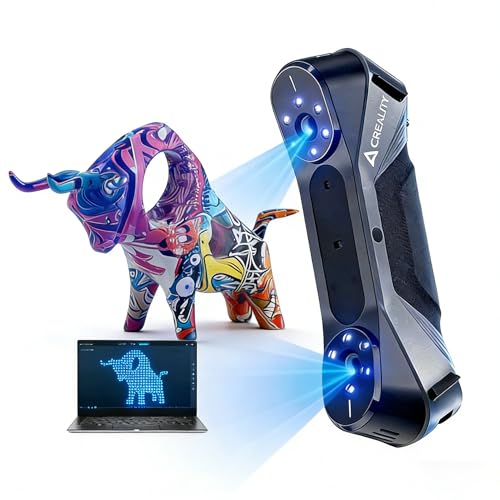
- 0.02mm claimed precision for detailed printable models
- Blue laser plus infrared modes for versatile scanning
- 24-bit color capture and up to 60fps speed
Best For: Makers and CAD users who want a handheld scanner for accurate, full-color object capture.
Best for Wireless Scanning – Revopoint INSPIRE 2 3D Scanner
The Revopoint INSPIRE 2 is a practical 3d scanner for 3d printing if you want flexibility without giving up detail. With WiFi 6, dual scanning modes, and support for reflective or dark surfaces, it’s a strong fit for creators who need to move between desktop, handheld, and even outdoor scanning.
Best For: Makers and small studios that want a lightweight scanner with wireless workflow options, color capture, and solid accuracy for printing or reverse engineering.
Pros:
- Wireless WiFi 6 scanning and PC-to-mobile streaming add real workflow flexibility.
- Dual infrared structured light and multi-line laser modes help tackle different object types.
- Up to 0.03 mm precision and 0.05 mm accuracy support detailed print-ready models.
- Full-color texture capture and outdoor scanning expand what you can scan.
Cons:
- Revo Design scan-to-CAD software is paid and Windows-only.
- Requires fairly capable hardware for the best results, especially on Windows and Mac.
- Advanced features may be more than casual users need for basic scans.
Overall, the INSPIRE 2 stands out as a versatile 3d scanner for 3d printing when you need portable scanning, better surface handling, and color-rich output in one compact package. It’s especially appealing if you want a scanner that can grow with more demanding projects.
Best Entry-Level Learning Curve – 3DMakerpro Fox 3D Scanner
If you want an affordable 3d scanner for 3d printing and are willing to spend some time learning the workflow, the 3DMakerpro Fox is a practical starter option. Its NIR scanning, 0.07mm claimed accuracy, and markerless tracking make it a capable pick for smaller objects, but it performs best when paired with a decent PC and some mesh-editing know-how.
Best For: Beginners, students, and DIY makers who want an accessible scanner for small-to-medium 3D printing projects and can tolerate a learning curve.
Pros:
- Markerless tracking and anti-shake help make scanning less tedious
- 0.07mm claimed accuracy is solid for detail capture on desktop parts and prototypes
- NIR technology supports safe face and body scanning
- JMStudio includes scanning, editing, fusion, and export tools
Cons:
- Not a true plug-and-play choice; results improve with practice
- Needs a capable PC, ideally with a dedicated GPU
- Best suited to small and medium objects rather than large, complex scenes
Overall, the Fox is a budget-minded 3d scanner for 3d printing users who value ease of setup more than professional-grade automation. If you can handle the learning curve, it offers a useful mix of portability, decent detail, and beginner-friendly features.
Best for Fine Detail Scans – Creality CR-Scan Raptor 3D Scanner
If you want a high-detail 3d scanner for 3d printing, the Creality CR-Scan Raptor stands out for its blue laser precision and flexible NIR mode. It’s built to handle everything from small mechanical parts to larger objects, making it a strong fit for makers who need sharp geometry and reliable tracking.
Best For: Users who need ultra-fine scan detail for printing accurate parts, props, or models, and don’t mind using a capable Windows or Mac setup.
Pros:
- 0.02 mm accuracy with 7 parallel blue laser lines for crisp edges
- Blue laser and NIR scanning cover both marker-based and marker-free workflows
- Fast 60fps blue light scanning helps reduce capture time
Cons:
- Requires a strong PC or Mac to run properly
- May be overkill if you only scan simple, low-detail objects
For buyers focused on precision first, this is a compelling 3d scanner for 3d printing because it blends industrial-style detail capture with enough flexibility for bodies, faces, and general objects. If your workflow depends on accurate mesh capture rather than convenience alone, it’s one of the more capable options in this category.
Best for Detail-Oriented Printing – 3DMakerpro Moose Lite 3D Scanner
If you want a handheld 3d scanner for 3d printing that prioritizes fine surface detail, the 3DMakerpro Moose Lite is built for precision-first workflows. Its blue light system, AI visual tracking, and JMStudio software make it a strong fit for capturing small to medium objects with cleaner point clouds and less manual cleanup.
Best For: Makers and designers who need accurate scans for printing, display models, or reverse-engineering parts with visible detail.
Pros:
- 0.05mm accuracy and 0.1mm resolution for detailed scans
- AI tracking helps maintain stable handheld scanning
- JMStudio combines scanning, editing, and optimization in one workflow
- Lightweight, quiet design is easier to use for longer sessions
Cons:
- Best results will take some practice and good scan technique
- Works best on medium objects rather than very large subjects
For buyers comparing a 3d scanner for 3d printing, the Moose Lite stands out when surface fidelity matters more than speed or budget pricing. It is especially appealing if you want a portable scanner that can produce refined models with minimal post-processing.
Best Wireless Pick – Creality CR-Scan Ferret Pro 3D Scanner
The Creality CR-Scan Ferret Pro is a flexible 3d scanner for 3d printing if you want cordless scanning, solid accuracy, and broad device support. With 0.1mm precision, 30FPS capture, and WiFi 6 transmission, it’s built to make handheld scanning faster and less fussy for everyday model creation and reverse-engineering work.
Best For: Makers who want a wireless handheld scanner for printing parts, props, and detailed object capture across Android, iPhone, and PC setups.
Pros:
- Up to 0.1mm accuracy and 0.16mm resolution for detailed scans
- WiFi 6 bridge enables wireless scanning on supported iOS and Android devices
- Anti-shake tracking helps maintain smoother captures for beginners
- Exports OBJ, STL, and PLY for common 3D printing workflows
Cons:
- Needs compatible hardware and software versions to run properly
- Performance can drop on reflective, transparent, or very dark surfaces
- Wireless scanning depends on the bridge and device compatibility
Overall, the Ferret Pro stands out as a practical 3d scanner for 3d printing when portability matters most. It’s a smart fit for users who want easier handheld scanning without giving up file formats and precision needed for CAD, design, or print-ready models.
Best for Industrial Precision – Revopoint MetroX Pro 3D Scanner
If you need a 3d scanner for 3d printing that can handle demanding parts, the Revopoint MetroX Pro is built around high-precision blue laser scanning, flexible tracking modes, and color capture. It’s a strong fit for users who care about accurate geometry for reverse engineering, inspection, and print-ready models rather than just quick hobby scans.
Best For: Makers, engineers, and advanced users who want industrial-style detail for 3D printing, prototyping, and reverse engineering.
Pros:
- Up to 0.01 mm single-frame precision for fine detail capture
- Multiple scan modes for shiny, dark, flat, and feature-rich objects
- Auto turntable and real-time streaming can speed up workflows
- Full-color scanning adds realism for presentation and reference
Cons:
- More expensive and complex than entry-level scanners
- Best features are aimed at advanced or professional workflows
- Some software tools are sold separately
For buyers who want a 3d scanner for 3d printing with industrial-grade accuracy and broad material handling, the MetroX Pro stands out as a serious tool. It’s especially appealing if you need dependable capture for precise parts, not just casual scans.
Best for Comfort – Creality CR-Scan Ferret Pro
The Creality CR-Scan Ferret Pro is a practical 3d scanner for 3d printing if you want a portable, beginner-friendly way to capture medium-sized objects with minimal setup. Its wireless WiFi 6 connection, anti-shake tracking, and full-color scanning make it a strong fit for hobbyists who want to move from idea to printable model quickly.
Best For: DIY creators and 3D printing enthusiasts who want a lightweight handheld scanner with wireless flexibility across PC, Android, and iOS.
Pros:
- Wireless WiFi 6 scanning works across Windows, macOS, Android, and iOS.
- Up to 0.1mm accuracy with 24-bit color capture for detailed models.
- Lightweight 105g design makes it easy to carry and scan anywhere.
- Includes useful accessories like a tripod, power bank, phone holder, and case.
Cons:
- Not a great choice for very small, highly detailed items like jewelry.
- Reflective, transparent, or very dark surfaces can be difficult to scan.
- Requires compatible hardware and enough RAM for smooth performance.
For buyers who value convenience over lab-grade precision, the Ferret Pro hits a sweet spot as a 3d scanner for 3d printing. It is especially appealing if you want wireless scanning and full-color results without investing in a larger, more complex setup.
Best for Wireless Outdoor Scanning – Revopoint INSPIRE 2 3D Scanner
The Revopoint INSPIRE 2 is a flexible 3d scanner for 3d printing if you need a portable setup that can handle both indoor and outdoor capture. Its dual structured-light and multi-line laser modes help it adapt to different object sizes and materials, while wireless scanning adds convenience for field work and fast setup.
Best For: Makers, designers, and reverse-engineering users who want a lightweight scanner with wireless freedom and good surface adaptability.
Pros:
- Wireless WiFi 6 scanning with PC-to-mobile streaming for more flexible workflows
- 11 infrared laser lines help scan dark or reflective surfaces without spray
- Dual scanning modes and optical zoom improve versatility across object types
- Full-color capture adds useful texture data for realistic models and archives
Cons:
- Revo Design scan-to-CAD workflow requires separate paid software
- Best performance depends on a fairly powerful computer
- Not the simplest plug-and-play choice for absolute beginners
Overall, the INSPIRE 2 stands out as a practical 3d scanner for 3d printing when portability, surface flexibility, and color capture matter more than a basic entry-level price. It’s a strong fit for users who want a capable scanner they can take from the workshop to the field.
Best for High-Detail Scans – Creality CR-Scan Raptor Pro
If you want a 3d scanner for 3d printing that can handle fine detail, tricky materials, and larger parts without constant setup hassles, the Creality CR-Scan Raptor Pro is built for serious work. Its mix of blue laser and NIR scanning makes it a strong fit for accurate reverse engineering, model capture, and textured scans.
Best For: Makers, designers, and pros who need high-accuracy scanning for everything from small parts to full-size objects.
Pros:
- Up to 0.02mm accuracy with fast 60fps laser scanning for detailed captures
- Works on black, metallic, and some transparent surfaces without spray powder
- Handles tiny parts up to 5mm and large objects up to 4m, including body scans
- Includes 24-bit color capture and broad software compatibility for pro workflows
Cons:
- Premium pricing makes it a bigger investment than hobby-focused scanners
- Best results may require a powerful Windows or newer Mac system
- Advanced features can be overkill if you only scan simple desktop models
Overall, the Raptor Pro stands out as a high-end 3d scanner for 3d printing when accuracy, material flexibility, and speed matter more than keeping things basic. It is especially compelling for users who need one scanner that can move between small precision parts and larger real-world objects.
Best Simple Pick – Creality Raptor 3D Scanner
If you want a 3d scanner for 3d printing that leans toward precision and speed, the Creality Raptor is built for capturing detailed models with minimal fuss. Its 0.02mm claimed accuracy, 7-line blue laser mode, and full-color scanning make it a strong fit for parts, props, and mixed-material objects.
Best For: Makers and CAD users who need a handheld scanner for accurate, full-color capture of small-to-medium objects and technical parts.
Pros:
- 0.02mm claimed precision is aimed at detailed reverse-engineering and printable models
- Blue laser and infrared modes help with both small parts and markerless scanning
- 24-bit color capture adds texture detail for realistic scans
- Up to 60fps scanning and anti-shake processing help keep handheld use smoother
Cons:
- Requires a fairly strong Windows or macOS system
- More advanced than a casual plug-and-play consumer scanner
- Best results may take some learning with the included software
For users prioritizing detail, versatility, and color fidelity, the Raptor stands out as a capable 3d scanner for 3d printing workflows where accuracy matters more than bargain pricing.
How We Picked the Best 3d Scanner for 3d Printing
For this roundup, we prioritized scanners that make real-world 3D printing workflows easier: consistent tracking, usable accuracy, flexible scan ranges, and software that supports clean mesh capture. We also considered whether each 3d Scanner for 3d Printing is better suited to small parts, medium objects, or larger subjects.
Feature claims matter, but so does usability. A scanner with excellent lab specs can still be frustrating if it struggles with dark surfaces, loses alignment, or requires too much setup for everyday use.
Quick Comparison
If you want a fast shortlist, think in terms of use case. Entry-level handheld scanners are usually best for hobbyists and occasional users. Midrange models often balance speed and precision for functional parts, figurines, and reverse-engineering. Higher-end blue-laser and hybrid scanners are typically the best fit for users who need sharper detail, better edge capture, or more reliable results on complex geometry.
Key Buying Factors for a 3d Scanner for 3d Printing
Accuracy and Precision
Look at stated accuracy for overall measurement fidelity and precision for repeatability. If you plan to recreate mechanical parts, tighter tolerances matter. For decorative models or concept work, you may not need the highest-end specs.
Object Size and Scan Range
Make sure the scanner is comfortable with the size of the objects you most often print. Some models excel on small detailed items, while others are designed to handle medium-to-large objects with fewer alignment issues.
Tracking and Surface Handling
Anti-shake tracking, marker support, and structured-light or laser modes can improve results on tricky shapes. If you scan glossy, dark, or repetitive surfaces, stronger tracking and more robust lighting usually help.
Speed and Workflow
Faster scanners can reduce hand fatigue and help capture data before alignment drifts. That said, speed is only useful if the software keeps up with stable, clean capture.
Portability and Connectivity
If you plan to scan on location, wireless support, compact hardware, and outdoor-friendly operation may matter. For desk-based work, stable wired connectivity and a smoother software pipeline can be more valuable than mobility.
Who Should Buy Which 3d Scanner for 3d Printing?
Choose a beginner-friendly model if you want the simplest path into scanning for hobby printing. Pick a midrange 3d Scanner for 3d Printing if you need a dependable balance of detail and ease of use for everyday projects. Go for a premium blue-laser or hybrid scanner if your work involves high-detail reverse engineering, tighter dimensional needs, or more challenging surfaces.
In general, match the scanner to your most common objects, not your rarest ones. That usually leads to better results, less frustration, and a setup you’ll actually use regularly.